We remain fully operational. Our teams are working around the clock to ensure your deliveries continue safely.

DOWNLOAD THE APP


Customer Services
Copyright © 2025 Desertcart Holdings Limited
DOWNLOAD THE APP
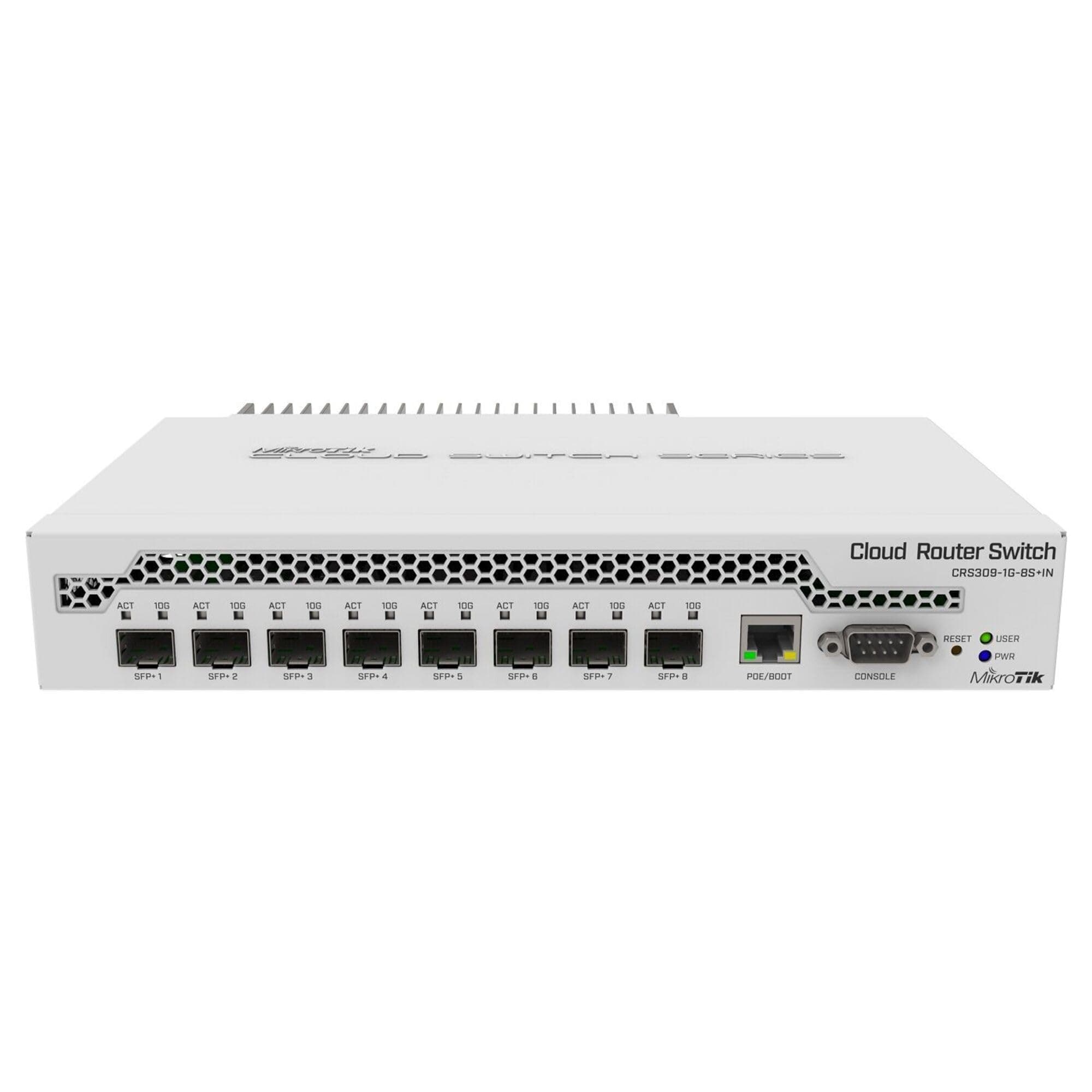
🚀 Elevate your network game with 10G speed and pro-level control!
The MikroTik CRS309-1G-8S+IN is a compact, managed switch featuring 8 high-speed 10G SFP+ ports and 1 Gigabit Ethernet port. It supports dual operating systems—RouterOS for advanced routing and SwitchOS for simplified management—offering flexibility for both tech enthusiasts and professionals. With a robust metal build, low power consumption, and enhanced security updates, this switch is designed to deliver enterprise-grade performance at a prosumer price point, perfect for home labs and small business networks.
| ASIN | B07NFXN4SS |
| Best Sellers Rank | #146 in Computer Networking Switches |
| Brand | MikroTik |
| Built-In Media | Power adapter 24 V 1.2 A, Rack ears, Screw kit |
| Case Material Type | Metal |
| Color | White |
| Compatible Devices | Desktop |
| Customer Reviews | 4.6 4.6 out of 5 stars (370) |
| Data Transfer Rate | 1000 Megabits Per Second |
| Interface | RJ45 |
| Item Dimensions L x W x H | 5.55"L x 4.53"W x 1.1"H |
| Item Weight | 1.1 Pounds |
| Manufacturer | MIKROTIK |
| Mfr Part Number | CRS309-1G-8S+IN |
| Model Number | CRS309-1G-8S+IN |
| Number of Layers | 1 |
| Number of Ports | 9 |
| Switch Type | Managed |
| Upper Temperature Rating | 70 Degrees Celsius |
| Voltage | 12 Volts |
| Warranty Description | 2 year manufacturer |
A**R
YES, It Works!! 10g mixed media and affordable. Now with MORE Security.
I was adding 10g to my home network, yes I like playing with tech. I needed both fiber and copper. This switch gives the flexibility to have your cake and eat it. Just plug in the SFP+ interfaces you need. I needed three fiber and a couple of copper 10g connections. I get amazing speed with this switch. I use 10g on the computer and 10g (fiber) on my NAS and I get blazing speed. SFP interface are inexpensive and you don't have to use Mirkotik SFP interfaces. I did change the unit from RouterOS to SwitchOS, this is just an option in the web interface and makes the unit easier to use as a switch. UPDATE 01-13-2026 The hardware quality is still amazing with these switches, HOWEVER, be warned that the RouterOS has had a security update. New units ship with a new version of RouterOS that has Severe security. Simple changes, such as changing the switch from running RouterOS to SwitchOS now requires juggling three balls, while doing a tap dance, and singing the Catalina Magdalena Lupensteiner Wallabeiner song. But it's not quite that easy. You have to open a terminal window and do a command line mode change and power cycle the unit (or use the reset Switch, a soft restart will NOT work) within a short time limit, then make the change in the interface and apply, hoping you get it right. Any documentation shipped with the router about this? NO. Any warning in the Interface? NO, just a cryptic error message that the unit can't do the change. I had to look it up on the internet. So when you are first setting up the unit you have to be Next to it, You can't install it then set it up. Fun Times... I understand the need for security, but making a change like this and not including a small slip of paper or a sticker that says "WARNING the software on this unit now had Security changes and you'll have to enable the ability to make changes" would be nice. ALSO being plugged into the Management port on the Switch doesn't make a difference. So why is it called a Management port then? You can't manage the firmware any differently than any other port. Still love the unit though. I have purchased 3 of the 8 port and 3 of the 5 port units and I will continue to purchase more as needed.
E**0
Fast switch, with a bit of a learning curve
I'm redoing my homelab and saw this little gem. For the price, it's not bad. 8 SFP+ port, all 10G. Perfect for my servers and my computer. It also performs much better than some enterprise equipment. For the first time, I see my servers reaching 5GB, peak, transfer rate. It probably could do better in SwOS. Very low power. This is replacing my existing brocade switch and compliments my CSS326 switch. I did notice a 20% decrease on my UPS load. It does come with rack ears which is nice, but they are a bit flimsy. Now it's "dual boot." Currently running RouterOS. It's great piece of OS. Lots of options. But if you want a simple, easy to use GUI, switch it over to SwOS. Please update the OS once you do. I think there is a fix for DHCP. I switched it over to DHCP, pre update, and rebooted the switch. It didn't pick up an IP address. Switch still function and passing traffic, but I couldn't log into the switch. I had to order console cable and reset the config. It's a powerful piece of equipment and I see it fitting nicely in my environment. Plus, it's the best bang for bucks. You get a prosumer device at a consumer value.
J**M
great switch...for the price its a gem
works great at 10Gbe, lots of software options to set it up however you want. for a home lab its perfect... ok not perfect..it has one fault, that blue power on led is clearly trying to signal someone in orbit. I put some nice thick kapton tape over it to calm it down a bit and not blind anyone walking past.
C**Z
Awesome switch. Super slow router. Deceiving setup.
This does what it says on the tin and provides 10Gbps switching throughout per SFP+ port. Only problem is that it boots up as a router. This requires significantly more configuration for people like me who just want to share their brand new super fast 5Gbps fiber connection with their computers. Significantly more configuration that, after hours of dealing with inexplicable password resets that don't actually work (reset your password, change the address space, change our manual IP, and...get locked out? This might have something to do with the router having zero firewall rules, which isn't great when your main gateway is in IP Passthrough mode...), gives you...a slow router? I could not manage to crank out more than 2.7Gbps when this was set up as a router. The CPU screams and it gets super hot. I'm still giving it three stars because it's a great switch for the price, but setting it up was incredibly frustrating.
R**B
Review for MikroTik CRS309-1G-8S+in
The order arrived quick and I received everything as expected. I am a big Fan of MikroTik. As an Network Engineer I work with a lot of brands HP, Cisco, Fortinet and the list goes on I thought for my own network I would try MikroTik and I was impressed. What you get for the price is unbeatable and their products are solid with a robust set a features. The switch runs quiet and is powered by POE and that doesn't diminish its performance. This switch is connecting a 3 PVE cluster and a bare bone TrueNAS server and I got a full 10 gig network through my house and lab. I will be adding a few more of their switches in the near future. I would stay with RouterOS because while their switchOS has a clean layout and is very simple not offering all of the features the other OS it doesn't offer https at least that I am aware as I write this so creds to login is sent in the clear as soon as they add that I would be game if I didn't need all the other features offered in RouterOS.
P**O
Come da oggetto, ho trovato l'apparecchio prestazionale e di buona fattura. Non ho a disposizione misurazioni effettive delle velocità di trasferimento dati, ma è silenzioso (il che non è poco) ed, al momento, affidabile
L**E
Verwende den Switch Zuhause in meinem lokalen 10-Gigabit Netzwerk. Der Switch funktioniert nach der Einrichtung von SwOS perfekt, allerdings kann die Einrichtung für Anfänger etwas knifflig sein, was aber bei Netzwerk-Equipment logisch ist. Die Preis-Leistung ist grandios und es gibt kaum etwas vergleichbares auf dem Markt. Mein Plan war mein lokales Netzwerk etwas zu verbessern, da wir im Sommer einen 2,5 Gigabit Anschluss bekommen. Mit diesem Switch war das sehr günstig möglich und das Produkt wirkt auch sehr wertig und ist sein Geld mehr als Wert. Die Kompatibilität ist auch sehr gut. Für die LAN Ports verwende ich die Herstellereigenen SFP+ Module (Mikrotik S+RJ10, MikroTik S-RJ01) die ohne Probleme funktionieren. Module anderer Hersteller (10Gtek AXS85-192-M3) funktionieren bei mir auch ohne Probleme und es werden sogar die erweiterten Infos angezeigt (Temperatur, Spannung, Signalstärke, Rauschen usw...). Kann mir nichts besseres vorstellen und werde wahrscheinlich zukünftig auch weiter auf MikroTik SFP+ Switches setzen.
T**H
Australian power supply NOT provided
A**S
Justo lo que necesito. Al ser fanless el truco está en usarlo con SFP de fibra. Los de cobre generan temperaturas insostenibles o que te obligan a dejar bocas sin uso para dar más espacio a la evacuación de calor pasiva. Con fibra el disipador trasero es suficiente.
S**R
Just took few minutes to start using the switch. First switched to SwitchOS, then changed management IP to match my needs and that's all. Used Twinax DAC cables of different brands - All worked fine. On the server, had used ASUS XG-C100F.
Trustpilot
2 weeks ago
3 weeks ago