

Desert Online General Trading LLC
Dubai, United Arab Emirates
Desert Online General Trading LLC
Dubai, United Arab Emirates
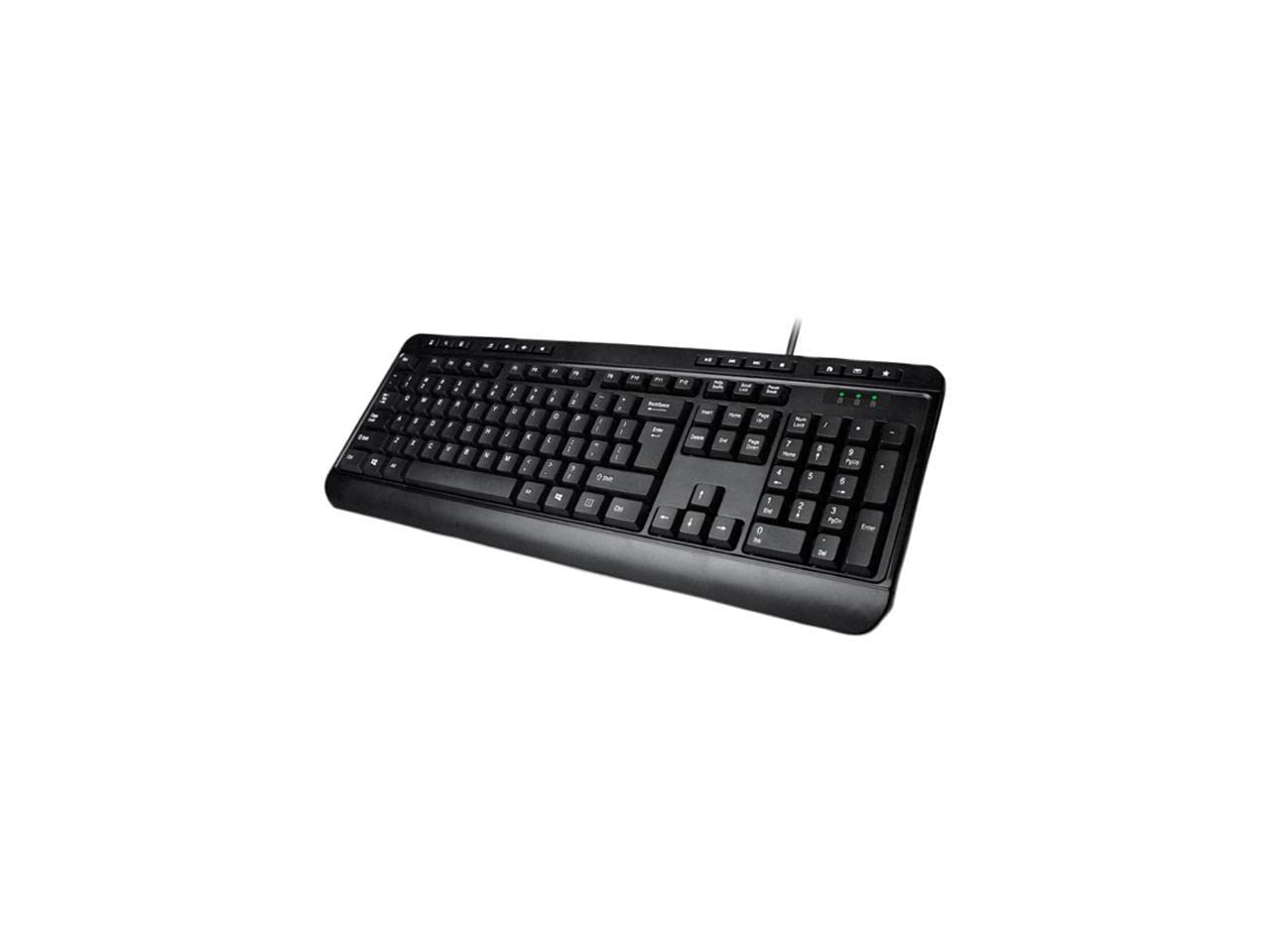
⌨️ Elevate your desk game with precision and speed!
The AKB-132UB is a robust 104-key membrane switch keyboard designed for Windows users, featuring 8 multimedia and 6 Windows hotkeys for enhanced productivity. With a lifespan of 5 million keystrokes and USB 2.0 plug-and-play compatibility, it offers durable, reliable performance in a sleek, compact black design.
| Standing screen display size | 1 Inches |
| Number of USB 2.0 Ports | 3 |
| Brand | ADESSO |
| Series | AKB-132UB |
| Item model number | AKB-132UB |
| Hardware Platform | Windows |
| Operating System | Windows® 2000 / XP / Vista / 7 / 8 / 10 |
| Item Weight | 1.5 pounds |
| Product Dimensions | 18.35 x 1.26 x 7.4 inches |
| Item Dimensions LxWxH | 18.35 x 1.26 x 7.4 inches |
| Color | Black |
| Power Source | Corded Electric |
| Manufacturer | Adesso |
| ASIN | B00ED9UT9G |
| Is Discontinued By Manufacturer | No |
| Date First Available | August 7, 2013 |
L**4
A Nice, Basic Affordable Keyboard!
The keyboard that came with my desktop computer purchase was junk, all the letters wore off the keys in a month or two, which was extremely annoying. So I needed a new one but I wanted it to be as inexpensive as possible since I was replacing something that was supposed to be free to begin with. This fits the bill perfectly. The price was more than reasonable and so far I have no complaints whatsoever. Not many bells and whistles, although it does have some of the handy buttons across the top (hot keys) for volume, playing tracks, etc. To be honest I don't really use those buttons but the ones I've tested all work fine. It does have the Windows key too, which I do use a lot to jump to the desktop. The keys have a somewhat soft touch as they tap down, not a loud clicking like older keyboards but not silent either. It does have the more traditional height to the keys, which I like. The last keyboard had very low profile keys, which I personally didn't like for some reason.I did as the instruction booklet suggested and plugged it into my PC while it was off and then started it up. Windows detected it immediately upon startup and started installing the driver without any issues.One thing to note, the description says: "Available with either a USB or PS/2 connector". Just to be clear, you don't get both, or an adapter or anything, you only get one or the other, so pay attention to the title of the Amazon listing; this one is for USB. Anyway, perfectly good keyboard at a great price; I can't imagine why anyone would spend more, unless you need certain features for some reason. This was a great buy!
D**U
An OK keyboard once you get it working.
The keyboard arrived and was well packed as expected, and I anxiously plugged it in to an available USB hub's vacant port. To my surprise, it did not work at all, and I needed to plug in the old keyboard to get my computer working. I tried other vacant ports on the hub and two ports directly on the machine and got nowhere.So I called my computer guy, who came by and noted that many of the current crop of USB keyboards are sensitive to where they are plugged in. He bypassed the hub altogether and plugged the keyboard into one of the open USB ports in the **back** of my CPU,.far from where I use the keyboard.. That meant that a USB extension cord.was required in order to make the connection.At that point -- Success! But my computer guy's bill and the extension cord were sufficiently costly that any illusion of my getting an attractive price for the keyboard were vaporized. Incidentally, one of the reasons I chose this keyboard was that it needed no drivers, and was supposedly plug and play.The keyboard is now working, and I am quickly learning the tactile elements of the board which obviously are more sensitive than the keyboard it replaces, where the letters on some of the keys had disappeared and some of the keys were barely working. So at this point, I would say I am satisfied albeit the early pains and added expense. The instructions might tell of the sensitivity to USB ports, which would help customers.
A**E
Unusable -- enter key not where it should be!
For some baffling reason the backslash (\) key has been wedged between the quote and ENTER keys, so that every time I try to hit 'enter' while typing, I get a backslash instead? Why would someone make a keyboard layout like this? I've been using computers literally since the 80s and never in my life have I encountered a keyboard where the enter key was not immediately to the right of the quote key, where it should be. And there's not even any REASON for it, it's not like this is some kind of compact keyboard where they ran out of space to put the keys in the correct locations? And of course, the picture on the listing is tiny, and you can't zoom in on it, so it's very hard to notice the wonky layout. If you've learned to type on any kind of normal keyboard, this will not work for you. It's completely unusable, I had to return it.
H**T
'Enter' key is awkward
First off, I liked the feel of the keyboard. The media keys are also very nice and handy.What I don't like: the enter key is just wrong. If you notice it is shaped so that the back slash key is where a normal enter key would be. So when you are typing and go to press enter, you hit the back slash key instead. I thought I could get used to it, but no. I use multiple keyboards a day and this one just throws me off every time.\I also don't like how short the back legs are. It's almost like they aren't there, you can't really tell a diffference when they are up or down.If you have a good stretch in your fingers and can get over to the enter key without a problem, then go for it. But for me, it's so different from all the other keyboards I've ever used I'm going to just return it and get a different keyboard.
D**E
Works with screen readers.
Works well with the JAWS screen reader.For those that are blind, the keys are layed out in the following order from Left to right as far as the extra keys.The very top row from Left to right.1. MyComputer(Windows +e)2. Search if installed.3. Calculator.4. Media Player.5. Volume Down.6. Volume up.7. Mute.8. Play/Pause.9. Previous track.10. Next track.11. Stop for playback.12. Web browser (internet).13. Email.14. Favorites only works if in web browser.The only issues I have with this keyboard is the keyboard is flat even with the legs folded out. Also the enter key is like a letter L that is rotated 180 degrese. The backslash is beside the '" key. That will take some getting use to.
R**N
I liked this Keyboard enough I wore one out and bought another one!
I first bought this keyboard in 2014. I enjoyed the heck out of this keyboard. It is just big enough to rest your palms on it and use it to its fullest potential. I actually wore my first one out and it had wear marks in the enter, shift, A, S, and Ctrl keys where my fingers had rested on them for oh so long. None of the keys actually stopped working the plastic bits to the top of the keys wore through from lots of use! This keyboard can take a huge amount of beating and keep on working! You can't go wrong with this keyboard for this price.
Trustpilot
2 weeks ago
2 weeks ago
1 month ago
1 month ago