We remain fully operational. Our teams are working around the clock to ensure your deliveries continue safely.

DOWNLOAD THE APP


Copyright © 2025 Desertcart Holdings Limited
DOWNLOAD THE APP


🚀 Dominate your digital domain with ASUS ROG GT-AX11000 – where speed meets power!
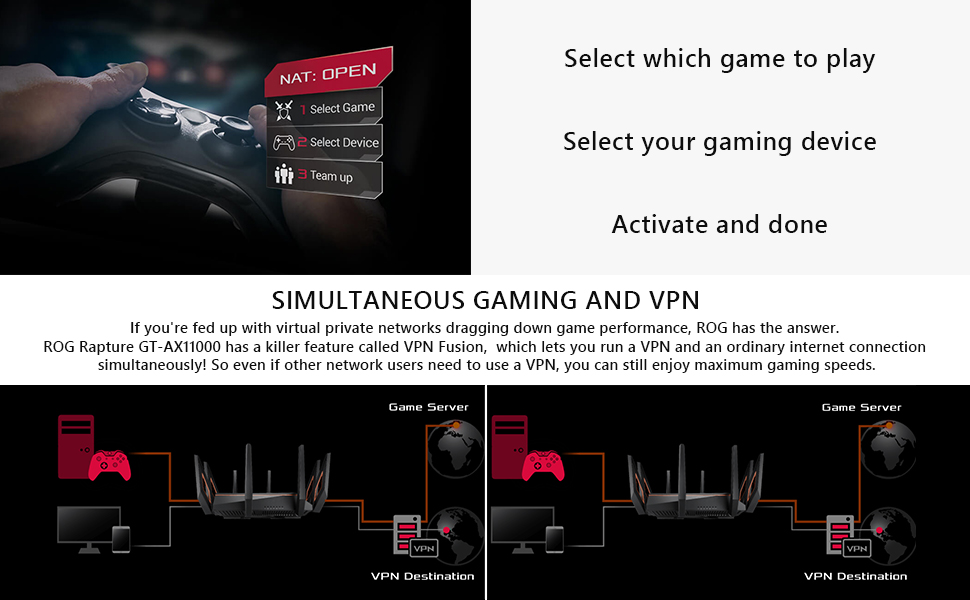
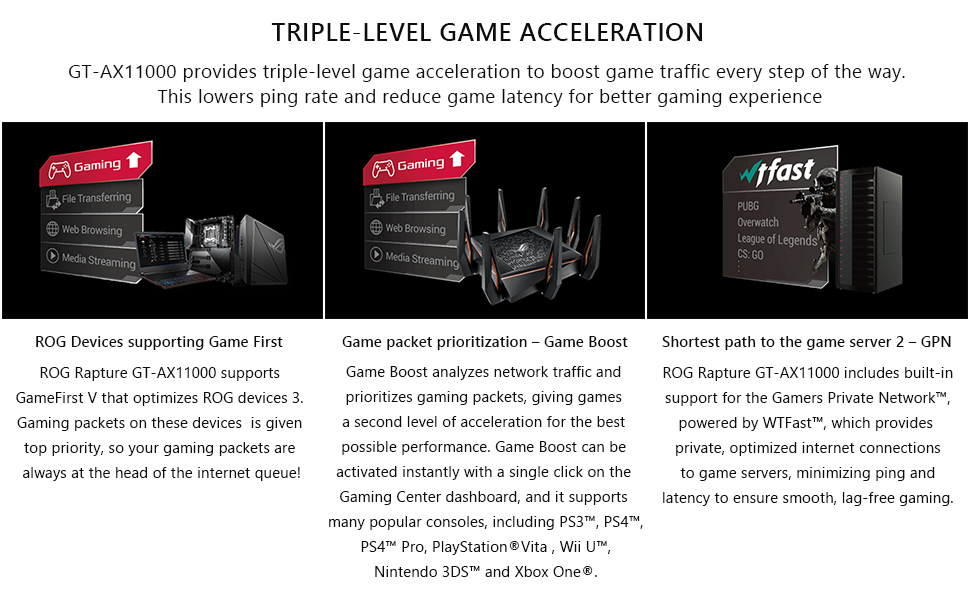
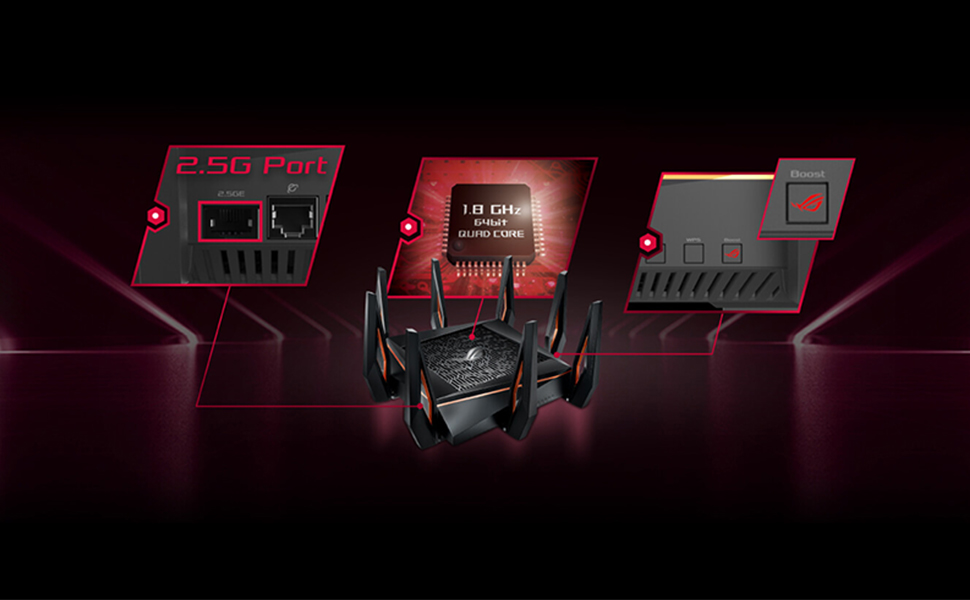
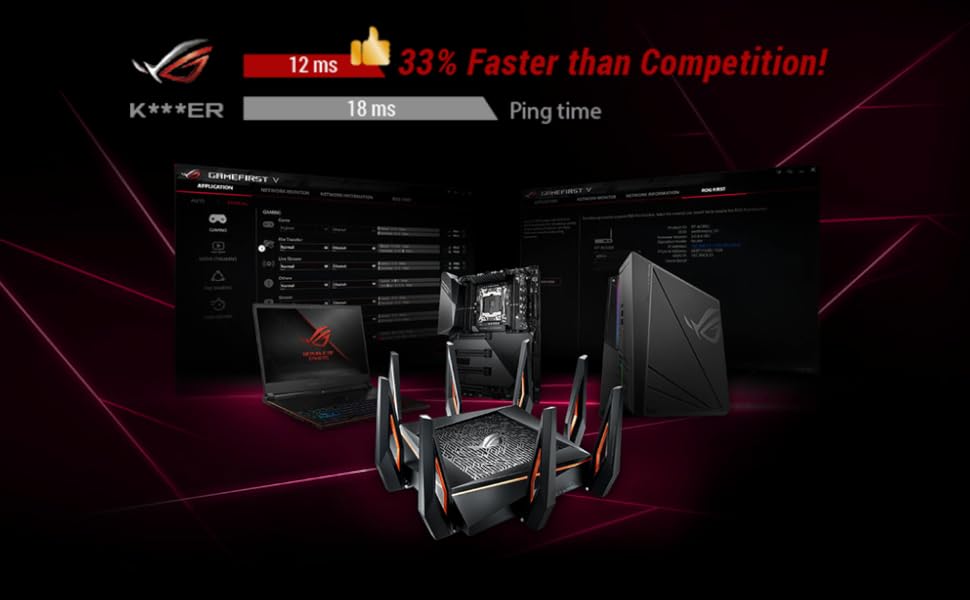
The ASUS GT-AX11000 ROG Rapture is a tri-band WiFi 6 router delivering ultra-fast 11000Mbps speeds powered by a 1.8GHz quad-core CPU. Designed for gamers and power users, it features triple-level game acceleration, advanced network security, and AiMesh support for seamless whole-home coverage.
| ASIN | B07MRD1LDZ |
| Antenna Location | Gaming |
| Best Sellers Rank | #67,910 in Computers & Accessories ( See Top 100 in Computers & Accessories ) #250 in Routers (Computers & Accessories) |
| Box Contents | Cable -1 , CD-1, Power Adapter -1 |
| Brand | ASUS |
| Brand Name | ASUS |
| Colour | Black |
| Compatible Devices | Laptop |
| Connectivity Protocol | Wi-Fi, Ethernet |
| Connectivity Technology | Ethernet |
| Control Method | Touch |
| Customer Reviews | 4.1 out of 5 stars 10,555 Reviews |
| Data Transfer Rate | 11000 Megabits Per Second |
| Frequency | 5 GHz |
| Frequency Band Class | Tri-Band |
| Global Trade Identification Number | 00192876064740 |
| Importer Contact Information | Rashi Peripherals P Ltd ,Rashi Complex A Bldg,Survey 186 ,Dongripada,Poman Village , Vasai Bhiwandi Road ,Dist Thane - 401208 |
| Is Modem Compatible | No |
| Item Dimensions L x W x H | 28.7L x 12W x 37.7H Centimeters |
| Item Type Name | Router |
| Item Weight Unit of Measure | 4.1 Pounds |
| LAN Port Bandwidth | 10000 Mbps |
| Manufacturer | Asus Global PTE ltd, Asus Global PTE ltd ,15A Changi Business Park central 1, #05-01 Eightrium,Singapore 486035 ,Tel - 1800 -2090-365 ,email : [email protected] |
| Manufacturer Contact Information | Asus Global PTE ltd ,15A Changi Business Park central 1, #05-01 Eightrium,Singapore 486035 ,Tel - 1800 -2090-365 ,email : [email protected] |
| Manufacturer Part Number | GT-AX11000 |
| Maximum Upstream Data Transfer Rate | 5500 Megabits Per Second |
| Model Name | Asus AX11000 |
| Model Number | GT-AX11000 |
| Number of Ports | 15 |
| Operating System | ASUSWRT |
| Other Special Features of the Product | QoS |
| Packer Contact Information | Asus Technology |
| Special Feature | QoS |
| UPC | 192876064740 |
| Unit Count | 1 Count |
| Voltage | 120240 Volts |
| Warranty Description | Wireless Warranty Policy A Limited Warranty is offered on Wireless products. This Limited Warranty does not cover any software applications or programs; non-Asus products or non-Asus branded peripherals. Asus guarantees that the Asus Wireless Products that you have purchased are free from defects in materials or workmanship under normal use during the Limited Warranty Period. The Limited Warranty … |
| Wi-Fi Generation | Wi-Fi 6 |
| Wireless Communication Standard | 802.11ax |
| Wireless Compability | 802.11ax |
R**I
Superb router! Fast, stable worth the asking price.
This is an end user review of a product. If you need performance analysis, I suggest using a website conducting such tests under controlled environments. Since I have installed the router, I have had ZERO issues with connectivity. Compared to my previous N router, the signal strength is moderately better and seems to have higher transfer speeds and better stability even with low signal strength. The router interface itself is faster. I have used an ASUS RT-N56U previously which would not be to handle all that it promised, probably because of a weak processor. This one however, manages being a router AND a media server AND a download manager without a glitch. HD videos stored on a USB 2.0 HDD connected to the router, play without any hiccups on all devices on my network. The Download Master utility, though a mildly painful to use, is ultimately useful, letting you download files (not just torrents) straight to the connected USB drive. This lets you turn off your computer, letting your router complete this rather mundane task. If you have the money to spend, I would recommend this router in a heartbeat. Bear in mind though, to use some of the features, you may have to delve into the interface try fooling around with the settings. This does require you to be somewhat comfortable with setting up such devices. Basic configuration though, was a breeze. Just plug it in, and turn it on and let the wizard guide you. Is this router for you? If you're looking for a basic router, that converts your cable line to wireless, this is not for you. If you are looking at connecting wireless AC devices, and perhaps setting up a media server to stream videos, you probably won't find a better router.
A**R
From Linksys to ASUS... Days of thunder
Earlier I was using a Linksys E1200 router. The router was perfectly fine and has been serving me for more than 5 years now. It is still working and has never created a single issue till day. The only bottleneck was range. I always mired the range offered by cheaper chinese options. To counter it I was using a xaiomi wifi repeater on an old mobile usb charger config resulting in 2 network zones. This was bothersome as unlike mesh counterparts this did not gave the seamless experience. Mesh is however expensive and not suited to small household requirements. Then the day came when the repeated breathed its last. I decided it was time to try something new. I was fascinated by the dual band tech and plethora of options the USB 3.0 offered. Plus I wanted something future proof. I was having difficulty between ASUS and Linksys EA series. Since I used Linksys I thought to give ASUS a try. Afte having used both brands I provide my personal opinion Pros. 1. Well built and premium feel though linksys also offers good built. 2. Detachable anntenas which I think can be replaced for more high gain antennas. 3. Good range but depends on number of obstruction. In my case the use of repeater is not needed but speed is marginally lower than my earlier repeater config though I now have a single network. Range ony good for 2.4 GHZ. At juncture of 5GHz and 2.4GHZ a cyclical stability issue of infinite switching over network is seen. For range shut down 5.00 and use 2.4. 4. Suport for media server setup, Network Drive etc. 6. Double WAN setup available. 7. Allows Mesh setup. Cons 1. Price is on the higher side. I have been using a 4K Linksys with internal MIMO till now but only marginal increase in range. Onle diff is number of features. I expected more reliable and robust range from ASUS at this price point. 2. No LED indicators on ports. Something which Linksys has and at times leads to easier fault finding. 3. Set Up software is useless. It does not work.I had to use on board windows config from laptop to set up primary lan and then proceeded with web based interface. 4. Web UI needs significant refinement. To look sophisticated ASUS screwed the asthetics and ease of use the Linksys web interface provides. 5. Strangely initially the network conn was slow and range was pathetic. I literally rebooted countless times and even cursed my decision to switch from Linksys.But after 5 days it is somehow automatically showing remarkable improvement. Is this AI ? Only god knows . 6. Though USB provides limitless oppertunity file transfer is sluggish. I am yet to experiment with Media Server.
S**M
Amazing router for the price.
Excellent router for what it does. The top end and best single band router. Firmware is too good with plenty of features. The VPN server is good which is not available with TpLink or other brands at this price. Signal is superb & performance at a distance is very good. Even basic routers could possibly have good signal but not strong performance as you go farther away. But, in this one, even at 2 signal points, the speed is way too good. Simply amazing and an all rounder within it's spec. Don't waste money looking at other "dual band" routers at this price range which don't live up to the spec.Real practical dual bands with good signl will cost > 12k This one will satisfy you in every angle for what it is.
P**R
Decent performer
For the price, this is a decent WiFi router. The signal strength is just about OK. Not the best. Certain new gadgets like iPhone 12 and smart tv found it harder to keep the connection stable with 5GHz band. Connecting it was simple and easy. No major steps needed. Overall 3/5.
R**L
Get it! (3 year updated review)
Update: Nov / 2018 Been using this for nearly 3 years now. Asus now has added the AiMESH feature to this and I've been thinking of purchasing another one as I intend to move the current one to my garage which is in the farthest corner of the house and my room is in the opposite end. There are a good 5-6 walls of concrete and I'm very sure 5Ghz will not reach. Hands down best router still. I'm also currently using DD-WRT version of the firmware which is as simple as updating to the official firmware. This version just provides more finer and detailed control. The official firmware is still plenty good for 99% of the users. ------------------------------------------------------------------------------- Very solid router. I've used for more than a year now. Sometimes I'll have 18-20 devices connected when people come over to my place and this thing doesn't skip a beat. I have a hard drive connected to it to stream media to all devices.. works flawlessly. Asus keeps providing new updates albeit more on security front than features which is good thing nevertheless. Reason I bought this was because i had latency issues especially with Pushbullet notification mirroring which was bugging me to no end. I've tried to diagnose and fix it myself changing packet size but nothing worked. This router has none of those issues. Also my mother was complaining about the range being non-existent in her room. My old router had to go through 2-3 walls. I used a repeater but that kept running into its own problems. With this router there is no longer any need for repeater. I also game a lot and it has helped with the latency factor a bit. Not too much..lets be realistic here.
R**D
Buggy and VPN system only supports PPTP and L2TP (Both are outdated(
WiFi Signal: I have a Nokia router (from ISP) and apparently it outperform this Asus one, Nokia router's 5Ghz signal can go beyond 3 walls and 10 meters and Asus router's 5Ghz band doesn't work on my pc, it just won't even connect and on my phone I get 70-100 Mbps meanwhile I have a 200 Mbps connection and my Nokia router provides me 250-260 Mbps imagine a cheap router outperforming a fancy expensive router. Installation: God it was horrible, I had to reset it 4 times just to kickstart this annoying mess. Sometimes it won't even accept your dashboard password, I had it saved on my chrome as soon as I made it and even put it manually but it just wouldn't, took me an hour of work to get this thing working and then I realise 5Ghz band won't connect to my pc, I don't even know why! User Interface: User interface is pretty fine but it doesn't matter if your router won't work! Features (especially VPN): So apparently it does support VPN client but only PPTP and L2TP and both of these features are obsolete and easily crackable, PPTP is very old and not secure but it's fast, L2TP is still old but it's slightly more secure (you can still have issues and just don't use it) and it's horribly slow, my normal Surfshark connection provides me 189-190 Mbps on my 200 Mbps connection and this doesn't even go above 100 on 5Ghz band, 2Ghz band it goes upto 50 Mbps. It's waste of resources!! I dont know why these companies still support obsolete features and promote these when VPN companies are not supporting these, Surfshark doesn't support PPTP coz it's not secure and L2TP might be removed from support in upcoming years. At the end if you don't care about future upgrade to your internet life (like VPN and stuff) and don't care about privacy that much you can buy this even tho you won't get good signal strength and other features. I'm returning this router :)
K**A
The most powerful router I've ever used!
Product: Asus RT-AX88U AX6000 Wi-Fi 6 Router -------------------------------------------------------- October 19th, 2020 Purchased this router as my existing Asus RT-AX3000 Wi-Fi router wasn't giving me much range across two rooms. I've currently setup the AX88U as the primary router & the AX3000 as an AiMesh node. SETUP: Initial setup was smooth & quick, although had some issues while upgrading the firmware for the first time (GUI froze, but fixed after a hard reboot). I can also use my AX3000 configuration settings file on the AX88U, but I chose to configure from scratch just to avoid any issues. A hard reset is recommended after updating the firmware. WAN SPEED: I have an ACT Fibernet connection (Chennai), and even though my plan is only 200mbps, speedtests show me a higher rate (No idea why, nearly 400mbps!) Download speeds max out at 20 Mega Bytes/second (according to my plan). LAN SPEED: I have a WD MyCloud NAS attached and file copying speeds over wired ethernet max out at the HDD's file transfer speeds (check attached image). WIRELESS SIGNAL: The main reason I purchased this is for it's advertised usage in very large homes and it does not disappoint. The 5GHz range is pretty good, holding a solid 120+ mbps over two brick walls. The 2.4GHz travels even longer, albeit with slower speeds ranging around 15~30mbps across two brick walls or even through my ceiling to my terrace. AiMESH: The Asus AiMesh is a pretty nifty feature to have and creates one seamless interconnected network across all your devices. I'm not using any dedicated wired back-haul line, and the speeds are still consistent everywhere around my house. You can check what devices are connected to the main router vs the AiMesh node using the Asus Router app. The AiMesh node also supports wired LAN connection over wireless (like an access point). WiFi6: I have just one device that supports WiFi6 right now (Samsung Galaxy Note 10) but I'm upgrading all my devices in the future, hence I just wanted to future proof my network first. WPA3 is supported with a fallback to WPA2 for unsupported devices. The AX band has some really nice features that promotes faster speeds, beam-forming, MU-MIMO, OFDMA And Target Wake Time to save battery on supported devices. Overall, the router is pretty powerful if you're thinking of future-proofing your home/office network with WiFi6. Check out some of the screenshots attached for a better understanding of the product & it's features.
T**L
-> Really Good Range (2
A real powerhouse for Wifi Networks for Home, SOHO or Mid Size Offices. It's simple to setup (almost plug and play) wifi networks with default settings. Advance users will also benefit by making changes to suite their tests. Pros: -> Really Good Range (2.4GHz band can be accessed up to 200 ft without any wall in between. It can be accessed up to 100 ft with 4 concrete walls in between. 5GHz has small range.) -> AiProtection - Inbuilt Protection to secure your network from malware and extruders. -> Really Good Network Throughput -> Performs well for HD content transfer. -> Dual WAN - Really useful to have back up internet just in case your primate internet is down. You can use the secondary internet using 3G Dongle without altering your wifi network setup. -> Feature rich and easy to use web setup interface. -> Guest Network on both 2.4 & 5 GHz bands. Cons: -> Takes little longer to boot up after restart or power on. -> Somewhat costly. -> Bonjour may not work properly (I cannot see my Bonjour enabled HP Printer from my Macbook.) -> No way to limit internet bandwidth for the specific clients connected to the router. I highly recommend it after my usage of about 1 Month. And Of course a blazing fast delivery (in 3 working days from date of order) by Amazon!
Trustpilot
3 days ago
2 weeks ago