We remain fully operational. Our teams are working around the clock to ensure your deliveries continue safely.

DOWNLOAD THE APP


Copyright © 2025 Desertcart Holdings Limited
DOWNLOAD THE APP
Buy anything from 5,000+ international stores. One checkout price. No surprise fees. Join 2M+ shoppers on Desertcart.
Desertcart purchases this item on your behalf and handles shipping, customs, and support to South Korea.
🚀 Elevate your vintage Mac to modern speed—because your workflow deserves the best!
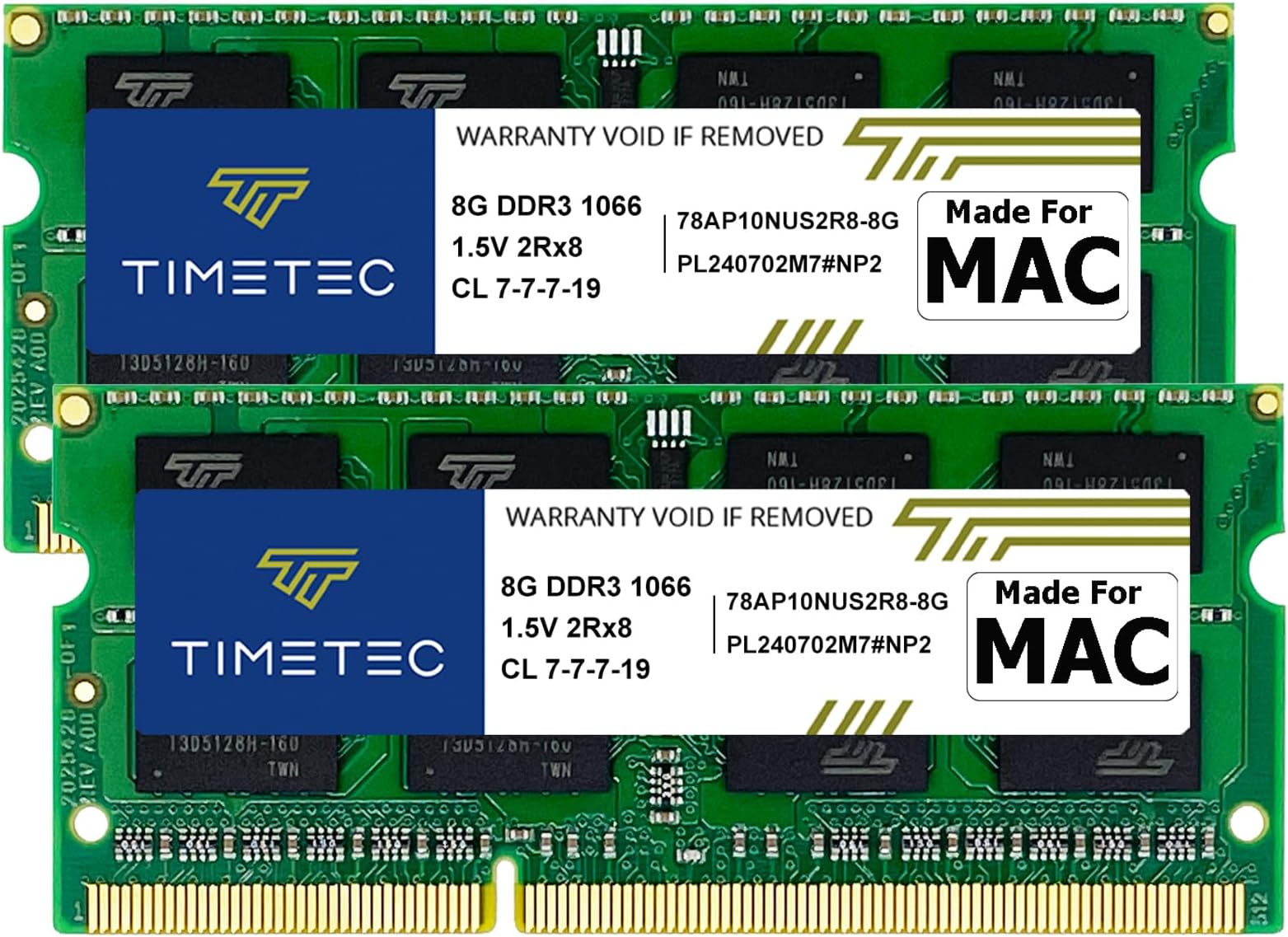
Timetec’s 16GB (2x8GB) DDR3 1066MHz PC3-8500 RAM kit is designed specifically for Mid-2010 Apple MacBook, MacBook Pro, iMac, and Mac Mini models. Featuring low-voltage 1.5V operation, CL7 latency, and 204-pin SO-DIMM form factor, this upgrade delivers reliable, plug-and-play memory expansion with lifetime warranty and free technical support—perfect for professionals seeking to extend the life and performance of their legacy Macs.


| ASIN | B07QGX5NYP |
| Additional Features | Lightweight |
| Best Sellers Rank | #175 in Computer Memory |
| Brand | Timetec |
| Column Address Strobe Latency | 7 |
| Compatible Devices | Laptop |
| Customer Reviews | 4.5 4.5 out of 5 stars (1,768) |
| Data Transfer Rate | 1066 MHz |
| Form Factor | SO-DIMM |
| Manufacturer | Timetec |
| Memory Speed | 1066 MHz |
| Model Name | Mac Series |
| Number of Pins | 204 |
| RAM Memory Technology | DDR3 |
| RAM Size | 16 GB |
| UPC | 765441341623 |
| Voltage | 1.5 Volts |
G**L
Works as advertised for my 2009 Late IMac
Bought a used 2009 late year IMAC that only had 4gb memory and can be upgraded to 16gm so I bought these and it was as easy as plug and play. Computer booted right up and moves much faster, works great.
C**T
10GB works great in mid-2010 mac mini server
4 YEAR UPDATE (2024/5/7): it’s been 4 years and my mac mini with 10GB of RAM is still rockin it! I’ve since switched to running Ubuntu Server 22.04.4 LTS which is super lightweight and CasaOS manages server configuration using a web interface. The server is currently running 4 media servers (Emby (x2), Jellyfin, Plex), Syncthing, Duplicati (backup server), samba (file server), DuckDNS + Wireguard to create a secure tunnel into our network. With all this running, all I see is the CPU maxed out every so often [due to AVI transcoding which I eliminated] and as I predicted, I never see 10GB maxed out so even though this RAM is half the price of when I bought it, I still see no need to go to the full 16GB. Perhaps if it starts ad blocking (Pi-hole) and managing home automation (Home Assistant) but for now - quite the happy camper for a machine going on 15 years! I did quite a bit of research and from what I found, as long as you buy the right speced RAM, a mid-2010 mac mini server with a max spec of 8GB will support 16GB (or a pair of these 8GB sticks) I wasn't ready to shell out for a pair when my gut said jumping from 4 to 10GB was a good size jump to toy around w Xcode development. worst case, if my machine barfs going over 8GB, I'll just have a single 8GB stick which is technically the max certified by Apple on this machine. I figured this was a calculated risk. I'm also well aware that mismatched memory pairs are not recommended by IT admins & to be honest, my 2007 MacBook never complained about having 1+2=3GB in it for 13 years. I had no reason to think this mac was going to complain and after a month, its working just fine & when you have light loads, macOS uses the extra RAM to cache files it looks. I was right about 10GB, the real bottleneck in this mini is not the RAM, it's the Core2Duo which is often slammed. that said, the machine suffered very badly with it's default 4GB esp if you upgrade to a patched version of Catalina (10.15.4). Point being, I will not be investing in a second 8GB stick - I don't think 16GB will make a difference w the CPU bottleneck. Go back to High Sierra on 10GB and it performs much much better. take a trip down memory lane and go back to Mountain Lion Server 10.8 and the machine is super snappy (esp if you upgrade at least one of its 2 HDDs to an SSD) Overall, it makes the mini good for running background server processes (I'm running 2 instances of Emby and AltServer & plan to get Apache and maybe a few others up) Now I wouldnt recommend the upgrade (for a mid-2010 mac mini) for Xcode development - it's a toy at best. This was only meant to be a stopgap until I can get my hands on a new mac w Apple Silicon and I've had a 2018 iPad Pro to hold me the last 3 months and it's been great. Now if you can get a 8GB stick for $25 (or two for $40!), this would be an excellent deal!
W**3
Successful install on mid 2010 MacBook Pro 13 inch (OS 10.12.6)
Installed in my MacBook Pro 13" mid 2010 model running mac OS 10.12.6 Sierra, which previously only had two 2 GB DDR3 RAM cards (4 GB total). As you could imagine, my computer was ridiculously slow. It would take about 10 to 15 seconds just to open Excel or Word or even Chrome sometimes, and I experienced excruciating lag when even just typing in a text field like the search bar or an Excel cell. Not anymore! I was a little worried about the warning from Timetec in the Amazon product info section that I would most likely have to update my EFI Firmware to the latest version because, not being a computer guy, I honestly had no idea what this meant especially with such an old computer running an outdated OS. However, Mac's software update web page allows you to search and then narrow the results by Mac model, so the EFI updates were easy to find (turns out, with Sierra, I didn't even need to update the EFI firmware). So, I installed the new RAM (took all of 5 minutes using the very straightforward provided instructions) and turned the computer back on. It booted up with no issues, although it did take a few extra minutes this very first time after the install. I wish I could give a more technical review, but again I'm not a computer guy. All I can tell you is that with this new RAM, this old laptop now runs like a brand new one with no ridiculous lag or delays with any process. This has saved me several hundred dollars, as I was about a week or two away from saying f*ck it and just buying a new computer. Couldn't be more happy with this purchase.
J**N
Works perfectly, awesome upgrade
Just installed the 16GB modules (2x8gb) and they work great. I'm running the latest version of MacOS that my computer allows (High Sierra/pre-Metal) so it will recognize and utilize 16GB of RAM vs the 8GB limit the older OS allowed. Plug and play with no issues, just a much faster computer. Must have upgrade if you plan to keep using your (very) old Mac, especially if you're running multiple screens. EDIT: These will also work in 2011 MacBook Pro computers. They're a slower clock speed than the OEM RAM for those models but the increased RAM far offsets any clock speed limitations. You should try to get the correct (faster) clock speed RAM if you have one of those models but, if you end up with these or switching to a different computer these will work fine. Although these worked great, my computer's processor and video chipset were just too outdated to keep up with my work requirements so I ended up using these for 3 months and then getting a new computer. I swapped these into my wife's late-2011 MacBook Pro and they worked wonderfully.
J**C
good value
good working ram chips. good value
T**Z
Excelente producto
Excelente producto
D**I
it worked in a mac mini
Really happy with this purchase. It arrived on time and was packaged well. Everything works just like it should and it’s exactly what I was expecting based on the description. No complaints so far, definitely a solid buy.
A**O
Trabajan bastante bien, las instale en un PC con Intel core i5 y le ayudo como se esperaba para mejorar su rendimiento
D**N
Good price and still working fine after 1 month
A**R
Easy install into older MacBook Pro. Made a big difference in performance. No issues installing or running. Trouble free computing. Recommended!!
A**C
Excelente produto! Meu Mac Book Pro (metade de 2010 13 polegadas) agora está com 16 GB de memória ram.
D**S
It's hard to determine which brand of memory can provide value and performance. TimeTec has worked great in both Apple based and Windows based hardware!
Trustpilot
1 month ago
3 weeks ago