We remain fully operational. Our teams are working around the clock to ensure your deliveries continue safely.

DOWNLOAD THE APP


Customer Services
Copyright © 2025 Desertcart Holdings Limited
DOWNLOAD THE APP


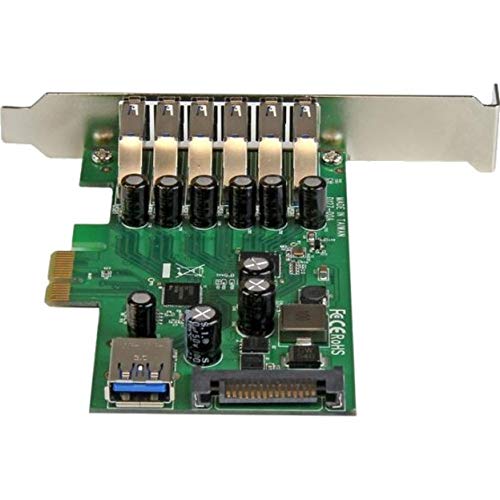

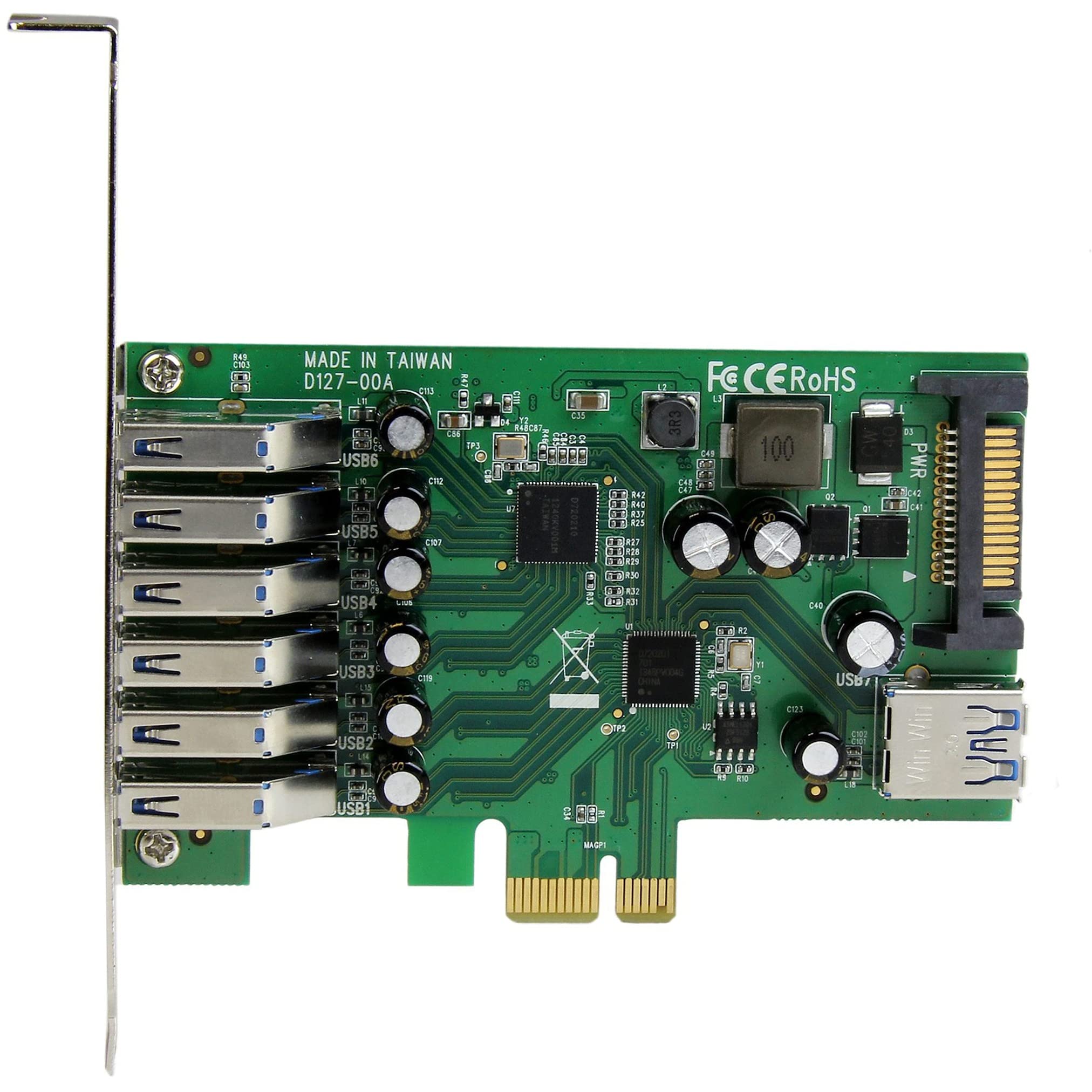
🚀 Power Up Your Ports, Power Up Your Productivity!
The StarTech.com 7 Port PCI Express USB 3.0 Card (PEXUSB3S7) transforms any PCIe-compatible PC by adding 7 USB 3.2 Gen 1 ports (6 external, 1 internal) with blazing 5Gbps speeds enhanced by UASP. Its unique dual-profile design fits both standard and low-profile systems, while the SATA power connector supplies up to 900mA per port for high-demand devices. Backward compatible and natively supported on Windows and Linux, this card is a reliable, high-performance upgrade for professionals seeking scalable connectivity and streamlined workspace efficiency.


























| ASIN | B00UK3X5CW |
| Best Sellers Rank | #28 in Internal USB Port Cards |
| Brand | StarTech.com |
| Compatible Devices | Personal Computer |
| Customer Reviews | 4.1 4.1 out of 5 stars (158) |
| Global Trade Identification Number | 00065030860345 |
| Hardware Interface | PCIE x 1 |
| Item Dimensions L x W x H | 4.1"L x 0.6"W x 4.7"H |
| Item Type Name | USB Adapter |
| Item Weight | 0.07 Kilograms |
| Manufacturer | StarTech.com |
| Model Number | PEXUSB3S7 |
| Operating System | Windows 8 Windows 7 Windows 10 Windows Server 2012 Linux Windows Server 2016 Windows Server 2019 |
| Style Name | PCI Express |
| UPC | 065030860345 |
| Unit Count | 1.0 Count |
| Warranty Description | 2 Year |
S**Y
Make Desktop Computer Installation a Little Neater
If you have an open slot it’s great for decluttering a desk by eliminating a USB hub. One word of advice, if you will be connecting power hungry usb devices you should really get an SATA cable to connect the card to your power supply. The card has an “optionally used” SATA connector to boost the power available through the ports. I am powering 2 external 1 TB expansion hard drives and a USB telco modem with zero power issues. I am using an old Dell 537s slimline desktop and this card fits like a glove and works perfectly with no apparent latency in access time.
J**N
Excellent Performance Running CentOS 7 NAS with USB 3.0 HDs
I built a NAS using an old Lynnfield-era PC running CentOS 7. I had previously used a Highpoint SAS/SATA controller to keep all the HDs internal. The Highpoint controller works well, but requires a kernel module that must be compiled with each kernel upgrade. I found this annoying and wanted a hardware solution that didn't require a kernel module. I picked the StarTech card even though it is 3x the price of the Chinese cards because of my experience with StarTech stuff. They make very high quality stuff. Their engineers design great boards that are not flaky. Since I'm relying on the data in my system, I picked high quality components. I purchased two of these cards. They each provide six external USB 3.0 ports so I have a total of 12 ports connected to 12 USB 3.0 HDs. I'm running zfs with raidz3. That's 48TB of raw storage with ~30TB of usable storage. I'm seeing ~60 MB/sec writing to the array from /dev/zero with 'dd'. While it's nice having internal drives for the NAS for a clean, compact setup; it will be nice to be able to easily disconnect and connect a replacement drive when I experience a disk failure. I got two large power strips to plug in all 12 of the HD power transformers.
T**R
Works Great, Easy Install, NO POWER CABLE
Very simple to install in the PC's chassis and Win11 installed the card with no issue at all. BUT, it does not come with a power cable so if you want to power the card you have to supply your own cable. -1 star because something so inexpensive and simple should, in my opinion, be included.
T**.
StarTech Always Makes Great Products
Works fine as expected. I opted for the model with the SATA power, just in case someone plugs in a high power device. This was the most ports I could find on any USB expansion card. StarTech makes great products. I've been in IT for 20+ years, and I think they make the best niche tech parts out there. They are so much better than the cheaper no name random alternatives on Amazon. StarTech is worth paying a little more. The best part is their support! The chat is great, and you can find downloads and manuals as you need them. That is really important when dealing with technology. I always default StarTech for hard to find and specialty adapters.
J**K
Good unless you need to power accessories.
I bought this because my mATX motherboard didn’t have a lot of USB connectors. It installs easily and the port speeds seem accurate but even though the card requires an external power source the ports don’t provide 2.1 amps as they should for USB3 spec.
S**R
Does not provide sufficient power to USB devices
Even with "optional" dedicated SATA power connected, device fails to provide sufficient power to USB devices. Tested game controllers, external sound cards, storage devices, VR HMD, etc, all non-functional when connected to this device despite its high price tag. Unfortunately, I cannot recommend the StarTech.com brand. Tested on Mar 10, 2026.
-**)
Awesome Purchase
Awesome Purchase
P**.
Very useful
Very useful product since I have quite a bit of USB plug-in computer. This meet my needed, and working as I expected. I always trust this brand but somehow is quite high cost. I utilize all port because I desktop does not have enough port, and I only want all USB cable come to one place for easier manage. Good product.
B**I
OK so Startech is an unusual brand. They do not employ huge marketing department and you will not see them in every shop, because they cost rather more than typical Chinese electronic and do not appear to have catchy unique selling points - unitil you look into detail. For example, in this case we have a combination of two best of the crop USB3 chips: Renesas uDP720201 (4 channel USB3 controller for ePCI) and uDP720210 (4 channel USB3 hub). Each connector is protected by a reasonably sized capacitor. The bracket features 4 ports past the hub and 2 ports attached directly to controller. On the inside you will find another single port attached directly to controller (the last port of the controller is driving the hub, obviously). You could buy cheaper USB3 controller obviously - but it wouldn't have this many ports and also, most likely, it wouldnt have this quality of components. Of course you could instead buy another Startech controller, 4 port where each port is driven by a dedicated Renesas chip for ultimate performance - useful if you need this much bandwidth. I did not, and wanted maximum number of port instead. It works great. One point to note: due to orientation of USB3 sockets, the USB plugs will fill space of PCI bracket with very little tolerance left. Be sure to plug an USB cable/device/anything into the bracket ports before you close the chassis, otherwise you may need to re-open your computer and readjust the card later.
J**.
Pedi uno y me vino con un usb que no funcionaba,solicite un remplazo y antes de que me diese tiempo a devolverlo ya tenia el nuevo en casa.
D**4
Achetée pour augmenter le nombre de ports USB d'un PC un peu pauvre en USB, la carte fonctionne parfaitement. Je l'ai installé sous win 8 et une config I5 sur une carte mère Lenovo. Je n'ai pas essayé les drivers livrés sur le CD mais j'ai téléchargé les plus récents sur le site du constructeurs. Les 6 sorties externes fonctionnent. Je n'ai pas testé la prise interne. Livraison rapide.
1**3
Not cheap but I have a lot of these cards in use and they generally seem to work very well. Using it on linux and windows. I much prefer the 7 port version over the 4 port version because it seems to have a much more sturdy sata power connector. So I would suggest to go with this version for that reason.
Z**X
ちょっと高くて手が出せなかったのですが、タイムセールで安くなっていたので購入。 Win10標準ドライバで正常に稼働中。ポートの向きがスロットに対して直角で、筐体の拡張スロットの形状によってはUSBケーブルが挿入出来ない事を理由に低評価が多いですが、それは正当な評価ではなく自己責任です。 回路構造は、PCIeバスとのブリッジにD720201 USB3.0/xHCI1.0 Host Ctrlを採用し、そこから直接3ポート(うちケース内用USB Type A 1ポート)、Host Ctrlから1回路分岐してD720210 USB3.0 Hub Ctrlを通って4ポート、合計7ポートになります。 取り付け後OS起動したら何事もなくドライバが勝手に入り、ハードディスクも問題なく認識しました。内蔵の1ポートの使い道がなく勿体無いですが、6ポートあるのでとりあえず満足しています。
Trustpilot
3 weeks ago
3 days ago