We remain fully operational. Our teams are working around the clock to ensure your deliveries continue safely.

DOWNLOAD THE APP


Customer Services
Copyright © 2025 Desertcart Holdings Limited
DOWNLOAD THE APP
![DigitalLife AuralynX Series: USB Audio Capture Device – Convert Cassette to MP3 with RCA or 3.5mm Input, PC, Mac & Linux Compatible, for Content Creators & Educators [1-Piece/Package]](https://m.media-amazon.com/images/I/6141AORf2zL.jpg)


🎧 Digitize your sound legacy—because your memories deserve to be heard in HD!
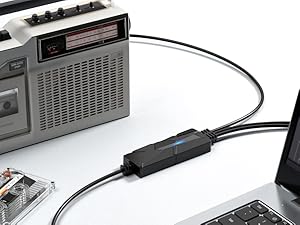
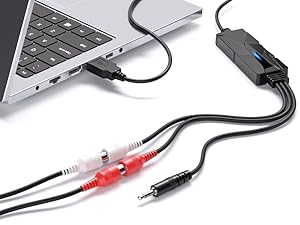
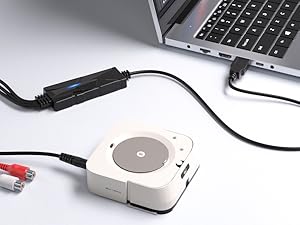
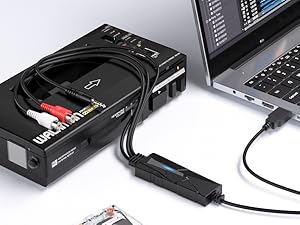
The DigitalLife AuralynX USB Audio Capture Device is a compact, portable converter that digitizes analog audio from RCA or 3.5mm sources into MP3 files. Compatible with PC, Mac, and Linux, it supports plug-and-play operation with popular recording software like Audacity. Ideal for content creators, educators, and music enthusiasts, it offers 2-channel stereo capture, dual input options, and comes with a 2-year warranty and 24/7 customer support.







| ASIN | B07BHGWBFY |
| Best Sellers Rank | 20,670 in Musical Instruments & DJ ( See Top 100 in Musical Instruments & DJ ) 6 in Digital Converters |
| Brand | DigitalLife |
| Country Of Origin | China |
| Customer Reviews | 4.0 out of 5 stars 427 Reviews |
| Included Components | USB 2.0 Audio Grabber |
| Interface | USB |
| Interface type | USB |
| Item Type Name | USB Audio Capture |
| Item Weight | 99 Grams |
| Manufacturer | DigitalLife |
| Material | ABS |
| Mounting Type | Portable |
| Mounting type | Portable |
| Number of Channels | 2 |
| Number of Pins | 4 |
| Number of channels | 2 |
| Number of pins | 4 |
| Product Warranty | 2-Year Limited Warranty |
| UPC | 712195289961 |
| Unit Count | 1.0 count |
F**Y
Does the job very well
Dislike- nothing. Like- very easy to use, works very well, no complicated setup, just plug it in and it's ready to go, price. I bought this in order to copy my vinyl collection to my computer. When it arrived I decided to try it out straight away, plugged an RCA lead from my amp into the RCA sockets on the device then plug the USB plug into my computer and everything is ready to go and my first attempt at digitising an album to my computer was more or less success, the minor problem I had was with audacity software. The sound quality is excellent. I would have no hesitation recommending this device to anyone who wants to copy vinyl to their computer.
J**8
Works well but was scratched on arrival
I use this audio capture device with Audacity to digitise some vinyl LPs and a lot of good quality cassette tapes. It works well. One thing to note is that there does not appear to be any way to control the volume when recording, either on the device or within Audacity (the recording software which is freely available). My output levels are a few Db down, so after recording, I use the Amplify function in Audacity. If your levels are very high (above Line Level), you might have a problem. My one complaint is that the casing was scratched on arrival (see photo), which makes me wonder if this was a "Return" rather than brand new. However, it works fine.
A**K
Quick, simple and cheap method for good quality audio for live streaming
I used this to live stream a DJ set on MixCloud. Worked straight out the box, not complex, sound quality was great. Can go up to 320kbps mp3 from what I could tell. Needed at short notice, got it the next day and worked immediately, no set-up required. Really happy with it. One tip, if you are using it to live stream, connect it to your laptop/computer BEFORE starting OBS otherwise OBS recognises your mic as this input instead and you get poor sound quality.
M**O
Excellent performance --- but...
On paper and even in use this is a very good unit - noise levels are incredibly low - approaching that of professional gear. But now the caveat. To work well this thing needs an input signal approaching 5V - which is at least 5x the level most equipment can produce. Why 5V? Because the internal reference uses that - it's the USB power level. This results in one of two issues, either the signal has to be digitally amplified - that's almost 14dB! Which means that the quantisation errors are ALSO amplified by 14dB (and in reality it's going to be more like 20dB). Line voltage from most equipment is not supposed to be "louder" than that - so a small pre-amp is needed in the line - something most people won't have access to. This is should have been built in for a device that's fitted with standard RCA/Phono connectors used with "line" out from a typical device. Worse (for some of us) there's no input protection so if pre-amp delivers more than that 5V swing, the ADC is destroyed. The device should have an input limiter and a small pre-amp but that would add cost. As a result I've ordered a Beringer (https://www.amazon.co.uk/dp/B0023BYDHK) in the hope that it is properly configured in this regard.
J**K
Used with Audacity
Great little adapter for cassette recorder digitisation. Works well with audacity on my system.
D**K
Very easy to record your music.
Works well, the software it comes with can overwhelm you if you, I never realised you could do so much with the software. I only use a small part of its capability. Lots of support including a manual within the software as well as an online forum.
R**E
Warning, doesn't work with Windows 11
Arrived next day , tried it on different Laptops both Windows 11, did not work , returned to Amazon. Purchased a different make which arrived safely, also did not work on my Laptops, this morning I tried the new one on an old Windows 10 machine and it seems to be working, so should have taken more notice of the advert which doesn't mention Windows 11 although considering most Windows 10 have probably been updated it shoulld at least mention that it will not work.
T**C
Works with Windows 10 Version 20H2
It did not require any special drivers. It operated immediately with the Windows default drivers. It appeared as :- USB PnP Audio Device/Microphone Array (USB PnP Audio Device). The drivers set that Windows selected were :- USB PnP Audio Device Microsoft 07/07/2020 V10.0.19041.388 Microsoft Windows Microphone Array (USB PnP Audio Device) Microsoft 06/12/2019 V 10.0.1904.1 Microphone Array (USB PnP Audio Device) Microsoft Windows I have successfully used it with LineOut from an amplifier using disk, CD and tape inputs. I had an initial problem with sudden noise being generated (usually after computer sleep) but I solved this by setting the Microphone Array as the Default Device in Recording in Windows Sounds. The sound quality is good as far as I can detect with plenty of range.
Trustpilot
2 weeks ago
3 weeks ago