Some deliveries may take a little longer than usual due to regional shipping conditions.

DOWNLOAD THE APP


Customer Services
Copyright © 2025 Desertcart Holdings Limited
DOWNLOAD THE APP

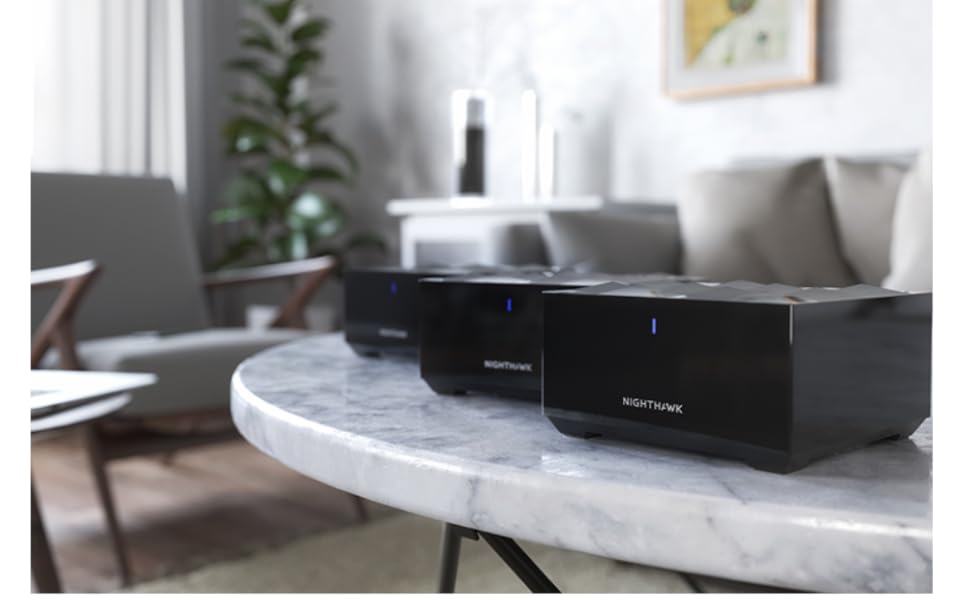
🚀 Elevate your home Wi-Fi game with Nighthawk MK63S — speed, coverage, and power in one sleek system!
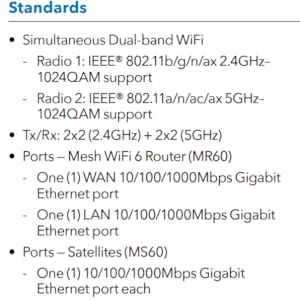
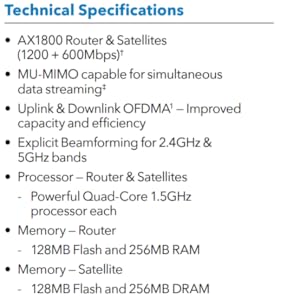
The NETGEAR Nighthawk MK63S AX1800 Mesh Wi-Fi 6 System delivers up to 1.8Gbps speed and expansive coverage up to 4,500 sq.ft, supporting 25 devices simultaneously. Featuring OFDMA technology for efficient bandwidth sharing and seamless room-to-room roaming under a single network name, this 3-pack system ensures reliable, high-performance Wi-Fi compatible with any internet provider. Ideal for busy households demanding smooth streaming, gaming, and remote work connectivity.
| ASIN | B086ZN5R6P |
| Best Sellers Rank | #54,715 in Electronics ( See Top 100 in Electronics ) #219 in Whole Home & Mesh Wi-Fi Systems |
| Customer Reviews | 4.2 4.2 out of 5 stars (1,849) |
| Date First Available | April 11, 2020 |
| Item Weight | 4.34 pounds |
| Item model number | MK63-100NAS |
| Manufacturer | Netgear |
| Product Dimensions | 11 x 7 x 6 inches |
S**E
NIGHTHAWK SAVES THE DAY!
I work remote and it's extremely important to have a strong Wi-Fi connection. I was using all of the hardware provided directly from the internet company. During the day, my system would disconnect from the wi-fi and I'd have to log back in. If I left my computer for 2 mins., it would disconnect. I've spent count less hours on the phone with tech support, adding extenders and moving everything around for the best possible signal. Then came along, Nighthawk! The mesh system is so incredibly easy to hookup. My internet signal is super strong and I am happy to report zero drops with my system. The mesh system is truly a lifesaver and I HIGHLY recommend using the NETGEAR Nighthawk Mesh System. I'd be absolutely frustrated without it.
E**W
Easy to Install and Works Great
With my wife and I both working from home and the kids starting school on-line, I upgraded our Internet bandwidth to 500mbps plan that would accommodate all the video calls that were going to be happening simultaneously. My old Nighthawk router couldn't handle the increased bandwidth even though it advertises up to 900mbps. I researched new mesh wifi 6 units and many were very expensive. The new Nighthawk mesh wifi 6 system had a range of different reviews but popped up on several on-line best of 2020 rankings and seemed to be a good value, so I bought it to try out. I've had the unit for about a week now and it has worked very well . It was easy to set up and I have a strong signal throughout my 3,200 sq ft home and in our back yard. As reviews state, the wifi is strongest near the base unit and diminishes the further away you get from it, but I've gotten wifi speed tests of up to 360mbps next to the base and the lowest it drops from the furthest points of my house and backyard is around 100mbps. I tried it again today while all four of us were on video calls with similar speeds. I'm very happy with my purchase so far.
J**S
Incredible!
I work from home, my husband works from home and we homeschool our child. With a house. My office is actually in a barn attached to the house so I can hold classes there (also where the classroom is located). My husband’s office is the complete other side of our home. It’s an old home with tin walls so getting internet dispersed has been a big trial. I do a LOT of video chats, uploading and downloading large files and so does my husband. My son is a gamer and we use a streaming service for tv. A WiFi that is far reaching and secure was necessary. Since purchasing this mesh I have not had a single dropped call or anyone who said “we can’t hear you” during a presentation. That’s with all of us online at the same time, plus tv or device, when I host in person meetings or learning sessions, all my attendees can all securely log in at the same time with no issues. And I LOVE the Armor security that blocks phishing attempts! Keeps us all safe! The nighthawk app that lets me control everything from my phone? Genius - I’ve used other apps on other devices, the amount of control in this one is exactly what a person like me needs. I can block and unblock devices attached to my WiFi, I can set parental controls, update software, remove websites listed as unsafe and see everything! And yes I named every device attached to my WiFi so I would know what it is so if something shows up I don’t recognize, blocked it becomes!
T**R
Product with lots of potential, yet can be aggravating for the typical end-user
I have been using this product for over six months, experiencing different results from time to time. I have seen it perform exceptionally well and total failure. The use of this product might depend upon the complexity of your network or what you intend to do with it. As a standalone, it probably functions pretty well for its intended purpose. Out of the box, the installation is fairly straightforward. If you have a smartphone, it will walk even the most non-tech savvy individual how to get it functioning. Advanced or power users such as myself, tend to see the setup as very vanilla or basic. One thing that should be highlighted bar none in the setup and is worthy to note is that each satellite will operate wirelessly independent of the router, however, it will operate exceptionally better if hardwired for ethernet backhaul. When I originally purchased this unit, the problems were fairly intense with disconnections almost all of the time. The satellites would not stay synced. I strongly considered returning the product and getting three independent routers to do the same thing. I read somewhere that there was going to be a firmware update that would correct these issues. Within thirty or so days, the firmware patch was released correcting the vast majority of issues. Over the course of six months, there have been a few updates, nothing as major as the first one. I did discover through experimenting, that while in the bedroom I could pull a max speed of 80mbps off a gig connection over wifi, but when I attached an ethernet cable to the back of the satellite from the router, the speed increased to 700mbps. In the manual, it will tell you that you can connect one satellite for wired ethernet backhaul. You can connect as many as you want, provided you use a network switch from the main router MR60 to the satellite's MS60s. In my particular setup, I needed coverage in my master bedroom and a playroom. Since both of these rooms are on the first floor and my main router (RAX120) is on the second floor, we had sporadic coverage at best. I have been utilizing the MR60 as a secondary router (by turning off the DHCP and statically assigning the MR60, MS60s their own ips) and sharing the same SSID and Password. This way the internet is fluid to work no matter what room I am in or what device I am on. These little units work well for the most part in this configuration, however, from time to time, the connection acts stagnant requiring a reboot. At times I can not access the MR60 page over wifi, but I can over ethernet. Sometimes it will go for months with no issue and other times it will just give issue after issue. In one of the latest firmware updates, they allow you to run the device as an access point, which is the proper way to do it, however, through further testing my connection speed drops by 25%, utilizing it this way versus using it as a secondary router. I would like to see the firmware steadily be improved for more reliability. My ratings are as follows, 4 stars over all for the product as it is not the worst and offers a lot for a package deal in comparison to much more expensive setups. 4 stars on the signal, when it works it works really good, when it doesn't it isn't good at all, improved firmware could make this even better. 3 stars on tech support, as I don't use tech support, most of the people don't speak well or listen to the problems the user is facing, partly because they simply do not know the product they are representing, 3 stars for the mobile app, it is good and looks appealing, however, I simply use the GUI because I can not access both the RAX120 and MR60 on the app at the same time and I don't use the app. The GUI is the only way to support both routers at the same time
F**A
tengo buena señal en toda la casa
M**Y
Una casa de tres niveles y en cada uno ya existe señal y velocidad constante, aparte estéticamente son mejores que un módem.
D**S
Vale cada centavo Cubre toda la casa, fácil de usar
A**N
Un gran producto. Lo compré principalmente porque la diferencia entre los Mbps que recibía en mi módem (cerca de 200 Mbps) y lo que llegaba en el resto del departamento (90 Mbps) hacía evidente el gran desperdicio de velocidad que pagaba respecto a la que experimentaba. También tenía un área en la que señal prácticamente no llegaba, aún con extensores Netgear Ac1200. Compré entonces un router Huawei Wifi 6 y la verdad bueno. Recibía casi los 200 Mbps pero a los 5 metros de nuevo se caía la velocidad. Finalmente me decidí por estos Nighthawk, por ser de malla para cubrir más area, ser Wifi 6, estar a buen precio (cuando lo compré, costaba 2 mil pesos más económico que la versión Mk62 que sólo trae dos equipos, este trae tres) y ser de marca Netgear que en el pasado me ha demostrado ser de calidad. El resultado fue muy bueno. Este sistema de malla me entrega ya 195 Mbps en cualquier lugar del depa y ya no hay zona sin señal. El único inconveniente para mí fue que, resulta que este sistema te deja ambas redes 2.4 y 5 en una misma, con el mismo nombre y clave y no es posible separarlas. Esto fue un problema puesto que estoy automatizando mi depa con muuuuchos smart swirches, smart plugs y smart lights, y dos Echo de Amazon (Alexa), pero varios dispositivos, sobre todo los smart plugs, sólo funcionan con red 2.4. El resultado es que pocos plugs funcionaron. ¿Que tuve que hacer? Dejar todavía funcionando uno de mis extensores Netgear AC1200 a donde se conectaron todos mis dispositivos smart. La historia acabó bien pero, ¿qué necedad de Netgear de no dar la opción de diferenciar ambas redes, como cualquier otro sistema?
G**A
facil de instalar y configurar
Trustpilot
1 month ago
3 weeks ago