We remain fully operational. Our teams are working around the clock to ensure your deliveries continue safely.

DOWNLOAD THE APP


Copyright © 2025 Desertcart Holdings Limited
DOWNLOAD THE APP



Buy anything from 5,000+ international stores. One checkout price. No surprise fees. Join 2M+ shoppers on Desertcart.
Desertcart purchases this item on your behalf and handles shipping, customs, and support to South Korea.
🚀 Upgrade your desktop’s WiFi game with lightning-fast 6E connectivity!
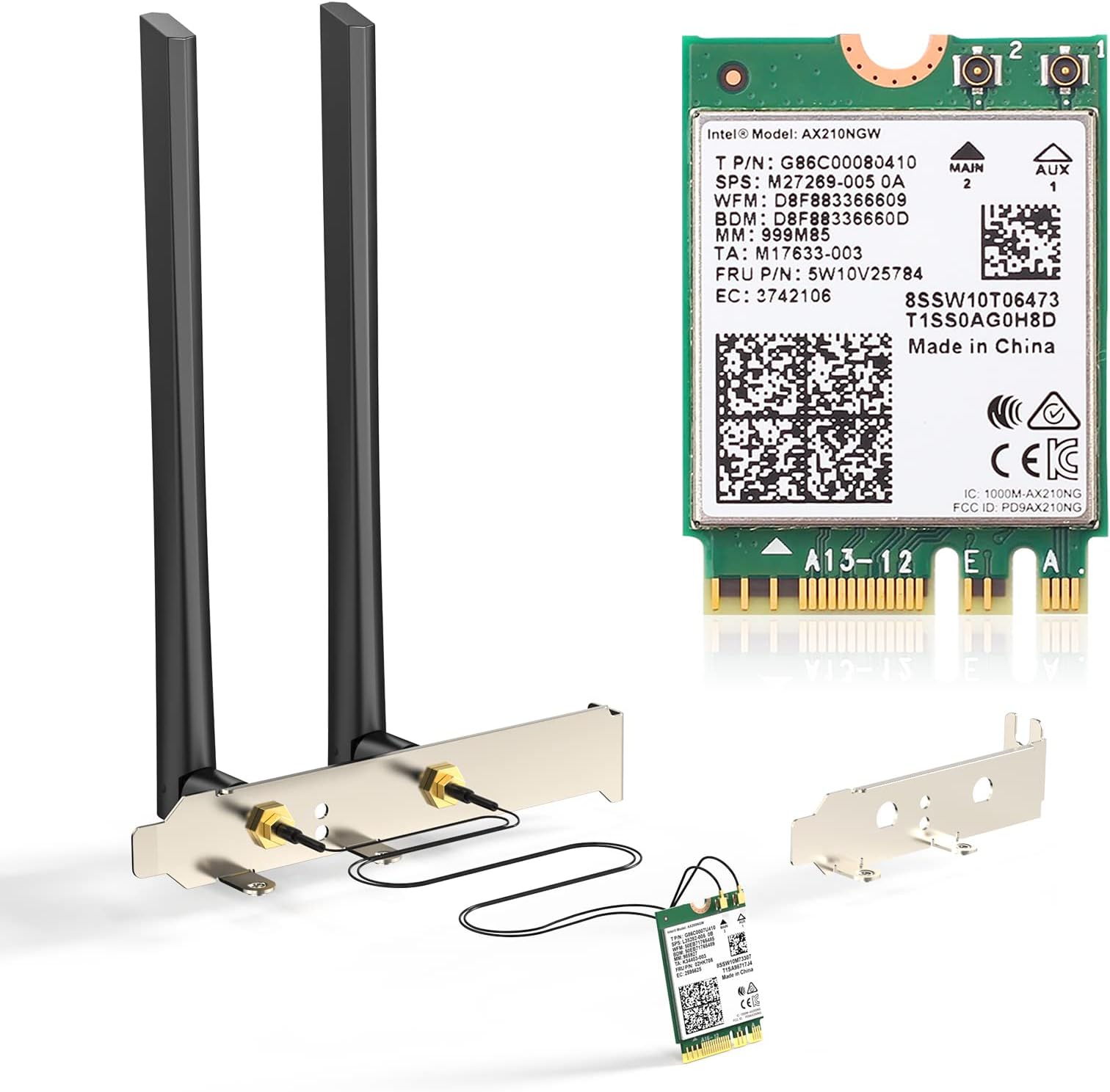
The EDUP AX210NGW is a cutting-edge WiFi 6E M.2 network card delivering tri-band speeds up to 5400Mbps and Bluetooth 5.3 support. Compatible with Intel 4th-8th gen CPUs and Windows 10/11 (64-bit), it includes 5dBi antennas, low-profile brackets, and Ipex cables for easy installation. Ideal for professionals seeking ultra-fast, low-latency wireless performance in congested environments.


| ASIN | B088M5CK5K |
| Best Sellers Rank | #104 in Internal Computer Networking Cards |
| Brand | EDUP |
| Compatible Devices | Desktop |
| Compatible Operating System Family | Windows |
| Customer Reviews | 4.3 4.3 out of 5 stars (117) |
| Data Link Protocol | Bluetooth |
| Data Transfer Rate | 2400 Megabits Per Second |
| Hardware Interface | Bluetooth 5 |
| Item Weight | 0.14 Kilograms |
| Manufacturer | EDUP |
| Mfr Part Number | USB 3.0 Hub |
| Minimum Required Operating System Version | Windows 10 |
| Model Number | AX210 desktop kit |
| UPC | 793420183537 |
| Warranty Description | 1 year manufacturer |
L**M
Works as intended.
Easy installation, connected to WiFi without any issues. Fit m.2 slot, speed test is perfect for the price!
R**9
Everything works, but speed disappoints (Update}
Update: I reset the networks on my laptop through the Windows system settings, and once my system rebooted, I was able to get the speeds I expected from the card. Original review (four stars): I ordered this kit to kill two birds with one stone. I used the external antennas to replace the ones I was using for my desktop computer, and that was a pretty simple swap-out. I used the AX210 Wi-Fi card to replace the AX201 in my laptop. My smartphone regularly records Wi-Fi 6E speeds of over 1050Mbps, and I was only maxing out at around 750Mbps on my laptop's Wi-Fi 6 card. I was hoping that upgrading to the AX210 would give my laptop speeds similar to those on my smartphone. While the card was relatively easy to install, reattaching the antennas is annoying because the connectors are so small and have to be precisely aligned to be snapped into place. I got it done, though, and I was prepared to be impressed by the speed increase. Unfortunately, not only did I not see a speed increase, I haven't come close to the top speed achieved with the previous card; the highest speed I've recorded is around 660Mbps. Don't get me wrong; that is plenty fast for a laptop. However, I'm disappointed that my smartphone's Wi-Fi6E modem achieves much faster speeds than my laptop's Wi-Fi 6E card, and that the newer, more advanced card is not as fast at its highest speed as the old one.
A**R
Device works PCIE bracket not so great
It's pcie bracket is total crap. It works wonderfully do not have any troubles did not even need to grab any drivers just started working.
C**T
Easy Installation and fast datA transfer.
A great way for an external upgrade or as a wireless addition to any Windows computer. Installation is so simple: plug it into a usb slot and a windows opens to install the software it requires. Once installed, Windows sets it up and you are ready to connect to a wireless network. This adapter provides fast internet service and doesn't break the bank.
M**.
Are you kidding
I could not make the cable connection. I must be too old. I could line up the connection, but it would not join together. People who design this trash need to be forced to use it.
M**.
Fast Intel Wifi 6E, worked with my Lenovo Ideapad 3, but YMMV
I was skeptical of this Wifi card working with my Lenovo laptop since a lot of reviews and forum posts says Lenovo whitelists wireless cards on certain models. What I learned ALSO is that after a certain model/year, Lenovo stopped the whole Whitelist fiasco. My Ideapad 3 15ARH7 comes with Realtek 8825BE(?) and noticed wifi drops periodically. I searched Google and noticed a lot of Realtek Wifi card users were swapping in these Intel AX210 cards. Mine worked, and I'm glad. Be sure to download the Wifi and BT drivers before the transplant. Also, before you remove your old wifi/bt combo card, unpair any peripherals.
T**O
Installed on ASUS Prime B560M-A motherboard
I installed this card on my ASUS Prime B560M-A motherboard. The only issue I had was connecting the cables to the card, but persistence paid off. You just have to line them up correctly, press down, and twist back a forth. The ASUS Prime motherboard comes with a bracket to hold the card. Windows 11 installed the drivers. I have an AC1900 router and I am getting over 200 Mbps when I run a speed test.
A**L
Bluetooth and WiFi connection is stable and fast.
The only complaint I have is the length of the antenna wires but I can get over it, it's a one size fits all. Not everyone's set up is as close as mine is to the graphics mounting (They are pretty long for my motherboard.) Internet speed hasn't bottle necked for me yet. It supports my ISPs speed at 250-300mbps. Bluetooth on this card was good, no issues with connecting. This card is the Intel AX200 m.2. So far it was worth the price.
S**L
We spent 4 hours trying to fit the tiny antenna pins to the wifi board and failed. Then we had to return the item. Completely unusable product just because we couldn't attach the antenna.
Trustpilot
1 week ago
1 month ago