


🔄 Switch Smarter, Not Harder — The Ultimate 16-Port 4K HDMI Command Center
The TESmart 16×1 HDMI Switch is a professional-grade 16-port HDMI switcher supporting 4K UHD resolution at 60Hz with HDCP 2.2 compliance. Designed for seamless multi-device management, it offers versatile control via front panel, IR remote, RS-232, and LAN/IP commands. Its intelligent EDID emulators ensure accurate display info, while auto-switch and auto-scan functions keep your inputs dynamically prioritized. Rack-mountable with a compact 1U 19-inch form factor, this switcher is ideal for advanced home theaters, gaming setups, and professional AV environments.


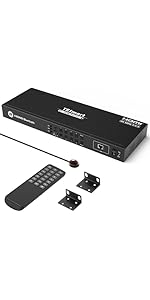


| ASIN | B085S1CR6T |
| Best Sellers Rank | #143 in Audio & Video Selector Boxes |
| Brand | TESmart |
| Cable Type | HDMI |
| Color | HDMI Switch 16 ports 4K@60Hz |
| Compatible Devices | Camera, Gaming Console, Laptop, Projector, VCR |
| Connector Type | HDMI |
| Connector Type Used on Cable | HDMI |
| Customer Reviews | 3.9 out of 5 stars 268 Reviews |
| Item Dimensions D x W x H | 17.32"D x 5.91"W x 1.77"H |
| Item Height | 1.75 inches |
| Item Weight | 3.5 Pounds |
| Manufacturer | TESmart |
| Number of Ports | 16 |
| UPC | 745695280435 |
| Warranty Description | TESmart (Manufacturer) warranty for 365 days from date of purchase. Always be able to contact TESmart via Amazon. |
L**Y
Great HDMI switch with some gotchas that make it hard to configure the LAN control
I give this 5 stars for good functionality at a reasonable price, but there are several issues to be aware of. First, this functions well as advertised. It's an 8x1 HDMI switcher supporting HDCP 2.2 and 4K (3840 x 2160) @ 60Hz. Switching can be controlled by front panel buttons, IR remote, RS-232, or Ethernet/IP. I use these on TVs where I have many HDMI devices that I want to toggle between. I have used this with Google TV, BluRay, Ubiquiti ViewPort, Roku, and other types of devices. I primarily use the Ethernet/LAN/IP control capabilities. I have Lutron keypads set to select the TV input. Programming the Lutron Homeworks QS system to enable switching HDMI inputs is relatively simple. Here are the downsides to this device: - The RS-232 port is a 3-pin connector that must be wired to a 9-pin Female D-type RS-232 connector to use the port. It's not hard to do, but this does not connect to a standard RS-232 cable out of the box. You will need to make a custom cable if you want to use RS-232. The manufacturer should include a 3-pin to 9-pin Female D-Type RS-232 adapter. - The LAN/Ethernet port comes set to a static 192.128.1.10/24 IP address. It does not use DHCP. The IP address requires using a custom Windows utility to configure. The Windows system running the custom utility must either connect to the static 192.128.1.10 address or use the RS-232 port. The device does not have a Web browser interface. It listens for hex commands on the IP address port (default 5000) in the same format as on the RS-232 interface. There needs to be a way to configure the IP address without using a Windows PC. - There is no way to factory reset the device. If you set the IP address wrong and are unable to connect over IP, you must use the RS-232 port to reset the IP address. The device should have a factory reset button or button sequence. Aside from these negatives, which make setting up the device more complicated than necessary, these are great little HDMI switches. I'm about to install the 16-input version on my main living room display, where I frequently switch between multiple security camera views and different AV devices.
J**D
Recommend
exactly what I needed, just needs a undershelf mount to be perfect. Helped me advance my game room!!
E**T
I'd give it less than one star if I could
What a colossal waste of my time. I have twelve devices (game consoles, computers) that can output HDMI at various resolutions and this thing fails miserably. This is advertised to accept "up to 3840x2160". Notice how a list of exact resolutions are not supplied in the specs? Well, while I have devices that output 1080p over HDMI (and those work fine with the switch of course) I have others that output various resolutions over HDMI. For example, the RetroTink (original) outputs 480P over HDMI. But, the switch does not like it. No display. It works fine when connected directly into my TV and it works fine when connected to a five dollar non powered switcher. I have an HDMI card for my Apple IIe. It outputs at 720x480. It doesn't like it. No display. WOrks fine on my TV directly or into the same cheap $5 switch. I have a Sofia2 on the Atari 800. It works, then it does not. I changed the resolution from 1280x960 to 1024x1200, 1366x960 as well. All of these resolutions work direct to the TV and guess where...again the cheap HDMI box. I went out of my way to disconnect everything from the multiple cheap boxes I have in order to clean things up and connect it all to this HDMI matrix...which is a job and it is not cheap. I really expected it all to work. Why would cheap HDMI boxes work but not this expensive matrix? What a waste and what a joke. Everything is connected back to the five dollar boxes now and this trash is going back immediately. Thanks for nothing.
X**0
EDITED: TESmart Customer Service Helpful, Received a Replacement for Failed Unit
EDIT: Consider this review a 4.5 stars, rather than a 5. There's no doubt that this HDMI 2.0 Switch is at the top of the line when it comes to physical durability. It is an industrial unit - aesthetically unappealing, but sturdy and extremely responsive. HDMI cables snap into their slots with a very satisfying clunk - it is very easy to know when the cable is properly in. The only issue with the design itself is the LED backlight, which is absurdly bright and can't be turned off or dimmed. I've had to place a strip of black electric tape over the screen. There's no getting around, though, that this is an extremely expensive HDMI Switch. Even for the 16 slots it offers, it is multiples more expensive than its competitors, of which a 5x1 or 8x1 Switch can often be had for less than $50. And, to a certain extent, it does have a premium feel. The problem, of course, is whether this switch will last. My HDMI OUT port on my previous TESmart 16x1 Switch failed - it no longer displayed output to my OLED, and read out as an "inactive" input, despite the unit turning on and switching through inputs as normal. This happened a mere 17 months after purchase. I had to contact TESmart Support and then had to get my elbows out a little bit to get proper support, and eventually a replacement free of charge. This was not even what I requested - I merely was looking for repair service - so the support was very much appreciated. This leads to my strongest criticism of this unit - the Warranty. TESmart only offers a 1 Year Warranty for this 16x1 unit, which, considering the price, is absurdly low. When you look at other consumer electronics markets, as you go up the stack in price, so too does the warranty length. AVRs are a great example of this - the Denon S Series AVRs have 2 or 3 years of warranty (arguably still too low), while their more expensive X Series have a 5 year warranty minimum. This switch is at the absolute top of the stack - it is the most expensive switch that I can find pretty much anywhere. A mere 1 year warranty for a 250 dollar purchase is simply unacceptable. I will keep my review at 5 stars, as support has been very helpful in replacing my unit. And, again, despite the price, this is the absolute best HDMI Switch on the market, bar none. But I seriously hope they reconsider their warranty policy to 2 years at least, particularly when internal failures are clearly a possibility.
A**R
Automatic input detection and switching does not work
EDIT: I got a replacement from the manufacturer and auto-switch works correctly. Must have been a bad unit. Overaly very happy with this unit. Original review: This is one of the only 16-port HDMI switches on the market. Per the Amazon product page, it includes "Automatic input detection and switching." I take this to mean that when powering on a connected HDMI device, the switch will automatically change to that input. This does not work for me. It's also not clear whether the switch actually includes this feature or not. While the feature is listed on the Amazon page, the manufacturer's website only lists the time-based auto-scan feature. TESmart offers a download package that includes a PC Control app. This app has a button to turn this feature on an off. The included PDF describes this feature as: Auto input detect on: When plug new HDMI input source to the switch or power on the HDMI input source, the switch will automatically select the input port that is connected to this input source. When unplug or power off the HDMI input source, the switch will switch to the input port which is last plug in or last powered on HDMI input source. This is exactly what I want but it does not work even after using the app to enable it. I have the app set up correctly as I can change other settings such as the muting the input change beep. I can also use it to change inputs. I should note that these other settings do not appear to be retained through a power loss. Adding to the further confusion as to the existence of this feature, there is a second PDF included in the PC Control app download. It is just an API documentation on the RS232 and IP Control hex commands you can send to control the switch. This is a great thing to include but I couldn't help notice that the automatic input detection and switching is not listed in this document. I have emailed TESmart support and will update this review if they can help.
L**G
Overall great HDMI Switcher
Update: I am rescinding my negative review as I finally got the device up and running properly I think. Over the course of the 2 weeks I have used the device since my review, I have not experienced any signal drop anymore. I was able to correct this by fixing the connection in the chain for the switcher and then resetting it. It was not playing nice with some of the devices. It was not a cabling issue but rather how it connected in my set up. The reason I am leaving it at a 4 is because I ultimately had to fix it myself. While TESMART did reach out promptly and offered technical support, I did not like the direction the support was going. While I don't ascribe any negative intention to them, I would have preferred keeping an open channel of communication through their initial contact where it could be documented properly. === Old Review === Signal kept being dropped over and over as I was in the middle of a stream on Twitch. For seemingly no reason, it just decides to give up and until I switch from one input to the next, Unplug and plug in the HDMI cable, or remove power from the thing, the signal will not hold. The incoming signal is only 1080p which makes me think this thing won't even hold a proper 4K signal. I initially bought this 16x1 switcher out of convenience and as I wanted to upgrade from my Monoprice 8x1 HDMI Switcher which only does 1080p and would like to hook in more devices without needing to daisy chain them. Looks like I'll be going back to that one. I would rather have a reliable signal that holds at 1080p than one that constantly drops. First TESSMART product I buy and probably the last at this rate. Only positive about the switcher was the software to turn off that annoying beeping and bright blue LED light displaying what signal your on... Beeping should come off by default, and if its going to be that bright should auto switch off without the need of going through the hassle to set it that way.
S**K
A professional grade HDMI switch
The TESmart 8 and 16-port HDMI switches are professional grade switches. They're many times more expensive than the cheap little 3-6 port switch boxes littering Amazon because they're better engineered and more reliable. This is a review of the 8-port switch labeled "4k@30". This switch is primarily aimed at the professional integrator market as it comes with rack mount hardware, an IR extension and options for controlling the switch via IR, RS232 or Ethernet. Provided you have the space, it also works great in a non-pro level home theater setup as well. The switch comes very safely packed and in addition to the IR extension and rack mounting hardware, it also comes with an IR remote. Out of the box, the switch is configured to automatically switch inputs whenever it detects a source has been powered on so in that sense it's plug-and-play. However you may want to adjust its behavior a little. For one thing it emits an annoying loud beep whenever it switches sources. To adjust the switch you'll need a laptop running Windows and an Ethernet cable. They don't exactly go out of their way to tell you where the software is, but you should find it if you go to http://www.tesla-smart.com/Downloads and look for the link labeled "HSW0801AXX application for Windows XP/7/8/10". The switch uses a default IP of 192.168.1.10 so you'll need to plug the Ethernet cable into the front panel of the switch and your laptop and set your Ethernet card's IPv4 settings to some other address in that subnet (i.e. 192.168.1.9) and subnet mask to class C (255.255.255.0), then run the software. Switch the software to "Ethernet" (it may be called "Network" - I don't have it right in front of me) and tell it to find the switch. From there you'll be able to disable the beep, turn auto-switching off or on, and set the input display to shut off after a short timeout. One major drawback of this switch is the exceedingly bright blue LED display. I consider a serious design flaw that there are not controls to lower the brightness. If you're using this switch somewhere in your eye line I would strongly suggest investing in some dimming stickers to take the edge off those LEDs. The switch is listed as supporting 4k@30 content, but in practice I was able to run 4k@60 content through it without any apparent issues. My guess is that the chips being used to handle switching are only rated for 4k@30 but not artificially limited to it. I've had no issues using advanced functionality like CEC through this switch. EDID works flawlessly - even with devices that fail on other switches. Each input has its own button on the front panel, and of course the remote has a corresponding button for each input. The remote control is minimal and, in my opinion, not really essential. Most setups are going to rely on auto-switching which works flawlessly in my experience. The only time you're likely to be switching deliberately between different inputs is if you're using some kind of automation like a Harmony remote. (The TESmart switches are all in the Harmony database, BTW). You should be aware that this switch does NOT support HDMI 2.1, but to my knowledge no switches do right now. If not for this I would say this is likely the last HDMI switch you'll ever need to buy. Final thoughts: This thing is expensive but worth every penny. I have a cardboard box filled with a literal dozen $10 to $30 3-6 port HDMI switches that I've had to remove from my setups over the years because they flaked out, never worked right with certain features, didn't have enough ports etc... If I had just bought one of these in the first place I would have actually saved money. If you need more ports than your TV or AVR provides, getting this TESmart is a no-brainer. If you think there's even a chance you might one day exceed the 8 inputs on this switch (like say if you had an extensive collection of game consoles for example), I absolutely recommend going for the 16x version of this switch - you will not regret it. Pros: - Professional Grade - Reliable - Auto-switching - Configurable - Supports HDCP 2.2 - Supports EDID - Supports CEC - Ready out of the box - More compatible than any other switch I've tested - Supports 4k (Actually works with 4k@60, though it's not rated for it) Cons: - Configuration requires a laptop and software (though the software is freely available) - Eye-piercingly bright LCD display - By default emits an annoyingly loud beep whenever sources are switched
A**A
Fantastic!
I set this up for my game room, in which I have a number of modern and retro consoles. I decided to go for this 16-port HDMI switch to be the main piece of equipment I would funnel all my video feeds from the different consoles through. Works like a charm! I love the flat rather than stacked design of the HDMI inputs (one row of 16 inputs side-by-side rather than 2 rows of 8 inputs stacked) as I found this design made cable management much easier and cleaner. The box switches automatically when it sees a new input, and makes a clear beep when this happens. I read many reviewers found this annoying, along with the blue light, I rather like the confirmation beep, and the blue light doesn't bother me so much. One could tape over it with black masking tape if it really bothered them but then you wouldn't know what input you're on. It has an Infrared based remote that works nicely. The only awkward thing about the remote is that when you want to go to channel 1, you press 1 and wait... kind of annoying when there are 16 dedicated buttons, seemingly 1 for each channel. The only other challenge I had was getting my laptop to get my Samsung C49HG90 monitor to recognize the feed through the HDMI switch was a mighty struggle; I eventually split my setup so the laptop and the switch are feeding to different HDMI inputs on my monitor. All in all, one of the better purchases I made for my game room setup!
Trustpilot
2 months ago
3 weeks ago



