


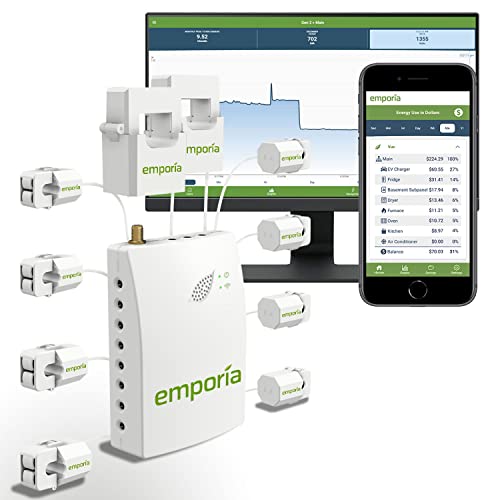


⚡ Empower your home with real-time energy mastery — don’t just save, thrive!
The Emporia Vue Smart Home Energy Monitor features 8 clamp-on 50A sensors that provide real-time, circuit-level electricity monitoring via a 2.4GHz WiFi connection. Designed for residential panels, it supports solar and net metering, delivering 1-second interval data with ±1% accuracy. The system includes DIY installation instructions but recommends professional setup for safety. Its intuitive app offers detailed analytics and alerts to help reduce energy costs and prevent costly repairs.


| ASIN | B08G37ML2R |
| Alarm | Visual |
| Batteries Included? | No |
| Batteries Required? | No |
| Best Sellers Rank | #472,623 in Tools & Home Improvement ( See Top 100 in Tools & Home Improvement ) #72 in Home Automation Modules |
| Brand | EMPORIA |
| Color | Dooof220 |
| Customer Reviews | 4.5 4.5 out of 5 stars (1,189) |
| Date First Available | July 8, 2020 |
| Item Package Quantity | 1 |
| Item Weight | 2.86 pounds |
| Item model number | VUE-V2-8 |
| Manufacturer | Emporia Renewable Energy Corp. |
| Material | Gen 2 |
| Package Dimensions | 8.82 x 4.88 x 4.65 inches |
| Part Number | VUE-V2-8 |
| Power Source | Solar Powered |
| Style | Monitor with 8 50A sensors |
L**.
This is really great!
Hello! This is an excellent product and quite affordable (Vue Gen2, with 8 sensors in addition to the main two that come by default). The manual at the website is quite detailed, and covers several faqs. The installation was fairly easy after reading the manual several times, and being very careful during installation. There are two wires for sensing the two main busbar voltages for proper watt calculations. The application will let you know If the two wires are connected to the same busbar, and will give you the chance to correct and connect them to separate busbars; quite convenient, and this gives you the confidence that the equipment is indeed reading the voltage for watt calculations, and not using any estimated values. Connecting to the cloud might take a while, especially if there is something wrong with the router. In my case, the system did not connect to the cloud initially, and we got concerned about that; but the system connected to the cloud immediately when using the phone hotspot. So, the problem was really the router. After trying reconfiguring the router for a very long time, we finally factory reset the router and worked immediately. The cloud has been working flawlessly since the installation on late September (it's now early November, 2021). Please bear in mind two important things: the one-second data does not storage for a long time, and the exported data from the cloud to csv format shall be downloaded shortly or it will not be available after a while. This second condition is not critical for long available data, but it is for short term data (seconds and minutes). After having everything up and running (we changed the sensors and circuit configurations a few times to get the most out of the system) the information provided is quite useful, as you will know the consumption of almost all your equipments (or group of equipments, depending on the configuration) with a very high degree of accuracy. Storaged information is only available in watts, but current (Amps) is available at the moment, and for quite a long time, depending on the time step. Graphics are quite useful, as they provide a lot of information at different time steps and for each and every circuit, and also in Amps or watts. This system exceeded our expectations by far, after getting it properly installed and configured. For knowing your consumption with high degree of details and accuracy, this is the right equipment, both on features and on price. Don't wait any more, don't think any more, just get it; you won't regret. Best regards,
M**F
Excellent Power Meter
I installed this in a subpanel in my home, with the plan to install a second one on the main input to capture a few breakers that aren't in the subpanel. My panel is 100% full, and I wouldn't recommend using the patch wire method they provide unless you know the circuits selected are lower current. I patched directly into two phases directly connected to two breakers instead. I had purchased the 8-channel unit, but quickly decided I wanted to use all 16 channels. Unfortunately it was out of stock at the time I wanted to do this, so I went direct to the site an purchased a set of 8 "Gen 1" sensors with Gen 2 adapters. The adapters barely fit side-by-side, and are also right-angle connectors, which means they can be hard to fit in tight situations within a breaker box. In addition to the tight connections, you have to plan accordingly to fit 18 CTs in a 100% utilized breaker box without running out of room for everything. A lot of people connect the CTs right after the breaker, but that is NOT required. There might be room above/below the breakers where it will make more sense to place them. Just need to trace the wires from the breaker up to this area and clamp on. Cable management is also a must! The app is easy to use. Setup was a breeze, and I was up and measuring within a minute of starting the app. The app provides a table view of all channels, and a graph of individual channels, one at a time. There is also an option to download all the recorded data which provides a link to a generated CSV dataset you can parse elsewhere. Realtime data is responsive, updating once a second. There seems to be a 5-10 second lag in the data, which can be seen when turning things on/off and waiting for the graph to show that update. In notifications, there are a lot of features that are not yet available. Right now you can set an alert if consumption on any channel is above or below a specified limit for a specified amount of time. Features I wish it had/hope to see in the future: - Ability to graph more than one channel on the screen at a time. - Ability to clear historical data from individual channels. Useful during setup, if moving CT channels around. - Easier way to scroll thru data. Maybe a zoom in/out feature. - More convenient way to switch between graphed channels. Overall I would recommend it, and I hope that app continues to see development and more features added.
J**B
Support is fantastic, product is great
1st read manual - don't lose. Install app. Install circuit sensors as required (50 amp for individual circuits 8/16 qnty, and 200amp for mains). Live chat is only a click away - they respond very quickly. If after work hours they engage you with an AI virtual (which in most cases will direct you to the right answers). If not type you want to chat with "real person". They will get back to you via email and app (very impressive). The product is great with charts and (time) graphs by seconds to years. In different data forms Amps, Watts, Cost (app goes and gets rates from local electric provider) many other associations like has gas savings if EV, and CO² if solar to name a couple.) if you have a solar setup it accounts for and tells you savings and 'Balance'. There is so much more to this that you will most likely will use (but there just Incase) you might get overwhelmed - don't worry support is easily/quickly there, and they know their stuff. Extremely well designed and integrated. (Don't bother with other power monitors. They cost too much and won't give you even half as much, certainly not in support.
W**8
I have a plethora of energy meters over the last 20+ years, this is the only one to better my aged and non smart Wattson/Holmes meter. I have Solar panels and an Air sourced heat pump the wattson was the only meter I have come across that could moniter and display net useage. The Emporia coame with 10 10mm sensors and one mains sensor. Very easy to setup but the instructions initially look confusing as they are for the "foreign/American" not the UK supplies. The transmitter has four wires I used a 3 pin plug and connected the Black to live the other three to neutral. Also found the sensors to be a very tight fit so had to grind off the plastic near to the magnets and on some more modern 10mm wiring had to remove the outer grey insulation exposing the inner blue insulation to get the sensor to fit. The software/interface is fanatstic clearly displaying all sensor readings as well showing overall consumptiom/export. The only reading that isnt accurate is the one on my air sources heat pump it is consistently out by more tahn 50% all others seem spot on.
A**N
I bought the package with 8 CTs and installed them all. The Phone app is easy to setup . But in the end I've just used the main CT on the Supply input , 2 x 50 Amp CTs one on the Hot water system and another one on the Solar array. This way I can see how much Power is going to the Grid and how much the Hot-water system is drawing , everything else is the difference. What I do not like is the fact the unit has to be Hard wired for power, you really have to have an electrician to do that, my old one was battery powered and lasted months before it needed replacement , this one as you can see, I've put a power plug on it and connected it to a socket I have in the Power Box. Suitable for Australia
C**I
Très bon matos pour surveiller la production d'energie des panneaux solaires et la consommation des appareils de la maison au Global et en détaillé. Manque plus que les smart Plug en version EU 230V pour rediriger le surplus solaire dans un ballon d'eau chaude ou charge de batteries et ce sera parfait !
R**R
Me parece un aparato genial, lo único que en la mayoría de cuadros eléctricos en España no entra dentro pero ya contaba con ello, los toroidales son pequeños pero sobrados para los cables de una vivienda, lo único malo es que no hay opción de idioma español pero la calidad precio es muy buena
C**N
Semplice e funzionale
Trustpilot
3 days ago
2 weeks ago



