We remain fully operational. Our teams are working around the clock to ensure your deliveries continue safely.

DOWNLOAD THE APP


Copyright © 2025 Desertcart Holdings Limited
DOWNLOAD THE APP
Buy anything from 5,000+ international stores. One checkout price. No surprise fees. Join 2M+ shoppers on Desertcart.
Desertcart purchases this item on your behalf and handles shipping, customs, and support to South Korea.
🎯 Master your art and game with precision that keeps you ahead!
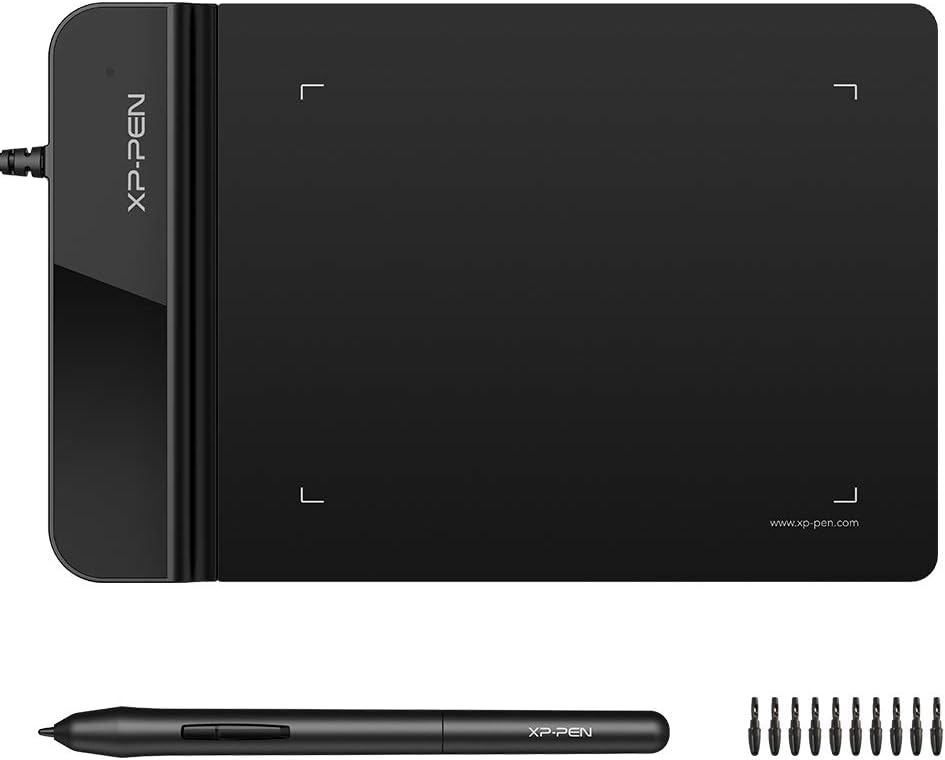
The XP-Pen G430S is an ultrathin 4x3 inch graphic tablet designed for OSU! gameplay, digital drawing, and professional creativity. Featuring 8192 levels of pen pressure sensitivity and a rapid 266 RPS report rate, it offers smooth, precise control. Its battery-free stylus and driver-free OSU! compatibility make it a seamless, portable tool for millennial pros balancing work and play.


| ASIN | B01BA6XQI0 |
| Active Surface Area | 4 x 3 inch |
| Additional Features | Stylus |
| Best Sellers Rank | #794 in Computers ( See Top 100 in Computers ) #6 in Graphic Tablets |
| Brand | XPPen |
| Built-In Media | 1 XP-Pen Star G430 Graphic Tablet, 1 x Passive Pen, 1 x Quick Guide, 10 x Replacement Nibs, 1 x Pen-Clipper |
| Color | Black |
| Compatible Devices | computers |
| Connectivity Technology | USB |
| Customer Reviews | 4.3 4.3 out of 5 stars (31,608) |
| Display Type | LED |
| External Testing Certification | Não aplicável |
| Item Weight | 0.55 Pounds |
| Manufacturer | XP-Pen |
| Model Name | G430 |
| Model Number | StarG430 |
| Native Resolution | 1920x1080 |
| Operating System | Windows |
| Pressure Sensitivity | 8192 Levels |
| Screen Size | 4 Inches |
| Specific Uses For Product | OSU Game, Online Teaching, remote working |
| Target Audience | Teacher |
| UPC | 602258815575 |
Z**E
Bought it for the second time
Very good product
K**A
It has osu drivers for the pen than the normal drivers
I like it , its amazing i first downloaded the normal drivers then i realized they had osu ones (which is the whole reason i bought the xp pen for)
L**L
It's up there with Huion. It's that good.
You'd expect this thing to fall apart or the pen to break its tip pretty easily. However, this thing is decent, but the tensegrity and durability of the material are astonishing! I consider myself a pretty reckless fellow, and I have the occasional "whoops" here and there. However, despite all the brunt damage, this has taken from falling, my heavy hand scribbling despite frustrations, it stands up valiantly! The drivers automatically detect once you plug and play, and the only thing I might need to complain about is the small form factor; however, voided when you realize this means more portability. Brilliant job, XP-PEN.
A**R
Nice gift for my daughter
Bought it as a gift for my daughter and she is so happy with it.
D**M
works well. Quite accurate.
exactly as described. Works perfectly with my Windows 10 x64 PC
H**I
Not recommended
I found Box opened finger prints everywhere product looks used and returned out of the seal im not happy with this order .
K**N
Works well
It is a good product but very small in size
N**.
Total Waste!
It was a complete waste of money! I wanted it to mark and write on my pdf documents. But you cannot write with much accuracy using it. In fact, its difficult to write and is nothing like many other reviews have written about it.
I**M
very small
E**E
I had another tablet from another brand before which didn't have a battery-free pen and I can say this is like the best feature! It's super cool not having to worry about the corrosion from the battery if you leave the pen some months without use. It works like a charm, the area is very adequate, I don't feel like I run out of space when drawing, some minor cons on the overall product are. 1- It gets scratched, very scratched after some time, but this doesn't affect the usability, it still performs as new and sensibility is the same, it's just some visual stuff. 2- The driver interface could be a bit more user friendly I think. I think these are the only cons, as you see, pretty small stuff which doesn't really affect how you draw on it. I've been using it for a year I think now, and wanted to write a review just now. Worth the money!
J**Y
I bought this for my task during working from home as sometimes my digital signature is required for approval. This digital pen and pad are good enough for the purpose. Additionally it supports WINDOWS INK app which is very useful for the meeting via Zoom/Webex as it allows to visualize your idea and what you talk about on MS Word, Excel and Powerpoint. I love to use it during my meeting.
L**G
Work with Microsoft Word flawlessly. I use this for Chinese text input. Way faster and accurate than using mouse.
N**L
Great so far - didn't rate "battery life" because it doesn't apply to the product, it's powered by usb and the pen does not require a battery unlike my previous Wacom tablet which became a massive pain in my rear near the end of its life. Product is as described, very sensitive and pressure differentiation takes some getting used to but is great for sketching. Driver install seems to have caused a minor issue with my system. Since installing, whether or not the tablet is connected (just having the driver installed), my system will behave as if it is constantly receiving repeated right-arrow inputs until I tap one of the arrow keys, then it goes away. This needs to be done once every system boot, but my PC runs nearly 24/7 and as such this poses no real issue for me. Driver/software is otherwise pretty straightforward, and allows for custom profiles. I currently have 3, 1 for illustration and vector software, 1 for Osu! gameplay and 1 for general use. The pen on the 640S has a textured gripping area, an improvement considering by and far one of the biggest complaints about the 640 seems to be that the pen had no grip and would slip out of the hand easily. It's not extremely textured though, to be transparent - it's just slightly grippier than the rest of the pen body. It has yet to fall out of my hand, it survived 2 hours of Osu! with sweaty hands, I naturally hold near the flared tip of the pen and have had no problems with grip. Then again, I'm a pleb so those playing more intense/competitive maps may find the grip insufficient. XP Pen is not stingy with their nibs either, including what looks like somewhere between 15-20 nibs with the product. Nice! Warranty is extensive, although I'm one of those people who probably won't enroll for a few reasons which I'll refrain from bothering with. It's great that it's offered at this price though, as a show of confidence in their product. While the tablet itself does not feel military grade durable, you'd be insane to expect that at this price point. I'm very satisfied with the apparent build quality and feel like it will last long emough to pay for itself in use. It's very lightweight but sits firmly on flat surfaces due to the rubber feet on the underside. It doesn't seem to be built to take any sort of abuse, just take care of your belongings and it should be just fine. As with most tablets lacking screens, the surface will eventually show visible signs of wear where the pen makes contact with the top, but it's no complaint. Only way I can see avoiding that would be to spend $350+ on a screen tablet with gorilla glass or equivalent, but that's not what this product is competing with. With the 640S (this review to be clear, as the original 640 reviews are mixed in) the usb input is a 90 degree angled cable, which is a massive improvement over the straighf-out style of cable input. The customizable buttons feel quite cheap/weak/brittle, so I wouldn't go mashing on them hard. They do work well though, particularly useful when mapped to brush swaps and tools like smear, blur, polygon/line tools and eraser if you don't enjoy using the pen button for erasing (I really don't). Also included is a little pen holder tab which can be stuck to the underside of the tablet (or anywhere you want, really) and the pen can be slid through the protruding loop of material to be held in place. I installed mine so my pen attaches alongside the far edge of my tablet. The pen does become inactive when it is raised roughly 3/4" or more from the surface, so those who have sporadic sketching habits will have to adjust, and those Osu! players who prefer the hover technique to dragging will probably need to adjust to the range for a little while. It took me about 20 minutes to get used to it, and it feels SO much better to me to play Osu! with this than with my mouse. I've officially converted for good after 2 days of use. Another reviewer recommended using an open source tablet driver found on Github as oposed to XP Pen's, and after my little hiccups with the official driver on my system I also plan to switch and try that driver to see if it resolves my minor issues. I strongly recommend against windows built-in driver for tablets, I just haven't had any satisfaction with it between 3 different brands/models of tablets and either official or open source drivers are almost always superior. For what I paid, I'm extremely pleased. Beats my previous wacom tablet in literally every regard, if it lasts long enough I'll be switching to XP Pen for all of my future needs. It's good for sketching & illustration, plays well with Osu!, and just plain gets the job done at a very attractive price. There are always more premium options, but there's some really great bang-for-buck in this product and I'm pleased.
Trustpilot
3 weeks ago
2 weeks ago