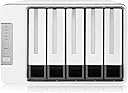
🚀 Elevate your data game with the D5-300: Speed, space, and security in one sleek enclosure!
The TerraMaster D5-300 is a 5-bay external RAID enclosure featuring USB 3.1 Gen1 Type-C connectivity with 5Gbps transfer speeds. It supports up to five SATA drives with a maximum combined capacity of 90TB in RAID 0 and offers multiple RAID modes including RAID 5, optimized for balancing data security and storage. Built with a durable aluminum alloy chassis and dual quiet fans, it ensures reliable, low-noise operation compatible across Mac, Windows, Linux, and Thunderbolt 3 devices.


| ASIN | B005IOLBT2 |
| Best Sellers Rank | #38,826 in Computers ( See Top 100 in Computers ) #179 in Enclosures |
| Compatible devices | Computers |
| Connectivity technology | sata |
| Data transfer rate | 5 Gigabits Per Second |
| Hard disk form factor | 3.5 Inches |
| Item model number | D5-300-US |
| Item weight | 3.08 kg |
| Manufacturer | TERRAMASTER |
| Material | Aluminum |
| Max number of supported devices | 5 |
| Product Dimensions | 22.61 x 22.5 x 15.39 cm; 3.08 kg |
K**N
We had bought 2 YottaMaster 4 bay enclosures and 2 Mediasonic 4 bay enclosures, which did not meet our needs. The YottaMaster has a freakin 5 minutes sleep mode that cannot be disabled, the Mediasonic is an old design (1990s w/ light show) and has poor performance comparing to the TerraMaster D5-300. TerraMaster D5-300 does not have a sleep mode and only puts your drives to sleep when you shut down the attached machine or program a sleep mode. We want our servers to run 24/7 all year around. (Sleep mode will kill your drives) The enclosure seems to be well made and the transfer rates (read/write) speed in RAID 1 and 10 are outstanding. We clocked 200Mb/sec write speed and 220+ read speed. The only thing TerraMaster could improve, there were no instructions in the box, just a link to their website where they provide the instructions and software. The setup requires that you use their RAID master software, which only runs on windows or Mac. Means, we had to use a windows machine for setting the RAID levels. After that simple setup, our units work flawless on Unix/Linux with Ext4 filesystem. Unlike some other enclosures, this unit has 2 cooling fans build in, which provides more security when one of them dies. They also run fairly quiet, almost silent. Unless you have it in your bedroom, you won't hear it. We would have bought TerraMasters 4 bay unit because we only use 4 drives, but it seems to be backorder. However, this unit has 5 bays, which allows us to add one more drive and convert it to a RAID 5 should we have the need for more space. We have not tested the speed in RAID 5, but the unit actually had a label on it that said: " This enclosure is optimized for RAID 5". (I will update this review in the future, when or if we test the RAID 5)
P**Y
I had bought two of these to replace Drobos that my partner and I had been using for our photo storage. I chose these because I wanted to be able to easily set them up as Raid 5 DAS units. When they arrived I was pleased that they seemed to be solidly made, and it was easy to insert the 4 TB Iron Wolf drives I'd bought for them. I was hooking the units up to Macs, and that's where the trouble began. I discovered the Mac version of the software had only fairly recently been updated to work with Mac OS Monterey. There weren't clear instructions on how to download the software and after I found it the installation wasn't like the typical Mac DMG file and wouldn't install on my Mac Studio. I also discovered in the forum that contained the software that there were a number of posts unhappy about the software. I contacted Terramaster support for help and after a few exchanges found their assistance to be of little value. I returned both units for a refund and bought two OWC Mercury Elite Pro Quad 4-Bay USB 3.2 Gen 2 RAID Enclosures. They were more expensive, but setting them up with OWC's Raid software was simple, and they've been working with no issues.
C**Y
Greetings, if you are like me you saw that it was listed compatible with linux, this is not true. The most you will be able to achieve is a software RAID array with MDADM. You must look for articles on how to do it as Amazon will not let me post it. Digital Ocean has a good one. You more than likely want to run a RAID 5 or RAID 6 like me and I am using 3, 18TB drives for now until eventually I get 5. In my opinion, this or RAID 6 would be the best choice for data security. First take the hard drives and put them in one at a time and plug into your Linux PC. You want to open Disks and format each drive to be exfat4. This will set you up to follow the steps in the Digital Ocean guide, just Google it. Please follow this carefully and you will have success. Also to note, you MAY have rebooting issues if you modify your fstab, do NOT do that. Do NOT set it to boot at start. I would suggest mounting it manually each time you restart your PC only after having properly ejected it and powered it off. If you are like me and wish to make a media server with Jellyfin, etc, just leave it on, no need to turn your PC off honestly unless it's power consumption you're worried about. Once you've set up your RAID I would suggest rebooting a few times, copying files to see if they are still there after before you start moving big data around and of course, have a backup. I have seen speeds as high as 200mbps when transferring files, 25 for FTP over VPN, about 80-100 on average for write speed but I will say that pulling things up is incredibly snappy. If you choose not to read this or follow the steps I outlined, you will be in for a headache and a few empty bottles of alcohol by the time you've exhausted Reddit and everywhere else trying to find an answer. IF you are smart enough, reverse engineer the USB driver however I am not that guy. For the price and build quality this is not a bad unit at all and if you are smart enough, can get you by far better than something 4x the cost. If wanting to run a media server like me, get a cheap optiplex and run a GTX 1660 externally with a riser card, upgrade the RAM, get an SSD and 500W PSU, plug in one of these and you've got a beast for less than $600.
B**N
Had it for over a year now. Nice unit, works good generally. Connected to a Macbook pro. Has all bay filled with Western Digital and Seagate drives of varied sizes. The largest being a 16TB Seagate Iron Wolf Pro NAS drive used as a backup on TimeMachine. I have almost constant problems with this drive dieing during backup and having to reformat then do a complete backup. Decided to Part the drive 8/8TB and use both parts as a backup on TM. Running for a month and seems to work ok. I believe this unit D5-300 has problems with hard drives over 12TB. Also it cannot be used as a boot device for the computer because during startup it does not wakeup until it receives a wake signal from the computer AFTER the computer starts boot up procedures.
T**N
I have thousands of photos and do not want to store on a cloud system that down rates my raw files to a Jpeg for storage. After losing my main drive that affected my back up I lost a lot of files. So I bought a NAS system that worked fine until Netgear quit supporting my model that I was using. This is not a NAS system you do not have access to your photos when on line. It can be set up as a Raid system. I did not set up as a raid and it shows each drive on my computer. To install the drives they have to be screwed into the brackets. Terramaster comes with a screw driver and plenty of screws for this. Install the drives then plug it in. I had to go to disk management to get the computer to recognize the drives and assign a drive letter to each one, but that be due that my disks were used, and I re-formated them. . The quality is good for being mostly plastic. Very quiet. You can set up the system various ways to shut down when not in use. Instructions are OK by that I mean I could follow them without big issue. The system will take 4 drives, I am currently using two WD NAS red 8 TB disks, and they work good. This system also works with Windows 7 back up and File history back up. I can now know that my photos are safe without the additional cost for a cloud service and my information is private. The only real con I have is screwing the drives into the racks I would prefer a quick attach to install the drives that would make it much easier to hot swap or change out the disks.
Trustpilot
3 weeks ago
4 days ago