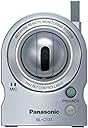
🎯 Stay connected, stay secure, stay ahead with Panasonic’s wireless watchtower.
The Panasonic BL-C131A is a versatile indoor wireless network camera featuring 802.11b/g Wi-Fi connectivity, 640x480 resolution at 30fps, and advanced motion plus heat detection. Designed for effortless remote monitoring via web browsers or mobile devices, it offers pan-tilt control with eight presets, secure encrypted connections, and reliable performance even in challenging environments. Ideal for professionals seeking dependable, flexible surveillance without the hassle of wired setups.
| ASIN | B000NVR9SM |
| Alert Type | Motion Only |
| Batteries Required? | No |
| Best Sellers Rank | #3,217 in Webcams #15,508 in Surveillance & Security Cameras |
| Color | Silver |
| Connectivity Protocol | Wi-Fi |
| Customer Reviews | 3.6 3.6 out of 5 stars (247) |
| Date First Available | March 1, 2007 |
| Frame Rate | 30 fps |
| Global Trade Identification Number | 00037988845156 |
| International Protection Rating | IP66 |
| Is Discontinued By Manufacturer | No |
| Item Weight | 7.4 ounces |
| Item dimensions L x W x H | 2.94 x 2.88 x 3.88 inches |
| Item model number | BL-C131A |
| Low light technology | Night Color |
| Manufacturer | Panasonic |
| Material | leather |
| Mounting Type | Wall Mount |
| Number of Channels | 1 |
| Number of Items | 1 |
| Power Source | Ac/dc |
| Product Dimensions | 2.94 x 2.88 x 3.88 inches |
| Room Type | Office |
| UPC | 037988845156 |
| Unit Count | 1.0 Count |
| Video Capture Format | MP4 |
| Video Capture Resolution | 640 x 480 |
| Wattage | 2.3 watts |
| Wireless Communication Technology | Wi-Fi |
| Zoom Ratio | 10 multiplier_x |
| Zoom Type | Digital Zoom |
M**N
Excellent camera for Mac; SUPERB customer service!
Although the camera ships with a Windows-only CD, it is fairly easy to configure the camera on a Mac once you know its default IP address is 253. Thus, if your router is 192.168.0.1, then all you have to do in order to connect to and configure the camera is to enter 192.168.0.253 in your browser's address bar. Although I had the camera up an running (both wired and wirelessly) within a few minutes, I ended up being totally stumped when it came to setting up the FREEEEE LIIIIIIIFETIIIME (!) dynamic DNS that enables one to see the camera's picture from any Web-browser or suitable cellphone via an customer-defined URL of the form [...], where XXX is the name you choose for your camera. Enter the SUPERB Panasonic tech support. I only called them because I was truly stumped. Usually (including this time) I work hard to AVOID calling tech support because I am so used to Indian call centers manned by worker drones who may be perfectly smart but who are forced to work off idiot scripts: 1) reboot your router; 2) reboot you computer; 3) unplug your fridge; 4) walk around your house and click your heels together three times, etc, etc, etc! Quite unlike that, the two Panasonic tech support guys I worked with---thanks, Jeff and Ken!---were American, smart, and used their knowledge and intuition to solve the problem, NOT a mindless script. In the end [after about 30 minutes, culminating in my providing remote access to my router] the problem turned out to be a weirdness about the way my Motorola SURFboard SBG900 DOCSIS 2.0 Wireless Cable ModemGateway (Black) (an excellent combined cable modem and wireless router) handles DNS servers. I should note that these folks were helping me (with patience and good humor) on Thanksgiving day! After this initial difficulty, I am thrilled with how well the camera works, how easy it is to control and configure remotely, and how stable its connection is. HIGHLY RECOMMENDED! UPDATE AFTER 15 MONTHS: This little beauty has sat in the window of a Sierra Nevada mountain cabin for more than a year, where it has endured extremes of 100-plus-degree summer heat and winter's 17-degree cold. The snow storms also knock out the power on a very regular basis. Yet through it all this camera has performed *perfectly*! Since I use it to keep an eye on the place (and enjoy watching the snow fall) from San Francisco, it's essential that the camera reconnect wirelessly with the router after each power outage, since I would be helpless to fix the problem till my next mountain trip. Well, this gem has reconnected perfectly *every* time the power resumed. [Remember to always power such electronics with a surge protector!] I also LOVE that I can view the camera perfectly on my iPhone. Tap with your finger on the iPhone screen, and 160 miles away the camera magically swings into action to center the view on the place you tapped! I feel like James Bond!! ;-) It's just a pity that on a Mac or iPhone you cannot *hear* the camera; on my PC I can listen to the birds chirping and the rain falling. TECHNICAL NOTE: One problem I forgot I had to overcome with the initial setup is that after you set up port forwarding on your router, you must ALSO get the router to assign a fixed internal IP address (in my case 192.168.0.253) by associating it with the camera's MAC address (which you can read off the "Maintenance" tab of the camera's webpage, for example). The precise procedure will depend on your router, but for my Motorola router you do this: Gateway-->LAN-->DHCP Lease. Hope this helps!
A**R
Best of consumer web cams (I have tested 20 models)
OVERVIEW The BL-C131A is a wireless/router based camera (no PC needed). In my view, this is the ONLY way cameras should be used due to the unstable PC connected solutions (e.g., PC freeze-up, lost power, etc). It is an IP based system which needs its own local internet address which the included software does a pretty good job setting up automatically. MY EXPERIENCES I have tried over 20 wireless web cameras from 7 brands over the last 5 years ($100-$600) and none are close to the performance, reliability, ease of setup of the Panasonic cams for a consumer based product. Dlink used to lead the pack until the BL-C20A/30A units came out. I was a fan of Dlinks but the software setup, remote camera configurations, and Viewnetcam dynamic DNS service of the the Pana's is just the best today. ADVANTAGES - The included software is the best on the market for finding the camera on your system and trying to configure it automatically. Most software engineers should be SHOT due to sloppy code but the Panasonic software and firmware (software inside the cameras) is pretty good for setup and reliability (I am an electrical engineer so I know the sloppy way most of these guys think). - Tech support for Panasonic is the ONLY support I have contacted from 7 brands with AMERICANS speaking ENGLISH (not "Engrish"). Their patience and overall knowledge is truly outstanding and worth every extra penny this camera costs. - I highly recommend you also buy the Panasonic wireless router. It automatically configures with the cameras and becomes really easy to find/control the cameras. - The ability to reset/reconfigure the cameras remotely is INVALUABLE! I am often travleing in China, at my home in Chicago, or my home in Florida and want to make changes. I can do it remotely with 100% success after the first setup. I was even able to configure some cams in Chicago and Fedex to my wife in Florida and they booted up into the other system perfectly! - The Viewnetcam dynamic DNS service is stunningly reliable. It has never gone down and my cameras reset/refind themselves every hour so if your local ISP dynamically changes your IP address (Comcast is worst) you are always going to have the cams back up in 1 hour. - The ability to snap images, group small video screens, and "mouse-point" the cameras via the pan-tilt-zoom are outstanding. - The built in microphones are AMAZINGLY sensitive and pick up small noises remarkably well. I could hear the kids playing outside the house with cams inside. - The built in multi-screen servers can integrate different models of cameras. For example, I use a BL-C131A cam as #1 at my mom's house for PTZ and audio. I then add a BL-C30A for simple PTZ photo/video and a BL-C20A for fixed photo/video. They all coexist in one screen and work beautifully! - The photo snaps work PERFECTLY for building a simple web page and placing multiple screen snaps on 1 page (I placed 8) thus a super slim matrix of what is happening in my homes. Each photo at 320x240 is only 8kb so they download fast. - The mobile function (viewing on a cell phone browser) works INCREDIBLY well. I use it everyday on my Treo700P via Sprint. DISADVANTAGES/CAUTIONS - ANY web cam is tedious to setup, no matter the brand. Be patient, and call Pana's tech support before returning the unit. - DON'T expect HD quality video - these are 640x480 screens as best and the upload speed of your home network will always be the limiting factor. I do not recommend more than 4 cams online at once since this overloads even a good 768K upload system. - The pan-tilt controls are outstanding. Lots of left-right-down travel but up is limited. Also, the zoom is a digital zoom (NOT an optical zoom) thus very pixelated and not worth much. - The cams can fight for packets and "burble" your VOIP telephone calls. SUMMARY Outstanding product. I now own 14 units around the world and all are stone-cold reliable. Just great products.
V**B
A great camera - just had some teething problems
I've had this camera at home for about 2 weeks and I am almost to the point where I am ready to return it. On the surface the product works well, the picture and audio are fine. The external viewing capability is not as easy to get working as other reviewers have indicated, so that is still on my to-do list. The major problem i have with the camera is the fact that it hogs my wifi network and interferes with server-to-server connections I have at home. I am in the middle of copying a whole bunch of files from one PC to another, then I turn on this camera and the connection is lost. Also, if the camera is running and showing a picture and audio is coming in normally, then I start to do something else on the network (not necessarily on the wifi network) the picture will freeze and the camera no longer responds. I have lost track of the number of times I have had to restart the camera. I have upgraded the firmware, reset to factory settings and have not found a solution yet. I am a day or two away from giving up and sending this camera back and going with another vendor. I will update the review if I find out what the problem is later. If I could get passed this issue, I'm sure I would love the camera and give it 5 stars. --Update: I fumbled around with the settings a little more and have managed to get everything working. It seemed that I had an IP conflict with two other devices on my network that was somehow causing the camera to freeze - since I have resolved that the camera has never stopped. Also somehow the internet viewing capability is now working too, although I am unable to move the camera when viewing it remotely - I get "error on page" when using the navigation buttons. I am now raising this from 3 stars to 5 stars - and hope that I can figure out what the remote nav problem is soon.
Trustpilot
3 weeks ago
2 weeks ago