
DOWNLOAD THE APP


Customer Services
Copyright © 2025 Desertcart Holdings Limited
DOWNLOAD THE APP


⚡ Dominate your digital domain with Nighthawk’s unstoppable speed and coverage!
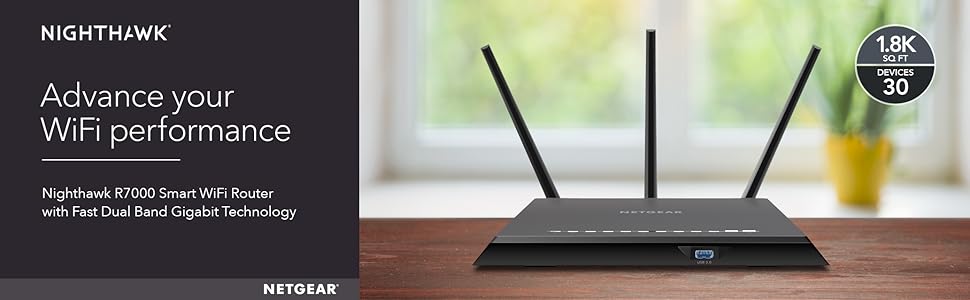
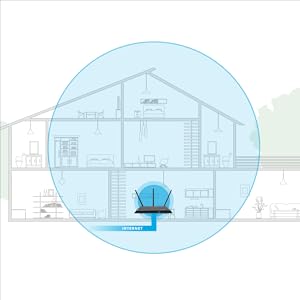
The NETGEAR Nighthawk R7000 is a high-performance AC1900 dual-band router featuring a 1GHz dual-core processor, 3 amplified antennas with beamforming+, and coverage up to 1800 sq ft. It supports up to 30 devices simultaneously, offers 4 Gigabit Ethernet ports and 2 USB ports for versatile connectivity, and includes advanced security with Netgear Armor powered by BitDefender. Ideal for professionals and smart homes demanding fast, reliable, and secure WiFi.




| ASIN | B00F0DD0I6 |
| Antenna Location | Security |
| Antenna Type | Retractable |
| Best Sellers Rank | #11,400 in Computers & Accessories ( See Top 100 in Computers & Accessories ) #399 in Computer Routers |
| Brand | NETGEAR |
| Built-In Media | Network cable, Software, Wireless router - 4-port switch (integrated) |
| Color | Black |
| Compatible Devices | PC, Mac, Unix |
| Connectivity Technology | wireless |
| Control Method | Voice |
| Controller Type | amazon_alexa, vera |
| Coverage | 1800 square feet |
| Customer Reviews | 4.3 out of 5 stars 21,389 Reviews |
| Data Transfer Rate | 1300 Megabits Per Second |
| Frequency | 1 GHz |
| Frequency Band Class | Dual-Band |
| Global Trade Identification Number | 00606449099812, 00606449099843 |
| Is Modem Compatible | No |
| Item Dimensions L x W x H | 11.22"L x 1.97"W x 7.26"H |
| Item Type Name | Netgear Nighthawk AC1900 Gig Router (R7000-100PAS) |
| Item Weight | 1.77 Pounds |
| LAN Port Bandwidth | 10/100/1000 (Gigabit) |
| Manufacturer | Netgear |
| Maximum Upstream Data Transfer Rate | 1300 Megabits Per Second |
| Model Name | R7000 |
| Model Number | R7000-100PAS |
| Number of Antennas | 3 |
| Number of Ports | 5 |
| Operating System | Microsoft Windows 7, 8, 8.1, Vista, XP, 2000, Mac OS, UNIX, or Linux |
| Other Special Features of the Product | QoS, WPS |
| Security Protocol | DoS attach prevention, Double Firewall protection (SPI and NAT), WPA/WPA2 - PSK |
| Special Feature | QoS , WPS |
| UPC | 655199176212 606449099843 606449110425 |
| Warranty Description | 1 Year Limited warranty |
| Wireless Communication Standard | 5.8 GHz Radio Frequency , 802.11a/b/g/n, 802.11ac |
| Wireless Compability | 5.8 GHz Radio Frequency, 802.11a/b/g/n, 802.11ac |
S**.
Perfect Router for using DD-WRT
I purchased this router to replace a old Apple Airport that I have had since 2008 to be able to take advantage of the 802.11ac that my mobile devices and laptop are able to use. I am an IT Pro by day but never got around to replacing the AirPort as it did what it needed to do and did not want to spend the money on something new just yet. However, now that all of my mobile devices and work laptop can use 802.11ac, I decided to go ahead and purchase something to replace it as I wanted to get the most out of my network and because of the 1TB HDD bundle that the Nighthawk included. Background on Network - My home was wired with Cat6 drops in every room of the house by myself and tested to insure connections were solid. The cable modem is a ARRIS SB6121 that I purchased from Amazon to replace a older DOCSIS 2.0 modem that could not longer handle the DL speed from my ISP. Reason for Purchase - After reading many different reviews on Amazon and Newegg on many different routers my choices were the TP-Link Archer C7, Asus RT-N66U, Asus RT-AC68U, and Netgear Nighthawk. I chose the R7000 based on the reviews online, the constant support by two devs on the DD-WRT forums, and because of the 1TB Toshiba HD bundle. Setup/Configuration - I ordered it on Friday (7/3) and received it at my door on Sunday (7/5). It was set up later that night and I began to upload the custom DD-WRT firmware by Kong that I got from the DD-WRT Forums. Once uploaded, the setup was a breeze and after following a few guides from the forums, I had the Wireless setup for 2.4Ghz and 5Ghz with two separate SSIDs for both and optimized for maximum speeds. It got to be to late and I stopped for the night, the next night I got back into performing setup and configuration of the DD-WRT software. I optimized QoS for it as we do streaming and gaming in our household on both LAN and WLAN. I then used a 2GB USB flash drive formatted with ext2 to install YAMon2 which is "Yet Another Monitor". This allows me to see a breakdown on bandwidth usage monthly, daily, and hourly along with overall network and per device on both LAN and WLAN. As my ISP has a Usage meter and I am charged if I go over 350GB of data in a billing period, this gives me an extra way to monitor the usage and make sure I am not going to go over. This USB Drive was plugged into the back USB port of the router as the USB 3.0 is not needed for it. As I had also received a 1TB Toshiba HDD with this purchase, I wanted to have it set up as a NAS for backups and storage for my desktop and laptop computer. This was as easy as plugging the hard drive into the USB 3.0 port on the front of the router and setting up the SAMBA server through the DD-WRT software. Was able to connect to it and transfer data within 15 minutes of plugging it in. There is more to do as far as the DD-WRT firmware is concerned, but for the moment, it is working very well and is doing what I need it to do. I plan on setting up a VPN with this, and the DD-WRT can do that, just have not had the time to set it up yet. Pros - 1. Overall design is very sleek and would look nice out in the open. I have this placed in my networking closet in the middle of my house and heat is not an issue. 2. 802.11ac is fantastic after unlocking more settings using the DD-WRT firmware, have great signal coverage throughout my house and outside. I have a 75Mbps DL from my ISP and after running multiple SpeedTests on both my iPhone 6 and Desktop computer, I average about 78Mbps DL on both devices. I have Beamforming running on the firmware, but have not fully tested it yet, so cannot report on it. 3. Stock firmware looked easy to use if you are just wanting to use it to set up your network, did not mess with it much, but for someone that does not have experience with networking, custom firmware's, and in-depth configuration. The Factory Firmware would work just fine for doing what you need to do. 4. If you purchase this router and want to have some fun with it, there are many guides on how to install DD-WRT onto your router. I had looked at both Tomato by Shibby and the DD-WRT by Kong, I went with the DD-WRT by Kong as it is in constant development and new builds are always being released. Cons - 1. Right now I have not found any major fallback on this router apart from the two Ethernet cables were Cat 5e, but I keep a box of Cat 6 on hand and made a few patch cables for it.
A**N
By far the Best Router so far on Planet Earth
Netgear really churned out an awesome piece of high tech equipment with R7000. Setup: It was supposed to be easy but the blame was not on the router. It took 2 hours for me and Netgear to figure out why a fully configured router was losing internet access. So, the initial setup takes less than 10 minutes if at all. I have to give 5 stars to Netegar. Now the problem I faced - The router is physically placed near the home theater equipment I can connect a lot of devices using hard wire method. One of the devices turned out to be culprit for my connection woes - and that device is Comcast's HD cable box. When connected (either directly to the router or through a Gigabit network switch which in turn connected to the router), the default IP address would change from 192.168.1.1 to 192.168.100.1, thereby causing all devices to lose connection. Netgear and I spent time trying to pinpoint the problem and eliminating one device after the other. We then entered in the browser the auto-modified ip address and it was populating a window showing "Pace Micro Plc" username and password. Anyway, to cut short the story, we removed Comcast box from connecting directly to the router or to the switch and instead connected to the back of another device which has LAN ports. Problem solved. Netgear customer support from Philippines is simply superb. They are patient, pleasant, very courteous, and most importantly, they know their stuff and even if they don't, they will get the answer quickly for you. And when they say, they will call - they surely will. Connectivity: Once the problem mentioned above was resolved, everything else was a breeze. The router interface page is great. I put the primary 5 and 2.1 is hidden mode which is working with all my devices. The guest accounts are visible. The devices are connected without a drop in connection, granted this has only been a day since I fired up the device and more updates will follow in the months to come. At this point, I don't have any AC devices. Only N devices and they all work fine. I have at least several devices connected to it. Signal Strength: Strong signals anywhere in the home. Speeds are very good no matter where I am in the home. I heard that 5 ghz signal weakens the farther the distance and I experienced that problem with my Cisco EA4500 but this one seems to beam the 5 ghz signals to the far end of the world and perhaps other planets too (if the antennas are any bigger). 5 stars here. Thanks to mega-sized antennas. Features: QoS automatically identified my streaming databases on multiple devices and is now configured. No buffering issues in the limited testing I have done. Other standard set of features you would expect in a router are all there. One annoyance is the bright LED lights that a lot of people complained about. I spoke with Netgear and there is no way to disable them. I used, like others, black electrical insulation tape to cover them. So much for spending $200 and taping the damn thing. I am not impressed with it. But, I am not reducing any stars for this and am hoping that Netgear will add this feature in the next firmware. Between Asus and this one, I went with Netgear because it has been in industry building networking products only. Asus on the other hand has its finger in every pie you can possibly imagine so I am not sure that their heart is focused solely on building the best networking products. In addition, I've read that Asus does only downstream internet speed optimization where as R7000 does upstream as well as downstream but if you don't game this might not make a lot of difference I suppose. See this: [...] Footprint: Contrary to a lot of people citing it to be huge and stuff, I don't find it any larger than other standard routers I have seen. Yes, with those lights it can be in your face though. Yes, it is a tad bit bigger than others but I don't care so long as it performs well. Conclusion: I will be adding a couple of laptops the AC network cards and will report the speeds, signal strength and other attributes at that time. For now, I am quite pleased with my investment. Update Nov 2014 With over 12 devices connected so far, the router has had ZERO downtime or dropped connections since the past 11 months. Speeds are consistent and terrific. Need I say more?
R**N
Amazing.. and here is why
This router is exactly what my family needed. I will give you a brief summary of our use and how it might apply to you. In our home we have Verizon Fios 75/35 and have been using the supplied Actiontec router for the past several years. Because my kids have gotten tablets recently and are constantly streaming Netflix, I have seen a decline in my wireless quality for my own use. I initially tried purchasing the newer wireless N router from Verizon, but that only gave a slight boost in my speed, if any. I also recently purchased an Nvidia Shield and needed a 5ghz AC router in order to take full advantage of the PC game streaming ability. At our highest usage we will have the following electronics connected wireless: Xbox One ( Capable of up to 5ghz wireless N ) Playstation 4 ( Capable of up to 2.4ghz wireless N ) Ipad Air ( Capable of up to 5ghz wireless N ) Nexus 7 ( Capable of up to 5ghz wireless N ) Kindle Fire HD ( Capable of up to 5ghz wireless N ) 2X Galaxy S4 Phones ( Capable of up to 5ghz wireless AC ) Nvidia Shield ( Capable of up to 5ghz wireless AC ) Laptop with a recently added dual band wireless AC card With only one of these devices connected, using my supplied Fios router I was lucky to get 20/15 and that was close to the router. If I tried to go upstairs with a tablet my speeds would take a severe plunge to as low as 5mbs download speed. Needless to say, I have been searching for a better solution. Just on a side note, my speed on my PC when connected by ethernet averages 85/40 After a ton of research my choices were narrowed down to three routers. The Netgear R7000, Asus RT-AC68U, and the Asus RT-AC66U. All three routers are fairly close in price, with the AC68U currently being the highest and the AC66U the lowest but also the oldest of the three routers.In the end it came down to the AC68U and the Netgear R7000. I'm not going to post all the specifics here but I will lead you to one of my sources so you can do your own research and make a logical decision for which you feel is right for you. [...] The above website is a comparison between the Asus 68U and the Netgear R7000, and from my personal opinion is one of the best articles I have found during my research. I obviously went with the Netgear, but I will say it was a tough choice and I am sure the Asus performs very well and neither could be a bad choice. After researching various options I chose to keep my Fios router as a modem and disable wireless then bridge my Netgear to my Actiontec and use the Netgear as a wireless access point. Using this option I was able to keep my Verizon Fios TV guide, on demand, and DVR working as normal. If you try and take the actiontec router out completely, just keep in mind that you will loose some or all of those TV features. All of that might sound confusing, it did for me.. but it's really not. Use the link below to research your various options and decide which is best for you. Then just follow the steps listed and you will have it running in no time. [...] So how did this all work out in the end? Very very well and extremely pleased. It took me around 20 mins to set up the new router following those directions. After I applied all my new settings I then updated the Netgears firmware. For some reason I wasn't able to use the " search internet for upgrade" so I just went to the Netgear support page and downloaded the file and manually inserted it, worked like a charm. I live in a 2 story, 5400 Square foot home and regardless of where I am in the house I cannot loose a single bar. My signal is so strong and fast regardless of what device I use. I can even go outside in my yard and I am still able to maintain all the signal bars. Using my Galaxy S4 and my Nvidia shield i am able to get over 80mbs download speed ( keep in mind both of those devices take advantage of wireless AC ) My shield just gave me 85/39 with a 18ms ping after running another test just now. And speaking of the Nvidia Shield, what a great device it is. I won't get into how much I love my Shield, because I do :) I picked mine up from a different retailer on a special and don' regret it one bit. I know it hasn't caught on much but someone out here might be interested to know that this router works flawlessly with Shield. Another reason I purchased this router, because it is listed on the Nvidia website as a recommended game stream router. Using my fios router my pc game streaming my choppy and barely playable on my Shield. Using this Netgear router I can now stream perfectly without a hiccup. I have been playing Batman Origins and Borderlands 2 streaming from my PC all day and I couldn't be more satisfied. So all in all, I would obviously recommend this router to anyone with similar needs. Don't let some of the negative reviews steer you away like it almost did to me. I would have to suspect that either those people were unfortunate enough to get a defective unit, or they did not know how to set up properly because I have had zero issues. Drop me a line if you need any help or advice on setting this thing up, I will do my best to assist. I hope you leave this review knowing you are making a worthy purchase. Good luck! ***** So I guess Amazon wont let you post links. Google this " Can I use my wireless or an extra router along with the Verizon provided router? " and go to the website dslreports for the instructions on setting up the router. Google this " AC1900 First Look: NETGEAR R7000 & ASUS RT-AC68U " for the comparison article on the two routers from small net builder. *****
P**K
GREAT ROUTER - BE WARY OF NETGEAR NIGHTMARE
Eager to replace my old failing Netgear 3400 the Nighthawk looked like all I needed for a faster, further reaching and stable Wi-Fi connection and it is. However there are a few issues with regard to set up that might help someone else who like me isn't as technologically savvy as I once thought I was, even though I've been using a PC since the world ran on DOS based 286 computers, I digress as usual. As the technical specifications have been covered in depth by reviewers much more knowledgeable than I, I'll leave those issues to be explained in the myriad of reviews that do a superb job of it Ok then, so I un-box the router and it's huge which I expected, a snap to put together with easy to follow instructions for both wireless and Ethernet connections. Paying close attention I set the unit up to find I had no Internet connection what so ever. I tried everything, re-setting the router and modem. re booting the computer but still, zip, zilch Nada, Nuttin. Here's where my problems begin - they have nothing to do with the router and everything to do with Netgear. Without a connection to the Web I called 1-800 directory assistance for Netgear because God Forbid they should list a support number in their manual . You have to have a registered product (online only) in order to get the number for tech support. Something they don't let the consumer know until you read the small type on the very back inside page of the guide. I call the number and after a while I'm connected to a Rep who tells me I'll be up and running in no time. Time marches on and mind you, I am under the impression that I'm talking with Netgear and puzzled as to why the Rep is so interested not just in devices that run on our home network but everything from kitchen appliances to sound systems. When I finally press the Rep to tell me if this is indeed Netgear I find out it's a company called "Tech To Us" and he tells me they're the sole support line for Netgear. I'm also told Netgear doesn't Support their products directly and hasn't in years, and here's the kicker - he wants my Credit card number because lucky me! for the Low, Low, Low fee of $399.99 per year I'm going to receive full tech support on every single device I own. After losing over an hour I hang up and call directory assistance again for Netgear and this time I'm given two options one in Hartford CT and one in San Diego - I take both and call both and it's the exact same deal every time. I get a low brow, High pressure used car salesmanship technique to buy into this plan. This time with a Buffoon named "Josh". Josh want's me to have "The most comprehensive technical support on earth" and what is more he's so very eager to help me get my new $188 Router working that he's going to take a whopping $50 off the already bargain basement price of $400 for a years worth of support. I refuse and tell him I'll be returning the router. As a final gesture of kindness Josh tells me how lucky it is that I've called today because he's going to get my network up and running, a great relief as he begins asking questions about my set up that make sense and as time drags on and he's ready to do a Direct Connect session all he needs now is a mere $129.00 - Another hour gone, I hang up. With half a day wasted via this scam I set my old router back up, log onto Netgear, register the new router, get the number and call. After a ridiculously long hold time I do get a very sweet Gal on the line who listens to my complaints, let's me vent and apologizes profusely on behalf of what transpired. In case you're wondering the router is indeed covered for 90 days. We we're up and running quickly, the NetGenie install page popped up in no time and it was as effortless at this point as I remembered it to be with the old 3400. 1) Make certain you register your new router immediately - write down the phone number for support should you need help during set up. 2) If you end up connected to "Tech To Us" under no circumstances give them your personal or financial information - do not be fooled into spending $400. These types of plans are panned by every legitimate source from Consumer Reports, Consumer Digest and CNET among others. They're a 3rd party scam that clearly works for Netgear selling wildly over priced sub Par support services which is why every single published Netgear Telephone number is linked directly to their offices or as the case may be "Boiler Rooms". Shame on Netgear for aligning themselves with a Bait and Switch company that Lies directly to their own customers - and whose sole objective is to sell bogus bargain basement "Tech Support Plans". You should also take notice that Netgear responds to every single review of a Netgear product sold on Amazon, but you won't find a response here, not with this review - because what can they say? How can they justify this? they can't. When it comes to the Netgear Customer Care all I can say is - Talk about a fall from grace. As for the router, it's a beast and I'm quite pleased with it. For the first time my new Desk Top is showing all bars and the signal reading as "Excellent", as are our other three computers, Amazon Echo, Roku's and additional devices on our home network. Some nice touches are: * Solid build quality down to gold plated antenna connections for greater connectivity. * Top Quality Ethernet cable * Good Power adapter is albeit Huge * 3.0 USB port is handy for a back up drive * WPS button for easy connection to printers and such. * Blazing fast However this depends on your Internet connection speed One final note, Netgear does offer their own router and umbrella support plans under the name "Gear Head" which can be viewed on their site. After warranty it's Pay per incident at $39.95. Netgear would do itself and it's Customers well to terminate this seedy relationship as in yesterday. Bottom line and the above mentioned horror story aside, this is a great router that delivers superb performance. But please make sure that if you do invest in this router prior to doing anything else register online and get that telephone number.
D**G
Updated Hello headaches---Hello faster network, good-bye reboots and overheats
My wife and I are both geeks for a living. She does networking and I do devices. We have owned many routers over the years varying manufacturers including Netgear, some commerical and some SOHO. I was not sold on Netgear based on past experience and almost bought a ASUS to try them out. Reviews read in research and did not need another rebooting AP. I got this in a daily deal from Amazon after they put it on special (Day after they announced a new model at CES). My previous routers were Cisco, Linksys, Juniper, and DLink. Each had their own issues that I could not stand. Most overheated/rebooted or were slow or had bad coverage (Cisco, Linksys, and DLink). Some were very difficult to configure (Juniper). Some did not allow VPN pass through (How basic is this!). This one rocks all worlds. I have a large network with 25 reserved DHCP assignments and other clients with various IPs. my old DLink was starting to time out on DHCP requests. I connect everything to the network, TVs, BlueRay, Amplifier, Garage door, Sump Pump, Door locks, Thermostat, PS3, xbox, Wii, Laptop PCs, MACs, Chromcast, and about 10 phones/tabs. I run both 5Ghz and 2.4Ghz as well as a guest network on both. The Dlink was a higher end model, but just could not cut the mustard anymore. The USB sharing and print fuction required special software that only worked on one computer at a time and had to be manually disconnected when done. This provided me with all the features I wanted and then some. I was considering a $200 NAS, but no more. I attached a small 2TB 2.5" USB 3.0 drive and share files with my PS3 and amplifier streaming movies and music. I attached a printer to the USB 2.0 slot and I am able to print from most devices, though my wife's MAC is giving me fits. This is the ONLY problem I have had with it. Wireless signal stregth is twice what I had previously. I had bought a directional antenna for my DLINK that still could not cover my house on 2.4Ghz, but this thing gives me 5Ghz in every room. I used to use a repeater to get to the second floor, but this covers the whole 3200sqft house from one corner. I have 75% signal on 5Ghz where I used to have none on 2.4Ghz in my bedroom. I recieved one update for the router. When I logged it it let me know it had already downloaded the update and just needed to be rebooted. All router updates should be this easy...none of this connect via cable and don't disconnect garbage, just click the button to update and wait for the reboot. Parental controls using DNS I had already setup, but this also gives me the ability to bypass them for my wife and my PCs using their client on either our phones, tabs, or laptops. To give you a frame of refrence on the speed and abilities I accidentially configured a bridge loop while migrating from my old router. Rookie move I know. It would cause problems with the wired side accessing the internet over a few minutes, but wireless was running just fine in the mean time. Once I figured out what I had done wrong (it took me about 20min because I never had a router able to keep one connection up with the other looping so I assumed this was not the problem) I was amazed at how well this handled my stupidity. I believe this is due to the dual core processing. While one processor was covering the bridge loop, the other was covering WIFI. I have been using this for over a few months now and can say I have not been happier. no more reboots, No more overheats, no more capacity problems, no more timeouts. So glad I don't have to do anymore workarounds. Speedwise to truely get the speeds being advertized for Wireless ac you need mulitple routers which I have not tried, but this does allow one to use all of the speed Google fiber can provide when their standard routers cannot support that. I have not seen 1700Mbps as a result, but I am getting the full speed from my internet provider now where previously I was limited by WIFI and router speeds. Their phone application is great too. Between parental control buybass, troubleshooting, and statistics I can use this on site visits with customers to see all available netwroks and compare signal strength. Once while changing printers I had unplugged my internet connection (broken tab on cat5 cable). I logged into the router to reboot remotely and it suggessted that I check the internet cable because it recently became detached. WOW, routers before never gave good tech advice. I checked and back in business in seconds. This is one of the best purchases I have ever made and makes me happy daily. I will buy another one and reccomend it to everyone who asks me for advice and I get asked a LOT for help. I have probably sold 3 more to friends and family already. Since I have to maintain them I get them what makes my life easier. All have been happy with improved coverage and speed, most don't get the features. Updated 12/18/17 - I have had google fiber for about 6 months and it has been smoking fast with no issues. Then I took a firmware update I should not have. I wanted to update for security reasons and wish I did not now. While I still consistently have 17 or so devices on the network I now have to reboot at least once if not twice a day in order to maintain a connection. I was simply using the update page from the router and I am not sure of the functional version of software, but I was running 1.0.9.14 when I was having trouble. I updated to 1.0.9.18 via netgear's site. If this fails to resolve my issue I will downgrade back to earlier versions to see what fixes it. I have not yet gone backwards because it will involve setting up the router new again which I want to avoid due to having to many smart home devices. Still love the router, but this was a big oops. My big problem is that when the router goes down you cannot login to it to reboot and have to physically pull the plug. Add to this that the TV remote no longer works and it makes for an unhappy wife...smart home - internet = dumb... Updated 1/5/18 - I have loved this router, but no more. Netgear is silent in their forums and in the press and apparently incapable of resolving their problem. I am not sure if they are even testing their software at this point, but they are definately not following best practices using a canary group because everyone has it and everyone is complaining and the broken firmware is still posted! It appears to be spread out across multiple platforms for them from what I have read, but I have only tested this product. Regardless of security any company pushing software to end users that essentially makes it useless without a recall is no longer something I can recommend. I provided this as something to 7 different people I know and all are having the same issues, none of them upgrade their routers as I am the one who does this. This means Netgear pushed the update out. Even with their "hotfix" I lose 2.4GHz network anywhere between 2 times a day and once every two days. Now everyone I suggested this router to is complaining to me. I cannot endorse a product online that I will not endorse in person and I have dropped my previous 5 star review to 1 star. If you stay with old firmware great, but once you update speeds decrease and you have to reboot regularly. 1/20/18 - I have downgraded to a previous version of firmware that WAS stable, but after a few weeks similar problems have cropped back up and I am again rebooting my router every few days. I have waited over a month for Netgear to resolve an issue they have introduced in their new firmware. What's worse is they continue to have the firmware posted that initiates the problem. They clearly have checked out. I am now purchasing a new routers (NOT a Netgear sadly) to resolve my network stability issues...
R**G
NETGEAR Nighthawk AC1900 Dual Band WiFi Gigabit Router (R7000)
NETGEAR R7000 Dual Band WI-Fi Gigabit Router I have a lot of wireless devices in my household and I am always looking for better range and features from a Wireless Router. While I have been able to cover most of my house and yard, I still have a few areas with either weak coverage or no coverage. So, I decided to give the NETGEAR R7000 Wireless Router a try. Short Summary: This router is a deviation from the design that all of the R series NETGEAR routers now seem to have. It is a desktop or shelf design that is also designed for wall mounting. Instead of having the same old box design, this router tried to make a statement with a design more like that of a stealth bomber. It also has three hi-gain antennas which allow you to obtain the best coverage. I found that following the advice in the setup page really does work best. The two outside antennas are at a 45 degree angle and the center one is at 90 degrees. Helps to also make it look like a plane! It also gives you the ability to do away with all of the annoying blinking lights that generally make a router a problem trying to locate in a home. Now, I am not saying that flashing lights cannot be impressive in an office atmosphere, but I hardly think that it makes a home look appealing. It does, however, add to the high tech look if that is what you are after. Actually, what is nice is that you can have the lights on when you need them and then you can turn them off when you don’t. This router works extremely well, has the best coverage I have found with a home grade router, has an excellent user interface, has a NETGEAR app that you can download for just about every device except Kindle Fire HD to monitor your network with and to share files with, will also use SAMBA to share either storage and/or a printer which has native support on Windows machines and on Apple computers, supports Kindle Fire and Apple devices (IPAD, ITOUCH) with a SAMBA app. You can also download backup software for Windows machines and is compatible with Apple Time Machine. I found that the Windows Backup software is extremely easy to configure and use. I have a 4 Terabyte drive on the USB 3.0 port and I am able to do 20 MB/s files with ease. This router also supports gigabit Ethernet. There is a 3.0 USB port in front and a USB 2.0 Interface in the back. This allows you to add a USB drive and a Printer to the Router. An additional feature is that by connecting a printer to the router, you enable that printer to be an AirPrint unit for your Apple Devices. My only gripe is that the USB 3.0 port is on the front of the unit and that the back USB port is only 2.0. Still, this is a very solid 5 star product based on performance, configurability, and reliability. Full evaluation: Here are the things that I wanted it to be able to do: 1. Support Apple products including iPad2, iPad3, iPad Air, and the iPhone 5S. 2. Support multiple Microsoft Operating Systems to include: Vista Pro, Windows 7 Pro, Windows 7 Home, Windows 8, Windows 8 Pro, and Windows Home Server. 3. Support multiple manufacturers of Internet Enabled TVs 4. Support multiple manufacturers of Internet Enabled Blue Ray. 5. Support multiple manufacturers of Internet Enabled Audio Receivers. 6. Provide full coverage to a two story home of 3300 square feet, and attached three car garage, and coverage to all areas of the 1/3 acre property that the house sits on. 7. Be more esthetically pleasing so that you can locate it in a house WITHOUT it looking like a light show! 8. I was also looking for a router that could provide the highest level of protection to include the latest security levels on RF with protection turned on as default, the ability to turn off SSID (turning off broadcast ID makes it that much harder for someone to break into the system) and good security on Router Configuration control. It also had to be able to use the latest AC band to provide for multiple streaming videos while also providing adequate support for other functions at the same time. One of the things you need to understand about dual band routers is that the 2.4 GHz band will pass easily through walls and other obstacles while the 5 GHz band will not. This means that you will generally have the best coverage with the 2.4 band and the worst coverage with the 5 Ghz band. My testing showed this premise to be absolutely correct. The 5 GHz band does fine with three or four walls, but quickly deteriorates after that. Thus the coverage in the yard was almost exclusively the 2.4 GHz band. However, the fastest data stream was obtained using the 5 GHz band. So, if you are streaming video to multiple televisions (think Netflix and Amazon video at the same time to different television sets) you will probably want to use the 5 GHz band for that function. By locating the unit in the middle of the upper floor of the house, I was able to receive at least 4 bars of signal in every room of the house and in the garage. Finally, this router supports the new AC data rate on the 5GHz band as well as all of the other previous standards. It also supports all of the current standards for the 2.4GHz band as well. What this means is that it will support existing equipment and any new equipment that you might acquire. Note: each of the standards (a,b,g,n,ac) are only different ways of encrypting data. The original standard encrypted data at a much lower rate and the newest standard encrypts data at the fastest rate. They all use the exact same radio frequencies! Here are my results: First and probably the most important to a lot of folks, this system is very easy to configure! In fact, if pressed, you could just connect cables, power up the unit and run with it! Wireless is preconfigured for security and the unique password for the unit is contained on the strip with the SSID and Network Key on the internal package of paperwork. It also supports WPS which means that as long as your equipment supports it, you can just push a button on the router to have your device automatically connect; no need to type in passwords! The user interface is straight forward and easy to navigate. You have an enormous amount of flexibility with the configuration of this unit. I was easily able to accomplish my requirement of turning off SSID. This unit also includes a sign-out feature for the administrator and will actually disconnect if you forget and wander off to another website. Using the back button will NOT allow you to connect until you have completed the sign in process again. You can also turn the lights on and off, which I consider a real plus!! There is a Genie app that will run on your computer, Apple device, phone, etc., that will allow you to share files and manage your network. The app is free and can be downloaded from several locations, depending upon the equipment you want to run it on. Here are my testing results: (Note: not all devices will support both bands! Ensure that your devices support both bands before trying to use them! Many less expensive wireless devices only use the 2.4 GHz band) I was able to actively stream HD to all of my Internet TVs concurrently while also doing backups, Internet searches, stream audio to multiple devices, and run my xBox without any problems. For reference purposes, my Internet Connection is 20Mb/S. For the Apple products, this router supported them with the following caveats: Both of the early model IPad models supported and used both bands though their antennas do not do as good a job as the new iPad Air. For the Microsoft products, I had the best range on both bands with the four different laptops that I tested. I was able to reach over 150 feet from the router with the 2.4 Ghz band and just under 100 feet with the 5 Ghz band. All five of my Internet enabled Televisions which were located in different areas of the house, floors, and in the garage, were able to connect to the 2.4 Ghz band and the 5 Ghz band without issue. I had the router located on the second floor, in the middle of the house, against the front wall of the house. All of the Internet enabled radio receivers were able to connect without issue using either band. All of the Internet enabled Blue Ray Players were able to utilize the 2.4 Ghz band and the 5 Ghz band while including the unit located in the garage. By setting up all of my portable units to utilize either of the two bands and to be able to automatically connect, I was able to wander around my yard and maintain a connection with everything. Being able to connect to the USB and whatever storage device you put on it (Thumb Drive, Hard Drive) requires that the wireless device you are using support SAMBA. All Macs and all Microsoft Operating Systems support this function. What does not support this function directly are the Apple Touch, the Apple IPAD, the iPhone, and the Kindle Fire. The good news is that you can download a free app onto each of those devices which then allows them to connect to the local resource on your network. This is a great way to share documents and pictures! The Genie app from NETGEAR allows you to connect to the share port to share files. However, on Apple devices this app only allows you to access files on the share drive on your Apple devices; it does NOT allow you to upload or download files to it. Home Server was quite happy to connect to any device that it will support using either band. The requirement is that you either plug the server into one of the 5 ports on the back of the router or that the server you are using has wireless capability. The guest network is a very nice feature and it works in such a way that you can isolate that network from your home network. You can also implement parental controls to limit what content can be accessed on either the Guest Network or on your own network. There are more security and other features in this unit than you can shake a stick at. I tested as many of them as I possibly could and had excellent results with all features. I did not run into a single issue with any of it. To keep this from becoming a book, I will simply say WOW! As you can probably tell from the above, setup is extremely easy and takes less than 5 minutes from starting to unbox to having the system up and running. The user interface is well laid out and is very intuitive. You can be as simple or as complicated as you want to get with the configuration. A final comment about the bandwidth that this unit supports. You need to keep in mind that no matter how fast and how much data a router can pass, it cannot make your Internet connection any bigger or any faster! So, if your Internet connection is capable of 10 megabits per second and your router is capable of 1900 megabits per second guess what? The fastest connection you can get is 10 megabits per second to the Internet!! This also applies to streaming video if the source of the video is the Internet (think Amazon Prime Movies, Netflix, etc.). However, if you have a home server with videos, a game server with games, a server that does backups, you are doing file transfers between computers, etc., you will have a lot more bandwidth to be able to do concurrent things!! I will also note that to obtain the fastest data transfer rates you will need to use a wireless device that supports AC standard. The unit I test with is the NETGEAR A6200. I would have to say that this is one of the best home version wireless routers I have ever used for the price and I would highly recommend it! It functions exactly as it should and it is easy to incorporate into your home whether you like an item that disappears into the background or one that stands out and looks extremely cool!
D**Y
Complete overkill for many, but I love it. Upgraded from NETGEAR Wireless Router - N900 Dual Band Gigabit (WNDR4500v1)
Yes, this router is expensive, and for most homes, it is complete overkill. But since many of my family members are upgrading their personal computers for home use and work-from-home (meaning high-end PCs and new iMacs/Macbook Pros), I just couldn't resist getting this since we actually have enough people with the technology to take advantage of the AC1900 network. According to speedtest.org, on the 5ghz band I am getting 90% of the speed I get when connected via ethernet directly to the comcast provided modem, 50 feet away and one floor up away from this router. When i had the Netgear N900, the 5ghz band would often not even reach that same spot in the house. That said, speeds elsewhere, though faster according to speedtest.org, are barely noticeable compared to the old router when streaming or playing games, meaning it works just as fast as previously. I am pretty tech savvy and love getting the most bang for my buck on my gadgets--so I will try to use it at its fullest potential for as long as possible. I could sense that the Netgear N900 was still kicking, but was on its last legs--I knew once my family got the newer gadgets they would start complaining about the internet. Getting this helped prevent that from happening. What draws me to this nighthawk versus other ac1900 routers that are quite a bit cheaper is WIDE SUPPORT FROM THE HACKING COMMUNITY. You can install your own firmware (DD-wrt being the most popular for this router) to modify this router if you find some of its features lacking. My previous Netgear N900 did not have this support from the hacking community, so I could not modify and improve it or customize it to what my family/house needed after it stopped running well. While I am perfectly happy with the Netgear firmware that came pre-installed with the router and am currently using it, I know that if I run into trouble or need to improve it later on, I can easily install custom firmware. So who should get this router? 1. If you are SURE you can use AC1900 and it is worth it to you to pay for it, smallnetbuilder.com has this ranked as the best AC1900 router in terms of 5 ghz downlink throughput (which end-users will usually just think of as "speed") and range for both 2.4 ghz and 5ghz bands. Of course, YOUR DEVICES MUST BE ABLE TO WORK ON THE 5GHZ BAND, otherwise you won't be able to take advantage of the killer speed (new tablets/phones/computers all can do this--computers older than a few years old might not be able to). Moreover, if your house is not too large, the wireless range of this router might be overkill for you so you can pay for a cheaper router. 2. If you want a easy User-Interface and setup: Many expert reviewers like theWirecutter recommend the TP-LINK Archer C7 Dual Band Wireless Gigabit Router AC1750 , as it is cheaper and provides the same speed and range (more or less). However, they note that the TP-Link interface is a bit clunky. I cannot say that the Archer C7 has a clunky interface firsthand, but if it is anything like the TP-LINK TL-WDR3600 Wireless N600 Dual Band Router, Gigabit, 2.4GHz 300Mbps+5Ghz 300Mbps, 2 USB port, Wireless On/Off Switch I installed for my family living elsewhere, I can corroborate that the Netgear User Interface is MUCH easier to use for less tech savvy people. 3. If you are nitpicky, tech-savvy and like to control all the nuances of your router, this is the AC1900 router to buy right now, as the support from the hacking and custom firmware community is the largest in my findings and research (correct me if I am wrong!). There are many opinions out there about how no router is future-proof because the technology is evolving and improving so fast, but having robust support from the hacking community means that if you are tech savvy enough, you can juice the last legs out of this router to run as optimally as possible for a bit longer than other routers that are not hacker-friendly. Note on parental controls. People say that Netgear's router parental controls are excellent and easier to use compared to TP-Link and Asus. However, I find that OpenDNS, which you can sign up for free and has easy instructions to put onto your router (supports many routers), is much more robust and easy to customize. So, if you care about parental controls--I would try OpenDNS on your current router before buying and see if that is sufficient, that way you can buy any router and not care/rely on the parental controls of router manufacturers. So, for me, parental controls was not a big feature I was looking for when buying a router, because I had my own system to deal with it. That said, I guess it is nice, and certainly doesn't hurt, that people like Netgear's parental controls more than other routers. tl;dr - Best router to get for large homes (because of its excellent range) and in homes with a lot of new gadgets/tech that can take advantage of AC1900 and 5ghz if you are NOT super tech savvy because its setup and interface is easier than TP-Link, and also if you ARE super tech savvy, as it has the widest hacking/custom firmware community in my findings. If you consider yourself more in-between and just pretty tech-savvy but do not care about custom firmware, I would consider the TP-LINK Archer C8 AC1750 Dual Band Wireless AC Gigabit Router (2.4GHz 450Mbps+5Ghz 1300Mbps, 1 USB 2.0 Port & 1 USB 3.0 Port, IPv6, Guest Network) or TP-LINK Archer C7 Dual Band Wireless Gigabit Router AC1750 as they pretty much offer the same performance in terms of speed and range for much cheaper but has a more annoying interface. How much easier is the Netgear interface?--well, I coached my parents on how to setup a brand new Netgear router over the phone, but I could not coach a teenage relative to setup a brand new TP-Link router over the phone.
M**D
WiFi on STEROIDS, and SO Easy!!!
A non-techie review here.... Thanks to all the Amazon folks, for reviewing this! I've been trying to find a WiFi booster solution, for YEARS, with my crummy Xfin wireless modem that can't seem to push a signal more than two feet in my small apartment, which is ridiculously frustrating. I have tried those cheaper ones, the $35 variety, that makes great claims, but none of them did any good. I figured I'd just suffer with lousy WiFi coverage, but, considering I'm paying for "high speed" WiFi, it eventually was just so irritating that I started doing more serious research. I am not a "tech" guy, at all, so most of the techno jargon about these things, from experts who know what they are doing, is way beyond my ability to comprehend, but, to keep it simple, if you have a modem from your internet provider that doesn't give you good coverage in your home or apartment, GET THIS DEVICE. Set up was a breeze -- unplug my modem, plug this into the wired Ethernet port of my modem, plug my modem back in, wait for it to boot up, then turn this bad boy on, and presto, you have a new WiFi spot to connect to -- one that works!!! Other ones I have used (the "WiFi Booster" type) have always just been the same WiFi address as my Xfin modem and have never managed to boost my signal much at all. This one, on the other hand, creates its own WiFi name and password (which comes pre-programmed, and is on a label for you), has both 2.4GHz and 5GHz (the difference of which is that 2.4 has slower speed, but more range, while 5 has faster speed, but shorter range) to choose from, and the coverage is NUTS!!! Anywhere in my apartment I have coverage now -- like really good coverage -- so, definitely this is worth paying for, to get these results. Skip the cheaper so-called booster devices. This one is the monster you need to push signal out to wherever you need it. Shoot, I left my apartment building this morning and headed down to the garage, got in the car, and saw that I STILL had WiFi! So, yes, this performs. There have been critiques that it doesn't last, as a device, so that's my only worry, although I've owned and used other NetGear devices, and, to date, none of them have broken down, ever, so hopefully this one will last, because I am SUPER happy with the performance of this miracle device, and it paid off to research this, before I bought it, because this is very highly reviewed everywhere, so I figured that many people certainly could not be wrong, and indeed they are not wrong, because this is the WiFi I've been hoping to have. I don't have any high tech test data to share, just real world experience that I can now get the internet where I never could before. Finally I can stream tunes while in the shower, woooo hoooooooo!!! I'm sure my review isn't even needed here, among all the great ones already posted, but I just wanted to add my five star experience, and to say that this definitely does what it says, better than my greatest expectation. I have now connected everything to this, the PS3, tablets, phones, smart TV with Nflix and YT and Amazon Prime Video, etc., and everybody is happy now, with plenty of signal all around, all the time. It is large, as folks have pointed out, but not huge, nor heavy. Takes up the footprint of about a box of chocolates or a hardcover book. I had to do some re-figuring, for finding a place for it, and routing wires from the old modem, to this, but it was all worth it, for sure. This was a BIG win, and a great purchase. Yes, it costs more than the cheap ones, but this is a clear case of getting what you pay for, so, if your WiFi is annoying you, get this beast and be happy in WiFi bliss! HIGHLY RECOMMEND!!!
Trustpilot
1 day ago
1 month ago