
DOWNLOAD THE APP


Customer Services
Copyright © 2025 Desertcart Holdings Limited
DOWNLOAD THE APP

🤖 Unlock the future of play with the mBot2 — where coding meets creativity!
The Makeblock mBot2 is a robust, AI-supported coding robot designed for kids 8-12+, featuring 10+ advanced sensors, 8+ interactive modes, and multi-platform connectivity (Bluetooth, USB, WIFI). It offers a seamless STEM learning path with Scratch and Python programming, easy assembly in 30 minutes, and up to 5 hours of rechargeable playtime. Perfect for classrooms and home, it supports collaborative IoT projects and expands with 30+ modules, making it a top-tier educational robotics kit.






| ASIN | B0919F9CKS |
| Batteries | 1 AAA batteries required. (included) |
| Best Sellers Rank | #26,725 in Toys & Games ( See Top 100 in Toys & Games ) #290 in Educational Science Kits |
| Customer Reviews | 4.4 4.4 out of 5 stars (1,028) |
| Is Discontinued By Manufacturer | No |
| Item Weight | 2.53 pounds |
| Item model number | P1010132 |
| Manufacturer | Makeblock |
| Manufacturer recommended age | 8 years and up |
| Product Dimensions | 5.91 x 3.54 x 7.09 inches |
B**E
Great well built STEM product for kids to learn programming and have fun
This is a great stem product to introduce younger students into robotics and coding. Easy to set up and program.
T**H
Voice Commands Are Awesome!
I just received the mBot NEO to use with my class. We have the previous mBots and love them. This new mBot NEO has many new features that my kids are going to go crazy over. You can watch me unbox it here: https://youtu.be/QZf4M2AdqhA It was relatively easy to build and there are multiple forms of instruction. I used a combination of the printed guide and the online directions. The printed guide is helpful because you can match the screws with the actual size photo to make sure you have the correct item each step of the way. I'm not the most technical and it did take me a minute to notice that the included screwdriver switches from a Phillips to a hex nut, but after I figured that out, it was smooth sailing. 4th and 5th graders can build this with limited supervision. Feel free to check out my build video. If I can build it, they can. https://youtu.be/3SHgRf6MmBo The battery is AMAZING. Such a huge improvement! It lasts 5 hours and is rechargeable without taking the robot apart. This is one of the features that my robotics team is most excited about. It simply connects to a computer or USB charging cube with one cord. The built-in features get you moving immediately and they have added some really cute features for the younger kids. The Makeblock app controls the robot and we used it on an iPad. Easy peasy. You can take a look at me testing them out here: https://youtu.be/XqI5VxB9yME The voice controls are fantastic and will be a huge hit with my nonreaders. You can. check out a video of me using them here: https://youtu.be/svA39uDeLmE This is great value for the money. It is sturdy and easily controlled and perfect for your robotic enthusiasts. #OMGRobots
B**T
A Perfect Gift for Bonding and Learning Together!
I bought the Makeblock mBot2 Rover Robotics Kit as a gift for my 10-year-old nephew, and it turned out to be so much more than just a toy—it was a weekend full of fun, learning, and unforgettable memories. The kit was well-designed and easy to follow, even for a beginner like me. We worked together to build and program the robot, and it was amazing to see his excitement as it all came to life. From assembling the parts to experimenting with coding, it was a fantastic hands-on experience that taught both of us a lot. The quality of the kit is top-notch, and the instructions were clear. Watching my nephew’s confidence grow as he figured things out was priceless. We both agreed it was one of the best weekends we’ve had together! If you’re looking for a gift that’s not only educational but also a great bonding experience, I can’t recommend this robotics kit enough. Memories like these are truly priceless! 🤖❤️
J**G
Tons of Fun - and Learning
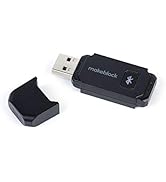
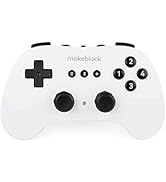
I'm an 80 year old grandfather of 5. Several years ago I bought an mBot for my oldest. Recently I bought an mBot Neo (aka mBot 2) for myself. What fun! This new version is full of great capabilities to stimulate my aging grey matter. My 2 year old granddaughter is into police cars and I have programmed it to look and sound like one. (See attached video.) Like other MakeBlock kits the mBot Neo is solidly constructed of beautiful blue anodized aluminum. It is easy to put together, and the block style programming language makes it possible for kids and aging seniors to teach it new tricks. The block-style language can also be used as a stepping stone to learn the professional Python language. I wish there was more in the way of tutorials for programming the mBot, but technical support (located in Shenzhen, China) is excellent. And there are lots of videos on YouTube to help. The older mBot kit is still available, but I recommend going straight to the mBot Neo because it has so much more to offer. I also recommend getting the MakeBlock Bluetooth Controller which enables remote control of the Bot. (Robotic operation is autonomous.) I set up obstacle courses in my living room to keep my hand / eye coordination sharp. If you decide to buy one of these for your kids or grandkids, I have only one caution: you may want it all for yourself.
A**G
Great but needs improvement
Overall, it's a great product for children to learn. It looks very well made, and the programming interface is relatively easy to use. It took me a while to realize that you can only use the Bluetooth connection via the web browser, which makes sense; it's easier. However, I am not a fan of using JST connector for the electricals. It's impossible for children. One wrong move, and the whole thing is unusable. Almost all children's kits I have seen so far use some sort of easy magnetic connector. The cables are so short at places where they should be longer. The manuals and guides need to be designed better.
A**R
Llegó en un par de días a Miami con una presentación excelente! Aún no lo he podido comenzar a armar y programar pero creo que será una magnífica experiencia.
A**D
Enhancements for kids educational program
V**L
Der mBot 2 ist ein richtig cooles Lernspielzeug, vor allem für Kids, die Spaß an Technik haben. Der Aufbau ist leicht verständlich und macht schon beim Zusammenbauen Laune. Danach kann man den Roboter über Scratch oder sogar Python programmieren, was ihn super interessant für Anfänger und auch etwas Fortgeschrittene macht. Die KI-Funktionen und die WiFi-Fernbedienung sind echt beeindruckend für ein Kinderspielzeug. Der mBot reagiert zuverlässig, bewegt sich flüssig und die Sensoren funktionieren gut. Perfekt für Projekte in der Schule, STEM-Unterricht oder einfach zum Ausprobieren zu Hause.
J**S
I love electronics and my son likes gadgets and this is all of the above. Most of the assembly involves just connecting wires and using screws to attach parts together, but it was fun hanging out with my son in the process of the assembly. We did have to figure some things out together, because the instructions get unclear in some places. Still, we managed to make it work and he had fun controlling it and learning more about it.
J**E
Recibido correctamente. Ideal para iniciarse en la robótica con tus hijos
E**O
Excelente compra y muy educativo. Lo compre para dar clases de programación y divertirme con los alumnos y mis hijos!
Trustpilot
1 month ago
3 weeks ago