
DOWNLOAD THE APP


Customer Services
Copyright © 2025 Desertcart Holdings Limited
DOWNLOAD THE APP




🚀 Elevate your desktop game with silent power and triple 4K brilliance!
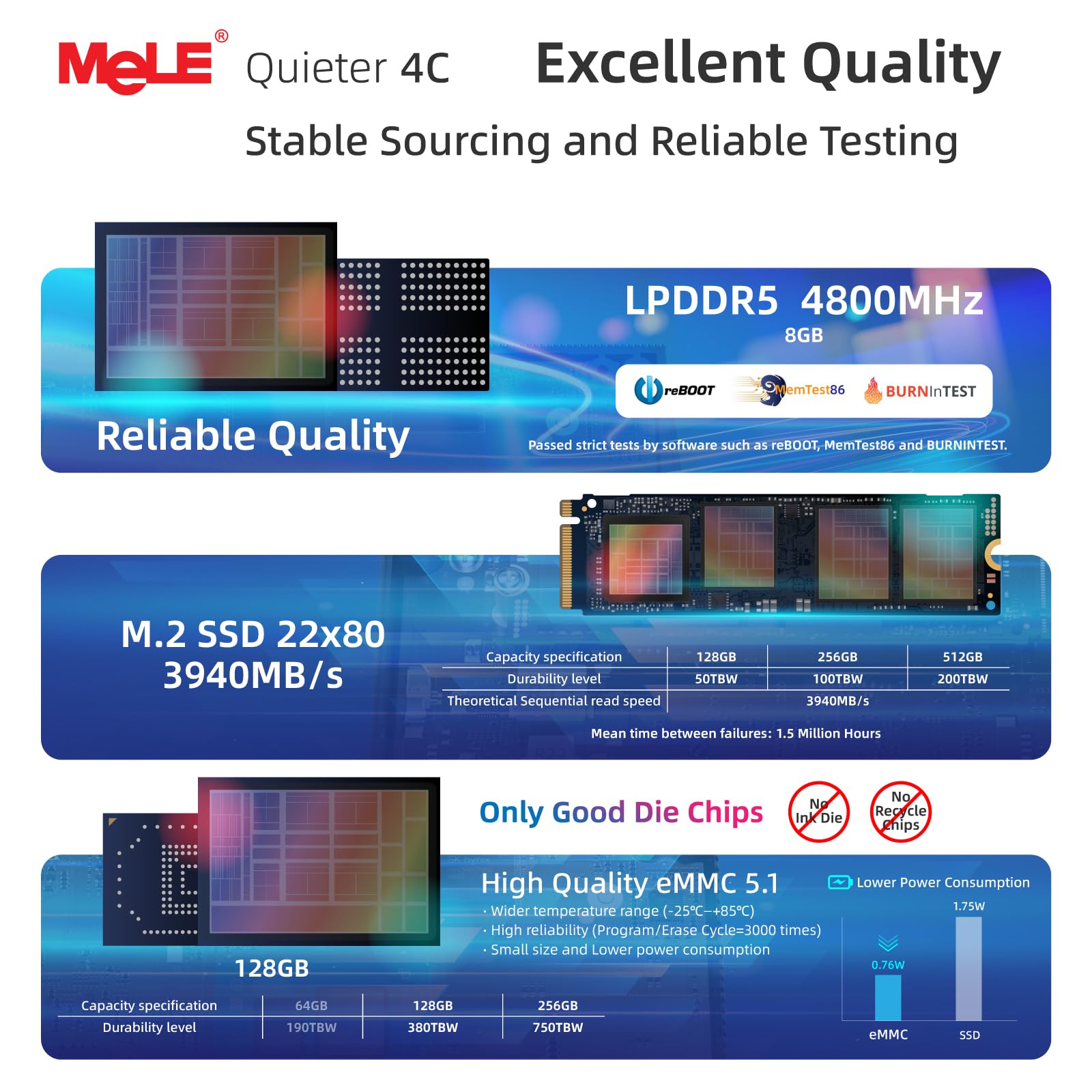
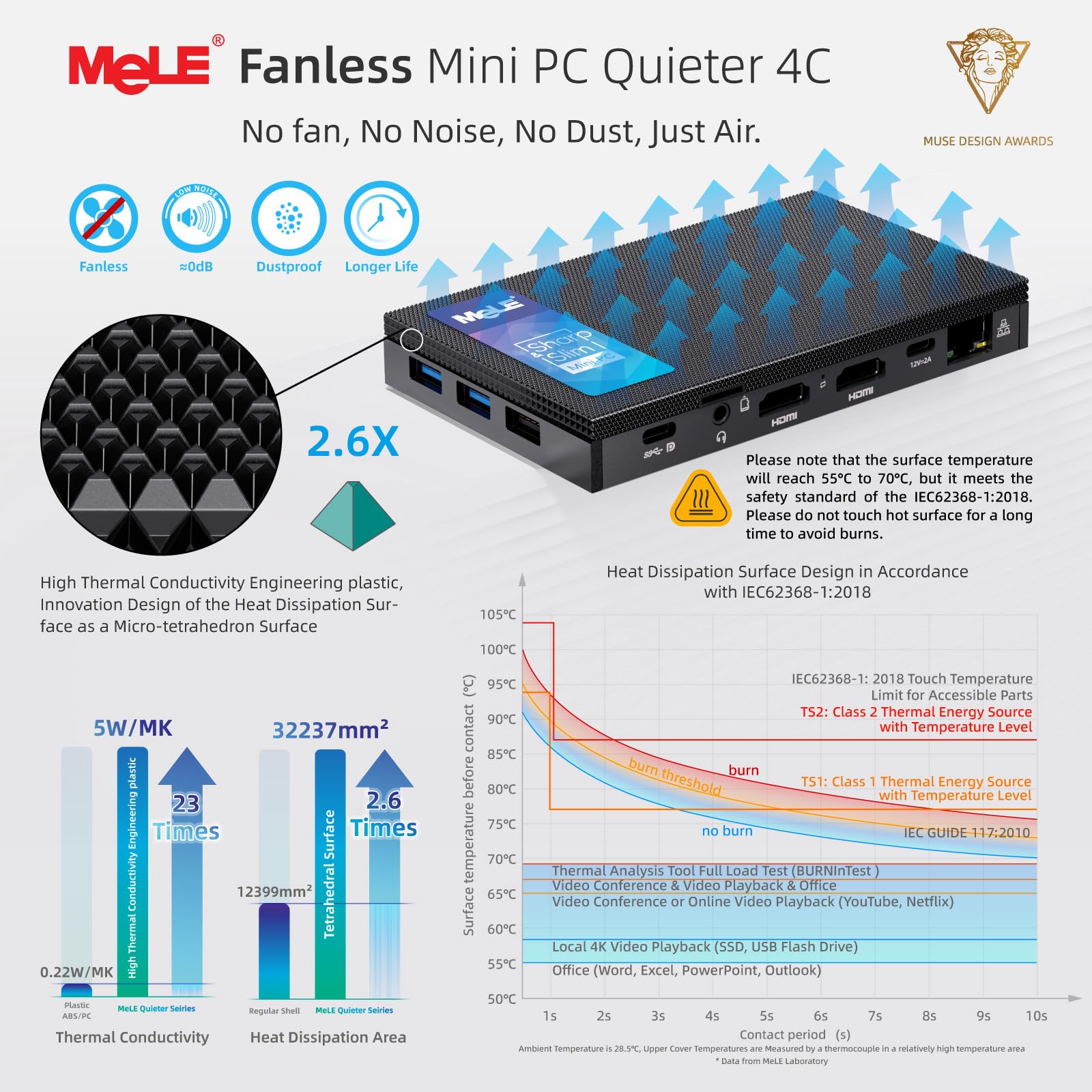
The MeLE Quieter 4C Mini PC features a cutting-edge Intel N150 quad-core processor clocked at 3.6 GHz, 8GB of high-speed LPDDR4x RAM, and 128GB of onboard storage. Its fanless design ensures silent operation while supporting up to three simultaneous 4K displays via dual HDMI 2.0 and a full-function USB-C port. Equipped with Wi-Fi 5, Bluetooth 5.1, and PD 3.0 charging, this compact powerhouse offers versatile connectivity and customizable OS options, making it ideal for professionals seeking a sleek, high-performance desktop solution.




| ASIN | B0F53JKLQZ |
| Batteries | 1 Nonstandard Battery batteries required. (included) |
| Best Sellers Rank | #2,837 in Computers & Accessories ( See Top 100 in Computers & Accessories ) #121 in Mini Computers |
| Brand | MeLE |
| Card Description | Integrated |
| Computer Memory Type | DDR SDRAM |
| Customer Reviews | 4.4 4.4 out of 5 stars (636) |
| Date First Available | July 7, 2025 |
| Hard Drive | 128 GB eMMC |
| Hard Drive Interface | USB 3.0 |
| Hardware Platform | PC |
| Item Weight | 1.04 pounds |
| Item model number | Quieter4C |
| Max Screen Resolution | 3840x2160 |
| Memory Speed | 4266 MHz |
| Number of Processors | 4 |
| Operating System | OS |
| Package Dimensions | 6.5 x 3.2 x 2.48 inches |
| Processor | 3.6 GHz celeron |
| Processor Brand | Intel |
| RAM | 8 GB LPDDR4 |
| Screen Resolution | 3840 x 2160 |
| Series | Quieter 4C |
M**.
This thing is fast and smooth!
*** Note to other buyers: Ethernet does NOT work out of the box. It has to be enabled in the BIOS first. So don't think you have a faulty unit like I did. See the end of the review for instructions. *** I am coming from a fanless mini-PC with the Intel Celeron N4100/UHD 600 graphics which is having RAM issues. And since RAM can't be easily replaced on these, it was time for an upgrade. And this is certainly an upgrade. The Intel Celeron J4125/UHD 605 graphics on the Quieter2 is definitely a noticeable upgrade. This Quieter2 is very snappy and smooth compared to my previous unit from another company. I couldn't even watch a single 1080p Youtube video in any browser without the CPU/GPU throttling and then the video becomes choppy after a couple minutes. I always had to bump the quality down to 720p, which still wasn't perfect all of the time. I just watched a 10-minute Youtube video on the Quieter2. And not only did it have no issues, I had ANOTHER video stream playing in a different tab at the same time. No throttling or lagging. That's what I'm talking about. I know other reviewers have said to get an NVME SSD, but it's not needed (unless you just need more storage) if you're not working with large files that need transferred back and forth from RAM to storage. The onboard SSD is plenty fast enough for everyday usage and computing. The Quieter 2 has been running non-stop for 2 days straight and has been fast, snappy, and smooth/fluid with everything I'm doing. And this goes for Windows and Linux. I currently have Linux installed as the OS on here, but Windows seemed to run fast and snappy also. But there's also too much bloat running in Windows compared to Linux. So I'm running Linux. *** My only CON if I have to list one right now, is that the Ethernet port is not enabled by default. It's disabled in the BIOS. I actually started the return process on my unit because I could not get it working in Linux nor Windows. Neither OS could even see the hardware at all, so I thought I had a faulty unit. And I unfortunately spent hours troubleshooting. One last thing I tried is some different settings in the BIOS, and finally got both Linux and Windows to recognize the Ethernet after changing one setting. How to get Ethernet working is in the BIOS (keep pressing the DELETE key while the Intel boot logo is showing at start up to enter the BIOS) and then under the Boot tab, you want to Enable the line that says "Network Stack Driver Support". Then on the "Save and Exit" tab, choose "Save and Exit" at the top. Windows and Linux will now recognize the hardware and install the drivers automatically. I have also attached a picture and highlighted the line for others as a visual aide. (There are also a LOT of settings visible and available in this BIOS that are not normally available or visible on most other computers. So please do not mess with or change anything unless you know what it does. Doing so could cause your computer to be unusable.) Note to manufacturer: on future units, please enable Ethernet port by default and let someone disable it if they need it disabled for some reason. There is no good reason to have it disabled as it does not affect being able to use WiFi. Others shouldn't have to go through hours of troubleshooting (like I did) and then start a return (like I almost did) for something so simple, and something that's almost always enabled on every other computing device in the world. Thank you for reading. I'll update this review if I experience any issues. 5/5. Not removing a Star for the hours of troubleshooting I had to do to get something simple working.
D**H
Nice little computers
This is a great little computer—small and reasonable for web surfing and light Office duty. I have five MeLe computers and use them for Kiosks at work. The thing to watch out for is that they get HOT. This is noted in the documentation, so it's not a negative. When first patching it up to current, it was untouchable; now that patching is done, there is little heat off the unit. It also works as a Plex server.
R**K
Excellent Second Mele Mini
Just upgraded from Mele Quieter 2Q (8GB RAM, 128GB SSD). Love the mini but outgrew it. This new Quieter 4C is awesome. Windows 11 initialized clean with no bloatware. Copied my data from my cloud backup, installed the few apps I use, and everything is working great. I love the silence of the fan less design. You can't beat the features and functions at this price point. I highly recommend for typical home or small office. Gamers should check the specifications before buying.
M**E
Fast and quiet
Great device but 10 per cent price drop two days later was aggravating.
M**A
MeLE Mini PC, Quieter 4C N150 (Turbo 3.6GHz) Windows 11 Pro, 32GB DDR5 RAM 512GB Storage
I really like the thoughtfully designed, compact, and robust design of the MeLE Mini PC. I wholeheartedly recommend it! I'm pleased to report that my recent decision to use the "MeLE Mini PC, Upgraded Quieter 4C N150 (Turbo 3.6GHz) Windows 11 Pro, 32GB DDR5 RAM 512GB Storage, Full Functional USB-C, 4K Triple Display on, Office, Education, Astrophotography" as the controller for my astrophotography rig has surpassed my expectations. My decision was primarily influenced by the latest N150 chipset, the fanless design, which is crucial for preventing vibrations, the useful expandability options, the large 32GB of RAM, and its low power consumption, which is a significant benefit for field use. Initially, I was hoping to increase the capacity of the existing 512GB NVMe SSD by adding another 2TB NVMe. However, I discovered that upgrading necessitated swapping out the original drive. I truly valued Dang's prompt and supportive assistance when I contacted MeLE support. The upgrading process was surprisingly simple and trouble-free because of his promptness and clarity. I was truly astounded by how quickly and effectively Dang responded to my question. Overall, this is a well-made product that has been improved by excellent support. I can't wait to use it in my astrophotography endeavors now!
D**S
I've bought a fanless Atom compute stick from Mele before, years ago. From China. So I felt I could trust their design/product. I've only had this a few days ... but as I was confused from reviews and product descriptions about what SSD it can take, I wanted to say here I can use a 2TB NVMe drive ... the socket's keyed for NVMe ... not SATA. On the model I bought anyhow. I just wanted a "back-up" + "ancillary" machine. I tend to RDP Virtual machines running on slightly heftier though mobile-CPU based servers ... I like small powerful devices that sip energy rather than gulp it. So as an "ancillary" machine, I have it plugged into a 13" 1080p USB C powered touch screen ... powering the screen from this PC via USB A port to USB C, which is also the "touch" connection, and using a full HDMI cable. I RDP my general VM for email etc. But I also have the Spotify App on there, and Plex client as I have a Plex server (I have a lot of personal "server" services running on other small machines in VMs/containers etc.). I can KVM to it with my mouse/keyboard, although I also use Microsoft's "Mouse Without Borders" which works really well in Windows 10. I checked compatibility for Windows 11 before purchasing ... I think this machine looks OK for that. Using Web browsers is fine too ... and fine for other video streaming etc. I'm an Office 365 account holder so I wanted to be able to store up to 1TB of OneDrive data on here too. I'm running Windows from the built-in eMMC though ... it seems fast enough for that, but I have created a Windows page file partition on the NVMe SSD. And I wanted dual boot - though still to set that up, though left some space free for it. I leave some space ... made some space on the eMMC, as I'm not sure how wear algorithms work on these chips and whether leaving some space might be helpful. I don't know. Just belt & braces approach. Bitlocker runs just fine on it. I chose to bitlock the entire partitions in one go though ... as I preferred to let it do it rather than possibly slow the CPU down a little more during operation later. I fitted a WD Blue SN550 2TB High-Performance M.2 PCIe NVME SSD from Amazon for £175 at time of writing which seemed the best bang for my buck from a reliable vendor, as far as I could see. This machine is unlikely to benefit from performance pedigree per se, but it's the reliability and running cooler when maxing-out the data transfer rates, at a competitive cost, that interests me. I'm using wired internet - not tested the WiFi or bluetooth yet. With the NVMe in, it gets a little warm if using the Plex client, but not hot. It goes to sleep nicely with a push of the front button. The sound is OK - using the wired socket. I use a USB powered Hart Just Mixer - mixer which is another product that I really like. (Though I use anti-ground loop thingies on a couple of the audio leads to get rid of hum/noise if powering the mixer, especially, from a USB source sharing a ground-plane with any of the audio inputs/outputs). In every day use the machine, including web browsers, feels fast/responsive, even with multiple tabs and apps open. -- As a back-up machine, I wanted the dual 4K option, because I like using at least 2x monitors for software development. One only 1080p landscape, but the other, a very wide screen, in flipped-portrait mode. And then I RDP my work VM. It's a backup to my Dell XPS that's my everyday driver, though it's nice having an ancillary machine while my XPS focuses on work. This machine is plenty fast enough to not notice much difference for everyday tasks. For back-up purposes, I can plug it into my "admin" vlan at home ... and I also have edge, chrome and firefox installed with no issues and running well. I'm saying all this to highlight how versatile this machine is ... as everyday computer, but also a handy thin-client and administrative machine. It uses so little power it could run on a decent UPS for ages! It doesn't give off much heat. I haven't tried anything heavier on it ... e.g. any Development / creative stuff. I'm sure it'll run vscode ... but I don't expect it to be a great experience though perhaps adequate for light Dev tasks, and I don't expect it to compile very fast. I don't expect it to play games unless streamed games which I expect will run quite well on it (ToDo). Maybe if I had no choice but to run a Dev environment on it, my impression is that I could maybe get by very slowly (e.g. running Web API servers with debugger attached and maybe Node proxy / front end React server, refreshing (recompiling) the Node stuff on save etc. and maybe running a heavy-database like SQL Server ... this sort of meatier load probably won't run too well on this machine, and might even knock it over, but using vscode or similar (I'm mostly Microsoft based and creature of habit though migrating a lot of stuff to Linux actually) ... anyway ... using something like VScode ... it could probably get by. If you're a front-end Dev maybe and the backend/database is running somewhere else. Occasional Photoshop etc. might be OK if not doing any crazy rendering. It is a 4x processor machine so I imagine multi-threaded work will benefit from that ... the J4125 does support VT-D ... Hyper-V etc. if you want Microsoft's Sub System for Linux and Docker desktop running etc. ... I'm pretty sure it will be OK for light tasks using those sorts of technologies. I do actually have a J5005 based NuC running Open Media Vault (including with LUKs encrypted drives), Plex Server in a docker container, and quite a few other services in Docker containers including IoT etc. and OpenVPN in case my main router goes down etc. ... and I have actually used an Ubuntu based container with a desktop, in the container, that I could RDP before too ... so I suppose I shouldn't be surprised at just how pleasantly powerful Intel's more modern Celeron chips are. This machine is a light duty machine. What's amazing about it is just how good it is, for such little volume, and such little energy. And a reasonable price. -- I had no issues finishing the Windows set-up and updating it to a more recent version. You can set it up with a local account if you like (while Windows 10 anyway ... not 11). If you want bitlocker, you have to enable it. (It is Windows 10 Pro). No crashes or freezes or anything so far. The only caution I have is that the USB C power socket isn't a Power Delivery one. There's a sticker on the device warning you of this, advising a 26V max input limit, and advising to use the included 12V 2A plug. The plug doesn't seem too cheap ... happy with that. And I'm powering a monitor from it too, via USB on this machine. But still ... I took the sticker off the heat sink facing, and I hope I don't forget in the future. I wish it was a Power Delivery socket. I've probably forgotten key things I meant to say that's actually relevant lol. Oh well. My impression at least, is that machine is a very decent every day (modern Windows / Web / Streaming) PC that could hide behind your monitor and add maybe £25 per year to your electricity bill if maxing it out 24/7 all year. Or something like that. Maybe less if you have "economy 7" equivalents etc. It's just amazing. Amazing.
J**E
Absolutamente ningún problema ni con el sistema operativo ni con las aplicaciones que he instalado. Lo uso para controlar un telescopio por escritorio remoto y cumple perfectamente. Optimizando el sistema operativo puedes conseguir un consumo de cpu sostenido del 5%. Eso si, no se le puede pedir capacidad gráfica o de cálculo. Aunque no se dice, incorpora una placa para montaje vesa. Quitaría media estrella por la alimentación. Con 2 Amperios no se puede suministrar mucha energía a los puertos usb.
D**B
Très silencieux Bonne performances pour bureautique et web "simple" Port usb-C PD/DP très pratique : se branche avec un seul câble sur un écran Usb C Power delivery, pas besoin du câble secteur
J**5
Perfekt für ruhige Orte, wenn einem die Rechenleistung genügt. Wird allerdings ziemlich warm unter Vollast - hier ist es ratsam, zusätzlich einen Kühlkörper mit Wärmeleit- Paste oder Pads zu montieren...
M**.
Excellent little PC. This is my second. They are reasonable fast and give great video output. They can run quite hot as there is no fan. So make sure there is plenty of air around to cool it!
Trustpilot
1 day ago
3 weeks ago