
DOWNLOAD THE APP


Customer Services
Copyright © 2025 Desertcart Holdings Limited
DOWNLOAD THE APP

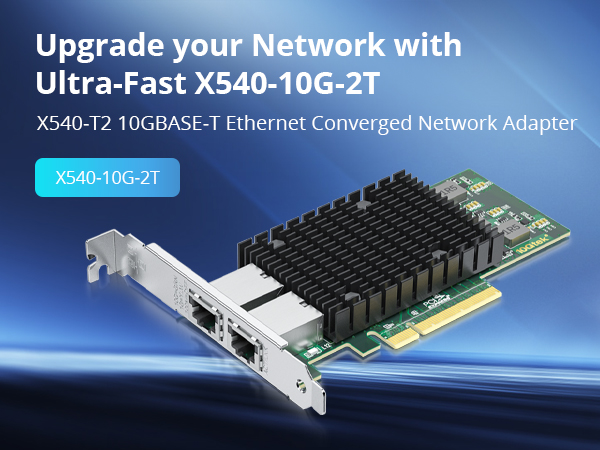
🚀 Upgrade your network game with ipolex 10GbE – because speed waits for no one!
The ipolex 10Gb Network Card with Intel X540-BT2 controller delivers dual 10G RJ45 ports supporting up to 100m over Cat6a cables. Designed for professional-grade networking, it supports multiple OS platforms including Windows, Linux, VMware, and FreeBSD. Featuring SR-IOV virtualization, it maximizes network efficiency and throughput. While installation requires manual driver setup and may need minor physical adjustments for desktop cases, it offers reliable, high-speed connectivity backed by a 3-year warranty and lifetime technical support.




| ASIN | B01IR7T7PG |
| Best Sellers Rank | #52 in Internal Computer Networking Cards |
| Brand | ipolex |
| Built-In Media | Industry Leading Support— Your purchase comes with Ipolex's unwavering commitment to customer satisfaction, featuring a 30-Day Free Return policy for hassle-free refunds, a 3-Year Free Warranty protecting against defects and malfunctions, and Lifetime Technical Support for continuous expert assistance, ensuring your peace of mind and the long-term performance of your network card. |
| Color | 1pc |
| Compatible Devices | Desktop |
| Customer Reviews | 4.4 out of 5 stars 405 Reviews |
| Data Link Protocol | Ethernet |
| Data Transfer Rate | 10000000000 Bits Per Second |
| Hardware Interface | PCIE x 8 |
| Item Dimensions L x W x H | 8.74"L x 5.83"W x 1.34"H |
| Item Height | 1.34 inches |
| Item Type Name | 10g nic |
| Item Weight | 0.35 Pounds |
| Manufacturer | ipolex |
| Product Dimensions | 8.74"L x 5.83"W x 1.34"H |
| UPC | 603149414471 |
S**R
Great performance, awkward fit in a desktop case
This card does what it is supposed to do. It negotiates at full speed and easily maxes out my connection without any drops or instability. Once it is set up, it just works and stays consistent. Setup was not completely plug and play for me. Windows did not install the driver automatically. I had to go into Device Manager, find the unknown network device, and manually point it to the driver I downloaded from the manufacturer. After that, the card came online and has been solid. The bigger issue was the physical fit. The metal port shield around the Ethernet connector is clearly designed with a server chassis in mind. In my standard RGB desktop case, the top of that shield hit the edge of the case and kept the bracket from seating properly. To make it work, I had to carefully trim the top of the metal shield down to roughly the height of the PCB so the card could sit flush in the slot. After that little bit of handiwork, it fit fine and has been working with no problems. Overall, performance is great and it fully saturates my line, but be aware that you need to install drivers manually and, depending on your case, you might have to do a bit of physical work to get it to fit right.
A**R
Great NIC
Works perfectly. The difference in speed between this card and a gigabyte card is incredible. It was easy to install, and I was able to download and install the drivers for it without a problem.
M**N
It does work well on Windows 11 with a windows 10 driver follow the video in the image.
I had trouble getting it working on windows 11 even trying some other tutorials I found on the internet. The seller sent me the above image with a note and the card comes up very well on both ports now. For the price this is the best value I have found even through it is using a "old" driver. It works well connected to my Ubiquiti set up. I am glad they responded with a note, I had figured I would have to use it on a server platform instead of a workstation. Follow the video from the link above and it will come right up in windows 11. It will warn you about driver signing but it is an Intel driver it is just that they are not keeping up with windows 11. Beyond that the card works well on my mother board. It has a well designed heat sink and where it is located in system it has a case fan directly cooling it. For the price you are not going to beat the card.
L**D
Worked out of the box, no issues, no special drivers or settings, just worked.
Installed in a vintage 2016 system (!), it still worked perfectly, was recognized by OPNsense (FreeBSD) which is often picky about NIC's, and operates at full speed. No issues at all.
A**R
No Windows 10 or 11 drivers.
It should be noted that this chip set is no longer supported by Intel, while Linux supports the drivers, and they work great, there are no windows 10 or 11 drivers. The company's website only directs you to the Intel website drivers, which only have drivers for BSD, windows 7 and a couple of Microsoft servers. But with some internet searching, you can find drivers for Windows 10, which work perfectly fine on Windows 11. I found some on a Dell support website. That's why I give them a 4.
I**N
Very Reliable, Easy Install, Recommended
My use case is a personal development network with two high end desktop workstations, one with AMD Ryzen 9 and the other with Intel i7. Both are running Ubuntu Linux 22.04.2 PRO and I am using a Mikrotik CRS306-4S-1N switch. Both Desktop systems have dual 10G NICs and cable into the switch with 6COM 6C-SFP-10G-T SFP+ 10G RJ45 Adapters and CAT8 cabling. As soon as everything was plugged in the systems came right up and everything was fast and sweet. Don't forget to plug in the backhaul cable from the switch to your in-house network feed otherwise no DHCP and the 10G connections don't com up. Highly recommended. This is plug and play and the most practical sense. Installation time was about an hour and that include putting boards in two machines, running cables, attaching adapters and installing switch. "Settings/Network/Ethernet/Wired/enp11s0f0 showed connected at 10000 Mb/s immediately. My one extra thought though is that the dual channel boards are only a little bit more, and by the time you bother to open up the box and install a board, you might as well think of the future, IMHO.
Z**O
Can't get it to work with Linux VMs on Proxmox
Got this for my Proxmox machine; It works fine with a Windows 2019 VM but TrueNAS Scale and Ubuntu VMs not so much – they get a valid IP via dhcp but no network connectivity so I think there are issues with Linux drivers or kernel. I just ordered a SolarFlare SFN6122F which TrueNAS reports works (see TrueNAS resources: 10 Gig Networking Primer), if it does, then I’ll be returning this. ‘lspci -vvxnn’ below: Ethernet controller [0200]: Intel Corporation 82599ES 10-Gigabit SFI/SFP+ Network Connection [8086:10fb] (rev 01) Subsystem: Beijing Sinead Technology Co., Ltd. 82599ES 10-Gigabit SFI/SFP+ Network Connection [1dcf:030a] Control: I/O+ Mem+ BusMaster+ SpecCycle- MemWINV- VGASnoop- ParErr- Stepping- SERR- FastB2B- DisINTx+ Status: Cap+ 66MHz- UDF- FastB2B- ParErr- DEVSEL=fast >TAbort- <TAbort- <MAbort- >SERR- <PERR- INTx- Latency: 0, Cache Line Size: 64 bytes Interrupt: pin A routed to IRQ 16 IOMMU group: 5 Region 0: Memory at 84180000 (32-bit, non-prefetchable) [size=512K] Region 2: I/O ports at 3020 [size=32] Region 3: Memory at 84204000 (32-bit, non-prefetchable) [size=16K] Expansion ROM at 84100000 [disabled] [size=512K] Capabilities: [40] Power Management version 3 Flags: PMEClk- DSI+ D1- D2- AuxCurrent=0mA PME(D0+,D1-,D2-,D3hot+,D3cold-) Status: D0 NoSoftRst- PME-Enable- DSel=0 DScale=1 PME- Capabilities: [50] MSI: Enable- Count=1/1 Maskable+ 64bit+ Address: 0000000000000000 Data: 0000 Masking: 00000000 Pending: 00000000 Capabilities: [70] MSI-X: Enable+ Count=64 Masked- Vector table: BAR=3 offset=00000000 PBA: BAR=3 offset=00002000 Capabilities: [a0] Express (v2) Endpoint, MSI 00 DevCap: MaxPayload 512 bytes, PhantFunc 0, Latency L0s <512ns, L1 <64us ExtTag- AttnBtn- AttnInd- PwrInd- RBE+ FLReset+ SlotPowerLimit 0W DevCtl: CorrErr+ NonFatalErr+ FatalErr+ UnsupReq+ RlxdOrd+ ExtTag- PhantFunc- AuxPwr- NoSnoop+ FLReset- MaxPayload 256 bytes, MaxReadReq 512 bytes DevSta: CorrErr+ NonFatalErr- FatalErr- UnsupReq+ AuxPwr- TransPend- LnkCap: Port #0, Speed 5GT/s, Width x8, ASPM L0s, Exit Latency L0s unlimited ClockPM- Surprise- LLActRep- BwNot- ASPMOptComp- LnkCtl: ASPM Disabled; RCB 64 bytes, Disabled- CommClk+ ExtSynch- ClockPM- AutWidDis- BWInt- AutBWInt- LnkSta: Speed 5GT/s, Width x4 (downgraded) TrErr- Train- SlotClk+ DLActive- BWMgmt- ABWMgmt- DevCap2: Completion Timeout: Range ABCD, TimeoutDis+ NROPrPrP- LTR- 10BitTagComp- 10BitTagReq- OBFF Not Supported, ExtFmt- EETLPPrefix- EmergencyPowerReduction Not Supported, EmergencyPowerReductionInit- FRS- TPHComp- ExtTPHComp- AtomicOpsCap: 32bit- 64bit- 128bitCAS- DevCtl2: Completion Timeout: 50us to 50ms, TimeoutDis- LTR- 10BitTagReq- OBFF Disabled, AtomicOpsCtl: ReqEn- LnkCtl2: Target Link Speed: 5GT/s, EnterCompliance- SpeedDis- Transmit Margin: Normal Operating Range, EnterModifiedCompliance- ComplianceSOS- Compliance Preset/De-emphasis: -6dB de-emphasis, 0dB preshoot LnkSta2: Current De-emphasis Level: -6dB, EqualizationComplete- EqualizationPhase1- EqualizationPhase2- EqualizationPhase3- LinkEqualizationRequest- Retimer- 2Retimers- CrosslinkRes: unsupported Capabilities: [e0] Vital Product Data Unknown small resource type 06, will not decode more. Capabilities: [100 v1] Advanced Error Reporting UESta: DLP- SDES- TLP- FCP- CmpltTO- CmpltAbrt- UnxCmplt- RxOF- MalfTLP- ECRC- UnsupReq- ACSViol- UEMsk: DLP- SDES- TLP- FCP- CmpltTO- CmpltAbrt- UnxCmplt- RxOF- MalfTLP- ECRC- UnsupReq- ACSViol- UESvrt: DLP+ SDES- TLP- FCP+ CmpltTO- CmpltAbrt- UnxCmplt- RxOF+ MalfTLP+ ECRC- UnsupReq- ACSViol- CESta: RxErr- BadTLP- BadDLLP- Rollover- Timeout- AdvNonFatalErr+ CEMsk: RxErr- BadTLP- BadDLLP- Rollover- Timeout- AdvNonFatalErr+ AERCap: First Error Pointer: 00, ECRCGenCap+ ECRCGenEn- ECRCChkCap+ ECRCChkEn- MultHdrRecCap- MultHdrRecEn- TLPPfxPres- HdrLogCap- HeaderLog: 00000000 00000000 00000000 00000000 Capabilities: [140 v1] Device Serial Number xxxxxxxxxxx Capabilities: [150 v1] Alternative Routing-ID Interpretation (ARI) ARICap: MFVC- ACS-, Next Function: 1 ARICtl: MFVC- ACS-, Function Group: 0 Capabilities: [160 v1] Single Root I/O Virtualization (SR-IOV) IOVCap: Migration- 10BitTagReq- Interrupt Message Number: 000 IOVCtl: Enable- Migration- Interrupt- MSE- ARIHierarchy+ 10BitTagReq- IOVSta: Migration- Initial VFs: 64, Total VFs: 64, Number of VFs: 0, Function Dependency Link: 00 VF offset: 128, stride: 2, Device ID: 10ed Supported Page Size: 00000553, System Page Size: 00000001 Region 0: Memory at 00000060e0300000 (64-bit, prefetchable) Region 3: Memory at 00000060e0200000 (64-bit, prefetchable) VF Migration: offset: 00000000, BIR: 0 Kernel driver in use: ixgbe Kernel modules: ixgbe
A**R
Poor dot1q performance
Works great - up to advertised speeds. But - once I setup a vlan on this card - if both are used at the same time - the performance suffers. Guessing related to buffers. But I’m done troubleshooting.
Trustpilot
2 weeks ago
1 day ago