Desert Online General Trading LLC
Dubai, United Arab Emirates
Desert Online General Trading LLC
Dubai, United Arab Emirates


Print Smart, Live Green! 🌱
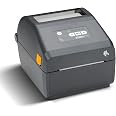
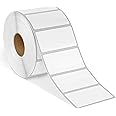
The ZEBRA ZD421 Direct Thermal Desktop Printer is a versatile and efficient printing solution designed for professionals. With a maximum print width of 4.25 inches and a speed of 4 inches per second, it delivers high-quality labels without the hassle of thermal ribbons. Its USB and Ethernet connectivity options make it easy to integrate into any workspace, while the Link-OS management tool allows for remote monitoring and troubleshooting, ensuring your printing operations run smoothly and sustainably.
| Color | Gray |
| Hardware Connectivity | USB |
| Connectivity Technology | USB, Ethernet |
| Resolution | 300 x 300 |
| Control Method | Remote |
| Print media | Labels |
| Compatible Devices | PC |
| Printer Type | Thermal |
| Additional Features | Ethernet |
| Printer Output Type | Monochrome |
T**D
Mac users - make sure to use the phone app
So I bought this to replace an annoyingly non-functional Dymo. It installed fine and I was able to locate the driver (Zebra ZPL) easily enough on my Mac mini. And then the nightmare began. No matter what I did, the labels would not print 4x6. It kept printing 2.75x4 on my 4x6 labels. I googled it. I followed the directions. I used the Terminal and the browser Window. I changed the defaults. All. The. Things. No success. 2 hours later I was at the end of my rope. Finally, just for the heck of it I thought I would try printing from my phone. I installed the app and connected via Bluetooth. There were settings. Print settings. And they said 2.75x4, even though all of the other mac mini settings said 4x6. So I changed the printer settings via bluetooth to 4x6 and saved them (yet again) and suddenly my mac mini started printing at 4x6. So use the phone to correct the settings. Now that it is working, I am a much happier human.
Trustpilot
2 months ago
5 days ago