We remain fully operational. Our teams are working around the clock to ensure your deliveries continue safely.

DOWNLOAD THE APP


Customer Services
Copyright © 2025 Desertcart Holdings Limited
DOWNLOAD THE APP





Buy anything from 5,000+ international stores. One checkout price. No surprise fees. Join 2M+ shoppers on Desertcart.
Desertcart purchases this item on your behalf and handles shipping, customs, and support to South Korea.
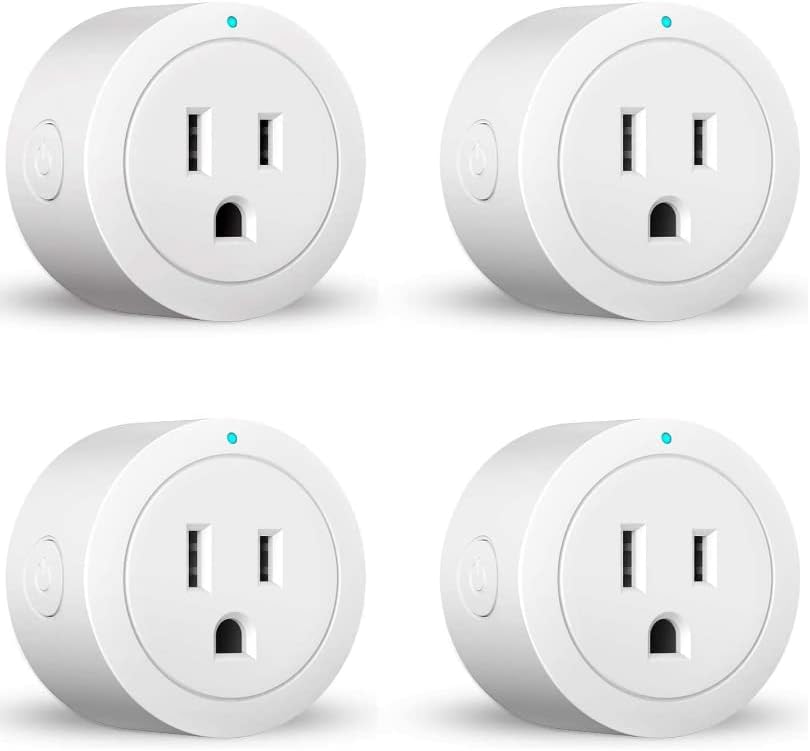
🔌 Plug into the future of home automation!
The Smart Plug ESICOO is a versatile 4-pack of WiFi plugs that seamlessly integrates with Alexa and Google Home, allowing for remote control of your home appliances. With features like a timer function, safety certifications, and easy installation, these plugs are designed to enhance your smart home experience without the need for a hub.

| ASIN | B09PGCJKLV |
| Actuator Type | Automatic |
| Best Sellers Rank | #2,134,683 in Tools & Home Improvement ( See Top 100 in Tools & Home Improvement ) #1,839 in Electrical Outlet Switches |
| Brand Name | ESICOO |
| Circuit Type | 1-way |
| Color | Blue |
| Connectivity Protocol | Wi-Fi |
| Connector Type | Plug In |
| Contact Material | Plastic |
| Contact Type | Normally Closed |
| Control Method | Remote |
| Controller Type | Amazon Alexa, Google Assistant |
| Current Rating | 10 Amps |
| Customer Reviews | 3.8 3.8 out of 5 stars (2,639) |
| Included Components | SMART PLUG |
| International Protection Rating | IP40 |
| Item Dimensions | 1.97 x 1.97 x 1.1 inches |
| Manufacturer | ESICOO |
| Material Type | Plastic |
| Model | 1 |
| Mounting Type | Plug-In Mount |
| Number of Items | 1 |
| Number of Positions | 1 |
| Operating Voltage | 240 Volts |
| Operation Mode | Automatically,Off |
| Specification Met | ETL |
| Switch Type | Toggle |
| Terminal | Through Hole |
| UPC | 606592931557 |
| Unit Count | 1.0 Count |
| Upper Temperature Rating | 85 Degrees Celsius |
| Wattage | 1250 watts |
F**.
Good value for money
I bought these smart plugs at least two years ago, in general very good for their price, sometimes some lose signal, I have 3 working, one is damaged
S**K
List of reasons not to buy this smart plug
Get the kasa smart plug instead. They are easy to connect and never fail. I got kasa after buying the esicoo and they were wonderful 1. Esicoo has 6 different types of smart plugs and none have model numbers 2. The instructions say hold button for 5 seconds and it starts blinking. The app has two choices:slow blink and fast blink. The plug blinks right in the middle and neither option works. 3. Uninstalling and reinstalling the app does not help 4. There are no way to reset the plug. 5. The plugs will not connect to app. 6. You will spend hours trying to connect them and fail. 7. There is zero tech support. 8. These are cheaply made and throw onto Amazon to collect free money from suckers 9. Your phone will be connected to your 2.4ghz wifi and the app will think it’s 5ghz and ask you to switch. This is after an uninstall and reinstall of the app. 10. You have to search for the app name to down load. Ap name not found on Amazon description. 11. No manual online. 12. I have worked in IT for 20 years. This is the only electronic device that I have hated. It’s like the manufacture created it as a gag gift to piss off a friend. Do NOT but these plugs. They will make you scream in frustration.
F**A
Divine
Oh, darling, let me regale you with a tale of unadulterated domestic splendour brought to you by none other than the ESICOO Smart Plug – the unsung hero of my household and the very reason I haven’t touched a light switch since 2023. With these clever little plugs discreetly peppered about my flat, I now live in a realm of sheer automation and botanical delight. My lamps click on with the poise of a Downton Abbey butler – no fumbling in the dark, no unsightly finger marks on my switches. Just elegant, effortless illumination. I simply whisper sweet nothings to Alexa or tap my phone like a Bond villain commanding his lair. And oh, the schedules! I’ve orchestrated my lighting so meticulously, it’s practically a West End production. Lights flicker on and off while I’m away, giving the illusion that I’m home sipping Earl Grey in every room – a cunning deterrent for would-be miscreants. Most crucially, my darling plants – Fernadette, Sir Photosynthesalot, and the others – bask under their grow lights at precisely the optimal hours. They’re thriving, practically singing chorales of gratitude under the warm artificial sun. In conclusion: this product is less “plug” and more life concierge. I eagerly await its triumphant return to stock, for I shall be purchasing more and achieving total household domination – one outlet at a time.
C**E
Working as Advertised
I setup two of the four devices so far, and performed a quick test of countdown & timer features, manual on/off with the physical switch and the app. I used my Google account to register my logon with the Cloud Intelligence app (impossible to mess up) and then the Alexa skill setup & account linking was easy too. The reason for only 4 of 5 stars is that I ran into an issue that was NOT documented within the instructions: Devices could not connect to my 2.4GHz Wi-Fi while using WPA2 for the security setting. After being unable to find a solution, I went to my router portal and started tooling around... Eventually finding that normal (older) WPA security setting allows these devices to connect successfully.
S**Y
Works perfect with Alexa
This was so easy to install and use. I did have to download the app, but after syncing it with Alexa, I just use the Alexa app to run. But you can use the app to run schedules if you don’t have Alexa. We have the lights turn on and off automatically on a schedule. We can also turn on the lights by saying, “Alexa, turn on living room lights.” You have to set the devices up in Alexa and put them in the living room to do this. If not, you just say, “Alexa, turn on [name of plug] smart plug.” You can use the same words to turn the lights off. This works really well for plugs that are hard to reach. But if you can easily reach the plug, you can manually turn the plug on and off with the button on the side. Also, in the Alexa app, you can create a routine that turns on/off according to when the sun sets or rises. You can set it for the sunrise/sunset or minutes before/after the sunrise/sunset. We have the schedule running even when we are home! And when we leave, it continues to turn on and off as if we are home. It’s fantastic.
A**H
Simple and Straightforward
Using for lights and fish tank lights for in my kid’s rooms so they aren’t on 24/7. I created a devoted hidden 2.4ghz ssid for all of them to simplify It further seeing as my phone tries to default to my Wi-Fi’s 5ghz bandwidth, so during set up in the app, it tries and fails to connect these devices to it. Because of this and the technology our routers are created with now, I can see grandparents and such getting very frustrated. Before you give up- If you have a dual band router, take the extra few minutes and establish a devoted 2.4ghz wifi. (Don’t be disheartened! We just got the router I’m working with so I even had to Google a “how to”, Nighthawk doesn’t present an easy option in their app 🙄) Then connection with the app for these is cake! This might not be necessary, but it definitely made it simpler in my case setting up 8 of them! After connected, they fit in with our Amazon devices just great!
Trustpilot
1 month ago
2 days ago