We remain fully operational. Our teams are working around the clock to ensure your deliveries continue safely.

DOWNLOAD THE APP


Customer Services
Copyright © 2025 Desertcart Holdings Limited
DOWNLOAD THE APP


⚡ Power Your Productivity, Connect Like a Pro!
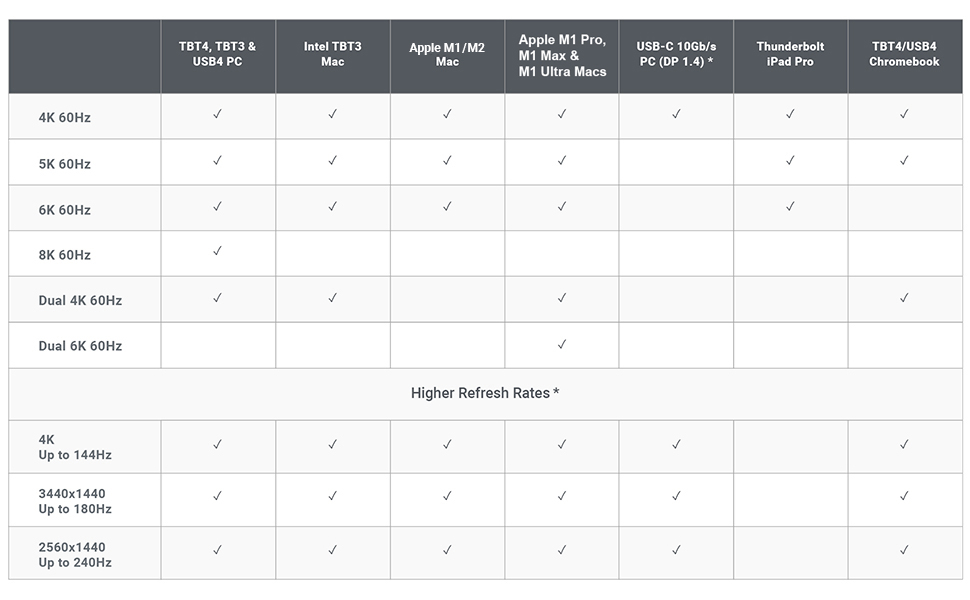
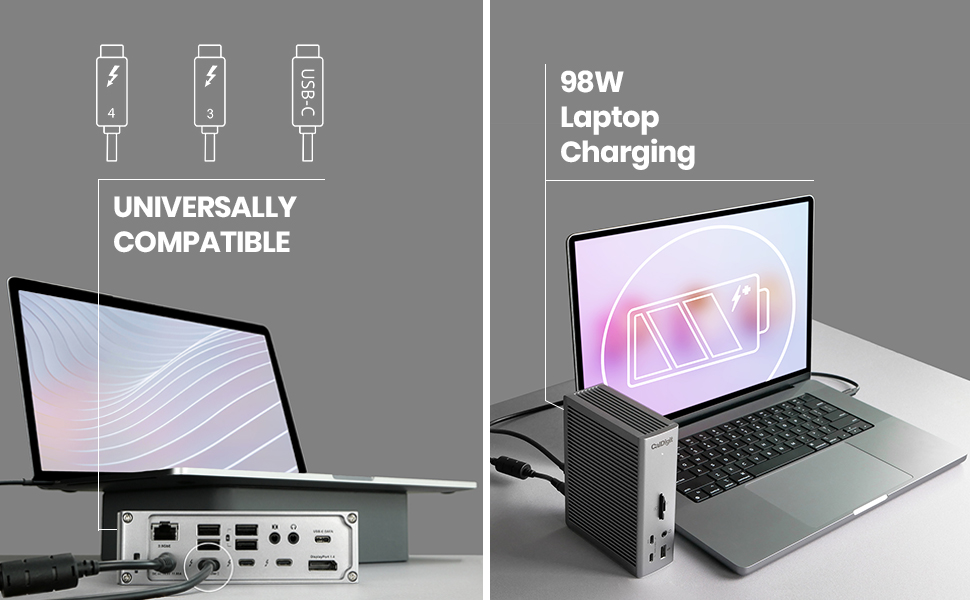
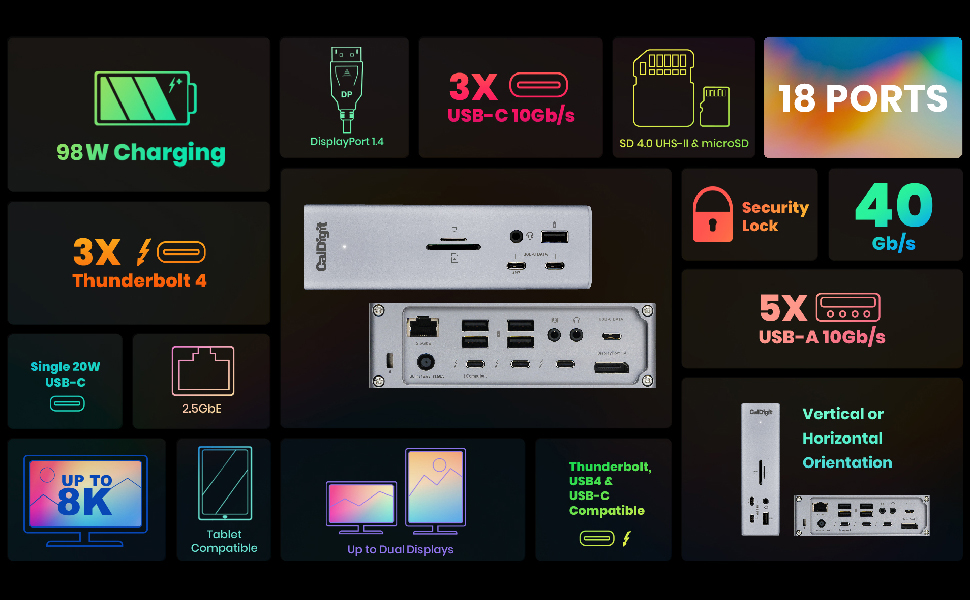
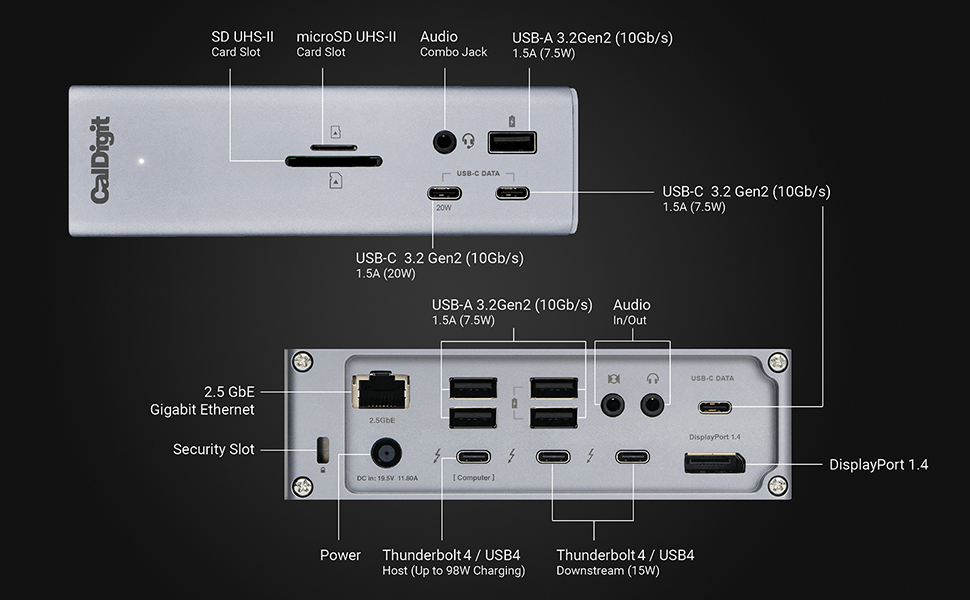
The CalDigit TS4 is a premium 18-in-1 Thunderbolt 4 docking station delivering 98W charging, ultra-fast 40Gb/s Thunderbolt ports, 2.5GbE Ethernet, and support for up to 8K or dual 6K displays. Compatible with Mac, Windows, and Chrome OS, it consolidates all your devices into one sleek hub, perfect for professionals demanding speed, power, and versatility.


| ASIN | B09GK8LBWS |
| Best Sellers Rank | #11,262 in Electronics ( See Top 100 in Electronics ) #141 in Laptop Docking Stations |
| Brand | CalDigit |
| Color | Space Gray |
| Compatible Devices | Dell Latitude 7370, MacBook Air, MacBook Pro |
| Customer Reviews | 4.1 out of 5 stars 1,709 Reviews |
| Hardware Interface | USB |
| Item Dimensions L x W x H | 4.46"L x 1.65"W x 5.55"H |
| Item Type Name | Thunderbolt 4 Docking Station |
| Item Weight | 1.4 Pounds |
| Manufacturer | CalDigit Inc. |
| Number of Ports | 18 |
| Product Dimensions | 4.46"L x 1.65"W x 5.55"H |
| Total USB Ports | 3 |
| Total Usb Ports | 3 |
| Unit Count | 1.0 Count |
| Wattage | 98 watts |
N**E
Best docking station for MAC Users
All my issues are gone with this docking station. My MacBook pro now recognize all the devices connected with no issue and my desk looks clean. A bit expensive but if you are on your computer for long periods of times I see this as an investment. I've had no issues AT ALL with this docking station. Before I had to be restarting my computer so many times. MAC would not recognize my second monitor, or my mic , CAC, you name it. If you are a MAC user and you have a whole setup on your desk with multiple devices connected to your computer, this is your deal for functionality, otherwise you will always have issues. I've tried many different options and I wish I would have buy this one since the beginning. I kept going from docking station to docking station and trying not to spend this amount of money I ended up spending twice what this docking station cost. So believe me, if you want something that works, that is good quality but that it also looks good this is it. Almost forgot to say that I also use this dock with My Dell 5570, my surface and it is compatible with all of my laptops.
B**C
Turns your Thunderbolt 4 MacBook Pro into a desktop computer with one cable
I decided to sell my Mac mini and get one of the new 14" MacBook Pro M1 laptops with Thunderbolt 4. This dock literally enables me to turn my MacBook Pro into a desktop computer simply by connecting one cable while turning it right back into a laptop once I disconnect said cable. So, now I have the best of both worlds - a laptop AND a desktop computer to replace my Mac mini. The dock works 100% flawlessly. I have it connected to two USB type C SSD drives, a USB type C 4K display, keyboard, webcam, optical drive, and mouse. Performance is on par to being directly connected to the MacBook Pro ports directly. Literally, ALL of this with ONE single cable running to the MacBook Pro... and I STILL have extra ports available on the dock to randomly connect something else like a USB flash drive. I ALSO have it connected via ethernet to my 1.2Gbs Xfinity internet.... so the 2.5GB ethernet on this dock enables me to also get the full potential of my internet speed. (FYI to anyone with ethernet issues on this dock - When first connecting this dock, the MacBook Pro ethernet would NOT work - consistently said an ethernet cable was not connected. There were two thunderbolt ethernet devices listed in the system preferences under Network. I removed both of these devices, indicated that MacOS should NOT install them again next time the MacBook Pro was docked, then disconnected and reconnected the MacBook Pro to the dock.... the correct thunderbolt ethernet device then appeared in the networking control panel. Ethernet has worked 100% fine since then at the advertised speed.) Did I mention this thing fast charges the 14" MacBook Pro at the full 98W? What is there not to like about this dock??? FYI if this applies to you also - I still use the old Apple USB superdrive for DVD-R/W discs.... CalDigit has the driver download to let this work with the dock still pending on their website, but I am sure it will be available soon.... UPDATE: Have to revise this review to report that USB C SSD drives occasionally drop connection when the MacBook is sleeping. Not sure if it is the mac or dock, but getting drive disconnected without ejection messages sometimes after wake from sleep.
T**R
One of the Best docks you can buy!
I’m what is known as a Power User. First let me tell you what I’ve hooked this up to. I recently bought an HP Windows 11 - 17” Laptop. It has 64 Gig of Ram and a 4 TB SSD drive. It comes with 2 USB C Thunderbolt 4 ports (40 Gig). One of them is used for charging the Laptop. It also comes with 3 USB A Ports (10 Gig). Unfortunately it doesn’t come with an Ethernet Port. I bought this incredible Dock for its Ethernet Port and all the other Ports that come with it. It has 3 Thunderbolt 4 (40 Gig) Ports. I use one for charging the Laptop and the other 2 I can use for a lot of other things like copying large SSD Chips etc. it also comes with another 3 USB C Ports (10 Gig each) and 5 USB A Ports (10 Gig each). I can hook up everything I always wanted to this baby! Some people complain that when copying large amounts of data it doesn’t work well. Thats because the people are trying to copy too much at a time and the Chip they are copying to gets overheated. If you copy the correct way you’ll have no problems. I only copy 200 to 300 Gig at a time and then wait awhile for the Chip to cool down before I copy more. Some people complain that their Dock burns out in so many months or a year or so. Thats because they load the Dock with way too many things being used at the same time. Just because it has up to 18 plug-ins doesn’t mean you can use a lot of them always at the same time and not expect the Dock to overheat and eventually burn out. Look at the Specs. It says it can charge up to 98 Watts for your Laptop. The Dock is rated at 240 Watts. In real life it’s only going to be about 200 or so Watts Maximum. So while charging your Laptop you have about 100 Watts left to use for other things that you can plug into the Dock. If the Total of what you are plugging into the Dock goes above 200 or so Watts, then the Dock will start overheating and eventually it will burn out. Common sense right? I’ve bought a few docks in the past that I wasn’t satisfied with. Although this Dock is very pricey it’s worth every cent if you want your Computer to be able to have all the Ports you’ll ever need. It’s almost future proof and is the best one I’ll found so far that is powerful enough to allow you to do anything with your set up! Read the Specs and see if you can find any other Dock that comes close to it! I highly recommend this unit. And btw, if for some reason you get a bad one, just remember that no matter what you buy you could get something once in a blue moon that doesn’t work. Nothing is perfect. When thousands of a product is made there is always going to be a few duds. Simply ask for a working unit from the company. Don’t cry and say “mine was dead on arrival and I will never buy from them again!”. That sounds like a very stupid person saying things like that. Make sure if you use USB C Cables for the Thunderbolt Ports that they are Thunderbolt 4 or 3 Cables rated for 100 to 240 Watts. Anything less and you might as well forget using them as they really won’t work the way they should (up to 40 Gig read and write) If you use USB A Cables, make sure they are at least 3.2 Gen. 2 to get the max out of this Dock (up to 10 Gig read and write). If you use USB C Cables then use Thunderbolt 4 or 3 to get the most out of the Dock (Thunderbolt cables are backwards compatible with all versions of USB C). However you can use any cables you want if you don’t care about using this Dock at its best. But if that’s the case then why bother buying it in the first place! Also remember that those fast speeds also depend on how fast your Computer or Laptop is (and whatever you are plugging into the USB A or USB C or Thunderbolt Ports). If you have an old or slow piece of garbage computer or Laptop, don’t expect this Dock to be able to do miracles. If you want a really great Dock that can do just about everything (see its Specs) then this is the Dock for you!
T**G
Fails on MacBook Pro 16” 2019 (Intel-chip); But Works on iMac 24” 2021 (M1-chip)
ADDENDUM, dated 4/21/2023@19:48 EDT: It WORKS Now on BOTH APPLE Laptop & Desktop ========================================================================= WORKS on MacBook Pro 16” 2019 (Intel-chip) & WORKS on iMac 24” 2021 (M1-chip) => Rating of 4 Stars This addendum, dated 4/21/2023, at 19:48 EDT, corrects my PRIOR negative review. Now, the CalDigit Thunderbolt 4 Dock (Model TS4) is working fine on both my Apple laptop and Apple desktop. It now works successfully with all my external hard drives (HDDs), external Solid-State Storage drives (SSDs), my Dell monitor, my Ethernet (wired), and powers the laptop without any problems. The ONLY failure now is that I cannot get my ancient, Anker 13-port, USB2.x, hub to work when plugged into the TS4. My PRIOR negative TS4 review is hereby rescinded. My PRIOR negative rating of it as one (1) star is replaced now with four (4) stars. Here are more details about my recent experiments & testing providing additional details as why my review now is quite positive and I've rated it a lot higher: On Sunday, April 16, and Monday, April 17, I did some more trouble-shooting and experiments to help us debug the problem with the CalDigit TS4 Thunderbolt Dock. The problem in a nutshell was that the TS4 FAILED to mount any drives on my Apple MacBook Pro laptop; BUT it worked SUCCESSFULLY on my Apple iMac desktop! During those experiments, I disconnected the TS4 from my laptop and re-connected it to my desktop being sure (like before) that I used CalDigit’s supplied Thunderbolt 4 cable. However, I took it one step at a time. WORKS. First, I tried connecting it to a different Thunderbolt 3 port on a different side (bus) of the laptop AND leaving the laptop’s Apple power-brick still powering the laptop. To my surprise, it SUCCESSFULLY mounted every external hard-drive (HDD) and solid-state storage (SSD) device that I connected it to. WORKS. Second, I re-connected it into the same Thunderbolt 3 port on the laptop that the TS4 originally failed on. Again, to my surprise, it now worked SUCCESSFULLY and mounted every external drive (HDD & SSD) that I connected it to. WORKS. Third, I dis-connected the Apple power-brick from the laptop. So, now the TS4 was providing the power to the laptop. Yet again, to my amazement, the TS4 continued to work SUCCESSFULL and again mounted every external drive (HDD & SSD) that I connected to it. WORKS. Fourth, I connected the monitor to the TS4’s Display Port 1.4 port. Again, to my pleasant surprise, it worked SUCCESSFULLY. WORKS. Fifth, I connected the Ethernet CAT-5 cable into the TS4’s 2.5 gigabit jack. Yet again, to my wonderment, it worked SUCCESSFULLY without any degradation in speed. FAILS. Finally, I did hit a failure (but not a show stopper). I connected my old, Anker USB2 hub (a self-powered hub with some 12 USB ports on it) into a USB port on the TS4. UNFORTUNATELY, it FAILED to recognize and activate the Anker hub. The peripherals connected into the Anker hub were thus rendered useless. So, some other external HDDs did not spin-up/mount; my wired trackball was useless; USB downstream connections to other devices (webcams, amateur radios, etc.) also failed. BOTTOM-LINE: For some unknown and puzzling reason, the CalDigit Thunderbolt 4 Dock (TS4) is now working fine on my laptop, EXCEPT for that Anker hub problem. If you have any insight on why the Anker hub is not being recognized, activated when plugged into the TS4, then let me know and we’ll try to resolve this Anker hub issue. Of course, this Anker hub works fine when connected directly to the laptop’s Thunderbolt 3 ports. It even works when connected via an un-powered, Anker 7-in-1 hub. It just will NOT work when cabled into the TS4 dock. By the way, this Anker hub problem cannot be a power one because the 13-port Anker USB2.x hub is self-powered with a beefy Anker power-brick. ================================================================================== ORIGINAL Review, dated 4/d?/2023@h?:m? EDT: It FAILED on APPLE Laptop; But WORKED on Desktop =============================================================================== Fails on MacBook Pro 16” 2019 (Intel-chip); But Works on iMac 24” 2021 (M1-chip) => Rating of 1 Star I just purchased this CalDigit TS4 hub device. Despite the glowing reviews, I’m very disappointed in its operation so far!🙁. It fails totally when connected to my Apple laptop. Yet, it works superbly when connected to my Apple iMac. FAILS. The TS4 gets a failing grade when connected to my Apple laptop computer (MacBook Pro, 16”, 2019, Intel-chip). It FAILS to mount any of my external drives (HDDs). It intermittently mounts my external SSDs BUT ONLY if I connect them to the TS4’s Thunderbolt ports; they fail to mount when connected to any other ports (USB-c) on the TS4. I only tried one drive an a time to insure they were getting adequate power from the TS4 and still they failed to mount. All these same drives work fine when connected to this laptop using my older, less capable hubs (by Anker); or when directly connected to the laptops ports. These dismal test results were encountered with the TS4 connected to the laptop using the CalDigit-supplied Thunderbolt 4 cable AND the TS4 was providing power to the laptop. WORKS. The TS4 gets a stellar grade when connected to my Apple desktop computer (iMac, 24”, 2021, M1-chip). It SUCCESSFULLY mounts all of those same external drives (HDDs and SSDs). They work whether connected to the TS4’s Thunderbolt or USB-c ports. This superb test results were obtained with the TS4 connected to the desktop using the CalDigit-supplied Thunderbolt 4 cable BUT the TS4 was NOT providing power to the desktop (instead the Apple power-brick was still plugged-into the iMac). I checked the CalDigit firmware on my TS4 and it’s the latest released by them. It’s version 39.1. So, I’m clueless as to why the disparity in my test results to date. If I cannot resolve the TS4’s failure on the laptop, then the TS4 will be returned to Amazon. I plan to do a NVRAM reset on the laptop and re-test the TS4 connected to the laptop. I also plan to test the TS4 again but with the Apple power-brick still connected to the laptop (to see if it’s a power issue). I will also contact CalDigit support. Has anyone else experienced this disparity? Any suggestions?
D**G
This "does it all" - a bit pricey but WORTH IT!
I have this hooked up to my 16" MacBook Pro M1 Max. In addition to everything you'd expect from this, let me add my use case.. I mostly use my MacBook in clamshell mode as a desktop (hooked up to a UWS 1440p monitor and a 16x9 1080p monitor). I wanted, among other things, an easier transition between "desktop" and "laptop" and this does it. I don't even need Apple's power supply (I can leave it in my travel bag) because one cable does it all, including power delivery. Now, instead of a dongle for a few things, two portable SSDs, and HDMI and MagSafe power cable to plug-in/detach every time I take my laptop with me, it's just the ONE Thunderbolt 4 cable and the HDMi. The TS4 has the two SSDs (one is my backup drive, another is a data drive, not typically needed when I'm on the road), Ethernet to my network switch, USB to a DVD/Blu-Ray burner, USB to a scanner, USB to a CAC reader, a DP->HDMI cable for my 2nd monitor and the audio from my SiriusXM radio plugged into it. It is SO much easier to transition now and it Just Works. Not only that, I still have USB-C ports, SD slots and a Thunderbolt port to spare - so there's some future proofing! I'm planning on eventually getting a Mac mini or Studio and it will be SO easy to migrate - unplug and plug 2 wires and everything will be there. One note, though, If you're sending video out from the DisplayPort to an HDMI monitor, make sure you get an ACTIVE DP-HDMI cable. They're a little more expensive than non-active but non-active is non-functional.
J**E
Macbook Pro M1 Max - Excellent, But Beware HDMI Adaptors, Slow Tech Support
UPDATE 02/02/2023. Originally this unit seemed to have no video output on the downstream C ports with either Mac or Windows machines, but after numerous emails with CalDigit tech support (more on this below), the problem turned out to be the USB-C to HDMI adaptors I was using. My QGeeM HDMI adaptors had worked flawlessly for over a year to provide video signal at 2560 x 1440 to my external monitors when plugged directly into my MB Pro Thunderbolt ports, other computers, and even a couple of other docks I had used them with. But I got no video when connecting them to the CalDigit TS4 dock. It seemed clear that there was something wrong with this new dock since the same cable/adaptor combo worked with everything else. After several days of tech support back and forth, CalDigit sent me one of their USB-C to HDMI adaptors, and that solved the problem. I had read about problems with non active DisplayPort adaptors from other reviews, but nothing about HDMI adaptor issues. For much more info about this dock, read on... The good: With a single cable connected between this dock and my 16" MacBook Pro M1 Max, all the following work well: - Charging (98 watts), - USB A devices - mouse, Apple extended keyboard, scanner and printer so far - iPhone charging and phone backup to MBPro using USB A port on dock - Ethernet port (I had to delete/re-create "Thunderbolt Ethernet Slot 0" to get ethernet to work) - Two 1440P external monitors (1 via DisplayPort and 1 via USB-C to HDMI adaptor) - Stereo analog audio. Sounds good to me for music and phone calls - no noticeable hissing or such - Both standard and micro SDHC card slots - USB C/Thunderbolt data ports with external hard drives, Time Machine backups Note: I got 260 mb/s to an older external SSD drive, and 170 mb/s to a mechanical hard drive when testing with Black Magic. That's a far cry from the 5490 mb/s I get on the MB Pro internal SSD, but this MB Pro is insanely fast internally, and the external drive speeds I got are substantially better than the same drives through my previous TB3 dock and a 2015 MB Pro. Unfortunately I don't have an external drive interface that is actually fast by today's standards. The disk transfer speeds are probably quite a bit better than I was able to test at this time. Other Good Things: - I've been using the TS4 for about a week now and have plugged and unplugged the dock dozens of times "hot" from my MB Pro and a Windows PC with no apparent problems - I've had no problems with the MB sleeping/waking from sleep so far and it has done so many times. It's worth noting that this dock came with firmware 39.1, which is the latest version available at the time of this review. This firmware may solve several problems earlier users were experiencing. My understanding at this time is you still have to have a Windows PC to update the firmware. - TS4 is dead silent - no sounds or noises so far - I like the way this dock has all the connections you need to leave plugged in on the back of the unit, while also having USB A and C (Thunderbolt) ports, the two SD card slots, and a stereo audio jack on the front for quick temporary access. It looks very clean on the desk - better than any other dock I've had. - Unit comes with a relatively large separate power supply, which I think is a good sign for a device that is supposed to charge at around 100 watts. - Neither the TS4 or it's power supply have gotten hot yet. It's been running my MB Pro for several 10-12 hour work days, and both the dock and power supply have been what I would call normal warm. However, I haven't really had to charge the MB Pro hard yet as it hasn't been more than 30% discharged when I've plugged it into the dock to this point. The Bad: - VERY SLOW TECH SUPPORT AT FIRST! The first day, after I confirmed the 2nd monitor problem was not user error, I called their tech support number over 10 times, left massages, and sent a couple of emails. I tried calling their "sales" line in case someone was actually in that department. No one ever answered or returned my calls at first. I finally used Amazon to send CalDigit a support/replacement request through Amazon's system, and I finally did hear back from CalDigit via Amazon, but after 2 days had passed. Then it took numerous additional emails with them asking me to do thing's I'd already done (and told them I'd done in previous emails). Finally, after several days and a plea for someone to please call me if they didn't want me to return the dock, things got moving and a very friendly guy called. It's amazing how much easier it is to figure things out when talking directly with someone about the problem. We figured out the issue might be caused by my HDMI adaptor on the first call, they sent me one of theirs to try (for free by the way) and now I'm in business. The initial tech support experience is the main reason for my 4 star rating, because the dock itself is looking like a 5 star device at this point. I'll contrast the CalDigit tech support experience with what I've experienced with both Pluggable and OWC, whose docks I have also used. With both those companies I had a live, friendly and knowledgeable tech support person on the phone within 2 minutes. - You need a Windows PC to update the firmware. This didn't affect me because my dock came with the current firmware, but it might in the future and it seems ridiculous that you can't update with a Mac. - If I unplug the dock from my MB Pro "hot", then plug it back in to a different TB port on the Mac, all the monitors including the MB Pro built in video will change resolution. The only way I could find to fix this is to unplug the TB connection from the computer, unplug the power to the dock and plug everything back in. I wouldn't consider this a problem per se, as why would you do this normally? it's just something I noticed while trying everything I could think of to test the dock and/or try to get the second monitor to work. It's possible this behavior would happen with other docks as well. Conclusion: This is now exactly what I was looking for in a dock for my MB Pro, and other than the lame tech support situation to start, I'm loving it. The only question now is long term reliability, and the fact that this is a rather expensive dock. If it's reliable for at least a few years, then the price is well worth it in my opinion. Will update this review if there's a reason to...
P**D
Worth the wait! This is a seriously awesome product.
Long story. I recently switched from a 2015 iMac 27" with an extra LG 27" monitor. The new setup is MacBook Pro M1 14" and added a second LG 27" monitor. Both the LG monitors are Thunderbolt 3 connections only. While I can connect the monitors to the laptop direct, I wanted something more unplug and go. The plan was to connect the two monitors via a dock. Then the laptop to the dock via a single cable, and things all work together. I had a dream. Tried one combo dock and a vertical stand. But it only supported HDMI inputs. I thought I would be able to connect the Thunderbolt connections from the monitors to the dock HDMI ports using some connectors. No go. I returned that dock. Then found another brand. It looked promising. I was about to hit the purchase button but then noticed at the bottom of the page a video link to the CalDigit TS4. Watching the video and reading other reviews, this was the one I really wanted. Now the only problem was at the time, Amazon showed it unavailable and no expected date. Checked the CalDigit site and other suppliers. All out of stock. This was either a phantom product or really popular. After a few weeks, I went to purchase something else, and just by chance, I returned to the TS4 product page. It showed as available. Faster than fast, I clicked that purchase button to lock it in. It arrived a few days later (this week). The setup was dead simple. Just unplug the monitor cables connected to my laptop over to the new dock. More the network cable. Then boom, everything works. Dual monitor working. The laptop is off to the side and still have plenty of deskspace for other stuff. And just a single cable to unplug the laptop if I'm going remote. The only a few negative comments. There are two. First, the dock seems to run very warm. Well warmer than I expected. Not hot, like melt your desk, or anything. Just warmer than expected to the touch. The second is the network awake. With the RJ-45 cable connected, when I go in the office in the morning, it doesn't seem to reconnect on wake. I like to have a hard-wire connect over using home WiFi. I know there are some fixes on the CalDigit support site. For me it was easier just to connect the home network direct to the laptop. My only other comment is to CallDigit to maybe drop the memory slots and replace them with another pair of high-speed USB ports. I personally have not had a need to use a card reader in over five years. Seems if someone had that need, there are USB products they could use instead. However, the same can be said of Apple on the latest laptops. Overall 9.5/10.0 Very well-made product. Solid material.
B**S
Expensive, but absolutely worth it
Honestly, this is just the best dock you can buy right now. Yes, it is expensive, and it can be hard to convince yourself it is worth the price. But after dealing with cheaper docks, I would much rather pay once and avoid all the headaches. It just works. No third party display apps, no random disconnects, no overheating issues. Everything stays stable, even under heavy use with multiple monitors and peripherals. If the price is hard to swallow, it is probably worth waiting for a sale or picking one up used, especially now that the TS5 is out. Either way, buying a good dock upfront is worth it to avoid the mess that comes with bad ones.
Trustpilot
1 month ago
2 days ago