We remain fully operational. Our teams are working around the clock to ensure your deliveries continue safely.

DOWNLOAD THE APP


Customer Services
Copyright © 2025 Desertcart Holdings Limited
DOWNLOAD THE APP




🔥 Stay cool, save smart — your home’s new brain! 🧠
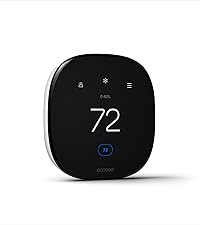
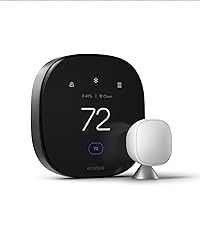
The ecobee3 Lite Smart Thermostat is a sleek, Wi-Fi enabled device that offers programmable heating and cooling control. Compatible with major voice assistants like Alexa, Siri, and Google Assistant, it features occupancy detection to optimize energy use and save up to 23% annually on utility bills. This certified refurbished model comes with all original accessories, a 90-day warranty, and is designed for easy DIY installation, making smart home comfort accessible and affordable.




| ASIN | B06W56TBLN |
| Additional Features | Door Sensor, Window Sensor |
| Backlight | Yes |
| Best Sellers Rank | #68,474 in Tools & Home Improvement ( See Top 100 in Tools & Home Improvement ) #88 in Home Programmable Thermostats |
| Brand Name | ecobee |
| Color | Black |
| Connectivity Protocol | Wi-Fi |
| Connectivity Technology | Wi-Fi |
| Control Method | Voice |
| Control Type | Touch |
| Controller Type | Amazon Alexa, Android, Google Assistant, Vera, iOS |
| Customer Reviews | 4.4 4.4 out of 5 stars (12,461) |
| Display Type | Touchscreen |
| Finish Types | BLACK |
| Global Trade Identification Number | 00627988303154 |
| Included Components | ecobee3 lite thermostat, power extender kit, hardware pack, instructions, wire labels, mounting plate, trim plate |
| Item Dimensions D x W x H | 1"D x 4.05"W x 4.05"H |
| Item Type Name | Smart Thermostat |
| Item Weight | 16 ounces |
| Manufacturer | Ecobee |
| Manufacturer Warranty Description | 3 year limited warranty. |
| Material Type | Plastic |
| Model Name | ecobee3 lite |
| Model Number | EB-STATE3LT-02 |
| Mounting Type | Mounting plate and screws |
| Number of Batteries | 1 Lithium Metal batteries required. (included) |
| Power Source | AC/DC |
| Product Style | ecobee3 Lite SmartThermostat |
| Screen Size | 3.5 Inches |
| Shape | Rectangular |
| Specific Uses For Product | Furnace |
| Temperature Control Type | Heating, Cooling |
| UPC | 627988303154 |
| Unit Count | 1.0 Count |
| Voltage | 24 Volts |
M**S
Highly Recommended Ecobee Thermostats!
As with everybody else, I researched which wfi thermostat will be fitting in our 3-zone two wire (white-W, red-R) Boiler Heating system (older home). There were very good reviews on the different products. We use Alexa at home and I was drawn to Ecobee3 Lite thermostats. Additionally, we appreciate the use of sensors. Youtube, Amazon reviews and Ecobee support provided me an easier way to provide constant power supply on these thermostats. I bought an Elk 24VAC 40 VA transformer to power my 3 Ecobee3 Lite thermostats via connection to C (common wire) and Rc. The old Boiler wires are connected via white wire to W and red wire to Rh. I followed all advises/requirements that power has to be turned off to the HVAC system when you plan to do work on your thermostats. I spent a few hours re-wiring our 3 zone system through the walls and our crawl space using a thermostat wire 18/5; then, installed the 3 Ecobee3 Lite thermostats. The result was very good. Once I turned on power to the HVAC and plugged in the 24VAC transformer, everything worked properly. The Ecobee3 Lite thermostats exceeded my expectations from installation, connections, ease of use, voice commands using Alexa, web portal use and android phone use; it works like a charm. I like the setting up of schedules, assigning different temperatures (i.e. home/away/sleep), screen on/off, etc. Fall and Winter is coming and I want to see how savings works. We have several sensors as well to check the different areas of a particular room/s. This is so much modern as compared to our older thermostats. I'm glad that I chose this product. As a caution, if you plan on doing this project and you are not familiar with your electrical systems, HVAC system, recommend that you hire a professional. I am no professional but just enjoy doing small projects at home. Lastly, check with your electric and gas providers for rebates when buying this product.
E**I
SMART Thermostat, Sleek Look
Update: November 2018 My wife and I just sold our house (ecobee included) and we will be purchasing a new one for our next home. It's been almost a year, and I can't tell you enough of how much we LOVE having a smart thermostat. I'm not sure how the other ones are, but this one is incredible. It's very convenient when we get ready for bed and one of us thinks it's too hot/cold so we just say "Alexa, ask ecobee to change the temperature to 77" or whatever. That's all there is to it. Not just that, but you have an option to program times/temps, and you can control it with your phone when you're away. This is great when you want to save money and control the temp when you're away, or if you have animals at home and you want to make sure they're comfortable. A year later and we still LOVE it. I wouldn't want the learning feature the Nest has, b/c what if we don't want it at a certain temperature but the Nest thinks we do? I wish the Ecobee looked as good as the Nest, but it's still slick looking. Original Review: December 2017 Oh my goodness. My recent addiction is smart home. Looking through amazon and cnet and I came across this. I actually came across ecobee4, but this is basically the same thing, except without the built in Alexa. I'm not going to talk to my thermostat anyways, especially when I have an Eco Dot in the room I stay in (living room & bedroom). THIS DOES work with Alexa though, just doesn't have it built in like an eco. Anyways, this thing is a huge upgrade to the old thermostat. It looks fantastic, I can change the temperature from my phone or I can ask Alexa "Alexa, ask ecobee to turn the temp to 76", I can check the local weather from it, and I can have presets for home/vacation/whatever. It was very quick and easy to install. If you're going for a smart home, and don't want to spend $200 - $300 on a thermostat upgrade, I DEFINITELY recommend this. Looks incredible on a wall, and functions amazingly.
D**N
For people that want a thermostat that helps you manage your HVAC system, & not just a pretty toy.
[This an edit of my original post, because Amazon is not displaying my images to users in the order that I entered them. Hopefully my revised numbering will now correspond to what you see.] First of all, I will give my opinion of the Google Nest Learning Thermostat, which I had for nine months before I replaced it with the Ecobee3 lite: The physical Nest thermostat is very attractive, & there is nothing wrong with the hardware. However, the web & mobile app software is very primitive (in my opinion) in helping users with any detail for understanding how their HVAC system is working (or not). See image #5, which shows the amount of usage each day, for the last ten days (note that you can click on one of the bars in the real graph, to see the individual on/off durations) . That's it; that's all the data Google shows you. They DO send you a monthly feel-good eMail, comparing your last month's usage with the prior month. I mean, how useless is that (unless you live at the equator)? Now compare that to the data in image #2 & #4; these are just some of the several graphs & charts that are freely provided for any of the home Ecobee thermostats. Note that I measure temperature in Celsius units (15C = 59F; 20C = 68F; 25C = 77F; 30C = 86F; & so on), but the default is Fahrenheit. Now, if your goal is to have a pretty thermostat (& it _is_ pretty) that you don't have to mess with after the two weeks it takes to learn your habits (although in my opinion, it's easier & quicker to just set up your schedule manually), then the Nest may be for you. However, if you would really like to be able to see how your HVAC system actually performs, the Nest is the wrong product. If you have a Google Home setup with a number of other Google products (like I do), that's fine. Google Home products automatically find Ecobee thermostats & let you include (& control) them in your Google Home environment. Same for Amazon's Alexa, by the way. I initially setup a schedule on the Ecobee (image #3), but since my schedule varies so much (I'm retired), it wasn't helpful. However, the Ecobee has "geofencing", which allows you to use your smartphone's location to tell the thermostat when you are away. The Nest provides a similar function by using sensors in the home to detect motion (& you can also do this with the Ecobee). However, with that motion-detect function on both the Nest & the Ecobee, the thermostats wait a while (hour or so) to make sure you've left, & they have no idea you are returning until you walk in the door. With the Ecobee's geofencing, you can set a radius, outside which the smartphone app decides you have left the area. The default is 100 meters (about 330 feet), I but I have set mine to about 6438 meters (four miles). There is no practical limit to how big the radius is, & you can very quickly change it. This means that when you start to return home, your home can automatically start heating or cooling your house while you are still some distance away. But wait; there's more! :) As good as the Ecobee graphs & charts are, they're not nearly as good as what a (free, no ads) 3rd party app (beestat) & website (beestat.io) provide. See image #6 for an example of how you can see how your HVAC performance, the Ecobee schedule, & your indoor & outdoor temperatures all compare. If you buy additional sensors, you can place them in various rooms to see how your home heats or cools (see image #7), & use them to control the Ecobee thermostat. (The Nest also has additional sensors available, to perform a similar function.) Image #1 shows the consistency of the Ecobee sensors, when I temporarily moved them all to the same room to compare them. So, how does all this techie info help you? Here's how it helped me: For several years (ever since I had to remove the shade trees on the south side of my yard), my air conditioner seemed to be working harder than usual. I was considering having a service call to check out my system & possibly add refrigerant ($$$). I bought the Nest thermostat, hoping it would give me some insight into how my air conditioning system was working, but it didn't, as I described above. When I installed the Ecobee thermostat, I could see the temperature rise & fall in my house (& outside) as the air conditioner worked, & saw that it was doing its job normally. So, that saved me the expense & nuisance of a service call. Further, now I know what normal looks like, so I can diagnose potential problems in the future.
M**D
وصل الجهاز بحالة جيدة الجهاز رائع و انا اشتريه دائماً
S**D
After researching and reading many reviews about this thermostat, decided to purchase from US Amazon. Surprising it worked very well in Australia. We had a very old analog thermostat (using mercury and springs) which replaced it with this Ecobee3 Lite. It made our air-conditioning system new and smart. The Apple HomeKit integration is much better than I expected. It has temperature sensor and humidity sensor. The smart schedule feature is very advanced and learning the current temperature to adjust the setting automatically. The Ecobee app is great and it receives regular updates. Love the bee flying animation on the screen at the beginning of the setup. Maybe it is a bug, but during the setup, when choosing Celsius as the display unit, it still uses Fahrenheit during one of the following steps: setting the comfort temperatures. After that, everything is Celsius.
G**Z
Al fin puedo prender la calefacción de donde este. Fácil configuración.
S**N
Si esta muy practico y fácil de usar sobretodo desde la APP
V**R
Bought 2, both arrived in good condition although strangely in different manufacturing origin boxes, although in operation identical. Connected to HomeKit and both work flawlessly. They are connected to a mesh network and each to different access points. Have not had a single drop in 5 months of use. Only 1 speed of operation. But this was known from the specs. Connected to AC only, roof HVAC system. Works well, and plenty of customisation options through the web portal. HomeKit app is basic but functional. Recommended.
Trustpilot
2 months ago
3 weeks ago