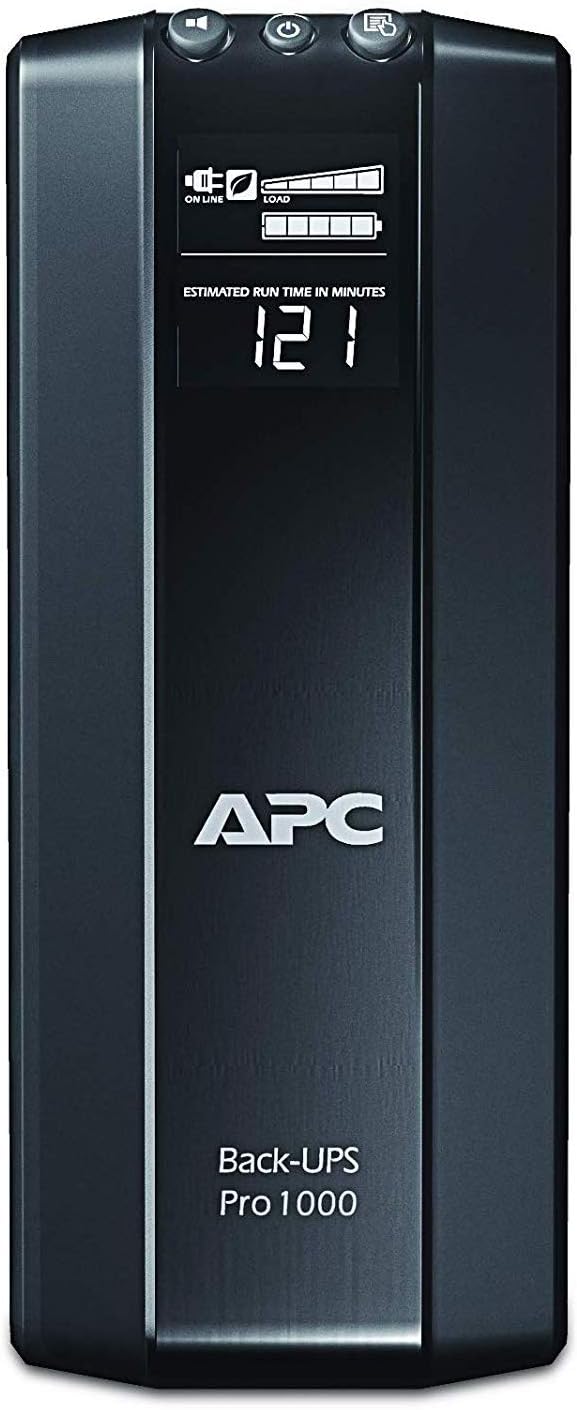
⚡ Power Up Your Peace of Mind!
The APC Back-UPS Pro 1000VA UPS Battery Backup & Surge Protector (BR1000G) is a robust power solution designed to keep your essential electronics running during outages. With 1000VA / 600W capacity, 8 outlets, and advanced features like Automatic Voltage Regulation and intelligent battery management, it ensures your devices remain protected and operational when you need them most.
| Material Type | 1 |
| Battery Cell Composition | Lead Acid |
| Color | Black |
| Item Weight | 23.6 Pounds |
| Output Voltage | 1.2E+2 Volts |
| Power Plug | Type B - 3 pin (North American) |
| Output Wattage | 6E+2 Watts |
| Wattage | 600 watts |
| Connector Type | NEMA |
| Number of Outlets | 8 |
| Frequency Range | 60 Hz |
| Input Voltage | 148 Volts |
| Maximum Power | 600 Watts |
| Voltage | 120 Volts |
| Amperage | 9 Amps |
| Form Factor | Tower |
M**G
Reliable and quiet
This summer I encountered several power outages at my home due to heavy thunderstorms passing through and decided I need a UPS for my computer. Among the Back-UPS PRO family I chose this model providing 1000VA/600W after weighing my power needs against the physical size and weight of the UPS. I run an iMac with a couple of external hard disks, having a total power consumption of about 180-200W in typical usage (web access or text editing). The UPS tells me it provides about 25-30 minutes runtime for this load which very well meets my goals. I mounted the UPS on a single-board shelf at the foot of my computer table - a laptop style table on casters which I had already heavily customized to hold hard disk and other accessories while hiding cables in the back. The shelf needed to be rather sturdy to hold the unit's weight of 23 pounds. A pair of braced brackets and a wooden board from a hardware store were sufficient.The shipping box contained the UPS, a USB cable to the computer, and a coax bridging cable, and no accompanying software, as several users noted. That said, add-on software is not needed on the Mac since Mac OS X has very good built-in support. Upon connecting the USB cable, the OS recognizes the UPS model and presents options relevant to UPS operation in the Energy Saver preference pane (under Lion, and I believe since Leopard). Sleep times and screen dimming can be customized specifically for the scenario of running under UPS power. A shutdown can be initiated based on one or more of three criteria: time having run on UPS, time remaining on UPS, or percentage charge remaining on the UPS. I chose the latter, with a conservative setting of 25%.The model does not make any noise during regular use. On loss of input power, it starts to quietly hum a little from the internal power source. On push of a front panel button, the font panel display cycles through various characteristics such as voltages, power, and estimated runtime. Its back-light can be set such that it is turned off during normal operations and comes on for a minute after pushing one of the buttons. I wish the display were a little more data-rich to avoid the cycling. The buttons are a little mushy and wobbly but suitable for the expected infrequent use. There is a sufficiently loud beeper which can be muted. By default, it beeps after loss of input power. As others noted, the beep would be rather inconvenient at night, and the ability to switch it off is very welcome. On loss of input power the computer is notified and Mac OS immediately pops up a warning message. After reaching a configured threshold while on UPS power the computer is shut down in an orderly manner.I had this unit for a couple of weeks now and I am very happy with it.
M**R
Does the job well
I bought this to deal with the blackouts I had been dealing with. After three power outages that abruptly turned off my gaming PC in the middle of usage, I needed to find a way to protect my PC from further power disruption so as not to break it.This back-UPS is heavy but sturdy. It is not a plug and play machine. You actually need to physically pull out the battery and flip it over to insert the battery in the correct orientation. If you don't do that, then it probably won't work.I didn't install the software or in fact mess with any of the settings. Once I installed the battery correctly, I plugged in my PC tower and my double monitors. After some consideration, I plugged in my TV and PS4 as well because I had extra plugs. And I did use multiple extension cords to fit everything.When my first power outage happened I didn't even notice it happening. My computer didn't flicker or react in any way. I was pleasantly surprised at how smooth the transition was from power to battery. Unfortunately, with my computer on, the display said it only had 10 minutes of power left even at full battery. Which is fine for what I needed--all I wanted was the chance to properly shut down my computer on my own terms in the event of a blackout. Once my computer was off, the display changed to around 100 minutes of power, and when I turned the TV on it changed to 60 minutes. The run time isn't very long but the UPS was satisfactory for me in providing continuous power to protect my computer.I haven't used it very long so I can't attest to its longevity.As a side note I noticed when I first plugged everything in I faintly smelled burnt plastic. The smell lingered for a couple days but I didn't see any issues with the device. After a while, the smell vanished. I'm not sure what it meant but in my personal experience it did not affect its ability to do its job.
S**S
Works great! Mostly compatible with Macs
I've bought two of these now. They are great. Thought this review may help a mac user considering purchase.The advanced power settings require windows to setup, but I did this through Parallels, and it works great. When I'm done at night, and power down the computer, all of my (now inactive) peripherals that are plugged into the managed plug are powered down to save power. I know it's about 15 watts it's saving me thanks to the great LCD display on the device. Not much, but it all adds up. Again... to take advantage of certain advanced settings you need Windows.It'd be great if APC made a Mac version of the management software, but if you can use a PC, parallels, vmware, etc... (even borrow a buddy's temporarily for the setup) you'll be good to go with the advanced power management settings. But even without using Windows the basics work great... When I plugin in the provided USB cable to my mac, the battery level, remaining time and power source show up at the top of the menu bar on Lion and Mountain Lion (may also work with previous versions of Mac OS X - you'll have to look). Also, in System Preferences additional options show up on how to handle a power outage. These are built in to the OS and work perfectly with the APC BR1000G UPS.One of these keeps my DSL modem, my Airport Extreme base station, some external hard drives, and a Mac mini I use as a fileserver and iTunes server running. It'll run for quite a while too. So... since the router and Wi-Fi access point have power backup, the internet keeps running though a power outage! Very nice... since ipads, laptops, kindles, etc have their own batteries (gives you something to do while the power is out) but it's especially nice for minimal downtime for those momentary power outages.For home or business use it doesn't take much time wasted with power outages to justify this purchase - especially if you have irregular power service. I highly recommend this product.
Trustpilot
1 day ago
1 month ago