We remain fully operational. Our teams are working around the clock to ensure your deliveries continue safely.

DOWNLOAD THE APP


Customer Services
Copyright © 2025 Desertcart Holdings Limited
DOWNLOAD THE APP
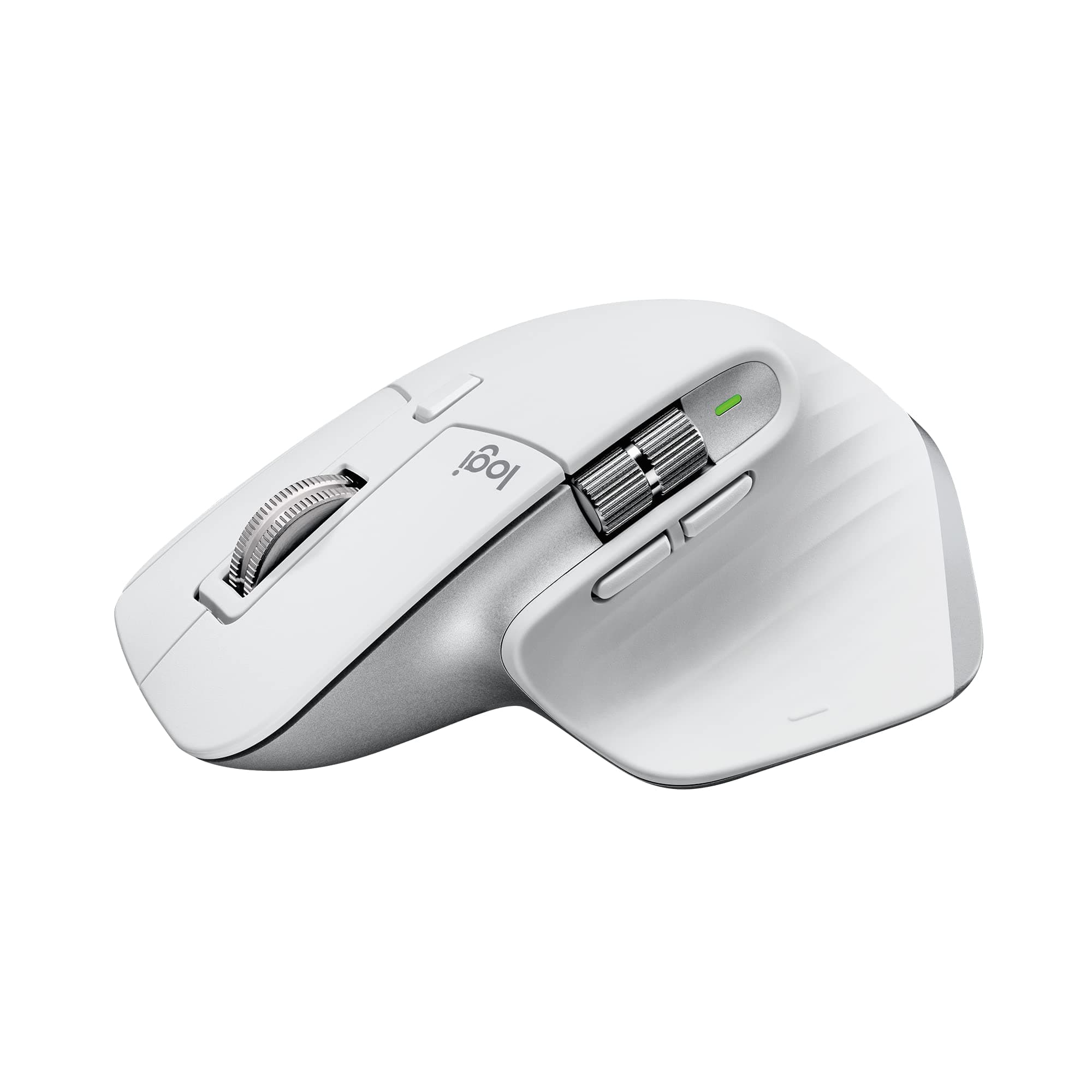



🖥️ Elevate your Mac setup with the MX Master 3S — where precision meets silent power.
The Logitech MX Master 3S for Mac is a premium wireless Bluetooth mouse optimized for macOS and iPadOS, featuring an ultra-precise 8K DPI track-on-glass sensor, 90% quieter clicks, and MagSpeed scrolling that’s 90% faster and 87% more precise. It supports multi-device pairing with seamless file transfer, offers ergonomic design for all-day comfort, customizable app-specific profiles, and USB-C rechargeable battery lasting up to 70 days. Made with recycled plastics, it’s a sustainable, high-performance tool tailored for professional Mac users.


| ASIN | B09KWXZ1HW |
| Additional Features | Ergonomic Design |
| Antenna Location | PW |
| Are Batteries Included | Yes |
| Are Batteries Required | Yes |
| Battery Average Life | 1 months |
| Best Sellers Rank | #281 in Computer Mice |
| Brand | Logitech |
| Built-In Media | MX MASTER 3S Mouse, USB-C charging cable (USB-C to USB-C), User documentation |
| Button Quantity | 7 |
| Color | Pale Grey |
| Compatible Devices | Personal Computer |
| Connectivity Technology | Bluetooth |
| Customer Reviews | 4.5 4.5 out of 5 stars (6,543) |
| Embellishment Feature | Gesture Support, Silent |
| Enclosure Material | Plastic |
| Hand Orientation | Right |
| Hardware Platform | Mac, PC |
| Item Dimensions L x W | 4.9"L x 3.3"W |
| Item Weight | 0.31 Pounds |
| Manufacturer | Logitech |
| Model Name | MX Master 3S |
| Model Number | 910-006570 |
| Mouse Maximum Sensitivity | 8000 Dots per Inch |
| Movement Detection | Optical |
| Number of Batteries | 1 Lithium Polymer batteries required. (included) |
| Operating System | Windows, MacOS, Linux, ChromeOS, macOS, iPadOS |
| Power Source | Battery Powered |
| Range | 30.0 feet |
| Style Name | MX Master 3S Mac (NEW) |
| Theme | Productivity |
| UPC | 097855174802 |
| Warranty Description | Manufacturer’s warranty can be requested from customer service |
N**N
Best Mouse I Own
This is the best mouse I own. The battery last a LONG time! The quality and feel of the buttons is great. The mouse wheel is metal, and will keep spinning if you roll it, which is great for usability. The mouse is very ergonomic and comfortable. Happy with this purchase.
J**Y
Logitech MX Master 3S: A Video Editor's Dream Mouse
As a video editor who's constantly toggling between my 16" M1 MacBook Pro, iPad Pro, and occasionally other devices, I've found a trusty sidekick in the Logitech MX Master 3S for Mac. This mouse isn't just a tool; it's my editing and productivity wand. The ease of switching between devices is akin to magic. Just like its cousin, the MX Keys keyboard, the transition is seamless. I can be trimming a clip on my MacBook and then switch to my iPad for some quick graphic work with just a click. It's like having multiple assistants at my beck and call. Now, let's talk about the programmability - a video editor's dream. The Logi app transforms this mouse into a Swiss Army knife of shortcuts and functions. Every button, scroll wheel, and gesture can be customized to my workflow. It's like having a bespoke suit; everything is tailored exactly to my needs, making editing a breeze and saving me precious time. Need to make custom program-specific hotkeys? Consider it done! The ergonomics are top-notch, too. After hours of editing, my wrist and hand still feel as fresh as a daisy. The mouse fits my hand like it was custom-made for it, and the strategically placed thumb controls are a godsend. And the battery life? I get a solid 2-3 weeks of all-day use on a single charge. It's like the Energizer Bunny of mice - it just keeps going and going. Plus, with USB-C charging, I'm back in action quickly when it does need a boost. Some people have mentioned connectivity hiccups, but I've never experienced one. In short, the Logitech MX Master 3S for Mac is a powerhouse mouse that's transformed my editing workflow. It's comfortable, customizable, and keeps up with my demanding schedule. If you're a video editor or a multi-device power user, this mouse is a no-brainer.
D**N
Better than the Magic Mouse
A few years ago, I had to (VERY regrettably) switch from a MacBook to a PC for work. At the time I absolutely LOVED the Apple Bluetooth keyboard except that at the time it did not have a num pad. I also had a wired version that did have the numpad, but obviously now that MB doesn't have USB anymore that's not practical anymore. So back then I looked for a PC keyboard to replace my Apple one, and I settled on the MX Keys and the Master mouse since that came the closest I could find to the Apple keyboard. I also really liked the Magic Mouse, except for a few things. It always felt a little sluggish (like it would not slide lightly over my desk, and I've tried a number of different things like mousepads and blotters), I was always accidentally touching it and triggering gestures, and the biggest was that I could not get used to the whole thing being a button, you had to push down the whole mouse to click. As I've used the MX mouse over the years, I have become very attached to it, it fits in my hand like a glove and it is such a pleasure using it. Fast forward to 2024 and I have to say that I love this MX Keys/Mouse a lot better than my Magic key/mouse. So much so even that when the opportunity came to switch back to MacBook, I was very happy to find out that Logi has Mac versions. Took me about 2 seconds to order them for my new Mac. Luckily the Apple BT connectivity is super stable (unlike Windows, BT is so crap that you have to use the universal wireless dongle) so there are no wires or dongles necessary. It's pricey for sure, but I spend my whole day typing and using the mouse that it's totally worth it to me. I haven't really played with the gestures but so far all the buttons work the same as I've become used to on the PC version. When I first started working on a Mac back in 2013, I really liked having the Magic mouse and loved how intuitive it was and how the touch surface had the gestures. The MX just fits so much better, there is zero tension in my hand, and the Logi software lets you customize the buttons down to the app level. Maybe it doesn't look as cool as the Magic Mouse, but it runs circles around it in every day use. For me this is the perfect mouse.
M**A
Very good
A**Y
I switched to this mouse after years of using Apple’s Magic Mouse on my M2 MacBook Pro, and it’s been a revelation. The ergonomic shape is an absolute dream—no more hand cramps during marathon work sessions. The thumb rest and sculpted design make it feel like an extension of my hand, and the textured finish gives it a premium, grippy feel. The standout feature is the scroll wheel: I love flipping between the tactile "click" mode for precise scrolling in spreadsheets and the buttery-smooth "free-spin" mode for flying through long documents. The buttons are whisper-quiet (no more loud clicks during Zoom meetings!), and the side wheel is genius for horizontal scrolling in Final Cut Pro. Battery life has been stellar—I’ve used it daily for 3 months and only charged it once via USB-C (while still using it!). Setup was seamless over Bluetooth, and Logi Options+ lets me customize gestures per app (e.g., Mission Control with the thumb button). My only tiny nitpick? It occasionally takes 2–3 seconds to reconnect when my Mac wakes from sleep—but once paired, it’s flawless. Compared to the Magic Mouse, this is a massive upgrade in comfort and functionality. If you value ergonomics and productivity, it’s worth every penny. Logitech nailed it!
G**S
Não recebi exatamente o produto que comprei. Mas a atendente Dayane merece destaque pois tratou o assunto com a devida importância e buscou minha satisfação com cliente.
C**E
Tenía mis dudas al comprarlo pero, después de empezarlo a utilizar, me di cuenta que vale lo que cuesta.
M**I
الماوس ممتاز، الاستجابة سريعة جدًا، بطارية فوق الخيال جايبه ليا أسبوع كان 60% وحاليا 50%
Trustpilot
2 months ago
2 days ago