We remain fully operational. Our teams are working around the clock to ensure your deliveries continue safely.

DOWNLOAD THE APP


Copyright © 2025 Desertcart Holdings Limited
DOWNLOAD THE APP
Buy anything from 5,000+ international stores. One checkout price. No surprise fees. Join 2M+ shoppers on Desertcart.
Desertcart purchases this item on your behalf and handles shipping, customs, and support to South Korea.
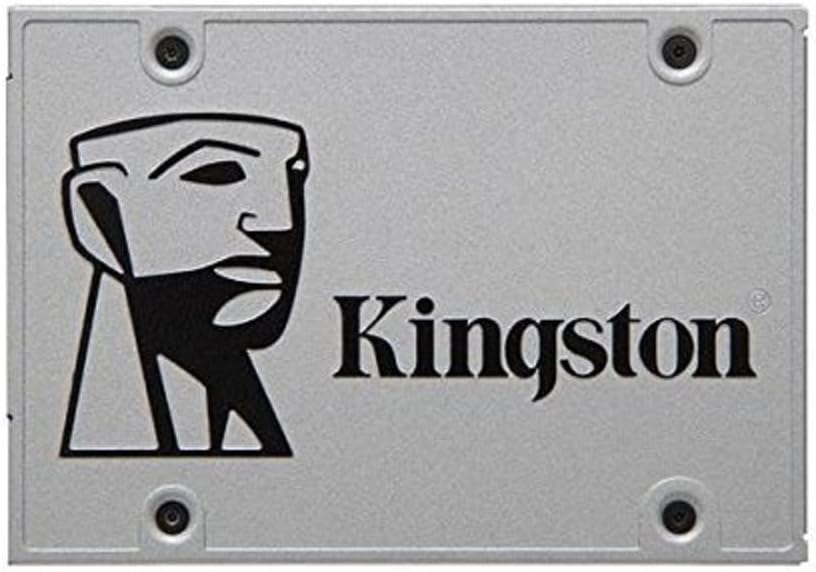
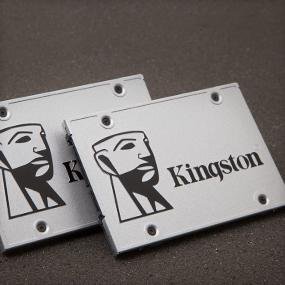
🚀 Upgrade your workflow with Kingston’s UV400 — speed, reliability, and sleekness in one!
The Kingston SUV400S37/240G UV400 is a 240GB SATA III 2.5-inch SSD delivering up to 550MB/s read and 490MB/s write speeds. Its slim 7mm form factor and durable solid-state design offer a reliable, noise-free upgrade over traditional hard drives. Ideal for professionals seeking faster boot times and efficient multitasking, it includes cloning software for easy installation and supports high IOPS for responsive computing.



| ASIN | B01FJ4UL2S |
| Are Batteries Included | No |
| Best Sellers Rank | 380,934 in Computers & Accessories ( See Top 100 in Computers & Accessories ) 2,093 in Internal Solid State Drives |
| Brand | Kingston |
| Colour | Silver |
| Computer Memory Type | Unknown |
| Customer Reviews | 4.1 4.1 out of 5 stars (3,096) |
| Date First Available | 11 May 2016 |
| Form Factor | SATA 3.0 |
| Guaranteed software updates until | unknown |
| Hard Disk Description | Solid State Drive |
| Hard Disk Rotational Speed | 2 |
| Hard Drive Interface | Serial ATA-600 |
| Hard Drive Size | 240 GB |
| Item Weight | 56.7 g |
| Item model number | SUV400S37/240G |
| Lithium Battery Packaging | Batteries contained in equipment |
| Manufacturer | KIngston |
| Operating System | Ja |
| Processor Count | 1 |
| Product Dimensions | 10 x 6.99 x 0.7 cm; 56.7 g |
| Series | SUV400S37/240G UV400 |
| Supported Software | Ja |
| Voltage | 240 Volts |
| Wattage | 2 |
| Wireless Type | Radio Frequency |
G**E
Superb SSD Recovery package from Kingston
We left replacing our Toshiba HDD (in a Sony Vaio) rather too long. Having had a "successful" disk repair we continued using it, until one day a boot took 2 hours and on reboot, things were missing and just not running. So, belatedly, we purchased this kit from Kingston. The Sony booted up ..not quite correctly but good enough. I connected up the 480GB SSD via the kit provided, using a USB3 connection. We downloaded the cloning software as instructed and away it went. it predicted a 30-minute clone operation. In fact, it took over three hours due to disk faults, many of which appeared in the last 4 minutes (which took an hour to clear). I was not so optimistic. However, upon removing the failed HDD and replacing it with the new SSD ( a 10-minute job with a small screwdriver), the system booted up in just a minute and has continued to operate flawlessly. No signs of anything missing, everything operating smoothly, much faster, and because this memory runs cooler than the old HDD the annoying Sony fan is no longer audible. It really could not have been simpler. When you consider the time I would have needed to reinstall, sort out licenses, passwords and more, this package has already paid for itself. I really cannot recommend it more highly...and especially the excellent cloning software from Acronis.
C**P
Decent SSD as far as I can see and reasonably cheap too
This is working well and I recommend it to anyone with a Hard-Disk Drive (HDD) - get one of these to REALLY see the difference an SSD makes. - Not 'that' expensive either. Not sure how this stands with other SSD's; it works well for me(so far ( 6 months)) I would recommend anyone wanting to fit this into a Desktop case to get a small drive handler though, as un-benowest to some, all Domestic SSD's 'seem' to be the size of a Laptop device and wont fit in standard Desktop drive bays! Also I recommend to new users who are not aware of hardware to not 'replace' a standard Hard Disk Drive (HDD) with this, only to compliment it; as from looking at figures, you get far more capacity on a HDD than you do an SSD: I use this for my system and then stick all my huge 'data' stuff on my slower HDD's. The performnace of an SDD makes it worth having though!
W**E
Hallelujah, no more slow hard disk
I did not want to spend a lot replacing a good laptop which lacked only the speed of an SSD. So I bought this kit to speed it up, realising that these days I can get a reasonable capacity SSD at a good price. The kit lets me download and use an Acronis software package for transferring my data from my hard disk to the SSD. My hard disk had C and D partitions. The data in C would have easily fit. However the hard disk uses GPT (GUID Partition Table) format (which from my perspective is just a pain in the ass, but I can't do anything about it). Unfortunately the Acronis software could not understand the format, so it could only copy it bit-wise, and of course that means it would not fit the SSD. Never mind. I downloaded a Windows 10 ISO image from the Microsoft web site, burned it to a DVD, replaced the hard disk with the SSD, and did a fresh install of Windows 10 Home 64-bit. There was no activation problem, just tell it to skip that, and it happily does. Then when it goes online, it figures out that the laptop had Windows before, and activates it, as confirmed in Settings / Update & Security / Activation. As for my data and apps, no problem. All my data was in OneDrive, so I just let it all download again. Because I am using the Files On Demand feature of the Fall Creators Update version of Windows 10, and told it to only download files on demand, that was easy. Then during the night I told it to make all files available locally, which it took a few hours to do, at a time when there were would be no broadband slow-down for me or others. I then installed all my regular apps. As regards drivers, Windows took care of that, as the laptop was nearly 4 years old. No need to re-install all the quirky apps and stuff that came with it. Nice to have a clean fresh install, which makes a lot of problems go away. Altogether, getting the SSD installed and doing the fresh OS install took me 3 hours. After that I did the app installs etc at my leisure. I also tweaked a few things, such as setting Hibernate to Never (for when plugged in) (and left it as after 3 hours, when on battery). (I normally have it powered all the time, so it will be on battery only for the duration of a power cut, which is rare.) Opinions are mixed as to whether avoiding Hibernate is necessary. Personally I believe it is. Since the switch to the SSD, my hard disk, now in the enclosure provided in the kit, has become a convenient 1 TB backup disk for regular weekly backups. And with the SSD, my laptop runs a LOT faster. Reboots are amazing. Task Manager never shows the disk as holding up the machine now. This is the best use of money I have made all year, and I wish I had done it a year or more ago, instead of putting up with the slowness of a hard disk. The kit provided everything I needed. I would recommend it to anyone who wants to speed up their laptop. Just check for compatibility with your laptop first.
G**T
I have a Dell Studio PC that I custom ordered in 2009, at which time I upgraded pretty much everything from the base specs. That was a good move, because going on eight years later it still has no problem doing anything I ask of it and it runs just about constantly. Lately, however, the eight year-old spinny hard drive had been making more noise than usual, which I have learned (the hard way) can be a sign it's about to fail. I did some research and decided to add an SSD, and I found out my Dell Studio already has a second hard drive bay and the wiring and plugs in place to accept it. Installation of the Kingston was quick and easy, although I discovered that out of everything that comes with the "upgrade kit", the only thing I really needed was the SATA connector. My PC already had a second data cable and plug coming over from the spinny drive, and it was hanging loose right where I needed it. The mounting plate and screws in the kit were unnecessary because the plate would not line up with any mounting holes in the open hard drive bay, but the SSD is so lightweight the data and SATA power cables basically hold it in place in the bay. In other words, I paid $9 extra for the upgrade kit just to end up using only the SATA cable to connect the SSD to one of the open SATA plugs on the motherboard, but no biggie. The "upgrade kit" also includes a USB enclosure for those who want to use the SSD as an external drive, which I also didn't need. Cloning the spinny drive onto the SSD using the included online access to Acronis cloning software download was a problem. The kit includes a software activation key once the download and installation is complete, but I never made it that far. After twice downloading the Acronis software as directed and having the installation fail, I went looking elsewhere. Apparently there is a trial version of Acronis available, but it does not do cloning and will not accept the Kingston activation key to upgrade from the free trial version. There are several free cloning software downloads out there from other sources, but after reading some reviews I went with Macrium and it worked flawlessly. The cloning process took about 3.5 hours. After making sure the cloning was successful, I changed the boot order in the BIOS and made the SSD my primary drive and will now use the old hard drive as a backup. The difference so far is impressive. My PC now boots and is ready for sign-in in less than ten seconds and is almost silent throughout operation. I can't yet say anything about the long term durability of the Kingston (some reviews report early failures), but so far so good. The SSD has given my PC new life and I wish I had done this upgrade a long time ago.
H**N
Çok iyi
J**S
Meu PC ligava em 3 minutos, agora em 38 segundos. Vou trocar o do meu not também. Bom investimento, Pena que no brasil é um absurdo.
M**N
The Hard drive Kingston Digital 960GB Ssdnow SATA 2.5 "Solid ... SSD buy it, a month I will install it on my Apple iMac and my novelty is that it does not work. I write to the seller and to date it does not solve the problem
P**3
Win7内臓のノートPC強化のため、HDDからSSDに乗せ換えました。 Win10をクリーンインストールするので、事前にデータは移す必要はなく、 事前に念のためフォーマットして認識することを確認しました。 OSバックアップのUSBから起動して、無事にWin10環境がセットアップできました。 まずは一安心。これから速度など、効果があったか検証してみます。 実測はどうあれ、体感的に早くなっていれば満足なので、不満があればまた書き込みます。
Trustpilot
2 months ago
2 weeks ago