We remain fully operational. Our teams are working around the clock to ensure your deliveries continue safely.

DOWNLOAD THE APP


Copyright © 2025 Desertcart Holdings Limited
DOWNLOAD THE APP
Buy anything from 5,000+ international stores. One checkout price. No surprise fees. Join 2M+ shoppers on Desertcart.
Desertcart purchases this item on your behalf and handles shipping, customs, and support to South Korea.
📡 Tiny device, massive spectrum power — own the airwaves!
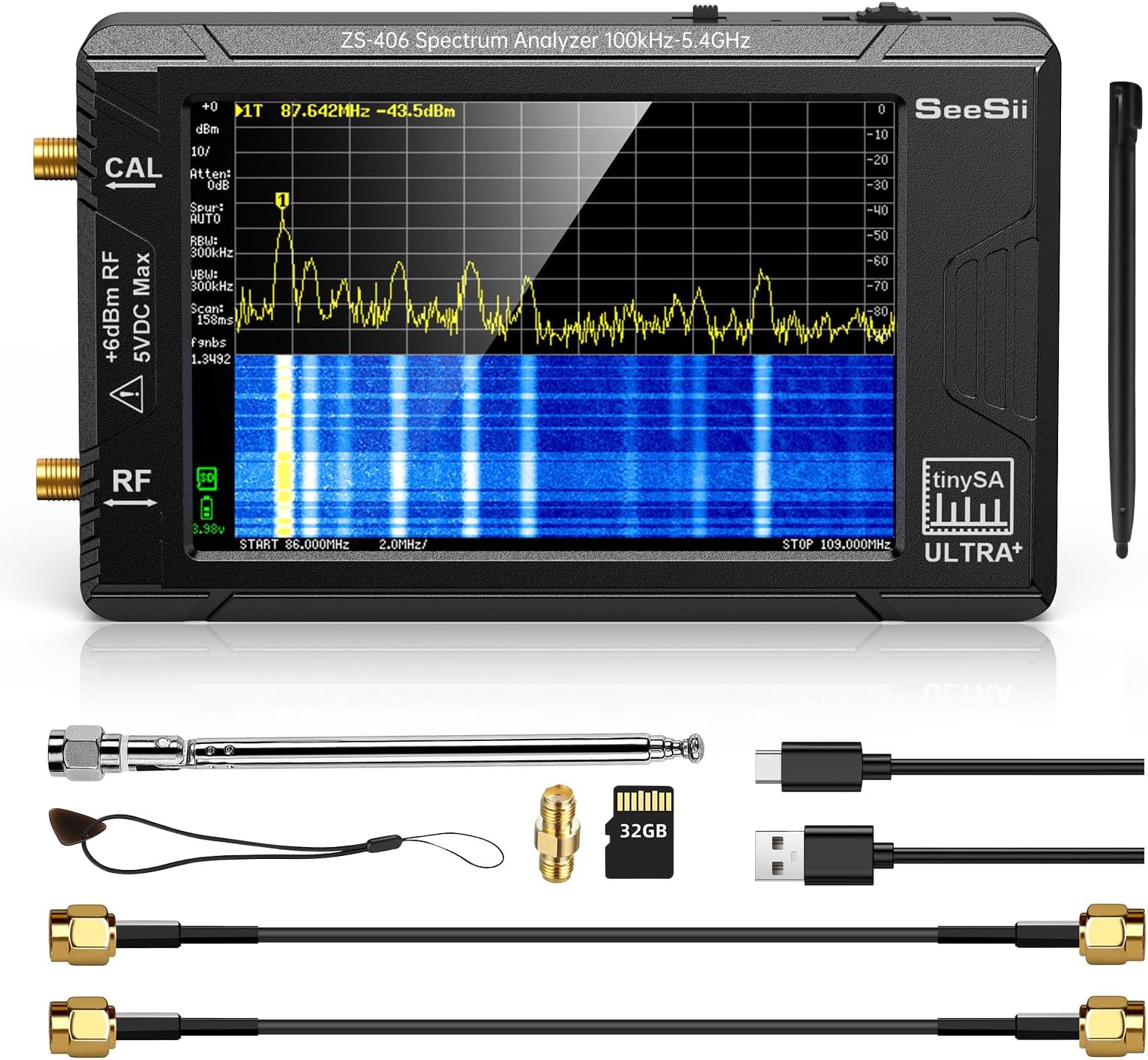
The SeeSii TinySA Ultra+ ZS406 is a handheld spectrum analyzer with a vibrant 4.0-inch touchscreen, measuring frequencies from 100kHz up to 5.4GHz. It features a built-in 32GB microSD card for direct data recording, dual functionality as a signal generator, and PC connectivity via USB for advanced control. Enhanced with ESD protection and a powerful 5000mAh rechargeable battery, this compact tool delivers professional-grade spectrum analysis and signal generation in a portable, user-friendly package.


| ASIN | B0BBGK9QJB |
| AntennaDescription | SMA |
| Best Sellers Rank | #30,802 in Industrial & Scientific ( See Top 100 in Industrial & Scientific ) #7 in Spectrum Analyzers |
| Brand | Seesii |
| Built-In Media | Tinysa ULTRA+,SMA cables,SMA connector,Antenna,32GB card,Touchscreen pen |
| Color | Black |
| Customer Reviews | 4.6 4.6 out of 5 stars (242) |
| Impedance | 50 Ohms |
| Item Weight | 265 Grams |
| Manufacturer | Seesii |
| Unit Count | 1.0 Count |
| Warranty Description | 3 Year Manufacturer |
Q**N
Awesome, and worth the money.
Amazing little tool!
D**S
Great product for the price.
I never thought that I could by a spectrum analyzer for less than $200. This product is amazing for what it will do. As a Ham radio operator, this item can be used for many things. Being able to test the sensitivity of a receiver or antenna system is great. Scanning the spectrum to find new frequencies in use for either Ham or scanner enthusiasts is easy. It can be used to determine field strength measurements. All in a hand sized package! This unit will not replace a bench SA that costs thousands of dollars, but it gives almost anyone the ability to use basic SA functions with their radio gear.
S**N
Great upgrade to the TinySA
This is a great upgrade to the original TinySA. The bigger screen is much better for use, the case is way more professional and durable. Operation is improved in nearly every way. A lot of built in measurements have been included with the Ultra version. This one does appear to be a "Real one" and not a clone. I was able to burn the newest firmware in it and it seems to work fine. Inside the build quality is very nice with good soldering, etc. There seems to be good programming support with some easy to use Python code and a decent TinySA application (that you can also use to update the firmware). Overall - for the cost, I certainly would buy this again. Edit - I just completed a Measurement Level Calibration Verification against my calibrated 4 GHz Signal Generator. The TinySA Ultra meets specifications (quoted as +/- 2dB). My test setup has a measurement uncertainty of +/-0.5 dB not including mismatch error to the TinySA, so it did really well! (See attached figure).
P**.
Works well enough
This id not a professional tool. If your getting it to debug your WiFi problems then it might help but it is not the best tool for the job. This wont get you professional results, but it should get you a rough idea of what is going on. It's not useful for WiFi because WiFi butst transmits far faster than this will pickup very well, you usually get only 1 pixel every few frames. But if you use it right it can help you identify sources of interference.
J**E
Surprisingly good SA features in a tiny box
I bought this to keep in my laptop bag for quick frequency scans at broadcast sites. I am surprised it works so well! In one instance, I used it to investigate interference to the LTE cellular band (720MHz), and was able to not only identify the source, but also confirm corrective actions were successful. I upgraded the software to allow for use past 1GHz and was able to clearly view an L-band signal out of a satellite LNB (~1100MHz). The screen is small and navigating the menus is a little awkward at times using the included pencil, but it's fine in most cases. And remember this is not a $15k analyzer, so the VBW, RBW and sweep times are not going to compete with one that is priced 1000x more. But for something that is small enough to fit in your hand, runs on batteries (for quite a while, honestly), and does a good enough job for most simple tasks, you can't beat it. Don't forget to buy a few SMA adapters, too.
G**Y
I wish I'd had this for the last 20 years
When I think of spectrum analyzers, I think of the $10k tool that I have to fight my co-workers to borrow. It's the one work tool I thought I'd never be able to just get my own that I could keep at my desk. I bought this assuming it would be kind of lame, but hoping it would at least let me see when my transmitter is on and the center frequency. It turned out to be a great tool. It's got a zero span mode, channel measurement with peak detect, a decent PC program it links to with USB etc... I love this thing! I'm an embedded software guy and not super technical with spectrum analyzers so I can't give you a full comparison of it VS our Rhode & Schwarz. It seems slower on screen refresh and I don't think it has as many options available for RBW and VBW, but it worked very well for the tasks I put it to and it's *easily* worth the price tag.
V**M
Dislike the screen, some software issues, lack of a feature, but works.
I'm honestly unsure on this device. I kind of want to return it. It wasn't quite the quality I expected. Particularly in the screen. It uses a pressure screen rather than a touch screen which makes it extremely hard to tap things. Even with the pen. I did the drawing pad just to test and boy it was just awful, drawing lines to areas I wasn't even touching, thinking it was still connected when I let go and touched somewhere else, skipping entire segments as if I let go when I didn't. Its no wonder I keep tapping the wrong menu items all the time and it keeps glitching when I try to tap things. Its extremely hard to drag the marker around when I need to. I was also kind of annoyed I had to go and buy an antenna just to use its full range. I kind of expected it to come with one for the non-discount price but, I guess whatever. As per the software parts, I tried connecting with my PC and turns out, you can't access the SD card through USB, which kinda sucks. It also seems that the tools they recommend on their website don't work. They connect to the device, but they won't actually do anything other than that, no graph no waterfall no scanning nothing. They just sit there. I had hoped to use a tool to import the presets I already put into the device and I just couldn't get the tool to even do anything whatsoever once it established connection. (WinSpectrumIII) More on the software, there seems to be no option to stop it from clearing the waterfall every time you open and close a menu. Which makes using the internal screenshot tool useless because every screenshot clears the waterfall before it takes the screenshot. I was up on the roof pointing this thing in different directions and using screenshots because it was too bright to see the screen fully so I could examine indoors. Five minutes between each to let the waterfall fill with long scan time. I'll attach the results here and you can see what I mean... (P.S. Might be nice if you could change battery from voltage to percentage) I don't know a ton about radio stuff, I used Google's AI Gemini to help me set the device up and find the network signals I needed to. Its kinda nice that Google's AI knows a lot about it and was extremely helpful. The guide on the other hand being online only, wasn't so much. In fact its got some pictures on it that require a password to access, which was like, wtf? Its kind of annoying there also wasn't a basic guide that came with the device to explain anything and that they hide the Ultra mode behind a code thats only available online. Tell me, what do you do if you get one of these devices and your site is down for whatever reason? Maybe even permanently? The users are just screwed in that case? Include a warning when unlocking, rather than locking it with a password. The user should have to click "I understand and have read your warning" before using it. I really hate online only lock outs. I understand your reasoning for wanting people to first use the guide to understand what they're getting into but the danger in that is that one day, the access may disappear. Which is also why the guide shouldn't be online only too. Its just good that the AI I spoke of knew a lot about it already and could help me with 100% of what I needed. I did have -some- trouble with it, trying to do what the AI suggested where it would say things like Reduced Linearity when I disabled LNA and increased the ATT to max 30dB, no matter what I did there it seemed like it just couldn't get rid of that red message even when I got further from the source. Again I am no radio expert, I was just testing on Wifi first so I could learn how to control it before I tried using it to find T-Mobile's towers and stuff. I'm sure there's an expert's opinion on this particular thing and I'm sure I may have just been doing things wrong on this particular part. Who knows though. My review here merely reflects the software issues I had (screenshot, waterfall reset, PC control, No SD access) and the bad screen type as well as the guide and lockout. Frankly, I'm wondering about returning it. I have to decide over the next week or so. It is handy, I'll say that for sure. Not something I'd use often but it was helpful to a point but the biggest thing is this screen, boy is it hard to control when you tap the wrong thing all the time.
R**S
Un buen grupo de buenas caracteristicas de medicion muy utiles en el trabajo de campo. Tan pequenho que lo puedes tener en la palma de tu mano y con todo lo necesario para realizar mediciones basicas e intermedias de calidad
Trustpilot
2 months ago
1 week ago