We remain fully operational. Our teams are working around the clock to ensure your deliveries continue safely.

DOWNLOAD THE APP


Copyright © 2025 Desertcart Holdings Limited
DOWNLOAD THE APP



Buy anything from 5,000+ international stores. One checkout price. No surprise fees. Join 2M+ shoppers on Desertcart.
Desertcart purchases this item on your behalf and handles shipping, customs, and support to South Korea.
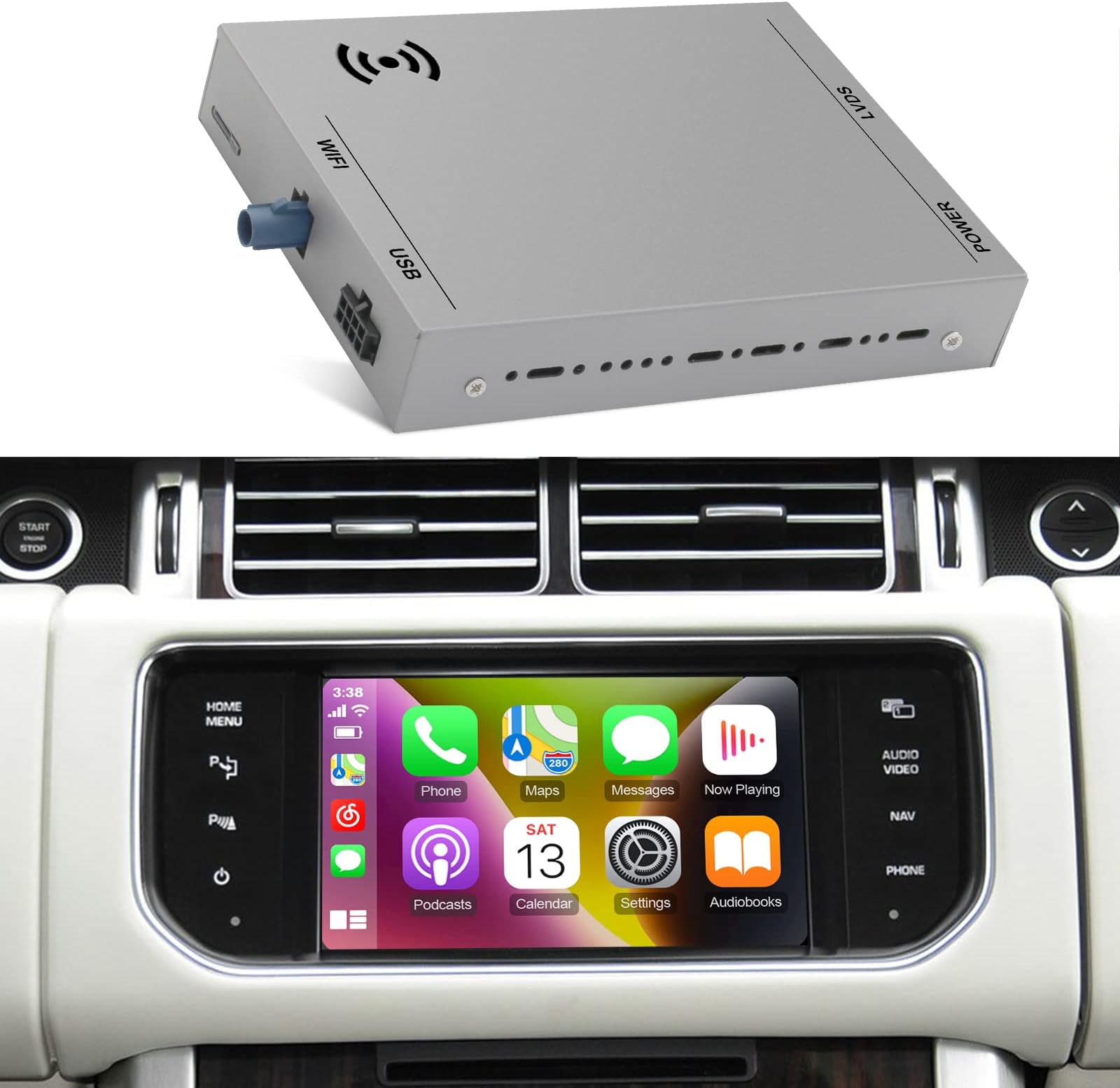
🚗 Upgrade your drive: Wireless CarPlay meets luxury Land Rover & Jaguar style!
This Wireless CarPlay Receiver SmartBox is a premium retrofit kit designed specifically for select Land Rover and Jaguar models (2011-2017). It supports both wired and wireless Apple CarPlay and Android Auto, including Mirror Link functionality, enabling seamless smartphone integration on your car’s original display. Powered by a SUNPLUS SPHE8368U Cortex A9 processor and equipped with 5GHz WiFi, it ensures stable wireless connections and smooth operation. The kit also supports steering wheel controls, original or aftermarket cameras, and voice assistants, delivering a safer, smarter driving experience without compromising your vehicle’s factory interface.


| ASIN | B0BXDH2D4S |
| Additional Features | Bluetooth |
| Are Batteries Included | No |
| Audio Output Mode | Stereo |
| Best Sellers Rank | #49,452 in Electronics ( See Top 100 in Electronics ) #643 in Car Audio Receivers |
| Brand | AUMUME |
| Built-In Media | 1 x Car Bluetooth Receiver |
| Compatible Devices | Smartphone, Speaker |
| Compatible with Vehicle Type | Car, SUV |
| Connectivity Protocol | Bluetooth |
| Connectivity Technology | USB, Wi-Fi |
| Control Method | App |
| Customer Reviews | 4.2 4.2 out of 5 stars (66) |
| Display Type | LCD |
| Human-Interface Input | Buttons |
| Item Weight | 0.9 Kilograms |
| Manufacturer | AUMUME |
| Map Types | North America |
| Mfr Part Number | 8816 |
| Model Name | SmartBox |
| Model Year | 2011 |
| Mounting Type | Dashboard Mount |
| Operating System | Android |
| Screen Size | 7 Inches |
| Supported Satellite Navigation System | GPS |
| Touch Screen Type | Capacitive |
0**C
Works perfect in my 2016 Land Rover LR4
This ISUDAR product, while it has very limited directions, was intuitive to install and is working perfect. I was shocked to find an Apple CarPlay tool for my 2016 Land Rover LR4 that works so well and, most important to me, retains access to my original Land Rover 4x4 menus. You might want to buy a USB/3.5mm flush ext on Amazon to complete the installation as you see in my last photo. UPDATE: A week in (maybe due to iPhone update?) but now need to connect via USB as BT no longer working. GOOD THING I ADDED THE USB EXT. ABOVE AS NOW I NEED IT! Still a 5-start item!
H**N
Fully integrated wireless CarPlay.
Product works great. You’ll have to watch a YouTube video to figure out how to get it all connected. You need to take the whole dash apart. Overall took me about 1.5hrs to install. But works amazing. Fully integrated wireless CarPlay in my 2016 Range Rover Sport.
S**G
Works well but does not support all steering wheel functions on Evoque
A great option to add Carplay or Android Auto to an older car that does not have it as standard. Installation is relatively straightforward and there are several online videos you can watch, the one I followed is by a user called notthatkindofachannel on you tube. It requires removal of part of the dashboard and the transmission tunnel cover but is not a difficult job. Once all the necessary parts are removed it is easy to disconnect and reconnect the existing wiring as detailed with the device. There are some DIP switches on the back but the description of their possible settings is unclear, I left them as they came (all off) and everything works ok. I think the idea here is if the display doesn't work try one of the other settings until is does, but unsure. Once installed and you have paired you phone ether wired or wireless the system works well with a couple of caveats. On my 2015 Evoque, of the buttons on the steering wheel only the volume control works, other functions such as changing track and answering or ending calls have to be done on the touchscreen, not a huge issue. Initially after installation I was having trouble getting it to play music, everything looked like it was working and the track time was advancing on the display but no sound. I believe I resolved it as it now works by unpairing the phone from the original car bluetooth. This connection is not required as the bluetooth is handled through the new unit so maybe the two were clashing in some way. Another useful feature in the settings is the actual box is the ability to set independent volume levels for things like music, navigation and phone calls. With a bit of experimentation you can get the levels so each of those items comes through at a suitable level without having to adjust the master volume on the car. You can also use this to better match the original volumes of the car so that you don't have to adjust the master volume higher or lower than before.
S**4
Touch sceen doesn’t work when module installed…cs no help!
Installed without a problem but touchscreen will not work. Customer service is bad. All of their suggestions on adjusting dip switches did not work. Now they are ignoring my messages. Don’t buy!
P**H
Works great.
Working great and as advertised. Been installed for a few months now and no issues.
C**S
Easy install, slick add-on to factory
Wish I would have found this earlier. Great add-on will keep me in my 2016 Rover for many more years. There is a really good YouTube - you have to take a little more of the dash apart than I wanted but it was not hard. I think too me little more than hour — most difficult part was fitting all the wires back in (and that wasn’t bad). Pay attention to your settings - you need to use AUX for sound and I turned off screen refresh (see photo). You need 10mm socket and 20 star — I didn’t have a trim tool and managed — recommend a flashlight too.
S**D
Amazing CarPlay Option for RR Sport Supercharged
This item was shipped very quickly. Once I received it, I watched a YouTube tutorial and installed it within 1-1.5 hours. Now I have CarPlay on my 2014 Range Rover Sport Supercharged, which is amazing. I plan to upgrade my lower panel with a touch screen now that I have experience adding this unit and removing the control panels.
F**N
Excellent Apple CarPlay option for an older Jaguar F-Type
I installed this unit to replace a GTA Car Kit I installed last February in my 2014 Jaguar F-Type V8 S convertible. I only gave this a four star rating because the loom that contains all of the wiring from the navigation unit in the back to the head unit in the front is about three inches too short. What made me want to switch was a Siri volume issue that GTA Car Kit said was not their unit. They said it was an Apple CarPlay problem. Basically when I would play music and someone texted me I couldn’t hear Siri when she read back the message. They told me to tell Siri to speak louder, or to search and change the volume settings for their unit and my car. Nothing worked. So I went out on a limb and bought this unit. In all fairness they appear to be the same, but the GTA unit cost me $575 and this one was only $359. I removed the old GTA unit in about 30 minutes, which is pretty good for a convertible. Unlike the coupe you have to remove the entire back panel to get to the navigation controls that these units plug into. After installing the new unit I tested the Siri volume issue I was having with the GTA unit. And what do you know? It worked perfectly, unlike the GTA unit. If you’re looking for CarPlay functionality without having to replace your head unit, of which Jaguar F-Type options are limited, this is a great inexpensive option. As this is plugged into the car’s navigation unit you will need to switch to the navigation button on your screen, then cycle through the modes to select Auxiliary. If your F-Type doesn’t have a native capacitive touch screen, which the 2014 models did not, you will experience a jittery swipe capability. I just put the apps I use most often on my Home Screen and that’s what comes up when I connect. I’ve attached some pics of the install. It is a pain in the butt, but well worth it to bring CarPlay to such a nice ride.
D**B
Product works well. Make sure you have it on the correct settings
D**L
Everything working great. First it was not working and I was worried but later after reading instructions properly it’s start working great.
S**R
No better than the £100 garbage from Chinese websites. All seems to be working. Connects to CarPlay but nothing on screen. Returning for refund.
P**L
Fantastic piece of kit let down by dreadful instructions! Installation was pretty straightforward if you’re comfortable taking the dash apart on your Range Rover. Make sure you get the right dip switch configuration before putting everything back together. I learnt the hard way & had to re-install after switching all dip switches into the ‘off’ position. Also, make sure you have the ‘return to home screen’ option turned off on the factory touchscreen. Took me ages to figure out why CarPlay kept reverting back to the standard factory screen! Once up & running seems to work pretty flawlessly. All in all a great product, would’ve given 5 stars if it came with a decent set of instructions.
J**D
This product does work however you have to find all instructions else where being online forums and YouTube, in my opinion it wouldn’t even be that hard for them to make clear instructions as it is straight forward once shown what to do.
Trustpilot
1 day ago
2 weeks ago