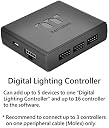
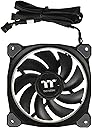
🌟 Light up your build, cool like a pro, and silence the competition!
The Thermaltake Riing Plus 12 RGB TT Premium Edition is a 120mm high-static pressure fan featuring 12 individually controllable RGB LEDs with 16.8 million colors, delivering vibrant lighting effects. It offers powerful airflow at 48.34 CFM while maintaining a quiet 24.7 dB noise level thanks to its hydraulic bearing and low-noise design. Controlled via patented Riing Plus RGB software, it supports linking up to 80 fans for synchronized cooling and lighting, making it a top-tier choice for professional-grade PC builds.

| ASIN | B077PQSJQ8 |
| Air Flow Capacity | 48.34 Cubic Feet Per Minute |
| Best Sellers Rank | #1,004 in Water Cooling Systems |
| Brand | Thermaltake |
| Brand Name | Thermaltake |
| Compatible Devices | Desktop |
| Cooling Method | Fan |
| Customer Reviews | 4.2 out of 5 stars 1,180 Reviews |
| Global Trade Identification Number | 00841163069462 |
| Included Components | fan, manual |
| Item Dimensions L x W x H | 4.72"L x 4.72"W x 0.98"H |
| Item Type Name | Thermaltake Riing Plus 12 RGB TT Premium Edition 120mm Software Enabled Circular 12 LED RGB Ring Case/Radiator Fan |
| Item Weight | 0.35 Pounds |
| Manufacturer | Thermaltake USA Direct |
| Material Type | Hydraulic Bearing |
| Maximum Rotational Speed | 2000 RPM |
| Noise Level | 24.7 Decibels |
| Power Connector Type | 9-Pin |
| Product Dimensions | 4.72"L x 4.72"W x 0.98"H |
| UPC | 841163069462 |
| Unit Count | 1.0 Count |
| Voltage | 12 Volts |
| Warranty Description | 3 year warranty |
| Wattage | 2.4 |
J**T
RGB Fans? Yes plz thnk you
The Fans are great quality, I must admit that I was skeptical at first because it was between these and the Corsair ML140's. I chose these because I liked the RGB feature which allows for color flexibility since I'm going for a black, white, and red build. The fans as I've stated are amazing they are PWM fans as well and all fans work out of the box, no dead LED's, stripped wires, scratches on or around the housing or anything. I have to admit as well that I am impressed at the amount of air these fans can move as well so between the functionality of RGB, and the fact that they are controllable (color and speed) through the software make this case fans an easy five stars for me. The cables are long, like over 18" long so be ready for some cable management. Routing from one end of your case to another will not be an issue and the LED's themselves aren't small these babies really light up the inside of my case and the surrounding area of the outside of the case. As a final note as the reviewer above stated one the software is really the only real drawback, I hope in the future they would implement more functionality over what the fans do and when for example auto switching profiles during certain games or when your desktop displays a screensaver also and this goes with all fans or anything that rotates for that matter, the faster they spin the louder they are but they aren't loud to the point of annoyance especially if you game with headphones. All in all, if you're looking for large, bright colored fans as you can see in the photos provided by myself and the other gentleman you really can't go wrong here.
S**K
They work, they're quiet, they're coloful
I'm using these as case fans, not radiator fans, and they are doing a great job with excellent control for the pricepoint and above. The software is comprehensive and unlike CAM software, does not crash Windows 10 while browsing. The "party" mode actually keeps up with the music well enough not to be a gimmick, and the other modes are very nice too. In addition, you can control each individual led on each fan with a different color, the fan speed, presets etc. Each fan can be controlled separate from the others, or, you can set one how you like, then set the others to "copy" and they just follow the one you set up. Easy setup and install, but you will need a good cable management case, or a creative routing, because you do get ample cabling. I am using this in an NZXT H400i and I'm using the stock led strip with the NZXT software side by side to the TT software and it's fine. If I change my mind, i'll change the review, but first impressions and install is dead on.
A**S
Excellent Quality Fans - Look Excellent with Performance to Match
I purchased these for an RGB build. I'm more than satisfied with both their appearance and performance! The LEDs are bright and vibrant. The frosted rings do an excellent job at diffusing the light, and the design is such that the rings are visible from both sides and the outside edges of the fan. The rings let enough light through to slightly illuminate the fan blades, but this effect would have been much better if the fan blades were white. *This is more visible in pictures than in person.* The colors are decently accurate. The fans are of surprisingly excellent quality. At lower speeds they are inaudible even in a quiet room. They become audible at about 730 RPM (around 35%). They have good static pressure capabilities and do an excellent job pushing air through radiators, but are also more than capable of being used as "air flow" fans. The speed range is about 470-1330 RPM, but the individual fans seem to differ in range by around 100 RPM. The software is usable, but lacks much of the functionality that I would expect from a high-end fan solution. The UI is rather artistic (perhaps too much so), and doesn't offer scaling for larger screens. The individual LED color selection is simplistic, but lacks functionality because of it. The color wheels are decently accurate, and do offer a numeric R/G/B option for finer tuning. Brightness of individual LEDs can be controlled. I have some issues with saving and loading profiles - it seems that every time I load a profile something with the fans is incorrect, whether it be PWM mode selection or manual speed percentage. Even on computer startup, some of the fan settings revert to defaults. Hopefully this will be addressed in future updates. Lighting has always saved just fine. The biggest downside to these fans by far is the software. I've found nothing lacking with the hardware, build quality, or appearance, but the software greatly lacks a feeling of completion. Hopefully this will be reconciled with future software updates. Nearly cost this product a star, but I don't interact with the software often enough for it to be a major concern. Other notes: The fan cables are long - very long. It's difficult to fit them all in a full tower case, so you should keep this in mind for smaller form factor builds. Each fan includes mounting hardware - four long screws and four short screws. Some additional hardware was included for mounting the controller, but I left it unused. The controller saves the selected profile and returns to it upon startup. The controller is able to completely control the lighting without the software running, but it CANNOT control fan speeds based on system temp without the software running. Each fan has a Thermaltake sticker in the center. I wish they wouldn't do this on such expensive fans. I may remove mine in the future because a few are slightly off-centered and it does bother me to look at.
B**T
Great Fans. v1.2.8 improved software a lot.
If you are looking to get these fans over because of the software integration like I was, I would say it technically works. The fans are great, their fairly quiet on the quiet setting while still producing a nice static air pressure. They can roar as well for some serious airflow. The LEDs also look great. I have no issues with the fan or the controller. Everything there is why quality, which is something I would expect at this crazy price point. Overall, I am happy with the purchase, but they have to redo their software. It gets the job done, but it's pretty crap. For reference, I only have 1 controller installed on the PC . Which brings me to my software Pro/Con List. Pros: - Has quite a few defaults to choose from as far as sequences go. - You can individually color each LED on each fan. - You can set fans 2-5 on each controller to copy the settings of fan 1 (this is useful because of the cons). - You can set a custom fan speed for each fan (based on preset values or a slider) - RGB Lighting actually works. You can choose through the RGB menu and a preselected color-picker. - Up to 5 pre-saved profiles to select from. Once you finish agonizingly customizing the fans you can do it 4 more times for easy switching. This is the software's saving grace, and the main reason I found it passable. After around 2 hours I now have 3 of my 5 profiles set up the way I want. Most of that time was waiting for the software itself. (see below). Cons: - Profiles are wholly seperate, you cannot clone from profile 1 to profile 2 and tweak it. - You could open up Internet Explorer on a Windows 98 computer running off floppy disks faster than this software registers button presses. Despite the exaggeration, I'm saying this thing's software is slow to react to user button presses. (Typically around 1-3s before it registers, then it has to actually do something too.) - The software shows all 5 fans at once, but its on a round-robin, so you can only modify 3 at the same time. The other 2 'cards' (thats what they look like) are hidden behind the 3 in the foreground. You go to modify one in the back and you run into: - Slow Animations (which isn't helping or is likely why its perceived as such above). The color changes on the software take aren't immediate, likely due to communicating with the controller. When trying to change settings of one of the other fans not in the foreground, the round-robin has to do a lazy-susan and spin around like a slow-motion 12fps gif to bring the one you want to modify to the front. All 5 fans should be displayed on the foreground at all times. No reason why the software feels like my pc aged several generations. - Changing between the default color sequences, while easy, takes a while for the software to register, then takes a few more seconds for it to pass it to the fan controller. If they were in a drop-down, that wouldn't be too bad. But no, you have to sit there cycling through each profile (half of which don't even work if you don't have the Razer software installed, which delays it even further because it animates a popup) until you get the one you want. - You can have fan1 be the 'master' of the group. But what If I want seperate groups? Then you need a seperate controller (atleast I assume its fan1 of each controller. It might be fan1 of controller 1 is master. I wouldn't even be surprised). But it should be able to be copy which one you want to duplicate. IE Fan3 shares colors with fan1, and fan2 shares colors with fans 4 and 5. You can't set them as copies, you have to manually modify each fan for the desired setup. Finally, my recomendations if some thermaltake coder gets wind of this: - Improve software response time in the GUI. - All 5 fans on selected controller should be modifiable at same time. None of this lazy-susan crap. - Drop-Down selection to go along with the current cycling through buttons for default sequences. - Put a setting in that disables and hides profiles that won't work without yet more software (Like the Razer-Integrated stuff) - Have a way to easily copy fan settings from 1 profile to another for easier tweaking rather than starting from scratch every time. - Be able to duplicate any fan's settings, not just the Fan1. ---------------------------------------------------------------------------------------------------------------------------- Edit 5/22/19: They have updated the software. Upgrading to 4 stars as it seems all my complaints have been resolved. They updated software today, so the new version is V1.2.8. One of the patch notes is "now supports 64-Bit Systems" (took them long enough). The software is now very responsive, which was by far my biggest complaint with it. I can safely recommend these to people, as I am very happy with the purchase.
D**A
COULD be great, if not for TERRIBLE software, hot spots, and jerky lights
Well I did it... I spent almost $300 on a thermaltake RGB LED kit for my water cooled desktop. I purchased 7 TT RGB PLUS 120mm fans, the case LED kit, and controller. At first I was happy-ish with my purchase, but have had nothing but issues with the terrible TT RGB PLUS software that thermaltake makes and have received NO help from them whatsoever when I attempted to contact them multiple times. Problems: 1) The LED's on these fans have MAJOR hot-spot issues because the diffusion is terrible. This is a preference thing, but pictures and videos do not show just how bad this issues is, so see them first in person before you buy. They don't look nearly as good as the corsair (or many cheaper brands) and the colors don't change smoothly so they jerk around and look cheap and cheesy by today's standards. 2) The software controls the fan speeds, NOT YOUR MOTHERBOARD, so they SURGE randomly and are extremely loud. This is downright frustrating. The software gives you options to either set a static fan speed (which is useless since SOMETIMES my system is ice cold and OTHER TIMES it's dealing with the temperatures of a custom loop watercooled, and overclocked CPU and high end GPU) or one of the "auto" speeds which give you NO adjustments for the fan curve. WHY NO FAN CURVE!?!? Clearly someone who buys this type of product is modding and every system's cooling needs are unique. But no. So every time my CPU jumps from 25c (idle) to 50+c (which happens when it it tasked to do... literally almost anything... and yes, my CPU is delidded and my load temps are very low so trust me, everything is installed correctly) it goes WOOOOOOOOSH and then quiets down within 3 seconds. It's the most annoying and frustrating thing I have ever had to deal with... especially since thermaltake could EASILY fix this issue by just making some software that WORKS, or at least giving me the option to customize their garbage software so that I could make it work. WOOOOOOOSh. quiet. WOOOOOOOOOOOSH. quiet. A little bit less "oooooooo" and a little bit more pathetic and embarrassing trash. If I leave my computer on doing nothing it annoys my girlfriend and you can hear my system from 3 doors down the hall. WOOOOOOOSh. WOOOOOOOOOOSH. pathetic. 3) THE SOFTWARE IS ABSOLUTELY HORRIFIC!!! The profiles don't work correctly, the control system is buggy and adjustments to one fan affect the speeds and lighting settings of other fans randomly. After playing with it for hours though, I was able to figure out where the bugs exist and work around them for something close to what I wanted (looks wise). Recently though, I had the biggest issue with their software yet. It automatically updated on me after working fine for months to the latest version (1.2.8). I thought nothing of this... until I tried to play a game I noticed my ping was jumping up to ~2000-3000!!! Yes, that's right. 3000. I'm an IT guy, so after a few minutes I was able to pinpoint the culprit. The TT RGB PLUS SOFTWARE!!! When running a continous ping test TO MY ROUTER, my ping goes 1-1-1-1-2425-1-1-1-1-2857 with HUGE 2-3 second ping spikes every 5-10 seconds. I'm not sure what this software is trying to do, since I DO NOT have it logged into my thermaltake cloud account and I DO NOT have automatic updating enabled anymore. So by all accounts, it should not have access to or be trying to do anything with my network connection. I have completely blocked the application from accessing the internet in my firewall, and still... It tries to do something that is making my system unusable for games. I even tried a fresh install of windows and it did the same thing. DEFINITELY THE SOFTWARE, and go figure, the old versions which at least kind of worked are not available anywhere on the internet (or by contacting thermaltake directly, who did not even respond...) So now I have to close the software entirely whenever I use my computer, so I'm graced with a SUPER BRIGHT RAINBOW LIGHT PARTY and no fan speed control. Excellent. Worth every penny. Not. This software is absolutely unacceptable for a product in this price range. There is a LOT of competition right now for RGB fans and lighting, and coming in at one of the most expensive options, I honestly expected MUCH MUCH more from thermaltake. I have been into PC modding for 15 years and purchased many thermaltake products over the years. I have always thought that thermaltake was a quality company that knew what they were doing - which is why I was willing to shell out big bucks for some "oooooo" factor and trusted them to deliver. SAVE YOUR MONEY AND BUY FROM THE COMPETITION. If they refuse to invest any money fixing this garbage software then you should refuse to spend your hard earned money on this overall garbage experience. The hardware is very nice in your hands, but in your system it's a BIG FAT FAIL. They won't add new (and much needed) features, even though they could. They don't fix existing problems, even though they could. Clearly they just don't care and aren't willing to spend a dime to help their customers. Next time I'm going with corsair... The only other premium company who makes similar products that (in my experience so far at least) have ACTUALLY WORKED.
P**Y
Software detected as virus
So these things are classy. the are s silent and Big. 140mm was a little much for me, but i made them work. at first the sftware was removed and quarantined but that birus software was found to be addware and i removed it. Malware bytes works just fine with it. you can get lost programming each individual Led. the software is very intuitive. works via USB, so older boards are fine. you can comine thers controllers and have up to 12, each with 5 ports. would still recomend after two weeks: ive noticed that i must re- run the software from time to time. it shuts off with hulu and some other net based video applications.
T**R
Great Fans, Questionable Software
I got the fans and they are great. They do exactly what they are supposed to do, and come with a plethora of mounting solutions (lots of screws). My only gripe is that the software is just truly awful. It's as if they spent 10 minutes in a board meeting hastily throwing together some semblance of a control software before declaring "Mission Accomplished!" and slapping high fives while the customers who are cursed to use it suffer. I am not a programmer by any means, but maybe make it so that the options can be controlled with dropdown menus, or allow fans detected by the controller to be rearranged so that the ripple lighting effects look correct instead of the user having to crack open the PC and fumble with plugging in the cables in the right order. Furthermore, what is the point of viewing each fan in a UI that rotates like a rotunda? Just make a list with sensible UI options next to them in drop-down menus. Allow for multiple controllers to be accessed by one master menu so that changes made to one controller automatically are applied to the other. Currently, profiles save unique to each controller, meaning that if you want to keep a cool lighting set-up, you must make it multiple times across all of the controller menus and save separately. It would also be nice to be able to adjust the LED lightings to compensate for a fan that was put in the case at a different orientation; say one fan was put in 90 degrees differently than the others, making it so the RGB loop is slightly ahead of the rest of the system. Make it so that the user can adjust the position of the lights to match the rest of the case. I could go on but you get my point. It has a bunch of issues that need to be addressed. These are great fans, but the software sucks.
D**X
The good: I love the look of how these look ...
The good: I love the look of how these look and the colors they produce. Currently running 5 120's and a single 140 in a water-cooled custom loop pc. The single 140 is on the back of the tower as exhaust (and is hooked up with the other 120's. The software has been updated and lights along with rgb settings seem to work well. The bad: The price is still a bit high but besides that here's what I have found. I am using two controllers with 6 of the rgb fans. Now, who decided to make a controller only work with 5? I mean this is not very customer friendly. However, it's good on a business side I guess as Thermaltake knows that anyone needing 6 fans controlled will have to get another controller. Besides having to get 2 controllers it also takes up space which is another big downer in using 2 controllers. Another big issue I have is that while my RGB lighting stays in sync every-so-often a "blue" or "another "color" will show up. This is extremely annoying. It occurs randomly with only one fan (though changes fans all the time) and only one LED does it (again random and isn't just one fan and one led). I have the software update automatically and it's current. Still hasn't gone away. The other big annoyance is that everytime my computer starts I get a notification about controller 3, I don't have a 3rd controller!!! So to finish, I love the fans, they look good, they have great settings (in the software), and are quiet at low-med settings (water cooled pc so when doing regular computing I can't really hear the fans and I'm using an all glass case). But even though there have been some software improvements the 3 things I mentioned are really annoying and should be fixed like yesterday. Customer service is no help because all they tell me to do is uninstall the software and ... you know the rest. So until these issues get fixed sadly I can't rate this any higher. Though, these are the best looking RGB fans out there in my opinion.
Trustpilot
3 weeks ago
2 weeks ago