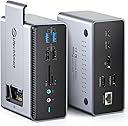
🚀 Triple your screens, not your clutter!
The UtechSmart 15-in-1 Docking Station is a powerhouse hub designed for professionals craving expanded display options and versatile connectivity. Compatible with both USB-C and USB-A laptops on macOS and Windows, it supports triple monitors, offers blazing 100W charging, and features a built-in M.2 SATA SSD enclosure for extra storage. Its compact, heat-dissipating design and extensive port selection make it the ultimate all-in-one solution for modern hybrid work setups.
| ASIN | B08Y5N1PF2 |
| Guaranteed software updates until | unknown |
| Item model number | Triple Display (HDMI+DP) |
| Manufacturer | UtechSmart Technology |
| Product Dimensions | 5.08 x 2.54 x 12.7 cm; 358.34 g |
G**L
I use this device every day. It runs nonstop in a harsh environment and hasn't died yet. I run all the following through it at all times: 1 43" 4K TV 2 1080p monitors 2 7-port USB 3.0 hubs 1 external microphone 1 audio out to my stereo 1 high end keyboard USB-C power in USB-C laptop in The USB 3.0 hubs often have up to 9 external HDDs attached, a game controller and other random items. I have not put an SSD hard drive in it yet, but I intend to. Issues: Few. Occasionally when I am REALLY poring it to the device with massive data transfers between numerous devices (IE: 3+ 100GB+ database or ISO transfers simultaneously) the device will choke and reset it's connections. It seems to recover properly about 90% of the time. Of the remaining 10%, about 90% of those times, restarting my laptop is enough. The rest require restarting the device which involves unplugging it and plugging it back in. Doesn't happen often. Would definitely recommend and buy again.
V**M
The one year edit: This device has continued to perform flawlessly, to the point where I recommended this to another team member in Ireland. She loves it to the point where she's telling her team about it. Accidental out-of-box failures aside, if you need a reasonably priced docking station, absolutely get this - just know that you can only have a maximum of 3 screens. Like many of those who were fortunate enough to work remotely during the pandemic, I worked from home for over a year. While working remotely, my laptop was upgraded and I was given an amazing docking station (charged the laptop, just had to plug in the USB-C port, plenty of monitor port options, a good number of USB ports). We're now entering a hybrid phase, which means I'm working Tuesdays and Thursdays in the office. Management announced that no new equipment purchases would be approved. I'm not complaining at all! My amazing job let me work from home forever, I saved on gas and insurance, I got to KEEP MY JOB. But dragging that docking station back and forth, well, that was kind of extra. A coworker gave me this listing and I decided to give it a shot. This was around Prime day, the device cost me $70. An actual second docking station would have cost me $250-$300 (I looked). Yeah, I kept my job and all, but I don't have like TESLA money or anything to be buying a docking station like that. I'll go with the bad first, detracts nothing from the rating, but I hope that telling you this will help you be prepared: It gets hot. Not like setting things on fire hot, but after a 10 hour day, I began to get worried. My home didn't burn down though, and I have a monitor base to rest it on the corner of for a little extra airflow, so yay for not dying of immolation in my sleep. The USB-C port that you can plug a charger into, as far as I can see, is worthless. There isn't a lot of documentation or information in the Q&A section, but from what I can tell, plugging the USB-C in to a power port does 2 things: Gives a little 'oomph' to charging anything except your laptop, and makes the device even hotter. I abandoned this connection after 2 hours and just plugged my laptop's mobile charger in. Not a huge issue for me personally, as I don't use this device to charge devices, and it's still just one plug for the laptop charger. HDMI only. If you have a monitor with DisplayPort, you'll either need an HDMI cable, or a DP > HDMI adapter. You've been warned. It has 3 HDMI ports, but max monitor support is 3. So you can't have 3 HDMI monitors plus your laptop screen. You can have 2 monitors and the laptop screen, or 3 monitors and no laptop screen. I've grown so accustomed to 3 screens (2 monitors and a laptop) that I've been mulling over a 4th screen. Not happening with this device. All minor gripes. Now for the good part: SO TINY!!!! My OEM docking station is a 6x6x4 cuboid with its own power cable and a big rectangular whatever-it-is that lets you then plug into an outlet. This thing is smaller than a lot of TV remotes (not including smart TV remotes) I've had. TINY!!! Ports for days! I think this device has more ports than the OEM dock (maybe like 1 more USB port, but more is more). I like knowing the ports are there even though I only use 1 for the wireless dongle for my mouse and keyboard. Because some might say less is more, but in this case, more is more, am I right?? HDMI Ports: You have 2 right next to each other and one on the small end. Depending on your end connector, you won't have to try to wedge 2 of them in right next to each other. All in all, between the money I saved and the functionality I preserved, there are 0 regrets with this purchase. There were some birth pangs when I first got it, and yeah, I have to plug in 2 things to the laptop rather than just 1, but if anything, that adds another star to this device and detracts a half star from my employer.
K**D
Using it very effectively to connect two HDMI external monitors, USB printer, keyboard, etc. Very versatile.
W**B
I got this for a docking station for my MacBook Pro running MacOS Big Sur. This listing seemed very professional and I felt it would be likely to be high quality and well engineered. It has so many ports, that half the ports are on one side, and the other half are on the other side of this docking station (see photos). It also has a compartment for a M.2 SSD drive to expand the storage of my laptop. My laptop SSD is full so this was a critical feature. It avoids more cables and clutter. It comes with some very thick and heavy duty usb cables (thicker than the usb-c power cable that came with the Mac), a usb-c to usb-c, and a usb-c to USB cable. I plugged the usb-c cable from my Mac's power adapter into the PD port of this docking station, Then I plugged the included cable into the usb-c host port of the docking station and the other end into my MacBook. The docking station now supplies power to the laptop as well as expands the single usb-c port into the 15 different ports including the M2. SSD drive. The docking station comes with a really cook card that provides support info, lifetime technical support, as well as a built-in flash drive. The first test of this drive was to plug in this flash drive into the docking station. This caused a browser to pop up with support and documentation, and a link to the online displaylink drivers to download. These drivers are needed to get the HDMI ports to work. I followed the instructions and set the settings according to the instructions, After that was done, then my HDMI monitors came alive and it all worked perfectly. I also plugged in my USB dongle for my wireless mouse and keyboard. It all worked the first time. I had no issues with the HDMI port sync'ing to my monitor like I've had with other cheaper products. I also tried some other ports like the memory card, DP, and connected the ethernet port to my model. In summary, this box seems well built, sturdy, even the packaging box and cables it came with are all very high quality. Much better than the cables I have ordered from Amazon before. Also, the life time support card is very assuring and shows they stand behind their products. They obviously want to make sure you are satisfied and build a brand name known for quality.
T**D
worked ok but haven't fully go it it working as my computer isnt up to speed
Trustpilot
2 months ago
5 days ago