We remain fully operational. Our teams are working around the clock to ensure your deliveries continue safely.

DOWNLOAD THE APP


Customer Services
Copyright © 2025 Desertcart Holdings Limited
DOWNLOAD THE APP

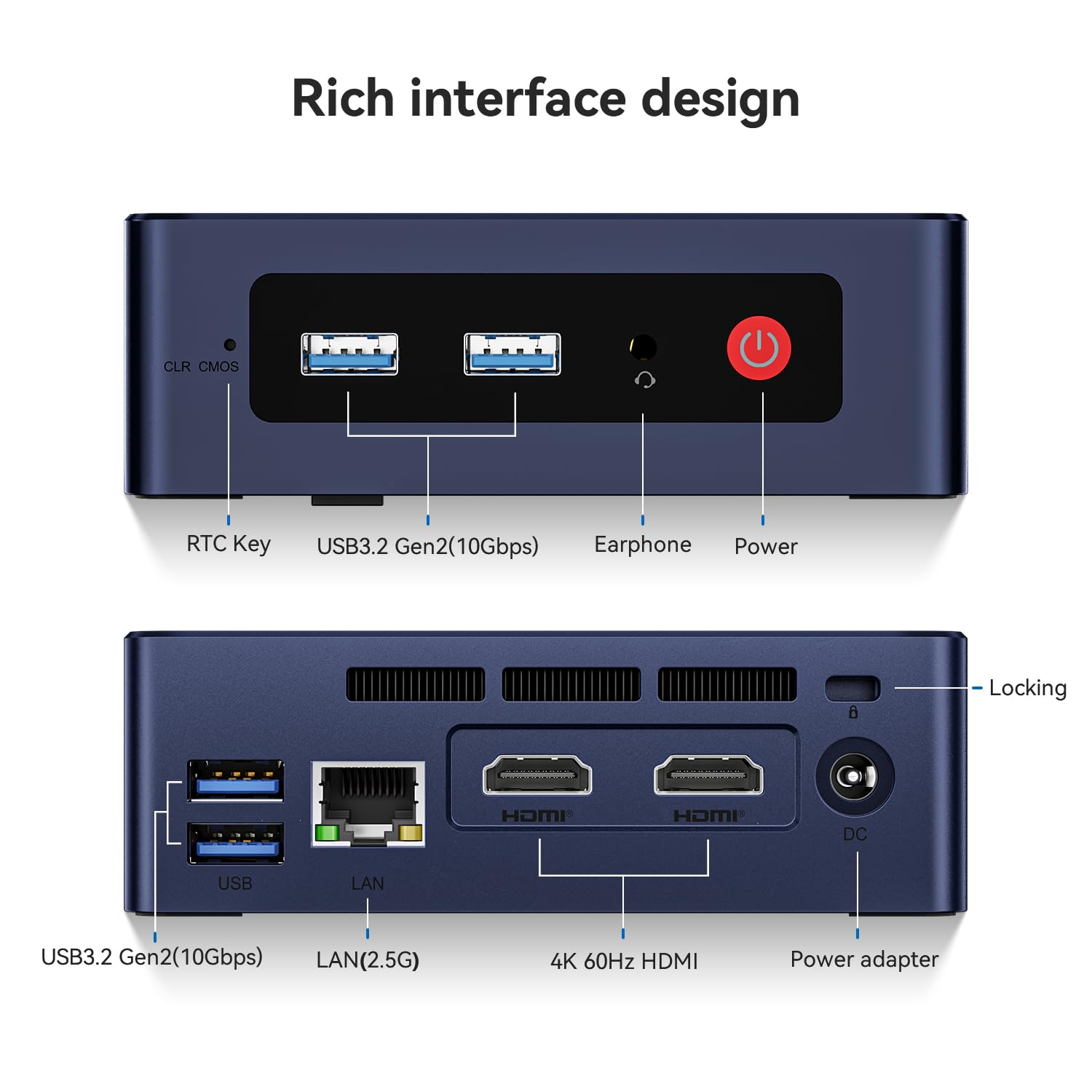
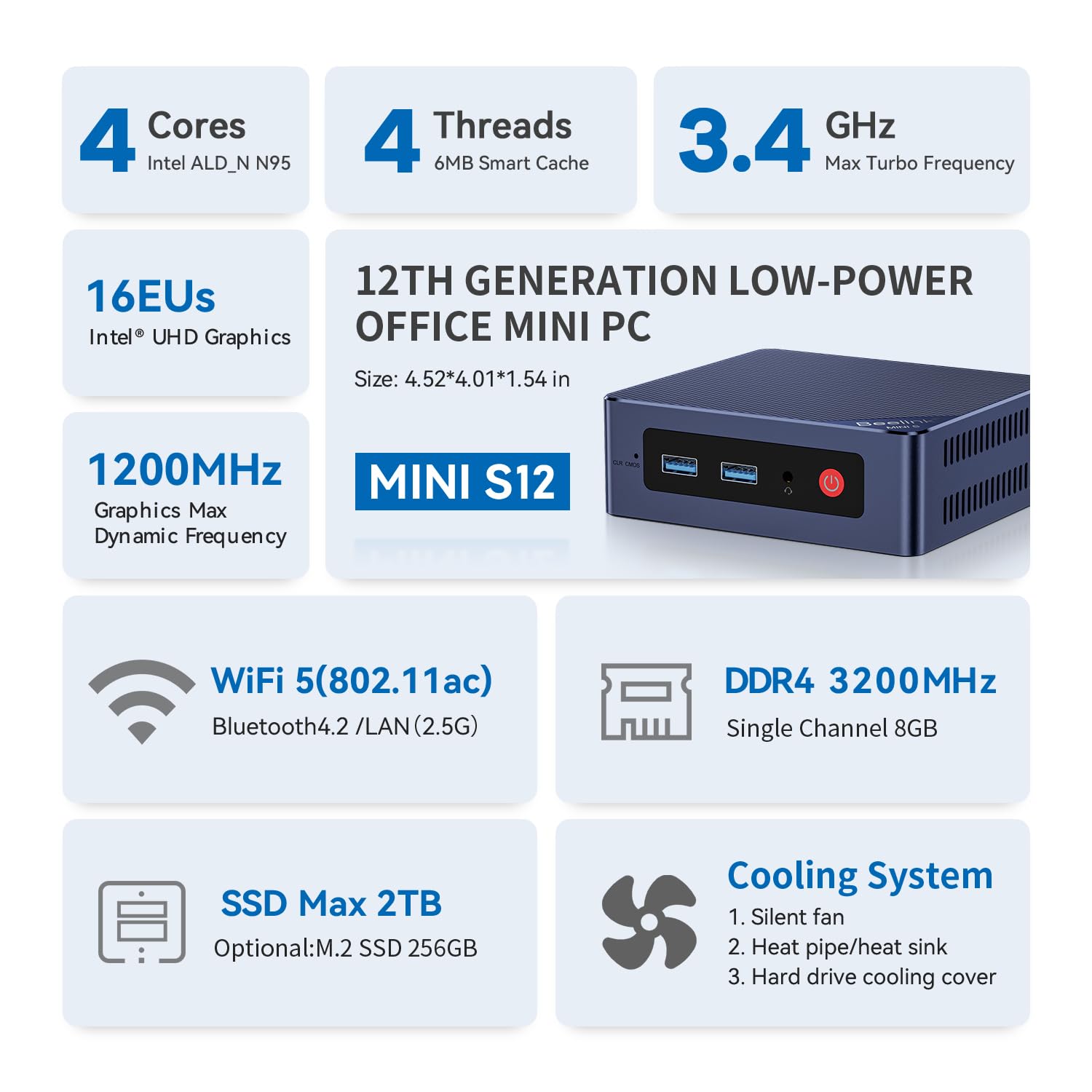
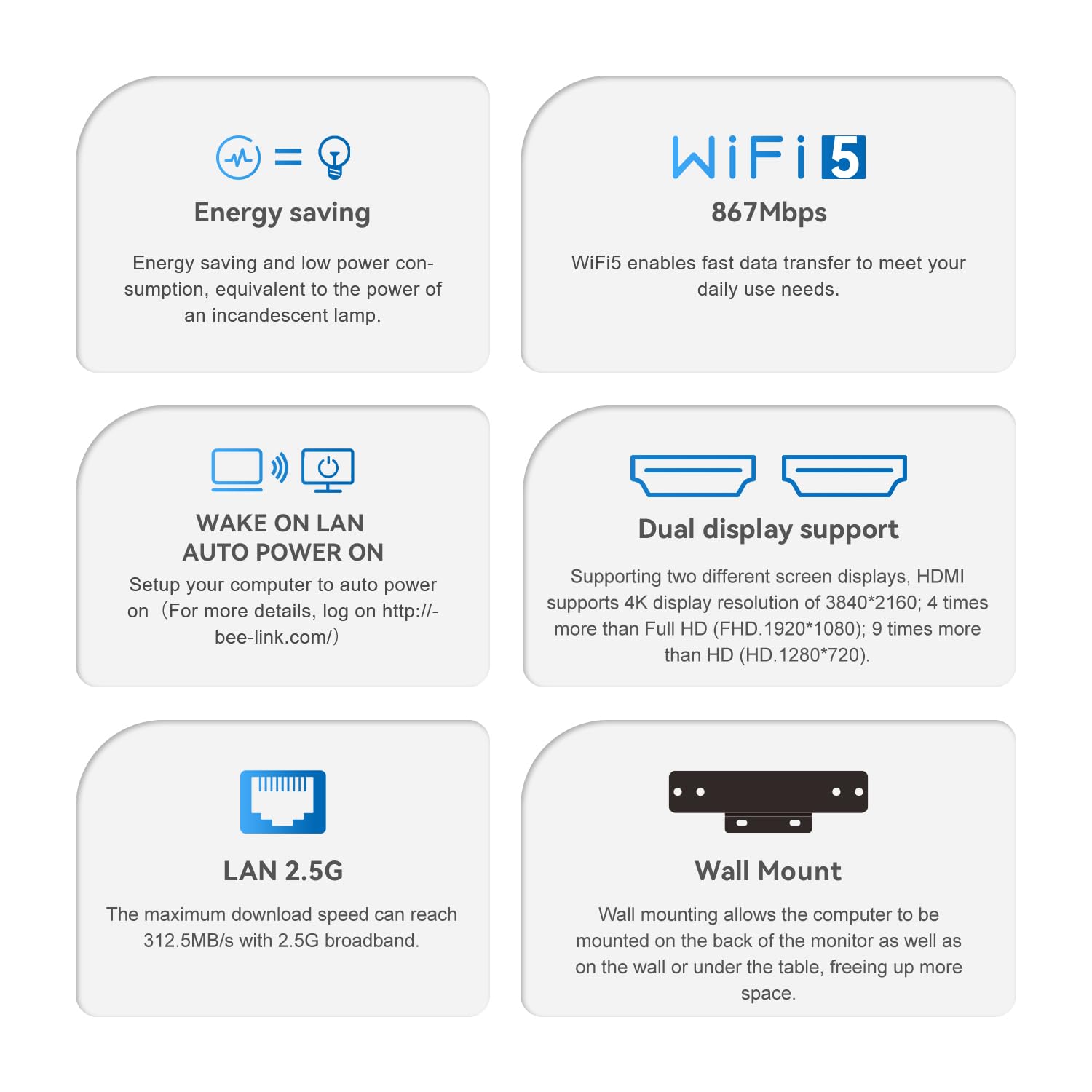
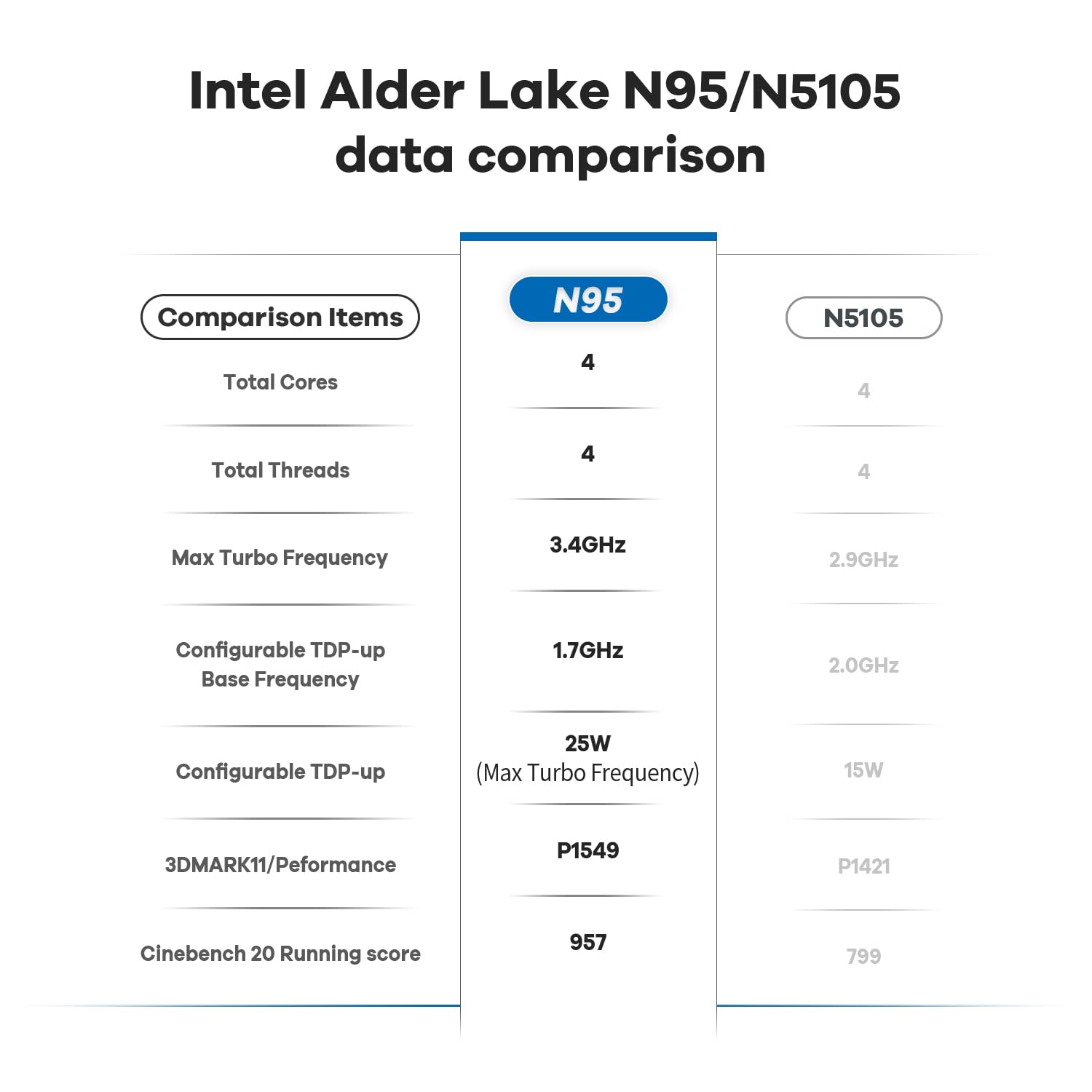

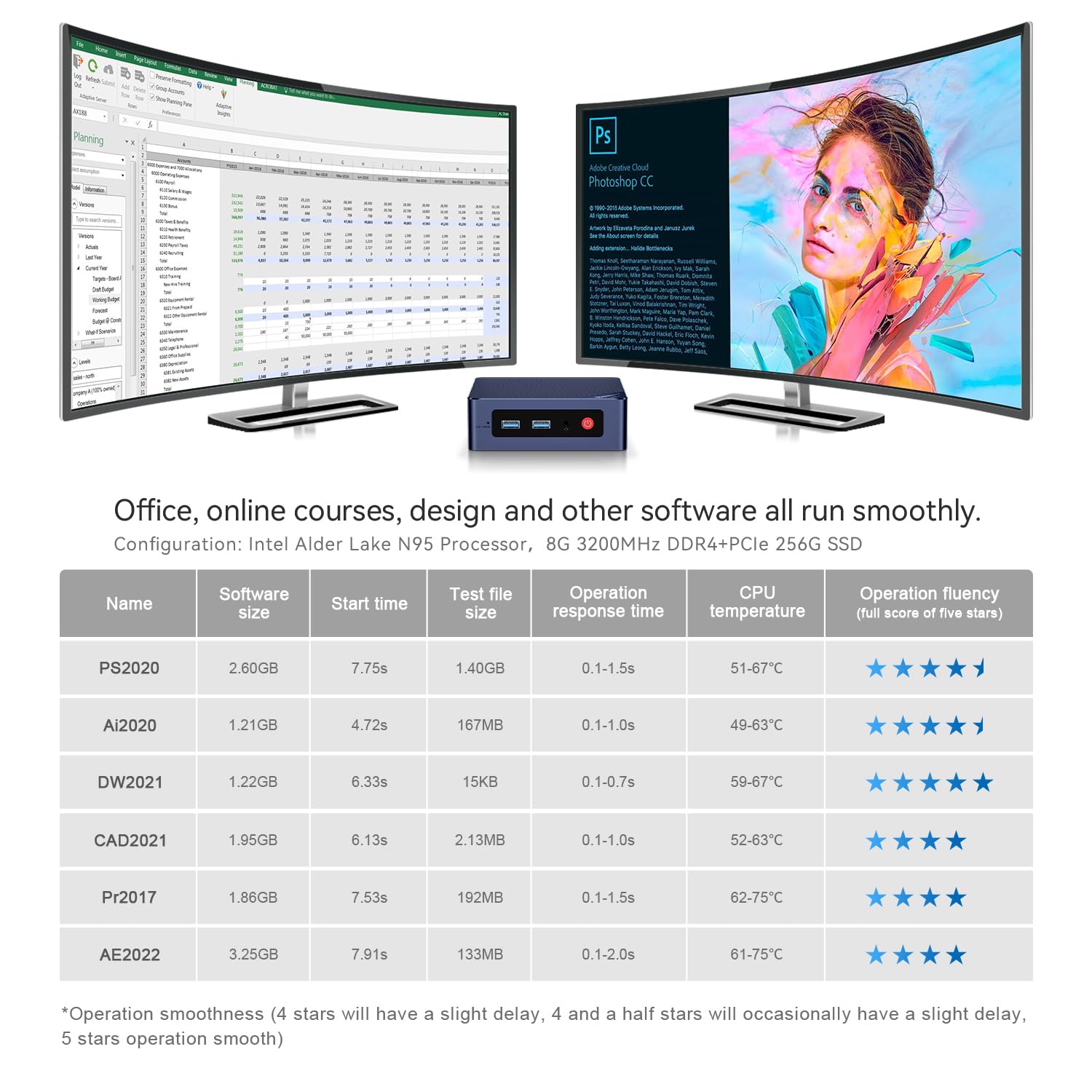

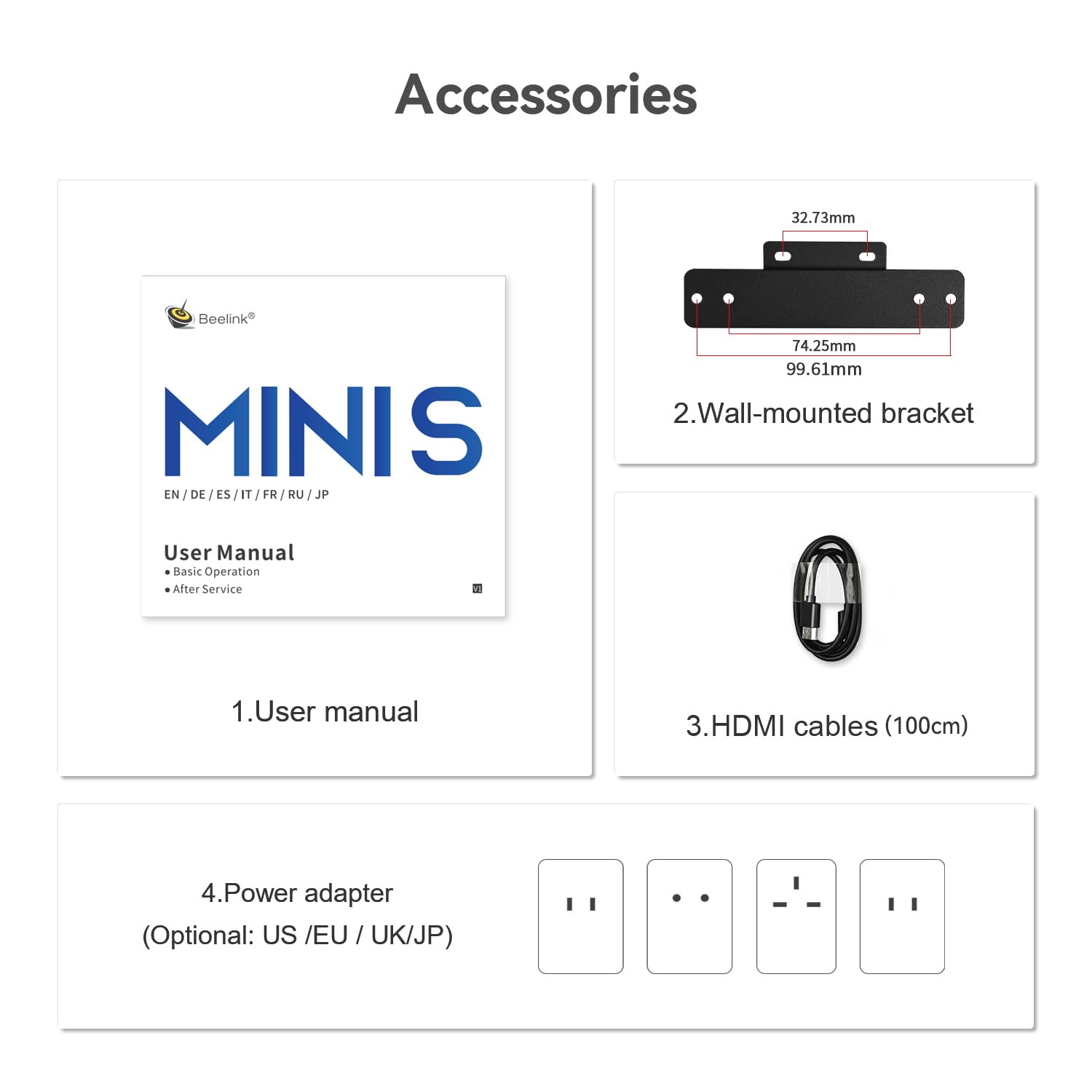
🚀 Mini PC, Major Impact: Power, speed, and style in a sleek package.
The Beelink MINI S12 is a compact powerhouse mini PC featuring an Intel N95 quad-core processor clocked up to 3.4GHz, 16GB DDR4 RAM, and a 500GB SSD with expansion options up to 2TB. It supports dual 4K UHD displays via dual HDMI ports and offers fast WiFi5 and Ethernet connectivity. Designed for professionals seeking a high-performance, space-saving desktop solution, it includes VESA mount compatibility and comes pre-installed with Windows 11 Home, backed by lifetime technical support and certifications.


| ASIN | B0BZ3PYYJB |
| Best Sellers Rank | #1,845 in Computers & Accessories ( See Top 100 in Computers & Accessories ) #60 in Mini Computers |
| Brand | Beelink |
| Card Description | Integrated |
| Chipset Brand | Intel |
| Color | Black |
| Computer Memory Type | DDR4 SDRAM |
| Customer Reviews | 4.4 4.4 out of 5 stars (324) |
| Date First Available | March 21, 2023 |
| Graphics Coprocessor | Intel UHD Graphics |
| Hard Drive | 500 GB SSD |
| Hard Drive Interface | PCIE x 4 |
| Hard Drive Rotational Speed | 300.00 |
| Hardware Platform | PC |
| Item Weight | 1.48 pounds |
| Item model number | MINIS |
| Max Screen Resolution | 3840 x 2160 pixels |
| Number of Processors | 1 |
| Number of USB 3.0 Ports | 4 |
| Operating System | OS |
| Package Dimensions | 8.39 x 5 x 2.2 inches |
| Processor | 3.4 GHz celeron |
| Processor Brand | Intel |
| RAM | 16 GB DDR4 |
| Screen Resolution | 3840 x 2160 |
| Series | MINI S |
| Wireless Type | 802.11ac |
G**L
A truly great computer given the size and price
This Beelink Mini S was my first foray into the world of mini pc's. I am impressed beyond all expectations. I wanted a compact and quiet and quiet pc to connect directly to my home theater components primarily to use as a player for music files. So it is connected directly to my surround receiver via HDMI and the receiver is passing video through to a 65" 4K UHD tv. I have attached an external hard drive as well as an external optical drive along with a wireless keyboard and mouse. I have expanded the USB connectivity by connecting a 4 port hub to one of the Beelink's ports. The system performs flawlessly, hi res audio files sound great, and the PC's display looks excellent on the UHD big screen. The PC itself is dead quiet and has awesome speed, at least for the limited range of applications with which I am tasking it. This experience definitely has me thinking of transitioning my main home computer from the huge desktop tower I have now to a more powerful mini. Really stunning performance and features for such a tiny and low-priced box. Highly recommended!
C**T
Easy setup
Setup was very easy - it took me a leisurely hour to get my desktop, passwords and other personalized setup completed. It's silent, powerful and handles all my needs. Strongly recommended.
A**R
Awesome mini home server
This has been an awesome proxmox box for self hosting. I am able to run a web server, home assistant, immich and a couple of other services without putting off to much heat.
C**C
Runs Linux fine
Got this today and never even turned Windows on. F7 on startup and told it to boot from a USB. If you need to get into the BIOS hit the delete key. For boot options hit F7. Mine was marked on the bottom. I booted into Linux mint first and tried to install it and got an error that stopped the installation. Yet I was able to use the live USB to download an ISO for AV-Linux-MX and with mint a mouse click lets you create a bootable USB with an ISO image. I like to play a guitar and AV Linux is geared to guitar players. Install was easy with no problems. Installed my VPN and that went easy then did a bunch of upgrades. Half an hour later it was running perfect. Fast, plugged in to a 24 in screen and graphics are good. Able to watch movies with it while surfing the net. Conky is telling me its running a Celeron N5095A CPU with 4 cores and 4 threads at 2.81 Ghz. Wireless USB Keyboard and Mouse, USB speakers with good volume, and the wireless seen and hooked up to the internet easily. How this mini PC does with Windows, couldnt tell you but with a Linux operating system, its fast and so far running perfect with zero headaches.
E**S
Works well for astrophotography
Use it as part of an astrophotography rig. Easy to load software and drivers. Connect to Windows 11 remote desktop client using Remmina through Linux. Can run Sequence Generator Pro and PHD2 with no problems. Plenty of storage for image files. Good wireless range for connecting remotely. Plenty of USB ports for connecting peripherals. Good setup for the money. Not a big fan of Windows 11, but what are you gonna do?
D**E
Sips power. No heat issues. Great purchase
I went through 3 GMKtek mini PCs before returning them and going with this beelink. I use this as a plex server. It runs 24x7 to serve up my music collection to me. The GMKTec PC would regularly overheat. This beelink is well ventilated, and simply has not had heat issues in almost 4 months of use. It sips power. Very small footprint. Plenty of storage and expansion ports. Look good. Works great. I’m very happy with the purchase, and would buy another if the need comes up.
P**U
So so...
I have mixed feelings about this mini PC. I have now purchased 3 of these. 1st one I bought lasted 6months, 2nd one 7months. When it started to fail, I would lose video, unplugging it and plugging it back in wouldn’t do anything, had to wait about 10 minutes before it would work again. First PC wouldn’t even show video most of the time. I reached out to tech support, very difficult to deal with to say the least. Communication is by email only, each response was different tech. Each time it was the same thing, open mini, check SSD make sure it didn’t come loose, check ram, make sure fan is clean, clean SSD/RAM pins, send me(tech) a picture of the BIOS settings of this page, press clean CMOS on front with a pin. One tech sent me a link to download windows 11 to reinstall after I told them it would not power up, blue LED lite, screen-initiated signal but nothing more, I tried second screen, the same. I was asked multiple times for the receipt, resending it every time. Eventually right before 1 yr warranty ending, they agreed to send me a new one once they received the old one back. The 2nd mini PC they drug it out so long it went past the purchase date and denied my clam, although I started the clam months before and again sent the receipt to them multiple times. What I eventually found out is the PCs over heat. At about 55*C the video would go out. After the disassembly I removed the heat sink, the thermal compound they use is generic and very hard. These run so hot even the thermal pad on the SSD is discoloring the metal. After replacing thermal compound with Artic Silver, bending the mounting arms up a bit to have more heat sink pressure on the CPU and turning off turbo mode (intel’s auto over clocking) the CPU temps dropped from 55*C to 50*C. This gave me enough time to get my data off and wipe it clean. The one replacement PC I received, this was the first thing I did with the replacements and it seems to have made a difference, although it’s only been about 3 months of operation. Time will tell. I have been working on finding a method to control the fan speed by app, none that I have tried work, the BIOS options are poor and not sure if they are doing anything. Tech support only forwards me their site when I request a BIOS update, none to this date. Fan doesn’t ramp up above 2000RPM when overheating, upon powering up you can hear it go well beyond this. At the end of the day, I wasted a lot of time and effort on these mini PCs for the price paid. If you’re looking for a reliable mini PC, I suggest another brand. True perspective in the the term, you get what you pay for.
J**A
Confirmado o recebimento. Bem embalado e certinho. Não testei ainda.
T**Y
----------- Update ------------ It has been almost a year since I left this unit unplugged. I decided to try it one more time before disposing of it. I held the CMOS button for 10 seconds without powering it or plugging it in. I plugged it in and it still did not work. I then removed the RAM and tried to power it on, still did not work. I then decided to remove the SSD and power it on with no SSD and no RAM. IT POWERED ON! I then replaced the SSD with a 256 GB Kingston M.2 SSD and put some new laptop RAM in. Still powered on and I was able to install/boot Windows 11. Also tried linux. It has been running for two weeks powered on and off and there are zero issues! So before you throw out that dead Beelink (U59 in my case) try taking out the RAM and SSD and reset the CMOS with the unit unplugged. Plug it in and see if it powers on. Replace each component with new ones if needed and enjoy your unit which you thought was dead. Apologies to Beelink. Looks like my issue after testing was an NVME drive in the SSD slot that was going bad. It looks like the slot is keyed for NVME but it can only use M.2 Sata SSDs. ----------- Original ----------- Was working perfect up until yesterday. Was working on something then suddenly the displays went blank but the power was still on. Couldn’t get the displays to come back to life so I unplugged it (holding the power button down didn’t shut it off). When I plugged it back in and pressed the power button, nothing. Saw a YouTube video where some success was had with resetting the CMOS but tried that and nothing. It’s basically a doorstop now. Waste of money.
H**M
Very good.
G**S
Hasta la fecha funciona perfectamente, lo tengo en un equipo medico funcional 10 horas diarias y tiene una muy buena estabilidad.
B**O
O Mini PC é excelente e funciona conforme o esperado.
Trustpilot
1 month ago
5 days ago