We remain fully operational. Our teams are working around the clock to ensure your deliveries continue safely.

DOWNLOAD THE APP


Copyright © 2025 Desertcart Holdings Limited
DOWNLOAD THE APP
Buy anything from 5,000+ international stores. One checkout price. No surprise fees. Join 2M+ shoppers on Desertcart.
Desertcart purchases this item on your behalf and handles shipping, customs, and support to South Korea.
🎮 Level up your AR gaming with flawless 4K clarity and zero lag!
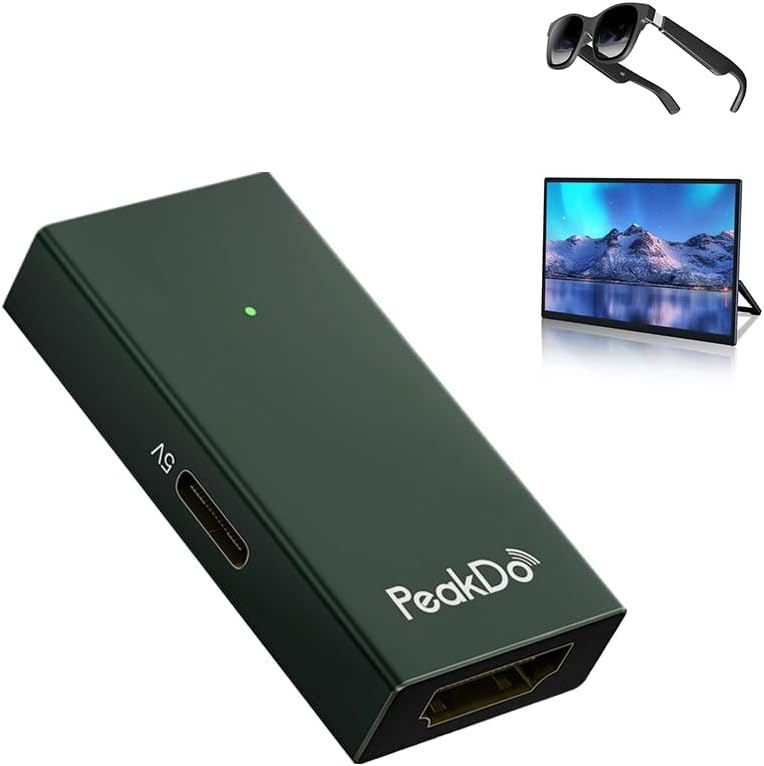
The PeakDo HDMI to USB-C Adapter delivers pristine 4K@60Hz video output from HDMI sources to USB-C AR glasses and portable monitors. Compatible with leading AR devices and gaming consoles, it offers plug-and-play simplicity in a sleek, lightweight aluminum design. Ideal for professionals and gamers seeking immersive, lag-free visuals on the go.




| ASIN | B0C854HLRM |
| Best Sellers Rank | 76,036 in Electronics & Photo ( See Top 100 in Electronics & Photo ) 2,277 in Audio & Video Adapters |
| Brand Name | PeakDo |
| Colour | Dark Green |
| Compatible Devices | Gaming Console, PC, Laptop, Monitor |
| Connector Type | HDMI |
| Current Rating | 3 Amps |
| Customer Reviews | 4.2 4.2 out of 5 stars (230) |
| Input Voltage | 5 Volts |
| Item Weight | 0.64 Ounces |
| Manufacturer | PeakDo |
| Nominal Power | 5 Watts |
| Number of Items | 1 |
| Number of Ports | 1 |
| Package Quantity | 1 |
| Power Plug Type | Type B - 3 pin (North American) |
| Product Finish Type | Hdmi |
| Specific Uses For Product | Laptop, Monitor, PC, Xbox |
| Unit Count | 1.0 count |
R**B
Great product
Works really well, finally got my ar glasses to work, with this to mu laptop. Time for large screen Gaming without the large screen
K**L
It works great with xreal video glasses with xbox source and laptop. To avoid problems, follow the following connection rules. Set the source resolution to 1080p at 60 hertz. A separate power supply of at least 2A / 5V must be used. First, connect the external power supply to the adapter, then the video glasses or monitor, and finally the HDMI cable to the source - this is mandatory. It is also very important what HDMI cable is used, those for high speed cause problems. The old generation of cables work better.
أ**د
جالي منتج اخر غير هذا المنتج الذي طلبته واشتريت غيره من امزون اول امس واستلمته امس
M**D
Highly recommended
P**R
The product is a tiny box which acts as a connector and has no 4k capability. My Xreal glasses show poor video quality with this . Wouldn't recommend
M**I
Real-World Review: Using the PeakDo HDMI to USB-C Adapter for Interactive Meeting Room Setup In a meeting room setup, a seamless way was needed to mirror and interact with content from a SMART 85-inch wall-mounted screen to a RICOH 15.6-inch portable touch monitor. The goal was to allow the audience to engage directly with the presentation using the RICOH’s stylus-enabled touchscreen. The PeakDo HDMI to USB-C Adapter turned out to be the perfect bridge. Setup Overview: - Source: SMART Board (HDMI output) - Display: RICOH 15.6” Portable Monitor (USB-C input with touch support) - Adapter: PeakDo HDMI to USB-C ✅ What Worked Well: - Plug-and-Play Simplicity: No drivers or configuration needed. The adapter instantly mirrored the SMART screen’s content to the RICOH monitor. - Touch Interaction: The RICOH’s stylus and touch features worked flawlessly, allowing participants to annotate, navigate slides, and interact with content in real time. - High-Quality Video: The adapter maintained a crisp 1080p/4K signal with no lag or flickering—ideal for presentations and collaborative sessions. - Compact & Portable: Its small size made it easy to integrate into our cable management system without clutter. ⚠️ Things to Note: - Power Matters: For consistent performance, especially with touch-enabled monitors, make sure the adapter is powered via USB-C PD (Power Delivery). - Cable Quality: Using high-quality HDMI and USB-C cables helped maintain signal integrity and responsiveness. 📝 Final Thoughts: The PeakDo HDMI to USB-C Adapter proved to be a reliable and efficient solution for enhancing interactivity in our meeting room. It enabled a dynamic, two-way communication setup where the presenter and audience could collaborate directly on the RICOH screen using the stylus—without any technical hiccups. Highly recommended for professional environments where content sharing and interactivity are key.
Trustpilot
1 month ago
2 weeks ago