We remain fully operational. Our teams are working around the clock to ensure your deliveries continue safely.

DOWNLOAD THE APP


Copyright © 2025 Desertcart Holdings Limited
DOWNLOAD THE APP
Buy anything from 5,000+ international stores. One checkout price. No surprise fees. Join 2M+ shoppers on Desertcart.
Desertcart purchases this item on your behalf and handles shipping, customs, and support to South Korea.
🖨️ Upgrade your old printer to wireless royalty—because your workflow deserves zero downtime!
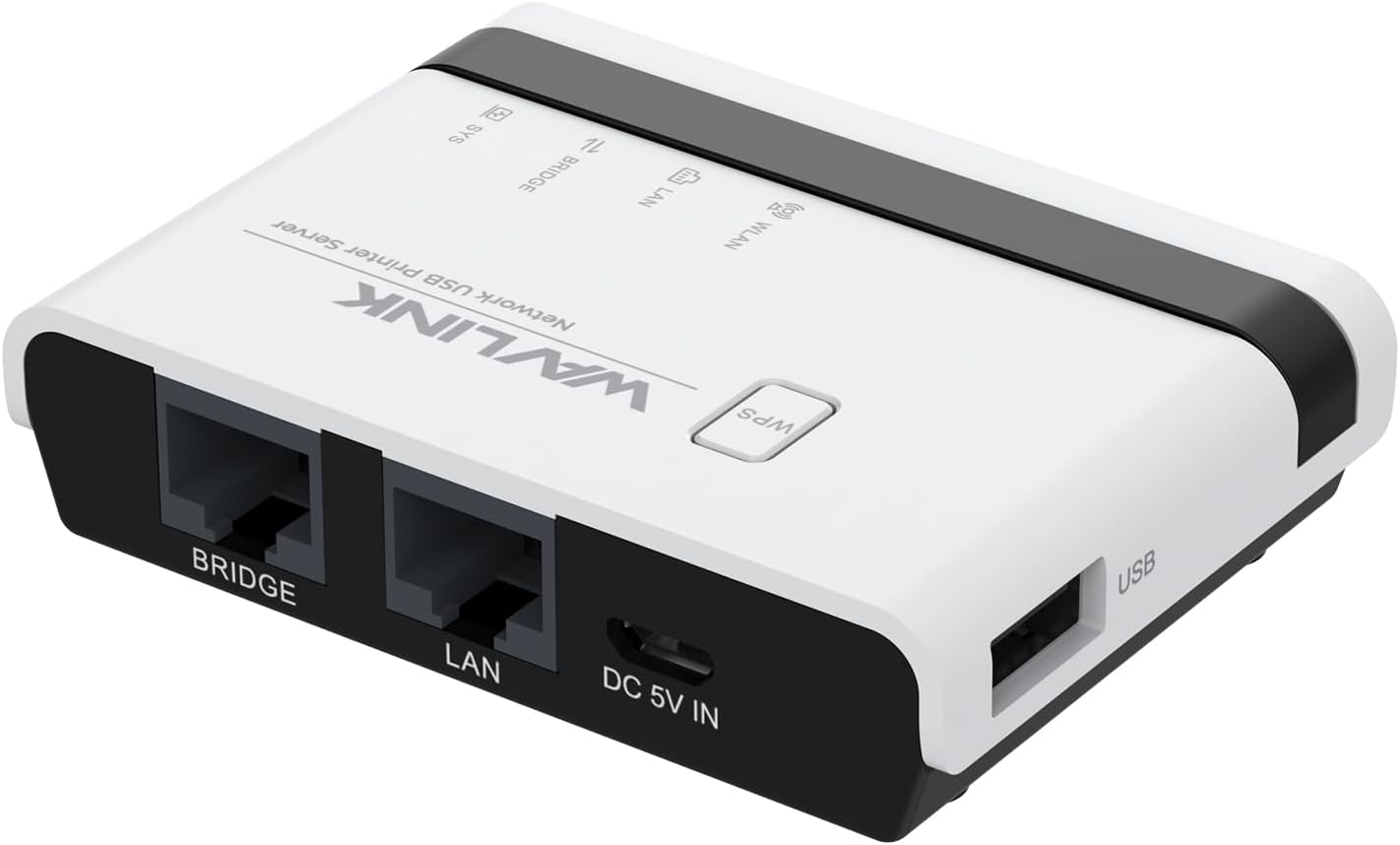
The WAVLINK USB Wireless Print Server transforms any USB printer into a versatile wireless or wired network printer with support for up to 4 printers via USB hub. Featuring 3 operation modes, 480Mbps USB 2.0 speed, and 10/100Mbps LAN bridge, it offers broad compatibility with Mac and Windows systems and RAW-supported printers. Its compact design and easy web-based setup make it ideal for home offices and small businesses looking to extend printer life and boost productivity without costly replacements.


| ASIN | B0CDC2ZDCY |
| Are Batteries Included | No |
| Best Sellers Rank | 13,046 in Computers & Accessories ( See Top 100 in Computers & Accessories ) 1 in Print Servers |
| Brand | WAVLINK |
| Customer Reviews | 3.7 3.7 out of 5 stars (66) |
| Date First Available | 1 Aug. 2023 |
| Guaranteed software updates until | unknown |
| Item Weight | 230 g |
| Manufacturer | WAVLINK |
| Package Dimensions | 17 x 10 x 5 cm; 230 g |
M**K
It actually seems to work!
For many months I have been struggling with my HP, allegedly wifi printer. Some days it works but most days it says it's offline or that there's no printer installed. I've tried everything (too boring to go into detail) but it never gets better. It was either a new printer or a tiny little box called a WAVLINK USB Wireless Print Server. The printer is only wifi or USB, no netwok port. But the WAVLINK also works as a converter from wired network to USB. This afternoon I set up internet over mains and then plugged the adapter into the WAVLINK and the WAVLINK into the printer via its USB port. It just works! No drivers to load up, no installing devices. I love it. I'll keep the old printer.
M**G
Wireless? yes, but not fast.
I brought this after replacing a router that supported a USB network device, but the new one didn't. Wireless connection setting up was actually very straightforward, using WPS it connected the first time and showed up as NETUSB. Plugging the standalone drive into it worked fine too. However ... Fast, it is not. Over the wireless connection, it takes at least 15 seconds to load a page on the admin console. Sometimes, they appeared to just hang, they were taking so long. I don't think this device uses a very recent wifi standard. Connecting to the remote USB device over wireless, was also slow, although usable. Just. So I was able to access via browser and Windows explorer, it just would pause for a second or 2. Wired connections to a network extender was much faster, unsurprisingly and the admin console, whilst still not blindingly fast, responds in a second or two. I now have two devices on my network with the same name and same IP address. It appears to use the wired connection in preference, but I suspect a factory reset would probably remove it. One thing to note, you will need to find the IP address that has been assigned on your network to be able to access it. The default URL doesn't work. I have not tried it with a printer, but I suspect this would work without much issue, but you may need to grab the path from the printer settings to find it. I don't know for sure. Ultimately, it is a bit of kit that fills a very niche function. It stops you forking out for a new Storage Device or Printer, but most new Printers will connect wirelessly these days, storage in the cloud is relatively easy and home/small office Network storage is pretty cheap now, so it's really just useful for prolonging the life of existing kit until you can replace them.
J**E
It works really well
I wanted to be able to put a USB memory stick on the network so any computer could access it without having to turn the main computer on that had the USB installed because Windows was causing all sorts of access issues over the network. Having looked everywhere to find something suitable but mainly only finding NAS drives, that cost well over three times what this unit costs!, I came across this unit. I thought I'd give it a try, nothing to loose. I wasn't expecting it to work very well, but it really does!! I bought an Anker 4 port hub, and I've now got two 128gb USB sticks running. All computers on the network can access both drives with no issues, I mapped them as network drives so they appear in the box when "open file" has been selected in all the software I've tried so far. I've only had it a few days, so time will tell if it's reliable. But no issues so far! Definitely recommend. Really good price and it totally works how I need it to. I've not used it as a print server as I don't need that, so cannot comment on how good that side of it would be. It runs with no noise, setting it up I found fairly easy but you will need to be handy with a computer and know your way around network settings as it's not quite plug and play (but then what network devices ever are!) In terms of file transfer speeds, on a large file transfer from desktop to USB I got around 2.5 - 3.5 MB/s according to Windows. Not the fastest, but I'm more than happy with that. I mainly use it for transferring smaller files or saving files direct from software anyway, so it really isn't an issue to me as of yet.
H**B
Toxic!
The first time I ordered this device, it was faulty. The reset didn't work and the WPS button was stuck. Should have known better than order another one! The second one was not faulty, but the installation manual comes in two versions that are incompatible, one on the leaflet and one online, the one online (at least) is ambiguous and confusing, and although I did everything as written, this programme infilterated my network, changed my IP, and destroyed my PC connection both to the Ethernet, and to my wifi adaptor (the latter during my desparate attempt to get rid of it). Ah, right! Impossible to get rid of the residuals in my machine. Certainly not through reset. I had to get technical support to resolve the Ethernet problems, although the wifi ones are still pending. Altogether I spent nearly 5 hours on trying to install this (twice) and trying to fix the mess. It's now been returned, and I hope Amazon thinks twice about allowing this to be sold through their site. STAY AWAY! You have been warned!
M**Y
Works well
I use this to share a hotlabel 6x4 label printer. I actually have it connected with wired ethernet, then USB to the printer. Small and inobtrusive. Intial setup of the print server fairly easy, but a bit of a pain to remember how to find and configure the printer in each PC/laptop once this is being used. I'm sure some printers might be easier - Not really the fault of this print server, more the way Windows works with remote print servers.
D**D
Great bit of kit but……….! It is certainly not plug and play!
I read the reviews before I bought and I guessed it might be tricky. I was not wrong! The instructions are exact but detailed. I failed several times. I was linking it to an old Samsung laser printer (so was worried about it working with something so old). Everything went well until registering the printer with the unit, for me this needed perseverance. Once done, I set the printer as, “Default”. Still did not work! I then restarted my Mac Book and the printer (not something in the instructions). It then worked! If it does not for you, it is not the product but you probably have not got the setup quite correct. For the price I have ditched all my cables and have an excellent wireless printer! “If first you do not succeed….”. Stick at it, if it works with my very old Samsung it can work for you!
J**Y
Disappointing
I could not get the configuration to work. I managed to get into the device software ok and the functions came up as per the little manual. But it did not work properly with the printer configuration. Changing the printer description did not change the stored data and I could not get it to work as a server.
J**E
It works - eventually
Do not expect setting this up to be strightforward. Plug and play it is not. Getting it to work was harrowing, but an educational experience, requiring exploration of the fundmentals of computer networking. Only bits of advice I can give are: Make sure you can access your router interface - you are going to need to be able to see connected devices to find the actual IP address this thing settles on. Intially connect it directly to your PC and find its interface at the default IP address. Avoid being tempted the WPS button. Go SLOW. Any set up change - even moving from one page of the interface to another takes an age for the thing to fully respond to and store. Take the MAC address on the label with a pinch of salt. My device now shows up as two separate devices each with very similar but different MAC addresses to the printed one. Maybe get help from someone who is familiar with IT networking.
Trustpilot
2 days ago
2 months ago