We remain fully operational. Our teams are working around the clock to ensure your deliveries continue safely.

DOWNLOAD THE APP


Copyright © 2025 Desertcart Holdings Limited
DOWNLOAD THE APP
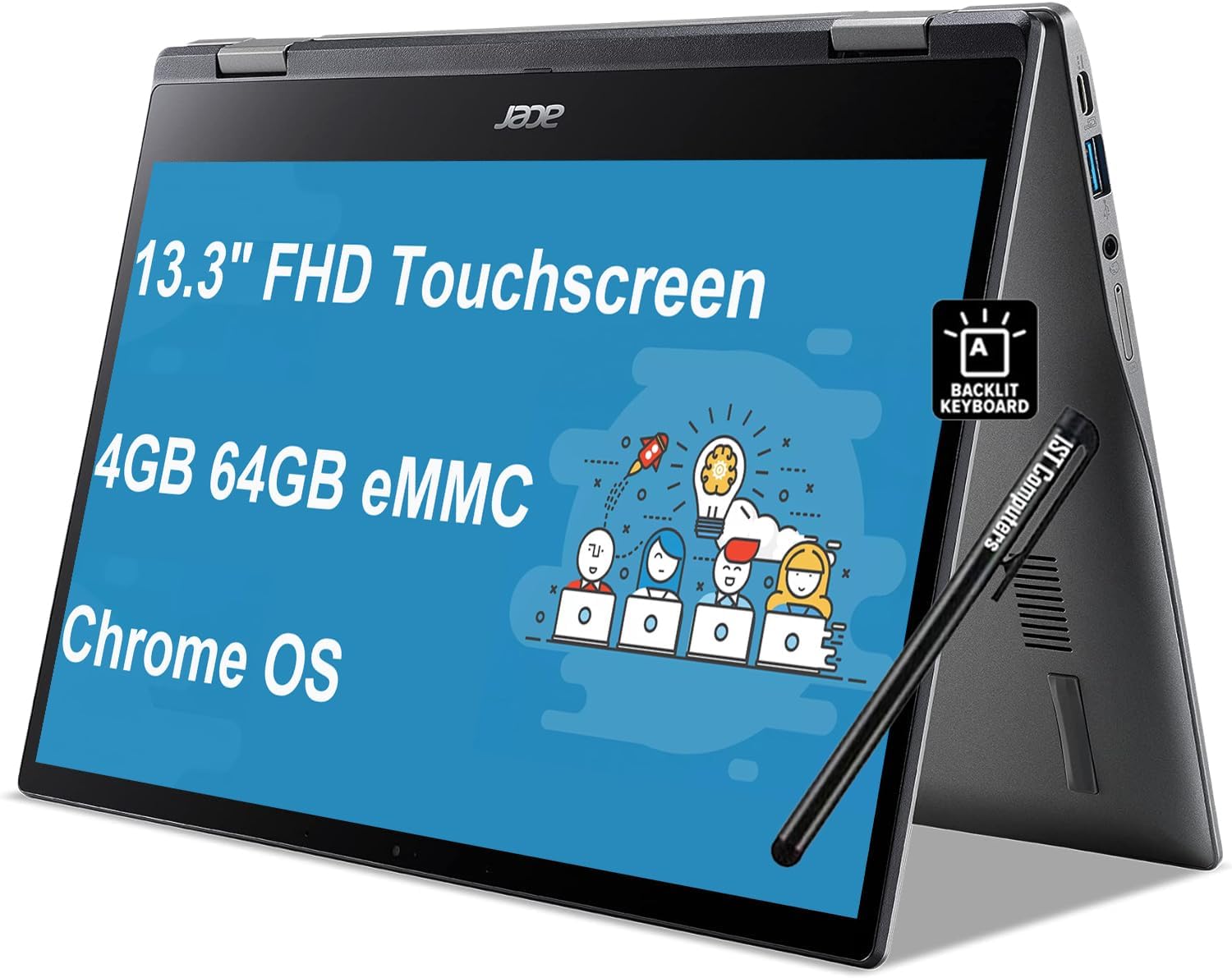


🚀 Power meets portability — spin your day your way!
The Acer Chromebook Spin 513 is a sleek, ultra-portable 2-in-1 laptop featuring a 13.3" FHD Gorilla Glass touchscreen, powered by an 8-core Qualcomm Snapdragon processor with 4GB RAM and 64GB eMMC storage. Weighing only 2.65 lbs and boasting up to 13.5 hours of battery life, it’s designed for seamless transitions between work, study, and entertainment with versatile modes, a backlit keyboard, HD webcam, and Chrome OS security and updates through 2029.
| ASIN | B0CLGGB88D |
| Audio Output Type | Headphones |
| Audio Recording | Yes |
| Audio features | The Acer Chromebook Spin 513 has audio features supporting basic multimedia usage and video conferencing, including a 720p HDR webcam and two built-in microphones. |
| Battery Cell Type | Lithium Ion |
| Battery Life | 13.5 Hours |
| Best Sellers Rank | #29,850 in Computers & Accessories ( See Top 100 in Computers & Accessories ) #407 in 2 in 1 Laptop Computers |
| Bluetooth Version | 5.0 |
| Bluetooth support? | Yes |
| Brand | acer |
| Built-In Media | 45 W power adapter with power cord, Acer Chromebook Spin 513 2-in-1 Laptop, IST Computers Pen, User Manual |
| CPU Model Generation | 7th Gen |
| CPU Model Number | Qualcomm Kryo 468 |
| CPU Model Speed Maximum | 2.4 GHz |
| Camera Description | Front |
| Chipset Type | Snapdragon |
| Color | Gray |
| Compatible Devices | USB devices, Bluetooth devices |
| Connectivity Technology | USB |
| Control Method | Touch |
| Customer Reviews | 4.2 4.2 out of 5 stars (600) |
| Display Resolution Maximum | 1920x1080 |
| Display Technology | LED |
| Display Type | LED |
| Form Factor | Convertible |
| Graphics Card Ram | 4 GB |
| Graphics Coprocessor | Qualcomm Adreno 618 |
| Graphics Description | Integrated |
| Graphics Ram Type | Shared |
| Hard Disk Description | Storage |
| Hard Disk Interface | Solid State |
| Hard-Drive Size | 64 GB |
| Hardware Interface | Bluetooth 5, USB 3.1 Type A, USB Type C |
| Has Color Screen | Yes |
| Human-Interface Input | Keyboard, Touchscreen, Touchscreen with Stylus Support |
| Item Dimensions L x W x Thickness | 12.2"L x 8.24"W x 0.61"Th |
| Item Weight | 2.7 Pounds |
| Keyboard Description | Backlit |
| Keyboard Layout | QWERTY |
| Manufacturer | Acer |
| Memory Clock Speed | 3200 MHz |
| Memory Speed | 3200 MHz |
| Microphone Form Factor | Built-In |
| Model Name | Spin 513 |
| Model Number | R841T-S4ZG |
| Model Year | 2023 |
| Native Resolution | 1920 x 1080 pixels |
| Number Of Cells | 2 |
| Number of Ports | 3 |
| Operating System | Chrome OS |
| Other Special Features of the Product | Backlit Keyboard |
| Processor Brand | Qualcomm |
| Processor Count | 8 |
| Processor Series | Qualcomm Snapdragon S4 MSM8270 |
| Processor Speed | 2.4 GHz |
| RAM Memory Installed | 4 GB |
| RAM Memory Technology | LPDDR4X |
| RAM Type | DDR4 SDRAM |
| Ram Memory Maximum Size | 4 GB |
| Refresh Rate | 60 Hz |
| Resolution | 1080p |
| Screen Bezel Thickness | 7.7 mm |
| Screen Size | 13.3 Inches |
| Series Number | 2 |
| Specific Uses For Product | Student |
| Total Usb Ports | 3 |
| Touch Screen Type | capacitive |
| Touchpad Feature | True |
| UPC | 191114668511 |
| Unit Count | 1.0 Count |
| Video Output | DisplayPort |
| Video Processor | Qualcomm |
| Voltage | 5 Volts |
| Warranty Description | 1 year warranty |
| Warranty Type | Limited |
| Webcam Capability | Yes |
| Wireless Compability | 802.11a/g/n/ac, Bluetooth |
| Wireless Technology | Bluetooth, Wi-Fi |
C**N
Great laptop!
This laptop was perfect for what I needed, touchscreen, small, easy to take with me, can flip into a tablet. Simple to use, good sound quality and not to expensive!
S**.
Love it!
I love chromebooks. This Acer Spin chromebook model has everything I need to take care of business while providing access to all forms of entertainment as well. Chromebooks are user friendly, have built in security features and free updates for 7 years and they are fast. I will never go back to Microsoft. I especially like the Acer brand and have loved every one I've ever had. I like the newer programming and features such as the touch screen, back the lit keyboard and the screen which can be folded back to back. For everyday browsing,email, games, news, and all the information you can read..this chromebook is the affordable option I chose.
J**N
Update*** 5-16-23 BLACKOUT! !
Update 5-16-22 I checked online regarding the screen going black. It turns out that this is a common Chromebook issue. I followed the YouTube video and the screen came back. Ironically I ran across the Chromebook I replaced with One. I say ran across because I really thought I had thrown it away a long time ago. Well I'll apply the same information from YouTube and mysteriously the Chromebook that I thought was long on came back to life. So I'm saying all of this to say I guess it's not a company Chromebook issue is the Chromebook itself that has the issues So I'm still loving my Chromebook. Update- 3-7-22 THE SCREEN WENT BLACK WITH NO EXPLANATION RIGHT IN THE MIDDLE OF ME TEACHING! SO HURT The computer itself is nice. It's been a while since my other Chromebook died. This has new features so at first it was like starting over, but I like it still. I always wanted a flip screen. BUT THE STYLUS SIMPLY DOES NOT WORK!! I press the button on the side and nothing, absolutely nothing happens. Apparently, I didn't read enough reviews because this is a common problem. I am requesting a real stylus-maybe a rubber tipped one. Update** 12-27-22 Still going strong. Thank you to YouTube showing me what to do WHEN the screen goes black. I revived my other Chromebook that was dead for almost a year. Ironically, that was the reason I bought this one. Oh well, now I have 2.
K**U
Perfect for those used to Chromebooks
I bought my husband an HP Chromebook several years ago...it needed replacing and I decided to try a different company Chromebook. This was cheaper, had touchscreen and backlit keyboard (so convenient too). Works perfect. Hubby not tech savvy (but loves his Chromebook) so I was afraid a different brand might not work exactly the same, no worries...it's perfect and affordable!
M**Y
Awesome chromebook
I love this computer...this is the second one I've gotten from this company and the other lasted 5-6 years. I make instructional videos on it and it is very easy to use the touch screen to create the videos. It's durable and a great price compared to other touch screen chromebooks. I would definitely recommend.
A**T
Not good
Update!!! This is still the worst Chromebook in existence. DO NOT BUY. I've had many Chromebooks over the years. I bought this one because my last one was 4 years old and was no longer updating so it was slowing down. I got this one because I wanted a touch screen that was good to draw on to replace my last one. This one doesn't work, the pen keeps skipping when I try to draw. The Chromebook is slow and often cuts out and won't connect to the internet even though my other devices are connected. This Chromebook is a big disappointment.
O**R
Needs more RAM and better speakers
Overall a decent laptop, but this thing really needs more RAM. It's really sluggish at times, and some websites work terribly, such as instacart. Pros: Price Build quality Tablet form + touchscreen Long battery life Good keyboard and touchpad. Cons: Sluggish (needs more RAM?) Speakers are too quiet Compatibility with Android apps not always as good as it should be.
J**M
Good price and reliable.
Affordable and enough power for all my needs. Lightweight and good screen size. Keyboard works smoothly and sound is great.
A**T
The keyboard has had an upgrade and feels more premium, still back lit but just feels 'better', i find myself just sending random emails as i'm enjoying the keyboard that much. The missing stylus was a bit of a bummer but the seller promptly apologised and promised to jump right on it so can't ask for more, mistakes happen from time to time. The inclusion of Gemini in Drive and Docs is a great resource and is great for bouncing ideas off. Once the stylus arrives its 5* and a very happy customer.
ع**غ
لايوجد قلم للابتوب اين القلم
J**L
El teclado no sirve, si tecleas una letra la escribe casi 10 veces, no puedes usar word, excel, powerpoint o cualquier otra aplicación, es mejor comprar una laptop de segunda mano
Trustpilot
1 month ago
1 month ago