
DOWNLOAD THE APP


Customer Services
Copyright © 2025 Desertcart Holdings Limited
DOWNLOAD THE APP

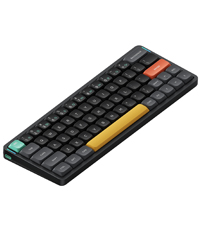
⌨️ Elevate your desk game with the Air96 V2 — where sleek meets speed and style.
The nuphy Air96 V2 is a premium ultra-slim wireless mechanical keyboard featuring 100 keys with durable PBT keycaps, low-profile Gateron Brown switches, and versatile connectivity options including Bluetooth 5.1, 2.4GHz wireless, and USB-C wired. Designed for professionals and gamers alike, it supports multi-device pairing (up to 4 devices), boasts a 1000Hz polling rate for near-zero latency, and offers up to 220 hours of battery life without backlighting. Its aluminum alloy frame and customizable RGB lighting make it a stylish, portable powerhouse for Windows, macOS, and Linux users seeking a high-performance typing experience.




| ASIN | B0CRKQ1BQ9 |
| Batteries | 1 9V batteries required. |
| Best Sellers Rank | #2,556 in Video Games ( See Top 100 in Video Games ) #235 in PC Gaming Keyboards #974 in Computer Keyboards |
| Customer Reviews | 4.0 4.0 out of 5 stars (299) |
| Date First Available | January 5, 2024 |
| Item Weight | 1.46 pounds |
| Item model number | Air96 v2 |
| Manufacturer | nuphy |
| Product Dimensions | 14.7 x 5.22 x 0.53 inches |
Y**I
One of the best low profile keyboards
The NuPhy Air96 is a low-profile mechanical keyboard known for its sleek design, portability, and solid performance. Here’s a detailed review based on common features users have highlighted: Design & Build Quality • Slim & Lightweight: The Air96 has an ultra-thin chassis, which makes it one of the thinnest mechanical keyboards available. Its low-profile design is appealing to those who want a modern, minimal aesthetic. • Materials: The frame is made of a combination of aluminum and plastic, offering a lightweight feel while maintaining durability. • Keycaps: The Air96 features low-profile PBT keycaps, which are known for their durability and resistance to wear over time. The keycaps have a good texture, and legends are usually sharp and clear. Switch Options • The Air96 offers low-profile Gateron mechanical switches, which come in different variants like red (linear), brown (tactile), and blue (clicky). These switches are much shorter than standard switches, offering a faster actuation, making typing or gaming feel more responsive. • Users often appreciate the smoothness of the Gateron low-profile red switches for fast and quiet typing or gaming. Typing Experience • Low Travel Distance: Being a low-profile keyboard, the Air96 has a shorter travel distance compared to traditional mechanical keyboards. This gives it a laptop-like typing experience, but with the tactility and responsiveness of mechanical switches. • Comfort: Its ergonomic design and low profile help reduce strain on the wrists, especially for extended typing sessions. Connectivity & Compatibility • The keyboard offers both wired (USB-C) and wireless (Bluetooth 5.0) options. You can easily switch between multiple devices, making it a versatile choice for users who work across different platforms. • It supports multi-device pairing, which is convenient for switching between, for instance, a PC, tablet, and phone. • Battery Life: With wireless use, the Air96 offers decent battery life, lasting up to a few weeks on a single charge, depending on the backlighting usage. Backlighting • The Air96 features RGB backlighting with various customization options. It can sync with the typing patterns, and users can adjust the brightness or choose from a variety of effects. • The backlighting on the Air96 is not as bright as some thicker mechanical keyboards due to its low-profile design, but it’s still functional in darker environments. Performance • The keyboard offers a very responsive typing experience, especially in gaming. The low-profile switches reduce the actuation force and travel distance, resulting in faster response times. • Users find the wireless connection reliable, with minimal latency during typing or casual gaming. Pros • Sleek, slim design with premium materials • Comfortable low-profile typing experience • Wireless and multi-device support • Solid battery life • Responsive low-profile mechanical switches Cons • RGB backlighting is not as bright compared to standard mechanical keyboards • Might not be ideal for users who prefer the deeper key travel of traditional mechanical keyboards • Lacks advanced features like hot-swappable switches Conclusion The NuPhy Air96 is an excellent choice for those looking for a slim, portable mechanical keyboard with a good balance of performance and aesthetics. Its combination of low-profile design and mechanical switch feel makes it suitable for both typists and casual gamers, though those looking for a more traditional mechanical experience may miss the deeper key travel.
M**D
Exceeded my expectations. I'm a little in love.
This little thing has exceeded my expectations! I did a lot of AI assisted research before buying, and expected to have to accept the default combo-key device switching. To my surprise, once I came to understand how to connect and work the VIA web app, I found the keycodes for device 1 and device 2 and simply assigned them to a couple of rarely used keys (in Windows, you do this in Layer 2. Depending on what keys you assign, you can probably give them their original assignments in Layer 3, which is the Fn layer). Presto! One press device switching. I also expected to have bluetooth connection problems and have to flash the bios to the March 2025 version. So far, this has not been necessary. It looked like a pretty complex process, so I'm hoping I continue to not need it. Most of all, though, I didn't expect to immediately love how the keys feel. I am coming from an MX Keys whose battery died finally after years and years. For a replacement, I wanted smaller footprint, keys that say "Alt" like they're supposed to in Windows, and device switching at least as good as the MX. Success on all those, and the feel is really lovely. Sound is unexpectedly satisfying as well. It just feels really high quality and my fingers land well and feel confident. I got the brown switches. I don't really need backlighting at all, so I have set to a solid gentle color, doing a slow breathe. I also assigned the battery check to Fn+B. Not hard to remember. For those lamenting the lack of an Insert key, it actually comes with an Insert key cap. You can use Via to assign Insert to something and then give it that keycap. You would have to sacrifice a key to do that, though. But, if you really need Insert, it is assigned to Fn+Delete in Via. At least mine was. But you can always set it that way if you like, or give it to Fn+Home. I should clarify that the device switching keycodes are under Custom in VIA. And the original key assignments persist. So you can assign them other keys but the original Fn+1, Fn+2, etc. are still there. These are not the F keys in the F1, F2, etc. row, by the way. They are the numbers above Q and W. As you can see from the length of this review, I'm looking for excuses to just keep typing away on this thing. I'm sure that will pass, but it really is a delight.
G**G
An Almost Loved Device
I absolutely love this keyboard. The size and feel are exactly what I was looking for. I've never had an issue with the wireless connectivity either, as some reviewers have. My issue is the battery; it's absolute junk. Nine months following the purchase and it won't stay charged for more than an hour after being plugged in overnight. I, like many, bought this to be a wireless keyboard, and that functionality is virtually useless. So, in summary, fantastic keyboard, love the feel, hate the internal hardware.
S**D
I love the colour and shape of the keyboard, kinda annoyed they don’t have a British / iso keyboard but you can get used to it. The colour lights are ok but gimmicky and I dont have them on anymore. Charges well and stays powered up for long.
A**R
Es el mejor teclado que he probado... me encanto.
S**.
Le clavier en lui-même est fantastique. Malheureusement, on ne peut pas en dire autant du logiciel. Il s'avère que l'application VIA ne fonctionne pas avec le clavier, car le fichier JSON du site web Nuphy a un identifiant incorrect. J'ai donc corrigé l'identifiant, mais cela ne fonctionne toujours pas. Je dois maintenant télécharger une application en ligne de commande, puis télécharger une mise à jour du firmware, puis la mettre à jour manuellement. Chercher des fichiers JSON obscurs, modifier les identifiants de produit et flasher plusieurs composants du firmware est inacceptable pour un clavier aussi cher. Soyez prudent si vous voulez pouvoir le configurer et que vous n'êtes pas à l'aise avec ce genre de choses. Comme je l'ai dit, le matériel du clavier est excellent, mais le processus de mise à jour est inacceptable pour un clavier aussi cher.
M**L
the box was opened, the keyboard was already used. It's very unpleasant to get this for such money.
D**L
Direkt beim Auspacken wird einem klar, dass man ein hochwertiges Produkt erworben hat. Neben der Tastatur ist ein Tool zum Entfernen der Keycaps und Switches enthalten, das ebenfalls einen wertigen Eindruck macht. Außerdem sind neben den verbauten Switches auch ein paar "Beispiel-Switches"enthalten, sodass man mit einer Taste testen kann, wie sich andere Switches anfühlen und anhöhren. Es sind ein paar wenige alternative Keycaps dabei (zum Beispiel eine Alt-Taste). Auch lassen sich die Farben der beiden Entertasten und der Escape-Taste anpassen (je zwei Farben zur Auswahl). Süß fand ich, dass auch eine Taste mit einem Katzenkopf darauf enthalten war (ich verwende sie als Esc-Taste). Ich selbst nutze die Tastatur sowohl unter Windows als auch unter Mac und habe keinerlei Probleme (2.4 Ghz Receiver ist an einem Switch angeschlossen). Das Tippgefühl empfinde ich als sehr gut (ich komme von einer Logitech MX Keys for Business). Die Geräuschkulisse ist denke ich typisch für mechanische Keyboards, d.h. absolute Stille erreicht man damit nicht (vor allem nicht mit Low-Profile-Switches) aber man schreibt auch nicht mit einem Maschinengewehr. Der Langzeittest steht natürlich noch aus, aber bislang kann ich guten Gewissens 5 Sterne vergeben.
Trustpilot
1 month ago
4 days ago