We remain fully operational. Our teams are working around the clock to ensure your deliveries continue safely.

DOWNLOAD THE APP


Copyright © 2025 Desertcart Holdings Limited
DOWNLOAD THE APP

⌚ Stay ahead of your goals, every second counts!
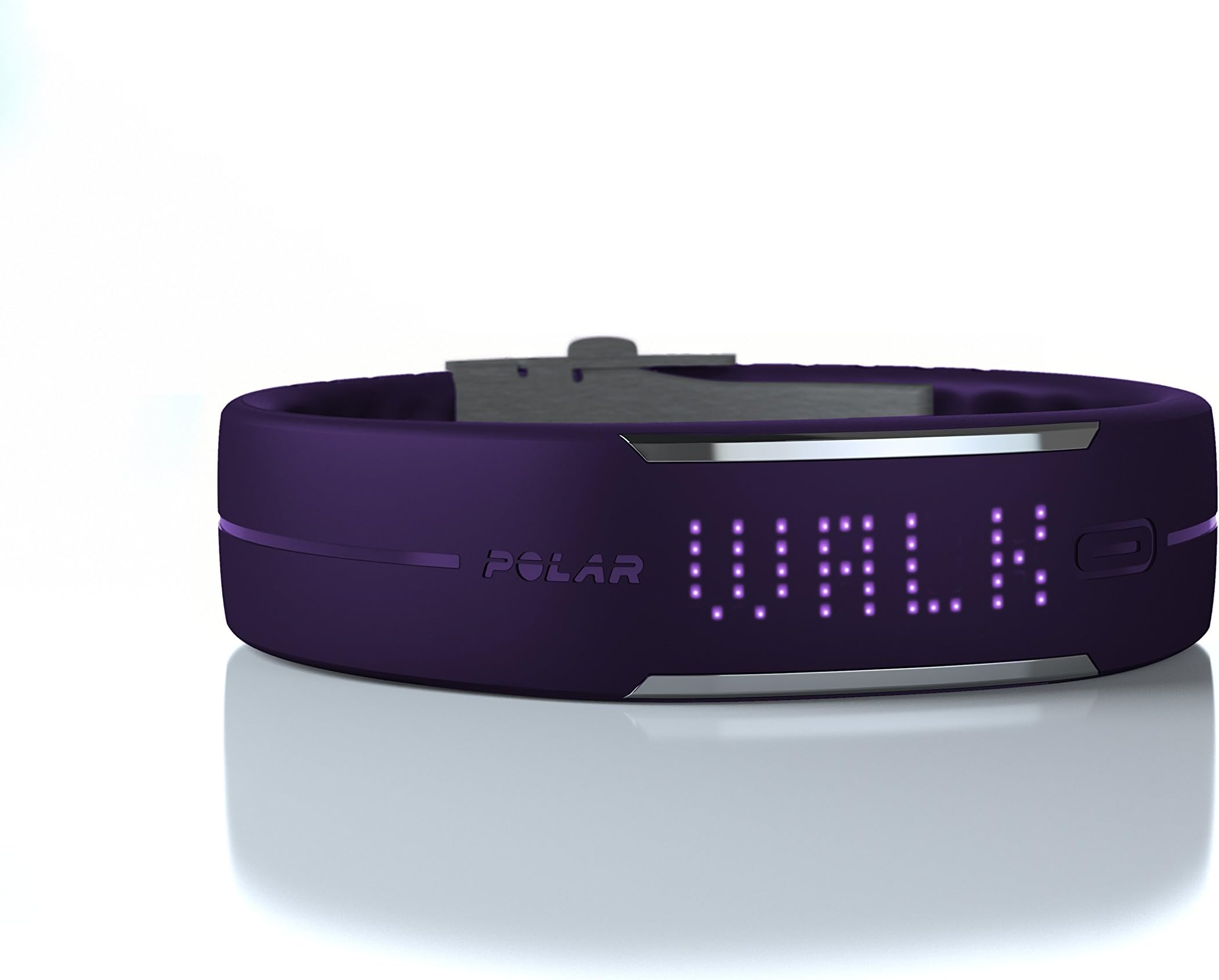
The POLAR Loop Activity Tracker is a sleek, waterproof wristband that monitors your daily activity, calories, steps, and sleep patterns 24/7. Featuring an 85-LED display and Bluetooth Smart syncing to the Polar Flow app, it motivates you with real-time feedback and community support. With a rechargeable battery lasting up to 5 days and compatibility with Polar heart rate sensors, it’s engineered for professionals who demand accuracy and style in their fitness tracking.
P**R
If you know what you're doing this is 5 star
First, don't buy this unless you're getting the H6 (for iPhone) or H7 chest strap. This review is based on using the Loop and chest strap. Currently the price for both can be had for about $150 on Amazon if you hold out for a sale. Considering the price of the Nike Fuelband at $150 and the Fitbit Force at $130, the chest strap for the Loop is a no-brainer and must have all at once.Why? because the Fitbit Force and Nike Fuel Band units will never use heart rate data, a deal-breaker for a legit exercise tracker. A $130-150 pedometer like the Fitbit and Fuel band are simply too expensive in my opinion if they exclude heart rate tracking. At $150 and higher you're well into heart rate monitor pricing and well past e-pedometers.Let's talk about sleep. Some have opined that the Fitbits are better for this. Total nonsense. If you're using the chest strap, the Loop provides *minute by minute* tracking of your sleep. You can even see if you experience PAC and PVC's during deep sleep on your chart using the Polar Flow website. Do Fitbit Force users know what PAC/PVC is? Of course not because their devices don't use heart rate at all. Basically when you awake you remove the chest strap, synch the Loop to your laptop (very fast compared to Nike) and you'll have a graph showing you (A) how long it took for you to get into deep sleep, (B) how many calories were burned during sleep,(C) what your resting heart rate is during deep sleep and (D) what the heart rate is during light sleep, (E)how many minutes or hours are spent deep sleep,(F) if you are restless sleeper as it shows when your breathing pattern was interrupted and (G) how many PAC or PVC's you experience in a night. If you think that wrist movement alone like on the Fitbit during sleep is all you need to analyze your sleep then have been misled by Fitbit reviewers. This aspect of the Polar loop and chest strap alone makes it worth buying. You would have to check into a Hospital Sleep Center to have this kind of data analysis at your finger tips. For which they would bill your insurance thousands of dollars.Some have complained that they don't know how to mark the begining or end of a workout when viewing the data on the Polar Flow website or App. Simple: get dressed for your workout and make sure the very last thing you do before you begin is to put on the chest strap (and hold the Loop up to it for it to connect). Dab a little water under the chest strap's blue tooth transmiter, it speeds up the linking. When you are done with the workout and have recovered for a few minutes remove the chest strap. This stops the data recording of heart rate. The Loop will continue to record your foot steps however. That workout is now a "feed". When I log on to Polar Flow I typically have two feeds a day. One is 7-8 hours for sleep. The other is 1.5-2.0 hours for workouts. In essence putting on and removing the chest strap acts as a stop watch. After your workout its good to leave it on until you've recovered your heart rate back towards the resting heart rate zone, or where you were when you began workout. Analyzing this data is important as it shows how quickly you can recover from exertion. As you workout more, this recovery time should begin to shrink. For example a very out of shape person climbing stairs will often be panting for a while afterwards. Since buying the Loop I wear the chest strap frequently to gauge how many calories are burned and the level of heart activity for common activities like walking in the mall or the supermarket. For example a long five hour shopping trip resulted in typical heart rate of 80 bmps and 1,300 calories burned (my resting heart rate for sleep is 55-60 bpms). This shopping trip was enough to meet my minimum activity goal for the day. On the Polar Flow website under "Diary" it showed 130% of the daily goal achieved and it also displayed the average for that week of 120%, thereby demonstrating short-term consistency towards a long-term goal. There were also hyperlinks for each calendar day that took you to the graph for that day's workout when the chest strap was used.Important: by using heart rate tracking you can see how hard those 10 miles you just hiked actually were. The Fitbit and Nike will only show the steps hiked but what if those 10 miles were a mix of hard uphill steps where you had to expend much more energy? Well without heart rate tracking it registers them all as the same. What if you walked those miles at a brisk pace? Only the Loop and chest strap combination records that data, and it does so with the most accurate alogrithm for calories burned in the exercise industry.I'm Android user, no there's no app yet. No big deal I can use use the Polar Flow website from my PC or Laptop to get at the data for exercise or sleep sessions until then. The Android app will come at some point so no point throwing out the baby with the bath water because of impatience. The issue is that Android devices have not all gotten on the same page about bluetooth stack so the app developers are left waiting for the phone makers to get it together. It's not Polar's fault. Either way its not huge deal because I will spend more time analyzing the Loop's data from the comfort of larger PC or laptop screen than a 4-5" phone display. Also, while I'm viewing this data the Loop is charging since its connected via the USB cable. It charges very quickly and its a good idea to charge it every three days. If the charge goes too low I find that the sensor is less responsive.Let me address the device itself. Some say cutting the band is negative. That's a matter of opinion and I could not disagree with that view more. The Loop uses a dual-deployant clasp, something you only see on high end sports watches like Tag Heuer. Once you're sized up the fit is SECURE, it will not come loose like some have complained on other wrist trackers. And getting it on takes 1/10 of a second because it's using a much better engineered spring-loaded clasp. I give this five stars on product design. Well done. Nothing fits better than a custom fit, you get that here. If you're worried about cutting it,take it to a high end watch store in the mall, they have experience with this. But if you do it yourself it will take about 10 minutes use a new pair of $2 scissors and cut in between the holes. Hint, use your finger nail to squeeze the push pins back into the bracelet once you're don cutting. But use the special tool included to remove the push pins. If you lose the tool just use a safety pin.As for the button that some people complain doesn't work. First of all it's NOT a button. It's a sensor. You have to hold your finger over it long enough for the device to sense the input. Much like the heart rate sensors on the handles of an elliptical machine at the gym. Once the device is awakened for the first time that day, the second touch will work quickly. This keeps the Loop from turning on inadvertently too many times which will drain the battery. The fact that the Loop is fully waterproof well past 10 feet must also add to that barrier as well. Once I wake the device for the day, like when on my bike ride, I will rub the sensor against my chin to light up the screen. This keeps at least one hand on the handlebars with my eyes on the road ahead. When I'm running it's easier for me to check the screen this way as well. It will display the last category you looked at previously. I keep mine set at "heart rate" when using the chest strap during exercise or on "time of day" for the rest of the day when I'm not wearing the chest strap. A second swipe of the sensor against my chin brings up the next window which can be "steps walked" (10K steps is about 5 miles), a third swipe brings up "calories burned", a fourth "activity". Now let's discuss "activity", the Polar Flow algorithm computes based on your height, weight and age the necessary number of steps you need to walk each day to arrive at your ideal level of activity. As you walk more the meter, which is just a red LED rectangle, fills up like a tall glass of water. When using the chest strap during exercise this fills up faster as it knows you are working harder. When the rectangle fills up to 50% I step on the pace so that later on, when I'm viewing this on my laptop on the Polar Flow website, I will see a higher level of work: more calories burned more work done. This is hugely motivating.I'm a cyclist and have been using Polar since 1992 to guide my exercise (using the Polar Favor). For the beginners, when you're doing exercise you can multiply your maximum heart rate (subract your age from 220) and multiply your maximum by 0.65 (or 65%). This the minimum heart rate during exercise that you need to stay at in order to begin burning fat. You will burn more fat all the way up to your maximum. Some stay within 65-80% to keep from bonking out too soon. When you remain above 80% your body needs help from more than just your existing fat stores. But the plus side for lurching above 80% is that you burn more fat in total and increase your endurance. The best workouts by far are high intensity interval training (HIIT) where you're basically play a cat and mouse game of moving your heart rate to the upper end (moving above 80%), slowing down for your heart rate to recover below the fat burning zone for a minute or two and then racing back up to the top. One method is to increase the amount of time you spend above 80% and then reverse the trend for the remaining sets. There's plenty on YouTube about this type of training if you wish to expolore it further. In the end high intensity invertal training will give you the hugely beneficial after-burn effect: although you have stopped exercising your body continues to burn off fat. Now explain to me how you are going to do any of this with a Fitbit Force or Fuelband if they leave out heart rate monitoring? How will you know when you're back below 65% for the required recovery or when you've gone over 80%? You're not. You're guessing. Too bad you spent $150 on those other devices when you could've had this.Also, the Loop with the chest strap is versatile as you can use it to track exercise where you're not really moving your upper body like when biking or skiing. Or perhaps during circuit training with weights where you are intentionally trying to move your arms and legs slowly but your heart rate is well into the aerobic zone. The Fitbit Force and Fuelband will not accurately record this type of activity while the Loop will show you every calorie burned and earned. If you were slacking during that work out it will show you that ugly truth as well.Yes there is no nutrition component yet, but if you have a smart phone there are a ton of Android and iOS apps that will do that for you. And yes the Loop does not have a GPS tracker like some higher end Polar or Garmin monitors costing hundreds more but again your smartphone can take care of that as well if you download apps like Endomondo. That particular app will stop when you rest to check a text or something or are a traffic light crossing and will automatically continue when you are moving again. Afterwards you can see how fast your ran or biked and as well as the route you used on Google Maps. So for the casual but committed athlete there's no sense is buying a second GPS unit for your biking and running when it's already in your pocket with the power of a dual or quad core processor. Which means its really just the swimmers that need a waterproof GPS device. For the non-swimmers perhaps Polar could integrate your phone's GPS into the Polar Flow app as well. There's a great deal of improvement ahead no need to wait for it to be all perfect and ideal before jumping onboard with a great device.Apple have apparently filed a patent to start incorporating heart rate into future iPhones. I doubt the data will be as good as Polar's whove been at this for 30+ years. And Apple's first attempt will not be their best, just looke at the Apple Maps debacle. And half the phone market belongs to Android which means an Apple activity tracking device will be of no use to 50% of us. (Hint Polar/Google collaboration). Point is Polar is a proven global brand in heart rate tracking and Fibit and Nike have some trouble ahead if their devices are to compete with Apple without using heart rate tracking. They could all be obsolete within 2 years.Polar Loop gets my vote for fitness tracker of 2013.
M**T
Love the Loop
I have used Polar products since about 2006, and upgraded several times through different models. I was very excited to see the Loop, and pre-ordered two, one for my wife and one for myself. I am fully satisfied.The Loop is a super-fancy accelerometer. It measures your movements 24/7 and interprets them as activity or inactivity. I wear mine daily, but do not carry my iPhone often enough to make use of the companion app. I use the included USB cable to upload the Loop's data to the Polar Flow website. Polar Flow is still marked as "beta," and they appear to be working on it as more and more people use it and provide feedback. Once you have your personal information set - height, weight, activity level - you just wear the Loop and it gives you your daily feedback. To use the Loop, Polar assumes that you have either a computer, an iPhone, or both, and that you are willing to set up an account on their website. It's definitely not a stand-alone product.If you tried a Polar product in the past, and found the polarpersonaltrainer.com website difficult, I will say that the Polar Flow website is different. It is oriented towards general fitness and activity, rather than serious competitive atheletes.I have tried using this with the H7 Heart Rate Transmitter. It is sufficient for basic workouts, and if you're interested in beginning heart-rate-based exercise/training, this is a good place to start. The H7 talks to both the Loop and to the iPhone Polar Beat app. It will not talk to both at the same time. The H7 is the most flexible heart rate transmitter yet made by Polar - works with Loop, their apps, gym equipment, and is backwards-compatible with other Polar training computers. During workouts, I use the Polar Beat app on my iPad. But the rest of the day is up to my Loop!The Loop also measures sleep. This is reasonably accurate compared to an iPhone app that I use as my alarm clock. There is no functionality for sleep measurement on the Flow website...yet. But I'm hoping that they come up with something, because IMO quality sleep is a big part of overall personal well-being.Like any fitness-oriented product, the Loop is not for those looking for instant-gratification, but it sure looks that way. The big strength of the Loop is that it seems to aim to change a person's habits, little by little. Are you being active through your day? Is it time to get up an take a walk? Elevator or stairs? Drive to lunch or walk? The combination of the Loop, the companion app, and the website diary help one to see and to choose to make these kinds of changes for a more active lifestyle. Like all sound fitness or nutrition programs, the health benefits take a while to really take hold. With the Loop, being able to see them stack up helps one to stick to the goal of a more active, healthier lifestyle. It was very satisfying to see my first full month of activity populate on my web diary in Polar Flow.The Loop has a single button which cycles the LED display through activity, calories burned (based on individual characteristics), steps counted, and time. The time is set through your computer during setup. This one-button arrangement is very easy to get used to.The battery is rechargeable and lasts about five or six days, a little bit longer in 'airplane mode,' where it's not seeking either your iPhone or a heart rate transmitter. So far the maximum I have gone between activity downloads is eleven days with time to spare.Overall a great product and I'm very glad I purchased it. Like I said, if you're looking for something to help you reach a goal for a more active, more healthy lifestyle, the Loop is worth looking at. iPhone users and tech-saavy folk will have an easier time with it, but anyone who's willing to learn will find it money well spent.
Trustpilot
3 weeks ago
2 months ago