We remain fully operational. Our teams are working around the clock to ensure your deliveries continue safely.

DOWNLOAD THE APP


Copyright © 2025 Desertcart Holdings Limited
DOWNLOAD THE APP
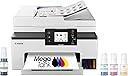
![Canon Megatank GX2020 All-in-One Wireless Supertank [Megatank] Printer | Print, Copy and Scan| Mobile Printing |2.7" LCD Color Touchscreen | Auto Document Feeder and Auto Duplex Printing](https://m.media-amazon.com/images/I/71KWZwpMfmL._AC_SL3840_.jpg)
Buy anything from 5,000+ international stores. One checkout price. No surprise fees. Join 2M+ shoppers on Desertcart.
Desertcart purchases this item on your behalf and handles shipping, customs, and support to South Korea.
🚀 Elevate your home office game with powerhouse productivity!
The Canon Megatank GX2020 is a compact all-in-one wireless printer designed for hybrid professionals who demand high-quality, cost-efficient printing. Featuring a massive 3,000-page ink yield, dual-band WiFi, a 2.7-inch color touchscreen, and a 35-sheet automatic document feeder, it streamlines print, copy, scan, and fax tasks with auto duplex printing. Backed by a 3-year warranty and Canon’s trusted support, it’s built to keep your productivity flowing effortlessly.


| ASIN | B0CHLHDHRT |
| Additional Printer Functions | All In One |
| B&W Pages per Minute | 15 |
| Best Sellers Rank | #119,635 in Computers ( See Top 100 in Computers ) #227 in Ink Tank Printers |
| Brand | Canon |
| Built-In Media | Ink Bottles, Auto Document Feeder, Power Cable, User Manual |
| Color | White |
| Color Depth | 24 bpp |
| Color Pages per Minute | 10 |
| Compatible Cartridge | GI-25 Pigment-Based Ink Bottles (Cyan, Magenta, Yellow, Black) |
| Compatible Devices | PC |
| Control Method | Touch |
| Controller Type | Touch Screen |
| Customer Reviews | 4.2 4.2 out of 5 stars (1,020) |
| Display Type | LCD |
| Dual-sided printing | Yes |
| Duplex | Automatic |
| Global Trade Identification Number | 00013803359497 |
| Hardware Interface | USB |
| Ink Color | Cyan, Magenta, Yellow, Black |
| Item Dimensions D x W x H | 37.6D x 38.1W x 22.6H centimeters |
| Item Type Name | Inkjet Printer |
| Item Weight | 17.8 Pounds |
| Manufacturer | Canon |
| Maximum Copy Resolution Black and White | 1200 x 2400 dpi |
| Maximum Copy Resolution Color | 1200 x 2400 dpi |
| Maximum Copy Speed Black and White | 14 ppm |
| Maximum Media Size | Letter |
| Maximum Print Resolution Black and White | 1200 x 2400 dpi |
| Maximum Sheet Capacity | 250 |
| Maximum print Resolution Color | 4800 x 1200 dpi |
| Model Name | MAXIFY GX2020 |
| Model Number | 6171C002 |
| Model Series | Canon MegaTank MAXIFY |
| Number of Drivers | 1 |
| Number of Trays | 2 |
| Other Special Features of the Product | Auto Document Feeder, Energy Star, Touch Screen |
| Output sheet capacity | 250 |
| Paper Size | Cassette: LTR, A5, B5, A4, 4" x 6", 5" x 7", 7" x 10", 8" x 10" Custom Size: 3.5” - 8.5” / Length: 5.0” x 14.0” |
| Power Consumption | 22 Watts |
| Print media | Envelopes, Glossy photo paper, High-resolution paper, Paper (plain) |
| Printer Connectivity Type | USB |
| Printer Output Type | Color |
| Printer Type | Inkjet |
| Resolution | 600 x 1200 dpi |
| Scanner Type | Flatbed |
| Specific Uses For Product | Home, Office |
| Total Usb Ports | 1 |
| UPC | 013803359503 |
| Warranty Type | limited |
| Wattage | 22 watts |
J**L
This printer is packed well! Pulling the printer out of the box is smooth and easy. Inside is the manual, couple with other items, the cord, the telephone connection and ground wire. The setup is so easy by following the direction on the printer screen. The setup direction was user friendly including the wifi setup. One feature I was very impressed with, while the printer is off. You can send a printing request, it turns itself on and prints the requested info.
A**N
In the 11-12 years since I last purchased a Canon printer a LOT of things have changed for the setup, and definitely for the better. Basically almost a plug and play - plug in the power cord and turn on and then follow directions on the printer screen. Maybe 10 munutes at most from out of box to up and running, and a good 5 minutrs of that is the printer doing callibration and alignment after ink is installed. Installation process and connecting to WiFi was seamless, and initial print quality looks very good. Did test run on a couple of documents, a photo, then tested the scanning function which also let me test the ADF. This thing is lightning fast with print speed. I am impressed! Set a tickler on my calendar to see long ink lasts and 🤞for positive results.
C**.
I love this printer once I got it to hook up to my wi-fi. The double sided printing works very well as does the scan, print, and copying. I found the instruction for set up a little light, but went online and printed out the Manuel so it all worked out. Seems to be a decent quality and easy to use. I have scanned a few pages with no problems. For use in my home office and it is easy to move around
G**U
Bought this to replace an old Epson all-in-one that still worked well but shut done unexpectedly when it said the waste ink pads were full. You can buy the parts but then need a code from Epson to reset. I actually got a code (only works with Windows) but it still insisted I bring it in for authorized service. Obviously no more Epson products in my home! There are fewer ink tank printers out there than regular cartridge printers, but it is well worth the cost and effort to find an ink tank printer such as this. Instead of 12 - 30 ml of ink in a typical cartridge (of which some is always wasted), you get 132 ml of each color and 167 ml black ink included with the printer. You can also see the ink level and can refill whenever you want, so no more frantic late night trips to Staples when you have a report due the next day. Setup is easier than it sounds. My computers and printer are all connected via wifi and each computer connects on its own to the printer. You initially fill the 4 ink tanks (bottles make it fool-proof) then print a page that it uses to check alignment. The instructions then tell you to download a program from Canon, which I did for my first computer. However, I skipped that step for my other computers (all Macs), as well as my phone, and they were all able to find the printer and connect almost immediately without having to download any additional programs or drivers. The downloaded Canon program facilitates printing and scanning, but really does nothing different or better than what already comes on the Mac. As others have mentioned, you need to go into settings and disable auto-off, so that the printer is able to respond to print jobs wirelessly. This uses minimal energy – less than a typical nightlight. Quality is great. I would have no concerns about using this for making handouts that contain print and graphics for business meetings. I've only printed photos on plain paper so far but they are vibrant and look very good. This machine comes with all pigment (as opposed to dye) ink. Pigment ink tends to cost a bit more, but the ink already comes included with the printer. Pigment ink also is more durable and UV resistant, and much less resistant to water smearing. (The HP tank printer that I looked at only used pigment ink for black, but dye ink for colors.) I purposely tried to smear the output from this printer with water, and was very pleased with the result. Scanning quality is very good and works with my Mac natively. And as expected, copy quality is also very good. If you need to change any settings, the touchscreen on the printer is bright and easy to use. One additional benefit of this machine is the rear printer slot which you can use for thick card stock that would typically not work in the paper tray. Overall, an excellent printer. The initial cost is higher, but the much lower ink costs make this a bargain in the long run. Highly recommended.
A**R
Excellent. Easy to set up. Prints well like Canon printers do.
Trustpilot
2 weeks ago
1 month ago