
DOWNLOAD THE APP


Customer Services
Copyright © 2025 Desertcart Holdings Limited
DOWNLOAD THE APP


🚀 Elevate your workspace with the KTC 32" 2K Monitor — where productivity meets immersive brilliance!
The KTC 32 Inch 2K Monitor delivers a professional-grade 2560x1440 IPS display with HDR and 109% sRGB color accuracy, ideal for office, gaming, and creative editing. Featuring a smooth 100Hz refresh rate (up to 120Hz) with G-Sync/FreeSync support, ultra-thin bezels for multi-monitor setups, and eye-care technologies like flicker-free and low blue light, it ensures comfort and performance. Connectivity options include dual HDMI 2.0, DisplayPort 1.4, and headphone jack, complemented by tilt adjustability and VESA mount compatibility, making it a versatile and stylish choice for the modern professional.


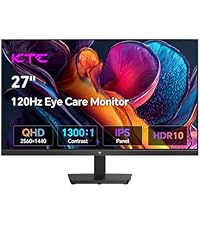


| ASIN | B0DKNRD42F |
| Adaptive Sync | FreeSync, G-Sync |
| Additional Features | Adaptive Sync, Eye Care, Flicker-Free |
| Aspect Ratio | 16:9 |
| Best Sellers Rank | #2,006 in Electronics ( See Top 100 in Electronics ) #85 in Computer Monitors |
| Brand | KTC |
| Brightness | 350 Candela |
| Built-In Media | 32 inch QHD Monitor *1, QSG*1, Tilt Adjustable Stand*1, Warranty card*1 |
| Color | Black |
| Color Gamut | 109 |
| Compatible Devices | Desktop, Gaming Console, Laptop |
| Connectivity Technology | DisplayPort, HDMI |
| Contrast Ratio | 1000:1 |
| Customer Reviews | 4.5 out of 5 stars 2,149 Reviews |
| Display Resolution Maximum | 2560 x 1440 Pixels |
| Display Technology | IPS |
| Display Type | LED |
| Hardware Connectivity | DisplayPort, HDMI |
| Has Color Screen | Yes |
| Image Contrast Ratio | 1000:1 |
| Item Dimensions D x W x H | 5.31"D x 32.48"W x 21.2"H |
| Item Height | 21.2 inches |
| Manufacturer | KTC |
| Model Name | H32T13 |
| Model Number | 0703 |
| Mounting Type | Desk Mount, Wall Mount |
| Native Resolution | 2560x1440 |
| Number of Component Outputs | 1 |
| Picture Quality Enhancement Technology | HDR |
| Pixel Pitch | 0.27 |
| Power Consumption | 54 Watts |
| Refresh Rate | 100 Hz |
| Resolution | QHD Wide 1440p |
| Response Time | 3 Milliseconds |
| Screen Finish | Matte |
| Screen Size | 32 Inches |
| Screen Surface Description | Matte |
| Shape | Flat |
| Specific Uses For Product | Business, Gaming, Photo Video Editing |
| Total Number of HDMI Ports | 2 |
| Viewing Angle | 178 Degrees |
| Voltage | 12 Volts |
| Warranty Description | 3 Year Manufacturer |
| Warranty Type | 3 Years Manufacturer Warranty |
R**H
Excellent monitor for the price
Bought two of these for a dual monitor setup. I took a chance on a brand that I didn’t know, but after a little research I learned that they build monitors for some of the name brands, so obviously they know what they’re doing. They started making them for the own brand now. They were very easy to set up, packaged well, quality feels like the top brands. Functionality, and ease of pairing and connection options are excellent. The size and weight are perfect, thickness is rather thin. The ones I ordered are 4k, and the quality and color is great, certainly bright enough. There is built in speakers, but haven’t used them as I have external sound system. I bought these to do video editing, and office work, but for gamers, these would be great, too. For the price, amazing quality!
D**P
Good monitor
This is just a great monitor for the price. Good refresh rate, good colors. Easy menus, also a nice long power cord. The hdmi cable it came with is fairly short, fine for gaming but just keep that in mind
M**O
Unbelievable performance and value for my office and general use
First impressions review of H27T27. They also are selling H27T13. YMMV. I am not a gamer so this is not a review of suitability. Amazing that a display in this price range is even of interest to gamers. The display is beautiful. It is far brighter with far more adjustment than I will ever use. The picture viewing angle is reasonable, there is very little variation side to side when looking directly at the monitor, better than my laptop display. There is minimal backlight bleed, especially for an inexpensive ips panel. There is a stuck pixel, or possibly a cluster of 2 in the lower right corner--ymmv. They have an explicit pixel guarantee you can check out on their website. If anyone is looking for power buttons or controls, it is all in the joystick on the back right corner. Just hold down 3 seconds to power off. Menu is very intuitive. I'm using vesa 100 mount, so can't speak to the stand. The only issue is that the screws I have are a little long--they won't tighten down all the way. No mounting screws included. But no issue with stability or usability once mounted. I'm running this at qhd 75hz, which is all my hdmi-display port adapter will support. Can't verify 100hz. It's more than fine for me. All in all, I couldn't be happier. Hope it holds up. I hadn't heard of KTC. Turns out they are an established, global company. They have a real CS team that returned my email overnight. They confirmed that all of their monitors have a three-year warranty. This is from their website: For 27 years in the display hardware market, KTC is basically the OEM manufacturer for some premium and medium Monitor Brands. Our excellent quality being widely praised in the industry, while KTC’s own brand is blank. In Jan. 2021, our own brand KTC(Key to Combat) was born with the concept of “Customer First, Inspire Innovation,” which made a jump from secretly to the onstage. KTC Gaming focuses on the production, research and marketing of high-quality gaming monitors and is dedicated to becoming a window between the human and gaming world. Relying on our R&D and manufacturing strength, KTC Gaming strives to bring players the immersive gaming experience and ultimate services, practicing the brand spirit of “Technology Improves Life”.
J**S
Solid monitor for the money.
I would have loved to give this 5 stars, and maybe I should have given the cost of this 2k monitor. It is a nice unit, arrived in good shape and installed easily. Nice sharp picture. The only things that bothered me was the lack of an on/off switch (have to pull the plug), lack of built in speakers (not that big of deal for me since it does have an audio port for external speakers) and a "joy stick" kind of button thing on the back I found a little difficult to use for making all settings. There is minimal control over screen angle, but still not bad. I can't speak for reliability as I've only had it a couple weeks, so time will tell. I'm using this a a second screen for my laptop, and it works very well. I'd definitely recommend it.
R**L
Amazing monitor at a price you can’t beat
I use mine for office work and it’s been a great monitor. The blue light filter makes it so comfortable to look at all day and the screen is so big I can very easily have two windows side by side. The resolution is so clear, but while I don’t need high refresh rate it’s worth noting that I’m only getting 60hz. Not sure if there is a setting that I have to change. Also the base is a little large but even then I haven’t been bothered by it
J**P
Incredible - especially for the price. I took a gamble and hit the jackpot.
This review is for the KTC Gaming Monitor, 27 Inch 1440p 165Hz 144hz Monitor, 2K QHD 1ms GTG Fast IPS Computer Monitor, HDR, HDMI/USB C/DP Vertical Monitor, FreeSync & G-Sync, Swivel Tilt Height Pivot Adjustable, H27T22. First off, several reviewers left inaccurate reviews based on some misunderstandings of this specific monitor, monitors in general, operating system settings, GPU control panel settings, or game settings. I want to correct these inaccuracies so shoppers can make a more informed purchase: 1. The monitor is 27 inches - NOT 24 inches. Monitors are measured diagonally, NOT horizontally. This monitor measures 27 inches diagonally (while it measures 24 inches horizontally). 2. The monitor does have true HDR (not fake HDR), and it has very strong effects, especially when properly configured. Needing to configure HDR is not a limitation of this monitor. It is a fact of life as it relates to HDR. It needs to be configured in the monitor, AND in the Windows operating system (search "Windows HD Color Settings" and turn on "Use HDR" - presumably, if you're using MacOS, it likely also has something similar to this), AND in each specific game which you want to use HDR in. 3. When using HDR, you want to adjust your color, brightness, contrast, black level, gamma, etc. in the GPU control panel (e.g. NVIDIA Control Panel), the Windows OS, search "Color Management" > then click the "Advanced" tab where you'll find a lot of options; and similar in each specific game. I believe a similar function may exist within modern consoles as it relates to turning on HDR, brightness, gamma, etc. in the consoles themselves. This can be adjusted to be easy on the eyes, and even goes far beyond what is needed (i.e. the limitations far exceed the need and therefore do not restrict your ability to adjust it to your liking). Pros: 1. If IPS panels are supposed to have poor black levels, this monitor completely changes this rule. The blacks are pitch black; like a black hole, they are so black. Again, you have to know what you're doing to properly configure things. So if your blacks don't look black, it is a problem with your configuration, NOT the monitor - unless perhaps you got a lemon, but that isn't likely as this company, while new to consumers, has been producing monitor hardware for decades and isn't as new as they seem. 2. The brightness and contrast are extremely well defined. No complaints whatsoever. 3. The HDR truly puts this monitor in an entirely new class of it's own. The level of detail, the dark blacks, the bright whites (to whatever level you adjust them), the contrast, the color vibrancy/saturation - it all looks so amazing, and it is extremely broad in how it can display images, video, and games. The colors are amazing, and can go far beyond what you need, or dialed back if you prefer. 3. The 1 ms response time, the 165Hz refresh rate, the 1440p (2K) resolution, the G-Sync & FreeSync, the incredible viewing angles of 178° both horizontal AND vertical, and fully adjustable height, swivel, tilt, and pivot, all add up to a monitor without any significant weakness compared to other monitors, and many very solid strengths. Con: Only con for me is the bezel is slightly larger than it appears in the pictures, but for a single monitor setup it isn't too noticable. Summary: Overall, just as the title says, after a LOT of research into monitors, I still felt like I was taking a gamble buying this one, yet it truly feels like I hit the jackpot. I HIGHLY recommend this monitor, so get it while it's hot.
R**N
Great Image Quality
Seems color calibrated with professional mode set to DCI-P3! High PPI and other specifics, make the image quality great and crisp to view, recommended with puzzle games. Durability, is as good as it can be, I didn't have any defects, everything works well! With the Audio Jack, slight white noise, which is to be expected because of grounding. Which can be resolved with a ground loop isolator. Great crispness in the sound quality. This is my second monitor from KTC, and the brand is very professional. An outstanding product every time.
E**C
Budget gaming monitor with a high end feel.
Typically, i like to wait a bit before reviewing anything i buy online. But honestly, this KTC monitor impressed me for being a budget option at this price point so I’m going to go ahead and five my thoughts on it. packinng was what you would expect, nothing too fancy. Included was the mount and and stand for the monitor as well as the power cord, an HDMI cable and a DisplayPort cable. The Good: - Picture quality on this monitor is really good. 1440p looks crisp and clear and even downscaling to 1080p, while degrading the image a bit, still doesn’t look overly fuzzy. So if you really wanted to play or use this monitor at 1080p you could. (But being a 1440p monitor, don’t know why you would want to) - there is very very little ghosting with this monitor at stock settings, i found that setting overdrive to low makes the ghosting pretty much go away without reducing image quality at all so that what I’ve kept mine on. I’ve attached a video to try and show an example of what it looks like. - Freesync/ G-Sync works well without issues, there was no flickering at all during gaming at 165hz. Gaming felt smooth and i had no issues with stuttering or response time. Just note, 165hz only works with the DP cable. If you decide to use HDMI, you’ll only be able to go up to 144hz. - Talking about the picture quality, the colors are vibrant without looking overly saturated, the blacks, while not being as dark as you’d see on a VA monitor, are still pretty good. Out of the box, you probably wont need to adjust the settings at all, unless you want really want to. - Speaking of settings, i thought that using one button to essentially control everything would be annoying, but it’s actually pretty easy. Just press the button once to access the menu, and then move it in the direction you want to change whatever settings you want and then press the button again to turn off the menu. The Bad: - the monitor did arrive with some stuck pixels at the bottom right corner of the screen , just above the power button. It wasn’t enough to make me want to return it, as it isn’t noticeable when using the monitor for gaming or when using it for day to day tasks. This is more a QC issue more than anything, so your mileage may vary. I’ve attached a picture of it so you can see it for yourself. - although it doesn’t affect performance at all, the RGB lights on the back of the monitor only have the option to turn it on or off and no setting to change the color to whatever you want. Out of the box, it just changes colors in this slow wave like effect. But this is just me being nit-picky. - HDR on thins monitor is pretty bad, it does increase the brightness a bit if that’s what you’re looking for, but it washes out the colors too much and overall just looks too bright imo without manually changing settings in both the monitor and windows. If you’re looking for a monitor for primarily game in HDR, you might want to look at other options. - this one is me being nit picky again, but the USB port on the back of the monitor doesn’t seem to have functionality, seems its just there to use a USB stick to update firmware or something. I plugged a mouse in there and a USB light strip, the mouse didn’t work at all and only half of the light strip lit up. So while a cool feature, doesn’t seem all that useful. I don’t know, maybe it’s in a firmware update that I haven’t done yet? Ill update this if i’m able to figure out more. UPDATE: the USB port on the back works, i ended up swapping out old parts for new ones and it suddenly started working. I tried a LED strip and a mouse and both worked fine. I don’t know why or how this would interfere with the monitor, but it is what it is. Overall, this monitor is really solid for the price, it comes with decent enough features to make it comparable with other options, but keep in mind it is a budget monitor so you won’t get some of the features here like you’d see with higher end models. But if you’re looking to get a gaming monitor with good image quality, good colors, high refresh rate, a 1ms response time and no ghosting, you’d be hard pressed to find a better monitor at this price point.
Trustpilot
3 days ago
2 weeks ago