
DOWNLOAD THE APP


Customer Services
Copyright © 2025 Desertcart Holdings Limited
DOWNLOAD THE APP

✍️ Elevate your Surface experience with precision and power at your fingertips!
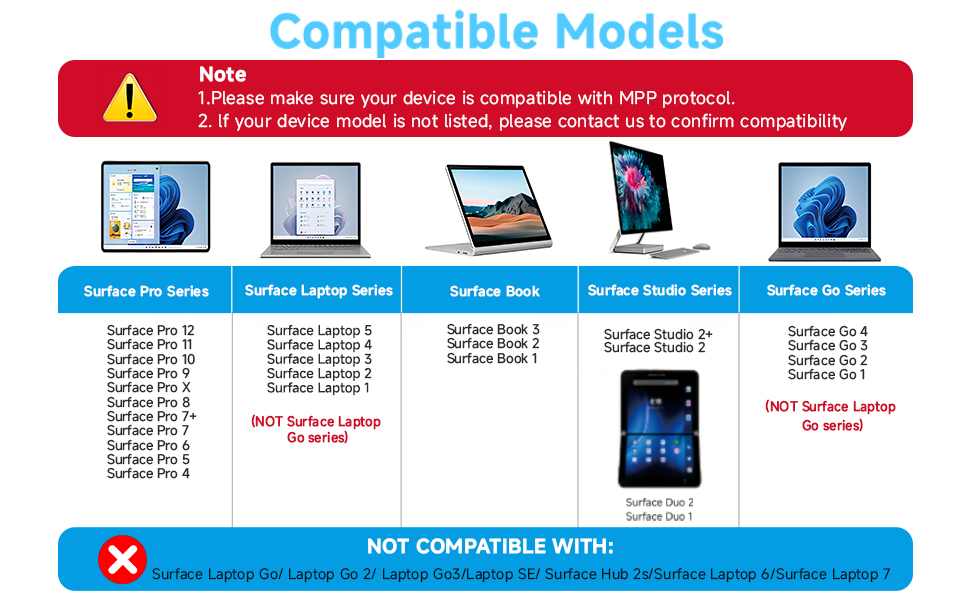
The Milikilo F97 Stylus Pen is a premium accessory designed for a wide range of Microsoft Surface devices (excluding Laptop Go series). Featuring 1024 pressure sensitivity, tilt shading, palm rejection, and eraser/right-click buttons, it offers professional-grade precision and functionality. With fast Type-C charging providing up to 80 hours of battery life and strong magnetic attachment, this pen ensures uninterrupted creativity and productivity for students, professionals, and creators alike.




| ASIN | B0CYXWKWNY |
| Best Sellers Rank | #31,223 in Mobile Phones & Communication Products ( See Top 100 in Mobile Phones & Communication Products ) #630 in Mobile Phone Stylus Pens |
| Item model number | F97 |
| Manufacturer | Milikilo |
| Product Dimensions | 15.8 x 0.99 x 0.99 cm; 14 g |
R**6
Compatible surface pro 7+ et 9. S'aimante bien a la tablette. Finition vraiment bonne.
M**A
Works fine, on surface pro 4
S**A
Funziona perfettamente con surface
A**.
I needed a backup stylus for field work because I didn't want to risk losing my expensive official Microsoft Surface Pen on a job site. I honestly expected this to feel "cheap" or have connectivity issues, but I can't tell the difference in daily performance. The "MPP" Magic (No Bluetooth needed): Because this uses the Microsoft Pen Protocol (MPP), there is no fiddling with Bluetooth settings. As soon as I turned it on and touched the screen, it worked. • Pressure Sensitivity: It tracks perfectly. If I press harder while sketching a diagram in OneNote, the line thickens exactly like the OEM pen. • Palm Rejection: This is the dealbreaker feature, and thankfully, it works here. I can rest my hand fully on the screen while writing, and it doesn't register stray marks. Magnetic Attachment & Charging: It has a strong magnet that snaps firmly to the side of the Surface Pro, just like the original. • Important Note: While it magnetically attaches, it does not wirelessly charge (unlike the Slim Pen 2). You have to plug it in via USB-C to charge it. However, the battery lasts forever. I’ve used it for a week of meetings and haven't needed to recharge it yet. Tactile Feel: The tip has a nice amount of friction. It doesn't feel like slippery plastic-on-glass; there is just enough resistance to make your handwriting look neat. Verdict: Unless you are a professional digital artist who needs specific tilt-shading capabilities of the high-end Slim Pen 2, save your money. For taking notes, marking up PDFs, and general navigation, this is an absolute steal.
C**R
Está súper bonito, muy cómodo de usar, dice que el botón inferior es para borrar pero en este caso subraya y el botón superior borra, solo es cuestión de acostumbrarse, lo compré para mi Kobo Libra Color y funciona muy muy bien.
Trustpilot
2 months ago
1 month ago