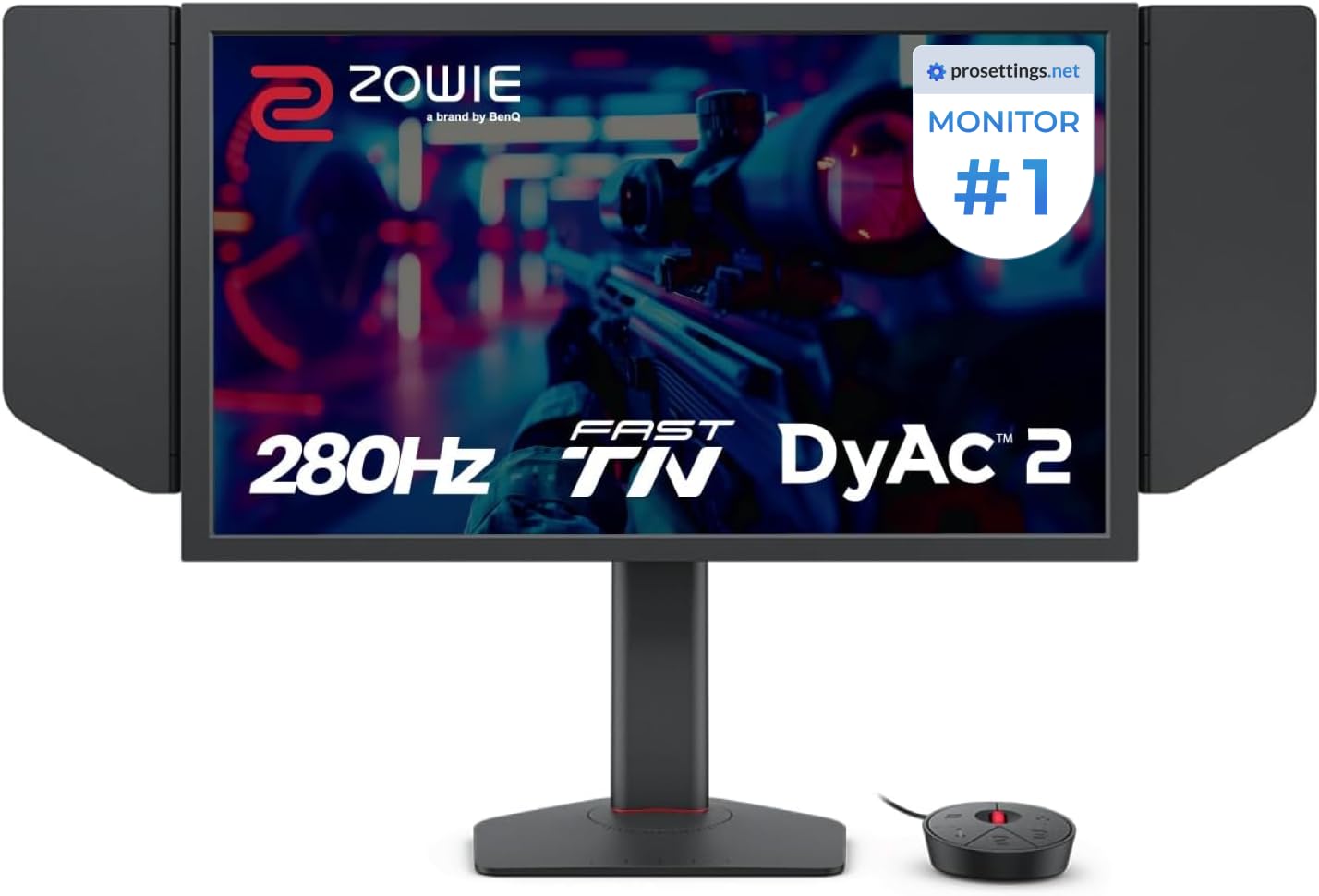
🎮 Dominate the esports arena with clarity and speed that others only dream of!
The BenQ Zowie XL2546X+ is a 24.1-inch 1080p esports monitor featuring a blazing-fast 280Hz refresh rate and cutting-edge DyAc 2 technology for unparalleled motion clarity. Its Fast TN panel reduces overshoot and enhances responsiveness, while the industrial-grade bearing height adjustment and shielding hood provide ergonomic comfort and focus. Designed for competitive gamers seeking precision and speed, this monitor automatically adapts color modes to suit your gameplay, making it a top choice for serious esports professionals.




| ASIN | B0DKZPJ1X6 |
| Best Sellers Rank | #9,159 in Electronics ( See Top 100 in Electronics ) #305 in Computer Monitors |
| Brand | BenQ |
| Color | Black |
| Customer Reviews | 4.5 4.5 out of 5 stars (261) |
| Date First Available | November 14, 2024 |
| Hard Drive | 2 |
| Item Dimensions LxWxH | 22 x 8.02 x 20 inches |
| Item Weight | 20.2 pounds |
| Item model number | XL2546X+ |
| Manufacturer | BenQ |
| Max Screen Resolution | 1920 x 1080 |
| Number of USB 2.0 Ports | 1 |
| Product Dimensions | 22 x 8.02 x 20 inches |
| Screen Resolution | 1920x1080 |
| Series | XL2546X+ |
| Standing screen display size | 24.1 Inches |
| Voltage | 240 Volts |
C**Y
unbeatable for the price, and still punches up
amazing monitor, for gaming you really can’t beat it for the price. 360hz with basically zero artifacts will leave you thinking you can see into the future- because you literally can see earlier than a lower hz monitor. color accuracy is definitely questionable, i have another monitor with much better colors for sure, but if you wanna play counter strike or other competitive shooters and you aren’t made of money this is the one to get. pros were using it a year ago for a reason.
M**D
no motion blur at all
very good for competitive gamers and esports players
J**E
Best monitor for CS2
No missing parts, easy setup, very customizable with picture and display settings. Overall great monitor for competitive fps games
X**S
Monitor specifically designed for the hardcore and ultra competitive.
This monitor requires a lot of tweaking for whatever you want out of it. It can achieve great colors but you will constantly have to use the s-switch to change settings for each application. I was considering this and the PG27AQN and I believe I will be sticking with this. The motion clarity is just too good to sacrifice for the 1440p/360hz/IPS/ULMB 2 combination. I have a PG279Q which was the highest end monitor at the time of release and 1440p is good, but it's not as clear as 4k and that leaves something to be desired (I have a 4k 144hz). Games like Starfield are extra crisp with the motion clarity, as well as D4/D2R, RDR2, Cyberpunk, etc. 1080p is definitely not great in games but at the time being it is the only way to get the most out of today's motion clarity technology. EDIT: Just tried the PG27AQDM, and while I have it set up right next to the XL2566k, I will be keeping the latter. The OLED of the first is obviously top tier and great, but I cannot live without the motion clarity despite the poor viewing angles.
W**M
Poor quality with high end price..
Was very exciting about BenQ XL2566X+ and the monitor has a hardware defect. The screen randomly shows colored glitch lines and pixel corruption on both DP and HDMI, even at 60Hz. Symptoms: • The screen suddenly turns into colorful stripes • It lasts for 2–3 seconds and then recovers by itself and continues! • After recovery the image becomes blurry and color fading away • Issue appears on all inputs (DP and HDMI) • I tested different DP cables and different DP ports on my GPU • My GPU works perfectly with my other monitor (Alienware AW2721D), so the graphics card is not the problem
J**W
It does what it’s supposed to
A TN panel in 2023 isn’t the move for most use cases. However, I pretty much only play apex legends and other shooters on my computer, and I have another 32” 1440p lg monitor for content consumption. That being said, this monitor is really, really good. The black equalizer and color vibrance features work well, and Dyac+ seems to work great. I’ve played with dyac on and off. To be honest, I can’t tell the difference unless I’m REALLY trying and am like dragging a window with text across my desktop and trying to read it at the same time. With it being 1080p, my frame rate is always capped (I have a 4080- I know. Overkill.) My tracking has noticeably improved as well. 360 hz is noticeable, as I came from a 144hz monitor. Now, with all this said, would I recommend it to people? No. Not unless all you do is play shooters or have a good second monitor for other stuff. I’d still much prefer to play a game like elden ring or Witcher on a bigger 1440p IPS display. Also, I forgot to mention- optimum tech on YouTube has a video on this monitor with some color settings to make it look better. I highly recommend using those settings and then just dialing in the gamma and color vibrance. The display actually doesn’t look bad at all.
D**H
It's great, but don't buy it.
Color accuracy? No. Viewing angles? not really. Refresh rate? Insane. Somehow it was plug and play with 600 hz, I didn't even need to mess with windows settings. That's not to say you won't have to. The only issue i had was getting my games to accept that it was going to be my main monitor. I also have an LG OLED (240hz). no amount of messing with settings fixed the issue, but unplugging my OLED's DP cable and restarting did the trick. I was then able to plug the OLED back in and everything functioned how i wanted. It's insanely good for FPS games especially CS2. i swear DYAC2 on premium is like some kind of black magic when it comes to reducing motion blur. With the premium setting their is some very slight overshoot in the UFO test, However I don't notice it in game. Putting Dyac2 on high (ironically... that is the lowest setting) eliminated the over shoot in testing, but does not have the same motion clarity as premium; that change is somewhat noticeable in game. compared to my OLED (240 hz) This monitor has noticeably better motion clarity. but some artifacts that affect image quality. On paper objectively it should be a way better monitor than 240 HZ OLED. however as far as Subjective/qualitative it is easily noticeable in testing, but in game vs the OLED its not all that game changing. value: If you're comparing this to a 480hz OLED which are currently at the same price point of 1000 $ USD the OLED is going to be a much better monitor overall only slightly falling behind in blur reduction. But not in a game changing way. I can't with a clean conscious say that this monitor is the answer for anybody really; except for Professional level players, and that's not because I think it's a better choice. The only reason it's the answer for pro level competitors is standardization of setup, because its what the tournament organizers have been using for years and will likely continue to use for the foreseeable future. if you're going to spend 1000 USD on a monitor Get OLED unless you're a pro level FPS competitor that goes to LANs regularly; then get the Zowie to make the online and Lan experience as 1:1 as possible.
D**N
Muy fluido perfecto para COMPETITIVO
10/10
N**M
I'd like to say this monitor is definitely costly and is intended for professionals, those wanting to go pro, and heavy FPS enthusiasts. Would I recommend this monitor to the majority of gamers? Definitely not, I'd go for a 1440P O-LED instead.
J**A
When it comes to competitive gaming, every frame counts. The 540Hz gaming monitor has been a game-changer for my experience in titles like Counter-Strike and Valorant, elevating my gameplay to new heights. Performance and Smoothness: The standout feature of the 540Hz monitor is its unparalleled refresh rate. At 540Hz, every movement on-screen becomes unbelievably smooth and fluid. This translates into a significant advantage in fast-paced FPS games where split-second decisions can mean the difference between victory and defeat. I've noticed a remarkable reduction in motion blur and input lag, allowing me to react faster to opponents' movements and actions. Precision and Accuracy: The enhanced refresh rate isn't just about smoother visuals; it directly impacts aiming precision and accuracy. With each frame updating at a mind-boggling speed of 540 times per second, my crosshair placement has never been more precise. This monitor has effectively reduced screen tearing and stuttering, providing a clear and consistent view of the battlefield at all times. Response Time and Input Lag: Another area where the 540Hz monitor shines is its incredibly low response time and input lag. Actions feel instantaneous, from clicking to shooting. This instantaneous feedback loop has honed my reaction times, making me more responsive and deadly in clutch moments. Color Accuracy and Visual Clarity: Despite the focus on performance, the monitor doesn't compromise on visual quality. Colors are vibrant and true-to-life, which not only enhances the overall gaming experience but also helps in distinguishing between different elements in the game environment with ease. Becoming an FPS God: Since using the 540Hz monitor, my gameplay has seen a remarkable improvement. I've climbed ranks in both Counter-Strike and Valorant, consistently outperforming opponents in intense firefights and nail-biting situations. The monitor has empowered me to make split-second decisions with confidence, knowing that my actions are reflected on-screen almost instantaneously. Conclusion: In conclusion, the 540Hz gaming monitor isn't just a luxury; it's a necessity for serious competitive gamers. Its unmatched refresh rate, low response time, and overall performance have transformed my gaming experience, turning me into a force to be reckoned with in FPS titles. If you're looking to elevate your gameplay and dominate the competition, the 540Hz monitor is a no-brainer investment that will pay off in spades.
H**I
At first it did not feel right because i used oled monitors for so long but when i started to get use to the panel and colors i started to appreciate dyac 2 and 600hz, the motion clarity is amazing. I recommend this monitor ONLY if you play tactical shooters lile CS2 etc..
P**E
facile a monter, je l'ai pris principalement pour du valo, avec un bras veza et cela a tres bien fit donc je suis content
A**B
I purchased this monitor specifically for its high refresh rate, but unfortunately, it arrived with a clear internal hardware defect that makes it unusable. I am writing this review to save others time on troubleshooting, as the issue requires an immediate RMA (Return Merchandise Authorization). The Problem (Visual Artifacts): Horizontal lines/static consistently appear across the bottom half of the screen the moment the monitor receives a video signal from the PC and while playing cs2. Crucial Troubleshooting Details (Proof of Hardware Failure): 1. Cable/GPU Ruled Out: The defect is present regardless of the refresh rate chosen (it appears at both 600Hz and a low-bandwidth 120Hz). I used the original DisplayPort cable and the latest GPU drivers. 2. Monitor Panel Itself is Fine: The lines disappear completely when the monitor shows its internal screens, such as the On-Screen Display (OSD) menu or the "No Signal Detected" message. Conclusion: Since the monitor displays its own internal diagnostics perfectly but shows artifacts as soon as it processes an external video feed (even at a low 120Hz), this points to a failure in the internal scaler or input processing board of the monitor. This is a fatal defect in the monitor's circuitry and cannot be fixed by changing cables or software settings. Recommendation: If you encounter any lines or artifacts that do not appear on the OSD or "No Signal" screen, stop troubleshooting immediately. Do not waste time buying new cables. Contact Zowie/BenQ support for an immediate replacement or refund. This is a manufacturing defect.
Trustpilot
1 month ago
2 weeks ago



