
DOWNLOAD THE APP


Customer Services
Copyright © 2025 Desertcart Holdings Limited
DOWNLOAD THE APP

🎯 Dominate your game with LG UltraGear’s razor-sharp precision and silky smooth speed!
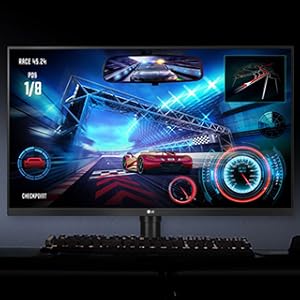
The LG 32GK650F-B UltraGear is a 32-inch QHD gaming monitor featuring a 2560x1440 resolution, 144Hz refresh rate, and Radeon FreeSync technology. Its virtually borderless design and advanced gaming features like Black Stabilizer and Dynamic Action Sync deliver an immersive, tear-free, and visually rich gaming experience tailored for serious gamers and professionals alike.




| ASIN | B07FLGR2PN |
| Best Sellers Rank | #150,141 in Electronics ( See Top 100 in Electronics ) #2,886 in Computer Monitors |
| Brand | LG |
| Color | Black |
| Customer Reviews | 4.6 4.6 out of 5 stars (3,763) |
| Date First Available | July 5, 2018 |
| Is Discontinued By Manufacturer | No |
| Item Dimensions LxWxH | 28.2 x 10.7 x 23.8 inches |
| Item Weight | 18.3 pounds |
| Item model number | 32GK650F-B |
| Manufacturer | LG Electronics |
| Max Screen Resolution | 2560 x 1440 |
| Number of Processors | 1 |
| Product Dimensions | 28.2 x 10.7 x 23.8 inches |
| Screen Resolution | 2560x1440 |
| Standing screen display size | 32 Inches |
| Voltage | 100240 Volts |
J**O
Insane Value
The first monitor that was shipped out to me had a single, teeny, tiny dead pixel right dead center in the screen. I was devastated by this first world problem and immediately got on the amazon chat service. They were able to ship out a new monitor and I was able to keep the current one while it arrived. This was ideal since I had sold my previous monitor to help cover the costs for this one and would have been without a PC for several days. The second monitor arrived with no defects in all the original packaging, but curiously the box was labeled as "Returned: did not want" and I assume a different customer returned the item at their door. I was otherwise blown away by how nice the monitor looked. Stepping up from 1080p 144hz to 1440p 144hz was certainly nice, and switching from TN to VA panel technology meant that all the content on the monitor has an incredible contrast that wasn't there before. With just a few simple tweaks (without even using calibration software) you can get the monitor to near-IPS color levels, certainly significantly better than TN. My current settings are: 6500k color temp, 144hz, freesync on, 1ms motion blur off, 40 black stabilizer, and fast response time. Picture settings are 70 contrast, 70 sharpness and with gamma on mode 2. My other main concern was brightness. My eyes aren't sensitive to light at all and generally I turn every display I own to max brightness. 350 nits is a sweet spot for me as it's the same brightness level as my previous monitor, but this metric can be relative and they might only be advertising the peak brightness. All in all, this is a good monitor that I think is a great step between content monitor and gaming monitor that brings the best of both worlds, but not necessarily the best at both. However, for this price point, you're unlikely to beat the size and refresh rate with it's actual best, most amazing feature: it's a flat panel, not a curve! Thanks LG
J**A
Great 144Hz monitor for a very reasonable price
Let me open up this review by saying, yes, you should get this. It's good. I like it. I don't regret my purchase in any way whatsoever and you probably won't either. I'm now going to complain because something this good shouldn't have some of the weird nearly-inconsequential flaws that it does. Input auto-switching is finicky. You occasionally have to do it by hand when it should be obvious to the monitor which input is active. The slim bezel is a double-edged sword. I love that it's comfortable to use in a pair. I also wish it had a little more top bezel to clamp a camera to. FreeSync works great and there's an extended compatibility mode that is intended to make it work with G-Sync if you monkey with your drivers a little. That isn't as consistently reliable as I wish it were, but once you get it going it's mostly fine. It urgently wants to go into sleep mode if there's no signal. This isn't really a problem at all unless you have multiple systems hooked up to the monitor. If you do, you will often find yourself in a situation where you switch inputs, turn on your other machine, and if it doesn't boot like lightning the monitor will assume there's no signal and switch back. It's really only annoying if you want to get into the second machine's setup mode or EFI menu. The back of the monitor is not flat. It's curved toward the mounting post. Remember that camera I wanted to clamp to it? The back of the monitor is not parallel to the front, so the clamp is a little wonky. I read every slip of paper that came with the thing and carefully assembled the mounts. There's still a small plastic clip in one of the parts bags that I have no idea whatsoever what it's for. It's shown on the parts diagram with no description and I've probably spent a good hour trying to puzzle out where it's supposed to go. Maybe one day I'll figure it out but until then the little clips sit in a drawer. Here's my big one, though, and I'd almost call this half a star off the review if I didn't really like this monitor: Two identical monitors from the same shipment sit at different heights. The height is adjustable just fine (although one post is a little stiffer to move than the other). If you bottom out both of my monitors, though, one sits about a quarter of an inch higher than the other. This wouldn't really be a problem for anyone who doesn't have a kind of high desk. I have a kind of high desk so I have to bump the other monitor up by that quarter of an inch. In any case, it's still a great monitor and I'm super happy with these things. No regrets. Despite the fact that 80% of this review consists of complaining, all the things I didn't talk about are fantastic. Picture's great. Price is terrific. Easy to put together. Doesn't take up a ton of space. Has a bit of cable management in the back for multiple inputs and it's pretty easy to reach back there and blindly mess with plugs if you have to. Power cord is acceptably long. It'll actually show a scaled picture if sent a 4K signal, although by default it will complain that you're in the wrong resolution. I dumped the EDID and it's pretty accurate; it's not faking that it's a 4K monitor, it just happens to not fail outright if you get a high resolution signal. All the good stuff. Oh. Right. The stand is kind of ugly. It's got these "cool gamer" red stripes on it that are a bit tacky and dated. If you put the monitors on a swing arm you can avoid having to look at the stand's feet. So, yeah, buy it.
C**Z
Best monitor I've ever used
I went from a 1080p 24" 60hz monitor (which I actually really liked) to this when we found out we would be doing some work from home. I don't know how it compares to other monitors on the market but for me it is amazing. Looks great, is large for a computer monitor which works great for gaming, streaming Netflix or YouTube as well as work (you can have multiple windows open simultaneously without overlapping and still be a useful size window) and doesn't break the bank. I guess I got lucky as some said it has a lot of light bleed but mine has none noticeable. It has a high refresh rate which works great for gaming with a beautiful picture. I noticed the difference right away when I switched (be sure your computer has the components to properly make use of the resolution and refresh rate). It's one of the best priced 32" 2560 x 1440 monitors on the market that I've seen and they don't really seem to cut any corners to get it there. My only gripe with the monitor is the stand is not my favorite. I'm not sure I like the size and shape and it does seem to rotate a little too easy. It is very adjustable though and has a Vesa mount for a monitor arm or wall mount. Great buy.
N**K
I recently bought an AOC CQ32G1 31.5 curved screen and had a really bad experience , extreme back-light bleed and a red taint in the colors which was impossible to buffer in color setting. Being my first curved experience omitting the problems of the screen , i didn't like the curved for that size and screen ratio (it does make sens on a ultra-wide 21:9 aspect thought ). So i decide to add a little more money and go with this LG screen... and I'm really happy about it! Pros :- No back light bleed, no dead pixels and no weird color taint. -rich colors and deep blacks - flawless free-sync /g sync compatibility - 144hz and flawless gaming experience - Monitor menu is easy to browse and have a tons of features -No curve -Design and build look good, good quality and fully adjustable(high, tilt , rotation) Cons :- None so far. -Hdr? hdr screen are more expensive and start to be good when reaching 600 to 1000 nits and screen with these specs cost twice as much. Best screen of its category!! Highly recommended !
P**R
Absolutely amazing monitor. For some 32 inch is bit big. Make sure you have enough desk space before purchasing it. This is an VA panel. Which has some good and bad thing too. Out of the box color is not Accurate, you need to adjust a bit to get the best results. Set the Black level to Low, color temp to cool & Gamma to mode 1. With gamer profile 1. This will make the colors much better. Now, don't expect this to be as good as IPS Panel when it comes to color performance. But as I said earlier it has its own unique good advantage. Good things... ✅With this VA panel you can get amazing level of blacks. I never seen better black level on any monitor before. It's simply amazing. If you use monitor in dark room then This is the one for you. Because of the 3000:1 contrast ratio black levels are pure black, no or minimal Back light bleeding which is great for watching movies and games which has dark scenes. ✅QHD resolution in 32-inch panel is similar to 24 inch 1080p in terms of PPI. So it's really crisp and clear you will love it. Just make sure you got enough GPU power to handle it. ✅ experiencing 144Hz refresh rate is actually amazing. Coming from 60hz I can say this is something every one should experience to enjoy. Not only gaming even on desktop while using windows UI or scrolling is buttery smooth. ✅with this monitor AMD Freesync works great with Nvidia GPU'S as well. (Series 10 and beyond) Not so good things... ❌ Viewing angles are not that good. Honestly if even you sit properly in the middle you will notice color shifting and dark areas on the edge of the display because 32 inch is pretty big for and monitor. So if you sin on the middle still edge of the display will be far from Your FOV. It's not a deal breaker but it's something that sometime really annoying. For up or down or side this panel doesn't show Accurate color. Color and brightness always shifts a bit. Not a big problem of you sit and watch from middle. For best viewing angle you have to get IPS Monitor. ❌ overall colors are not Accurate as IPS, though it's depends on your preference. For me I like more Deeper blacks and high contrast for gaming and movies. Acurate colors don't matter for me. What matters is which looks good on screen. That's why I love this monitor. But if you are doing photo editing or multimedia works then this is not for you. Get the IPS Panel (10 bit if possible) which has Accurate color but average blacks. ❌ No HDR support. Though with 350nits of brightness HDR won't work good. But still better than nothing. 🔰Overall I can say I enjoyed watching movies and playing games on this big screen. With HDR support it would have been a perfect purchase. If you don't care about HDR or super Accurate color then go ahead and purchase it. Tested with PS4 also and loved it. Colors are punchy, super bright display. Big size with high refresh rate with Freesync ang G-Sync support. What more could you ask? ❓My personal experience : I received a nearly flawless unit from Amazon. No BLB, NO dead pixels. Manufactured 06/2020. imported 07/2020 Great service from Amazon and seller appario retail private Ltd. BUT I noticed that on my unit the bottom bezel gets too hot after few minutes of use. As much hot like I couldn't touch it without hurting my fingers. That was the deal breaker for me. I got worried it might even catch fire.
D**E
Lo compré en una oferta en $8100, valió totalmente la pena, se ve excelente aun comparado a otro monitor IPS que tengo, tal vez los ángulos no son tan buenos pero usualmente un monitor no se usa de lado. Tengo activo el G-SYNC con una RTX 2070 sin problemas, nunca he usado un monitor G-SYNC nativo así que no sé si está a la altura pero para mí funciona bien. Llegó sin defectos, espero que siga así mucho tiempo.
W**W
Easy assembly, sturdy, not too big as others say. Its fine if you have enough distance from monitor to chair. Only compliant is that its not AS adjustable as ROG monitors if you like to pull it low like myself. No issue tho worth the price.
J**K
Great monitor at a reasonable price to work and play games. Refresh Rate, colours, luminosity is great. Only downside is that there's only one HDMI port, wish there were 2 so I could plug 2 different computer on a same monitor. I love the sleek design and look. Side and top border is quite slim as the bottom one is thicker, making it look taller and wider. The monitor stays cool when used as well ( doesn't heat up the room). I strongly recommand this monitor if you are looking to up the quality of your work at home setup for a reasonable price.
Trustpilot
2 days ago
4 days ago