We remain fully operational. Our teams are working around the clock to ensure your deliveries continue safely.

DOWNLOAD THE APP


Customer Services
Copyright © 2025 Desertcart Holdings Limited
DOWNLOAD THE APP
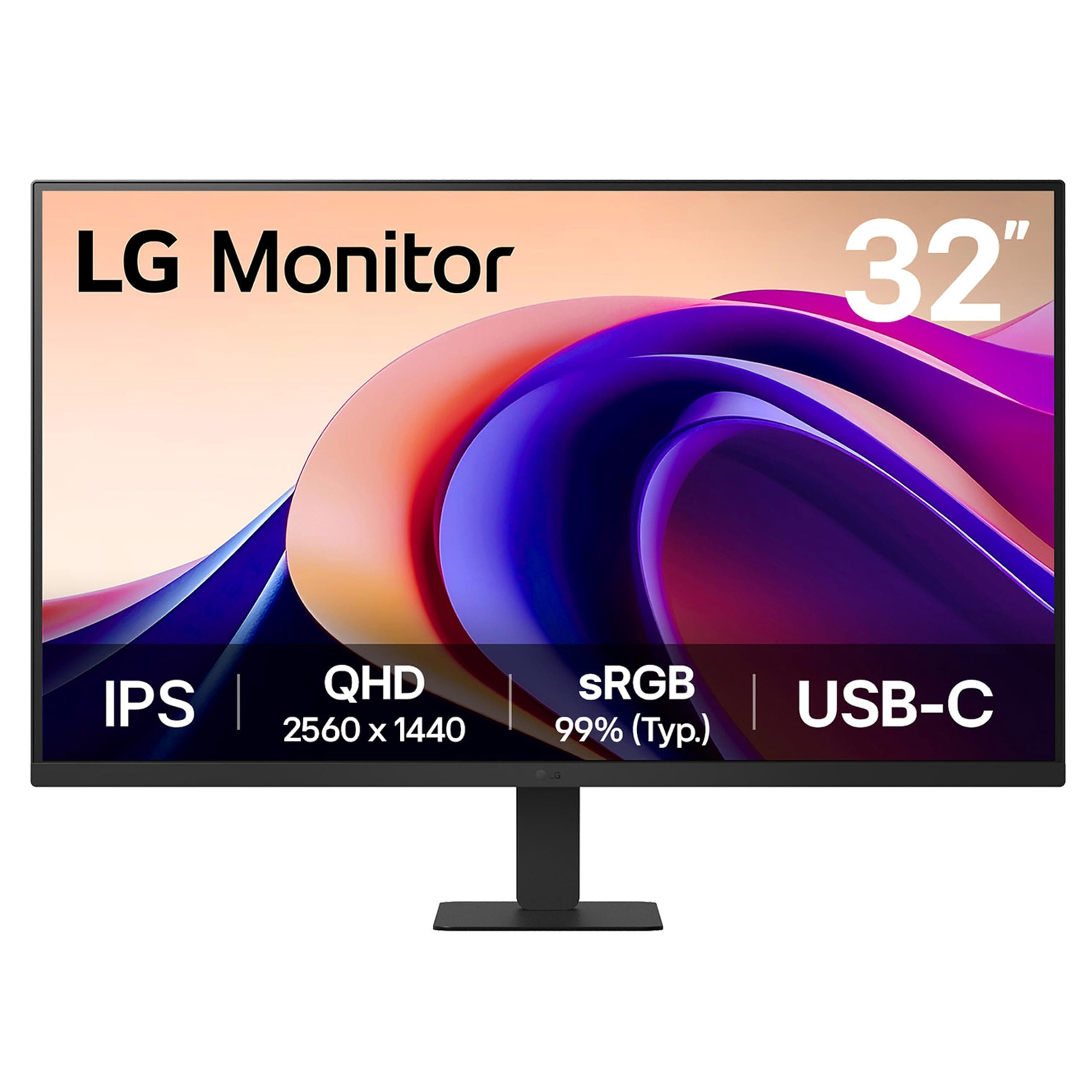
🚀 Elevate your workspace with stunning visuals and seamless power—because your productivity deserves the best!
The LG 32U631A-B is a 32-inch QHD (2560x1440) IPS monitor featuring a 100Hz refresh rate and 5ms response time for smooth visuals. It supports HDR10 and covers 99% of the sRGB color gamut for vivid, accurate colors. Connectivity is streamlined with a USB Type-C port providing up to 15W power delivery, reducing cable clutter. Designed for comfort, it includes Reader Mode and Flicker Safe technology to reduce eye strain. Its virtually borderless design and slim stand optimize desk space, making it ideal for professionals seeking a premium, immersive display for multitasking, gaming, and streaming.


| ASIN | B0DS2SL7L1 |
| Adaptive Sync | FreeSync |
| Additional Features | Anti Glare Screen, Dynamic Action Sync, High Dynamic Range, Tilt Adjustment |
| Aspect Ratio | 16:9 |
| Best Sellers Rank | #5,392 in Electronics ( See Top 100 in Electronics ) #183 in Computer Monitors |
| Brand | LG |
| Brightness | 250 Candela |
| Built-In Media | HDMI Cable, Monitor, Power Cable |
| Color | Black |
| Color Gamut | 0.99 |
| Connectivity Technology | HDMI, USB Type C |
| Contrast Ratio | 1000:1 |
| Customer Reviews | 4.5 4.5 out of 5 stars (3,010) |
| Display Resolution Maximum | 2560 x 1440 Pixels |
| Display Technology | IPS |
| Display Type | LED |
| Hardware Connectivity | HDMI, USB |
| Has Color Screen | Yes |
| Item Dimensions D x W x H | 9.25"D x 28.12"W x 20.18"H |
| Item Weight | 6.5 Kilograms |
| Manufacturer | LG Electronics Inc. |
| Model Name | 32U631A-B.AUSQ |
| Model Number | 32U631A-B |
| Native Resolution | 2560x1440 |
| Number of Component Outputs | 1 |
| Picture Quality Enhancement Technology | HDR10 |
| Pixel Pitch | 0.2727 |
| Power Consumption | 29 Watts |
| Refresh Rate | 100 Hz |
| Resolution | QHD Wide 1440p |
| Response Time | 5 Milliseconds |
| Screen Finish | Matte |
| Screen Size | 31.5 Inches |
| Shape | Flat |
| Specific Uses For Product | Multimedia |
| Total Number of HDMI Ports | 1 |
| Total Usb Ports | 1 |
| UPC | 195174107638 |
| Unit Count | 1.0 Count |
| Viewing Angle | 178 Degrees |
| Voltage | 240 Volts |
| Warranty Description | 1 Year Manufacturer |
N**.
Excellent!
This 32-inch IPS computer monitor is an absolute powerhouse for both productivity and professional communication. The expansive screen real estate is a total game-changer for multitasking, and the color accuracy remains stunningly consistent from any viewing angle. What truly sets this 2026 model apart is the integrated audio system, which delivers excellent sound quality during video calls. Voices are incredibly crisp and clear. I also appreciate the flicker-free technology and blue light filter that significantly reduce eye strain during long work sessions. It is a premium display that delivers exceptional visual and acoustic performance, completely elevating my remote work experience. So easy to setup and use.
M**L
Great so far (11 month update)
I thought I'd write a quick review because no one else has reviewed this model and it's brand new. I thought it had more than one HDMI because that's my fault for not reading the specs better (I had read specs for many monitors while narrowing it down). So it has just one HDMI, which is OK but it's nice to have a second option. The quality of this monitor is very good. I have one dead pixel, on the right side in the middle. It's definitely noticeable. There is another one on left side that's not quite as bad, I don't know why, the pixel isn't dead but it looks fuzzy. At this resolution I don't think it's a big issue but I'll see if I get used to it. Overall the quality and resolution are great and it works fine with my macbook pro. I get 60 Hz using my USB-C hub and if I plug HDMI direcct I get 100 Hz. I don't see much difference (I'm not playing games) so I just use the hub so I have less things to unplug when I want to take my macbook away from my desk. The height is another issue. I put two books under the stand to raise it 2" which seems much better. I wanted an adjustable stand but the only IPS with adjustable stand was a Samsung which was $50 more. For $50 I will cut a piece of wood and use that. The stand is 6x9" approximately, which I like better than the V shape. Overall I like the monitor so far but this is my first day using it. Update after 1 week: I'm really enjoying this monitor. I use it for my work so I'm using it a lot. It has a lot more space than a 27" and the quality is good. I do notice that with a black screen, there is light bleed in the corners but it's not noticeable while working. I think the text is very sharp. Update after 2 weeks: Still very pleased. Update after 3 weeks: My only regret is not having adjustable height. I use multiple chairs and a standing desk, so height adjustment would have been nice. I cut a block of wood and painted it black and that works fine but it's not adjustable. Also the samsung odyssey is just $30 more. if it was at that price I probably would have tried it instead, so consider that one. But the LG is still excellent and absolutely zero problems! Update after 11 months: Love it and looking to buy another one for a second room.
Z**Z
Secondary monitor in a gaming setup
Like many others who are now working from home, I wanted to get away from having separate spaces for work and home computing. I wanted to easily switch between work and home using 2 32 inch monitors. I was willing to pay high end prices for one of the monitors for gaming, but the second one wasn't as important to me. I wanted both monitors to be QHD. My home PC is a new gaming system running an RTX 3070. The work PC is a HP Elitebook laptop. For the gaming monitor I purchased the LG 32GK65B-B VA panel with 144hz and Freesync for $399. For the second monitor I purchased the LG 32QN600-B IPS panel with 75hz HDR10 and Freesync for $209 on Amazon's Black Friday sale. Both monitors were a breeze to mount on an adjustable mount. Took less than 2 minutes each to install. With the power off, both monitors look exactly the same from the front. I can put them touching each other and you can't tell they're not exact the same panel. The backs of them look different but that wasn't an issue. Both monitors set up instantly via display port on my gaming computer. It took a few moments fiddling with the menu to get Freesync rolling but the menu controls are fast and intuitive and before long the gaming monitor was at 144hz and the secondary was at 75hz. The primary VA panel 32GK65B-B struggled with my work laptop through HDMI. The screen would completely flash off every 2 seconds, even at the windows login screen. The secondary IPS panel 32QN600-B immediately functioned correctly on my work computer without any problems. After tinkering around for a few minutes I found that the gaming monitor was trying to push 75hz, and the secondary was pushing 60hz. Since I don't need a higher refresh rate on the work computer I went into the Windows 10 display settings and locked the refresh rate to 60 and that solved the problem instantly. I flipped back and forth between displays a few times and was pleased that all the settings and window locations stayed the same without any issues. With initial setup complete I started actually using the computers and everything seemed great, but before too long I noticed that the gaming monitor didn't look as nice as the cheaper monitor. I eventually realized that I was sitting too close. The cheaper IPS panel has a pretty excellent viewing angle so 2.5 feet from the monitor looked fine. The more expensive VA panel lost a lot of color around the edges if I was too close to it. After some testing, basically the VA monitor looks terrible compared to the IPS if you're too close to it. As long as you're about 3.5 feet away or more they look the same. After moving them back a bit I realized that I had no reason to sit that close to begin with since they're gigantic. In summary, both monitors look and work great. The quality of the cheap IPS panel is pretty impressive. If you don't care about refresh rate above 75hz you'd be extremely pleased with a pair of those, otherwise if you want the 144hz refresh than the VA panel is a competitive price and functions very well. If you'd be watching it from an angle for some reason, or having others crowd around you, you probably want to find something with a better viewing angle, but I think most gamers tend to sit in front of their monitor. I'm not sure if I'll ever notice the lack of HDR on the gaming monitor, but so far games look fantastic without it. I'll update this in a few months but for now I'm giving both 5 stars.
R**N
Great value, great picture, good-performance, clumsy controls.
Really nice monitor overall. Has a really sharp and bright picture with a fast response for games. I use two of them for my work computer running them at 2K mode for spreadsheets and other work functions and they are really great for that use. For gaming they are bright, have a fast-refresh rate and nice color depth. LG knows how to make a nice screen that's for sure. They were in my opinion high-value for the price and worth it. They have two HDMI and one Display Port input, and are easy to assemble. I did not get the base tilt option - for me I did not need to pay the extra money for that bit. The criticism I have would be with the "joystick" type control for settings adjustment - it's clumsy and takes some getting used to. I have all three inputs in-use with different PC's and each one has different needs for their optimal picture - it would be great if these monitors had a remote as reaching for the joystick to change the input or make an adjustment is a chore. Aside from that though these are really nice displays and I am happy with them!
O**N
Un monitor que te puede servir para el home office y para jugar videojuegos. El color que arroja el panel es increíble tanto si le conectas una consola de videojuegos o una computadora, tanto si trabajas en Excel como en Photoshop; es plano y de aspecto mate. Casi no tiene bordes, lo que lo hace ver muy elegante. Lo he tenido prendido casi todo el día y prácticamente no se calienta. Su entrada DisplayPort es una maravilla porque puedes conectar un dispositivo extra si compras un cable de DisplayPort a HDMI (o si tu dispositivo ya cuenta con esa entrada). Le puedo conectar una MacBook Pro del 2015 o una Lenovo ThinkPad T14 y ambas mandan señal a 1440p sin problema alguno y la imagen se ve muy nítida. Por otro lado, le he conectado un PS4 Slim y un Xbox One S y ambos se ven excelentes. El reescalado que hace el Xbox One S de 1080p a 1440p es excelente y casi no lo notas; el del PS4 Slim es reescalado por el monitor y se ve bien pero a secas, ahí se llega a notar fácilmente que la imagen se estiró (eso ya dependerá del modelo de consola que tengas y si tienen la función de reescalado). La base es un poco estorbosa pero nada del otro mundo y no tiene bocinas, por lo que deberás considerar usar el audio de las bocinas de tu computadora o invertir más en un sistema de sonido que puedas conectarlo por la entrada de 3.5 mm.
I**E
Ya llevo 3 años con este monitor y la verdad es que me encanta, no es tan caro como otros pero cumple muy bien con sus funciones, en especial para trabajo en diseño. Pros: - Con 32 pulgadas tiene excelente tamaño y se siente la diferencia entre ir de Full HD (1080p) a QHD (1440p). - La nitidez es excelente, desde cómo se ven los textos en detalle hasta los colores. - Buenos materiales y dado que llevo 3 años con ella y no he tenido ni un problema de daños inesperados o pixeles muertos. - Muy buen precio, dado que otros monitores de panel IPS en estas resoluciones si pueden llegar a ser un tanto costosos, pero este funciona perfecto para edición de imagen y video entre otros trabajos profesionales, y para juegos tambien se ve muy bien aunque podria tener mas Hz para la tasa de refresco en juegos. Contras: - El HDR deja mucho que desear la verdad, aunque no es terrible y en algunos casos se ve bien, el monitor simplemente no tiene el brillo en nits suficiente para que realmente valga la pena tenerlo activado. Lo único bueno es que es un elemento al final 100% opcional e incluso sin él la calidad de imagen es muy buena. - Aunque 75Hz es perfectamente bueno e incluso un poco arriba de los 60Hz de monitores comunes, la verdad pudiera ponerle un poquito más, como 90 por ejemplo, casi no hay diferencia con 60 y 75 y en algunos casos hay programas que generan defectos por ese tipo de tasa de refresco en 75 lo que me obligó en algunas ocasiones a configurar la resolucion a 1440p y 60Hz para evitar problemas. No es perfecto como mencione, podría tener una tasa más alta de refresco y brillo en nits más alto (esto únicamente para el HDR, en cualquier otro caso el brillo del monitor es muy bueno), pero incluso con eso la recomiendo ampliamente, ya que tiene excelente tamaño y calidad de imagen y un buen precio. Si trabajas en edición de imagen y video profesional, la verdad es que funciona muy bien y para jugar videojuegos también funciona.
T**E
A good monitor. This is my 3rd LG monitor. Got a 27" last year & a 24" a few years back. All still working well. This 32" can be mounted on the monitor arm & can move around freely. Only thing is have to get used to the higher resolution. Been using 1920x1080 for many years
J**A
Compré este monitor principalmente para edición de color y de vídeo/fotografía. Y no me arrepiento nada. Tiene 10 bits de color y es compatible con la calibración hdr de windows. Es bastante grande, lo que me permite tener mucho espacio en mis lineas de tiempo y es muy vivido el color. Algunos dicen que en las esquinas se ve diferente, y esto es cierto, pero eso pasa cuando no lo tienes a la altura correcta y solo pasa cuando está en modo hibernación, fuera de eso no me ha dando pex. Que sea QHD lo hace fenomenal para trabajar. El dpi es 1.4 y tiene software de sincronización con envidia y amd. Incluso lo he usado para gaming y me va muy bien, no se compara con uno 100%dedicado a eso, pero saca la tarea de sobra. En serio uno de los mejores monitores para trabajo que existen a buen precio.
J**E
La verdad por lo que ofrece y el precio que tiene, es la mejor opción que yo encontré, por el tamaño, resolución, tasa de refresco y más. Es un punto medio, si no quieres gastar hasta 10,000 pesos en algo más especializado, pero también quieres algo de buena calidad. Yo tengo la de 32 pulgadas y vale totalmente la pena, llevo ya un año con ella y hasta ahora no he tenido ningún problema en absoluto. Sólo me gustaría que el cable de alimentación fuera más grueso y largo. Lo único que yo le podría encontrar de malo es que no tiene bocinas, sólo se puede girar de arriba hacia abajo y no tiene tantos conectores atrás. Vaya pues, hay que tener bien presente que no es una televisión, es un monitor.
Trustpilot
3 weeks ago
1 month ago