
DOWNLOAD THE APP


Customer Services
Copyright © 2025 Desertcart Holdings Limited
DOWNLOAD THE APP
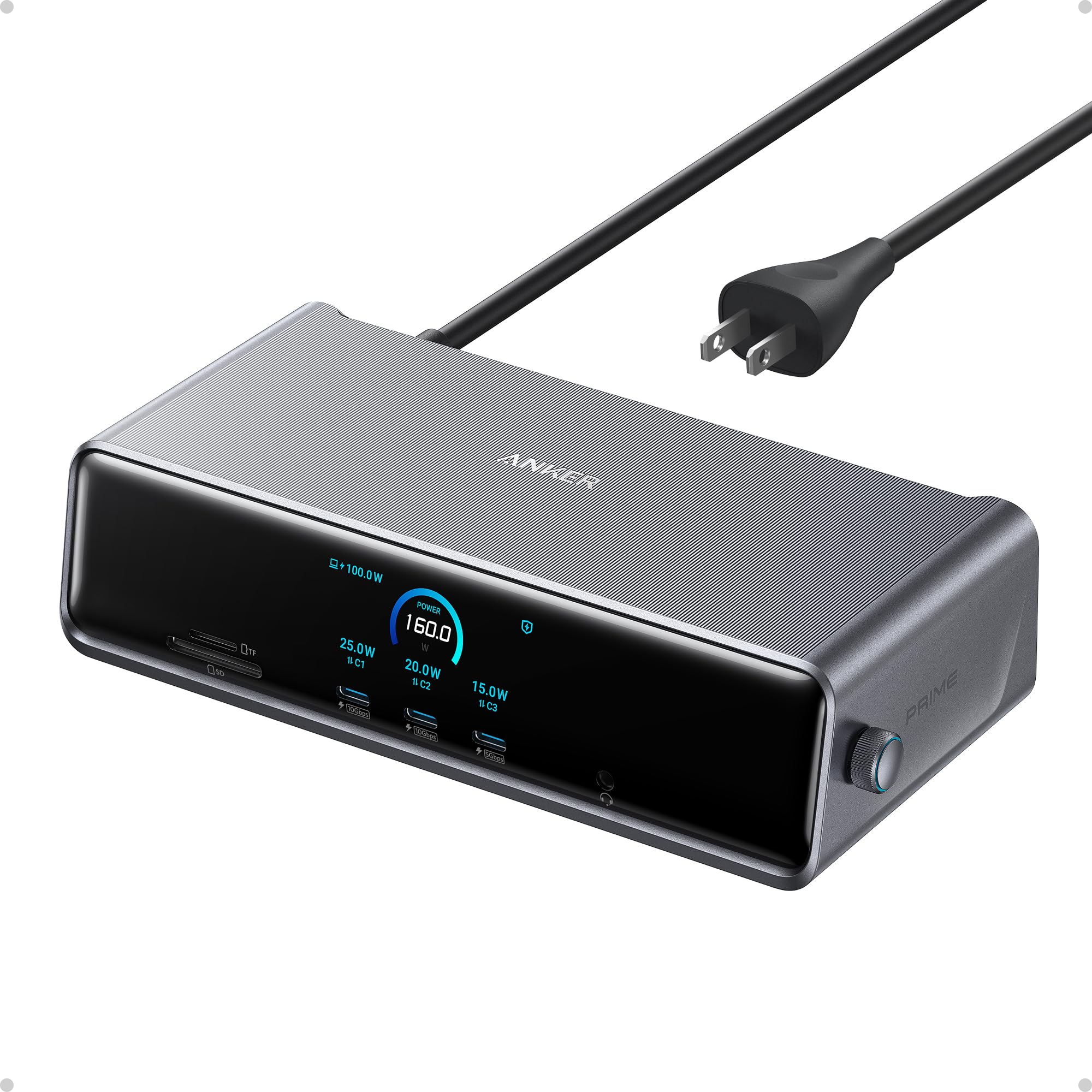
🚀 Elevate your workspace with power, speed, and triple-display brilliance!
The Anker Prime Docking Station DL7400 is a powerhouse 14-in-1 hub designed for professionals and gamers alike, offering triple 4K 60Hz plus 8K display support, 140W max charging, and a smart cooling system. Compatible with macOS and Windows, it transforms any laptop into a multi-display productivity beast with seamless connectivity and real-time control.






| ASIN | B0DTSZC5Y7 |
| Best Sellers Rank | #1,693 in Electronics ( See Top 100 in Electronics ) #22 in Laptop Docking Stations |
| Customer Reviews | 4.1 4.1 out of 5 stars (265) |
| Date First Available | September 14, 2025 |
| Item Weight | 1.84 pounds |
| Item model number | A83B3 |
| Manufacturer | Anker |
| Product Dimensions | 7.67 x 3.62 x 1.89 inches |
G**K
Simple, Easy to use Dock!
This dock is a must-have for those looking for a simple, easy-to-use interface to connect their laptops to an external monitor. I must admit, I was on the fence about this one when it came to gauging the value I would get out of this, but I was proven wrong. It is designed well with good weight and build quality. Setup was relatively easy, and it was nice that they threw in a DisplayPort and HDMI cable in the box. It does not take up a lot of space on my desk and the clock feature is a nice touch. Note that the clock is only customizable after you install a firmware update via the Anker Dock Manager PC application, which you can download from the Anker website. The dial is another welcomed addtion as this is present on their Anker Prime Charger 250w. Maneuvering through the settings was a breeze. The device runs cool and does not heat up to such high temps. Anker has done a great job at managing temperatures across it's devices. There are plenty of ports for connectivity, including 3 front USB-C data/charging ports, a SD + TF card reader. The back ports include 1 DisplayPort, 2 HDMI ports, 2 USB-A 3.2 ports, 1 USB-A 2.0 port, an ethernet port, and your standard upstream data/charging port. Upstream charging to the device is max 140w (unfortunately my gaming laptop supports only 100w), and the connection was relatively simple. This device also supports PPS PD charging for Android devices such as the Samsung Galaxy via the front 3 ports. You can also establish a data connection from your phone to your PC. For display, keep in mind that you need to download the Synaptics DisplayLink driver for your pc/laptop to output via DisplayPort to an external monitor. It is a relatively quick and simple download. Once the driver was installed, and I restarted my pc and reset the dock,the video display was seamless. I am currently outputting a resolution of 3440 x 1440 @240Hz with no stutter and no artifacts. This has improved my gaming setup tremendously, and I have not noticed any issues during hardcore gaming. The Anker Dock Manager application is a nice touch and allows you to see the multiple connections that you have on your setup. You can change from Mirroring to Extended display, even change the display direction if you have your monitor set up vertically. Refresh rate and resolution can also be customized. Overall, this is a solid addition to anyone's future laptop/desktop to monitor setup. Though there are other docks out there with more ports and features, the Anker Prime does a great job of incorporating functionality and simplicity for the everyday user.
J**T
Great Docking Station For Gaming Setups
This docking station is everything you need for a gaming setup. I run two 34 inch wide screens and this docking station could handle extending my gaming laptops display while adequately charging it. Be mindful that it does require you to download the DisplayLink driver. My work laptop does not allow external drivers to be installed so unfortunately I couldn't use it to extend it's desktop. If you're looking for something that can charge your power hungry gaming laptop and extend it's desktop onto multiple displays then look no further. It's quiet and I haven't once heard its fans. I also like that you have some customization with the station's display so that it's out of sight and out of mind.
T**N
Great upgrade for a multi-monitor desk
I picked this up for my work-from-home setup, and it was mostly plug and play. I did run into a small issue at first where my laptop wouldn’t connect to the monitors, but after updating my laptop software, everything worked as expected. I use this dock to run three monitors, and it’s been reliable with no lag or display issues. The build quality stood out right away—it feels sturdy and well-made, not flimsy like some other docking stations I’ve used. I also appreciate the number of ports available. I regularly plug in my phone and AirPods at my desk, and it’s convenient having everything connected in one place. I picked this up during a Black Friday sale, which made it a great value, and it’s now an essential part of my WFH setup. If you need a solid, well-built dock for a multi-monitor setup, this one has worked well for me.
H**O
Not great out the box but rocks once set up to preference!
Had to fuumle a bit with the settings and the updates, downloads etc.. It also made my Apple magic mouse very slow. Solved with a console command. Also had to search through trial an error the best reosultion x Refresh rate combination. Once the set up is done (Took me like 20 minutes) it works amazingly and even has 3 super fast charging ports in front. An all rounder devce to make the centerpiece of a setup! Display link connection is great, and had 2 other HDMI ports to boot. You can also tell the materials have a certain quality and weight that feels premium, just like its price.
I**S
MacBook Pro M4 - Not a good experience
Nothing but problems. Mac M4 64GB, with 2 exact same Samsung Monitors. Too many bugs and inconsistencies. Each time I go to use my laptop 50/50 chance left and right screens have swapped. Most of the time one or both of the monitors could be 30hz, hard to get them both 60hz, even if the Anker device tells me they're running at 60hz - seems like just keep unplugging and rebooting to make it happen eventually if youre lucky. Worst of all... OMG, the frame rate drops insanely on just a single monitor, seems random which one it chooses. This device seemed cool. Maybe it works great on Windows - but this is not a final product for Mac, it's not finished.
V**S
Worth every penny!!!
I have been using docking stations of various designs for 30 years, and have always found them to be convenient and useful. I have also been buying Anker gear for several years, and have always found it to be rock solid and great quality. Well, this bit of gear is no exception! Simple to configure, versatile enough to handle all my components and easy to set up. It's not the least expensive option (Anker never is), but if you are looking for solid performance and excellent quality, then this is the piece of gear for you.
J**L
It’s a great dock that has cleaned up my desktop a lot with all of the connectivity it has. Compact, operates well, and attractive. You need to know that this dock will not transmit any video to monitors without the DisplayLink drivers installed on your computer.
E**A
The Anker Prime Docking Station is a powerhouse for anyone needing a versatile hub. With 14 ports, it easily handles multiple devices while keeping everything organized. The triple display support via DisplayLink is a standout feature, allowing smooth multitasking across up to three monitors with resolutions reaching 8K. The 140W max USB-C port ensures fast charging for laptops and other devices, while the smart display adds a modern touch by showing real-time power usage. The built-in cooling fan is a thoughtful addition, keeping the dock running efficiently even under heavy loads.
B**D
The Anker Prime Docking Station connected seamlessly to my Windows Surface Pro. The Anker Prime Docking Station (DL7400) is a powerhouse for anyone looking to expand their laptop or desktop workspace. The build quality is impressive—the metal housing feels solid and premium, and the compact design keeps the desk looking clean and organized. Setup is straightforward, though it’s important to install the DisplayLink driver for full multi-monitor functionality. Once configured, it handles up to three displays with ease, including an 8K output, well above my 2–4K monitors, making it ideal for multitasking or complex workflows. The range of ports is remarkable: high-speed USB-C charging, USB-A for peripherals, HDMI and DisplayPort for video, plus Ethernet and card slots. Every port feels robust, and the front USB-C ports provide clear, real-time feedback on charging speed. The built-in fan runs quietly while keeping the dock cool, and the smart display adds a professional touch, showing useful information such as wattage, fan speed, and connected devices. Power delivery is exceptional—enough to charge multiple laptops and devices simultaneously without slowing down performance. If you’re using a newer laptop, this dock is seamless and extremely reliable. Older systems may face some limitations due to DisplayLink compatibility, but for modern setups, it’s a premium solution that justifies the price. A sleek, functional, and well-engineered addition to any workspace. Pros: Solid build quality and premium materials Supports up to three displays including 8K output Extensive ports and high-speed charging options Quiet, efficient cooling with smart display monitoring Reduces cable clutter while maximizing connectivity Cons: Requires DisplayLink driver for full functionality Some older laptops may experience compatibility issues Overall, this is one of the most capable docking stations I’ve used—it transforms a standard workspace into a professional, multi-screen setup with fast charging and smart monitoring.
B**A
Was not able to power bigger laptop and the display on the dock quit after a few hours use - would no longer display readings for power draw etc. seemed like a good buy at first but I had to return it.
M**G
This is a DisplayLink dock, so it will absolutely require the DisplayLink driver. I tested the three display output and none of them work without the DisplayLink Manager running. Some other dock I tested has a Hybrid USB Alt Mode and DisplayLink support so at least one monitor would be functional if the DisplayLink Manager is not active. This is not the case here. None of the display will work without the Display Link Manager running. There are two important things to know about the DisplayLink dock. First, it's only for productivity. The DisplayLink technology basically encodes the video and sends it through a data stream over USB. The encoding process adds latency, can cause artefacts, there could be drop frames if there is not enough bandwidth, takes CPU cycles and takes some system memory. If you start a game, the GPU will render to VRAM but then the frame buffer will have to be copied back to system memory for the DisplayLink to encode the frame and send it over USB to the dock. The end result is a very laggy and inconsistent framerate. Second, HDCP playback is not guaranteed. It will depend on your OS and a bunch of other factors. On Mac OS, you will get a black screen if you play a movie on Netflix. The only advantage of a DisplayLink dock is that it can bypass hardware limitations. For example, the MacBook Air M1 can have at most one external display, but if it is hooked to a DisplayLink dock, it can have multiple displays. In this case, it can have three. Note that all of the advantages and disadvantages above are not unique to this dock. The same is true for all DisplayLink docks. The set of ports on this dock is pretty decent. There are 2 x USB-C 10Gbps, 1 x USB-C 5Gbps, 2 x USB-A 5Gbps, 1 x USB-A 2.0, 1 x 2.5Gbps Ethernet, 2 x HDMI, 1 x Display Port, SD Card slot, and a headphone jack. This is not Thunderbolt speed, but for office work, it's plenty fast. I used it for the past two weeks. For the most part, it works well enough. I did have a bit of stuttering at the beginning, but it fixed itself after a few days. I didn't update drivers or firmware, so the only thing I can think of is that I was running low on memory. My big issue, however, is that I can't watch any Netflix, Prime Video, or Disney+. I use a Mac, and HDCP is not supported over DisplayLink on Mac. The thing that is very unique to the Anker Prime dock is the integrated power supply, the OLED display, and the companion Anker Dock App. As opposed to other docks that have a large power brick, the power supply is integrated in the Anker Prime. It makes the dock heavy and stable. The downside is that such a strong power supply requires cooling, so there is a fan in the dock. The Anker Dock App is available for Windows and Mac. It will let you monitor the USB power output and change some settings directly. For example, you will be able to change screen resolution, refresh rate, and screen orientation. The OLED display is used to show USB power, USB speed, display resolution, and system temperature. Overall, unless you absolutely need a triple display setup, you are okay with all of the downsides of DisplayLink, and you really want that OLED display, I wouldn't recommend this dock. There are better options at a lower price available.
Trustpilot
3 weeks ago
1 week ago