We remain fully operational. Our teams are working around the clock to ensure your deliveries continue safely.

DOWNLOAD THE APP


Copyright © 2025 Desertcart Holdings Limited
DOWNLOAD THE APP


Buy anything from 5,000+ international stores. One checkout price. No surprise fees. Join 2M+ shoppers on Desertcart.
Desertcart purchases this item on your behalf and handles shipping, customs, and support to South Korea.
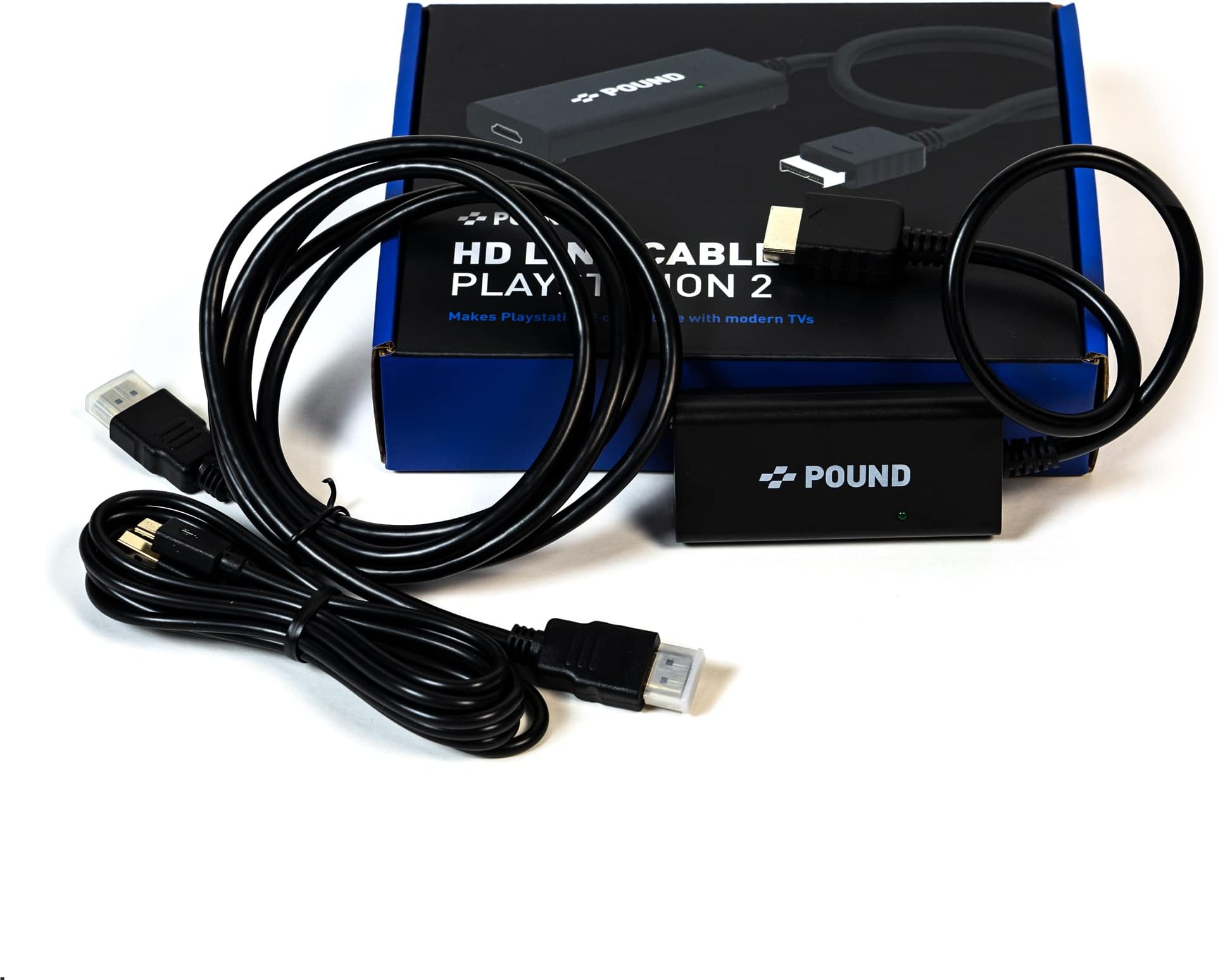
🎮 Level up your nostalgia with HD clarity—because classics deserve the spotlight!
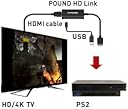
The POUND HDMI HD Link Cable is a must-have accessory for PS1 and PS2 owners who want to play their classic games on modern HDTVs. It upscales original 240p/480i signals to crisp 720p resolution using native RGB output for superior color and sharpness. The included Micro USB cable powers the device, reducing stress on vintage consoles. Easy to install and compatible with PS1, PSOne, and PS2, it delivers a hassle-free way to relive iconic gaming moments in vibrant HD.


| ASIN | B07HPF7PRT |
| Best Sellers Rank | #9,436 in Video Games ( See Top 100 in Video Games ) #71 in PlayStation 2 Accessories #127 in PlayStation Accessories |
| Brand | POUND |
| Color | Black |
| Compatible Devices | PS2, PS1, 4k TVs with HDMI ports |
| Connector Type | HDMI |
| Customer Reviews | 4.4 out of 5 stars 1,981 Reviews |
| Item Dimensions | 7.48 x 5.91 x 1.57 inches |
| Item Weight | 250 Grams |
| Item dimensions L x W x H | 7.48 x 5.91 x 1.57 inches |
| Manufacturer | Pound Technology |
| Mfr Part Number | 0736900534092 |
| Model Number | 432105 |
| Number of Items | 1 |
| Number of Ports | 1 |
| Package Quantity | 1 |
| Power Plug Type | No Plug |
| Smart Home Compatibility | Not Smart Home Compatible |
| Specific Uses For Product | Game Console, TV |
| UPC | 736900534092 |
| Unit Count | 1.0 Count |
P**S
Works very well with my PS1 - Better than other av to hdmi converters!
I tested this little fella against another converter to HDMI I had purchased, the KanexPro - which costs close to $100 if you bought an AV cable like I did. This product by pound, at only $30, produced a FAR SUPERIOR image that the KanexPro. I tested an Original PS1 with Silent Hill 1 - even just the menus and the game intro sequence are good enough to give you an idea of what the game will look like. Though, really any PS1 game should work. My first impression of this PS1 to HDMI (as that's how I used it) was fantastic: very simple to setup, very few things to deal with when installing this product. Although it did not come with a power adapter, I had a 5v 2amp one lying around. Hook that to the micro-usb cable to the unit, and the unit to the back of your PS1's video out, and using the HDMI cable included I got a nice 720p image to my Vizio flat screen. No issues whatsoever. The upscaling is done surprisingly well for such a small device, no lines or weird artifacts from the conversion to HDMI are present, and the image in-game still looked nice and sharp. I didn't notice much lag at all, just the terrible control scheme of SH1. And, there was little to no cable clutter - the most I had to do is tuck the HDMI cable a bit. To test the KanexPro, I removed this device and replaced this simple setup with the AV component cable, the KanexPro, and the HDMI to the TV. It was worse from the getgo, the Playstation splashscreen when the console boots was already distorted and awful looking - like the KanexPro upscaled using interlacing, but didn't de-interlace the final output before going to the TV. It looked terrible at 720p in comparison to the Pound cable, and even worse at 1080p. I immediately removed that setup, and went back to the Pound HD Link cable (what I dubbed the PS1-2-HDMI). I really enjoy this product. As a new PS1 owner myself, I wanted to get it setup in the simplest way for the modern era of TVs and HDMI signals, and this was the right way to go about it. An easy recommendation from me to any PS1 owner. I cannot speak of it for the PS2 however, keep that in mind.
C**M
Brings old PS1 games into sharp focus. Did not try on a PS2.
As a older gamer i have a box full of PS1 era Role Playing and Strategy games sitting around. I've tried upscalers, and other means to try and make them playable on modern TV sets. Nothing really worked. So after watching some You Tube videos on this device i thought i would give it a try. Surprise! No more horrible, eye bleeding graphics! It brought to life my old copies of Final Fantasy Tactics, Tactics Ogre, and others. It does work better with old 2D games than 3D games, still the picture is remarkably better. Some reviewers have complained that the picture is stretched to fill the screen, but i thought that was an improvement over the old letterbox format, not a bad feature at all. I did change some settings on my old Samsung TV to enhance things a bit, but nothing much. It depends on your personal taste. All in all, this is a easy to plug and play little device. Plug it into your PS1, or PS2, connect up the USB power cord with a adapter to change voltage output, then connect the included HDMI cord, or your own. Turn things on and bingo! Your ready to relive that old copy of Front Mission 3 that's been laying around for years. A good purchase!
S**N
It works for the most part
It works on both my PS and PS2. The graphic quality is much better than those cheap China adaptors you see for 10 dollars. The only downside I've noticed is that PS1 games will work for some monitors. It works on my TV, and two side monitors that I own. But for some reason, my main monitor doesn't detect the ps1 games, regardless what system its being played on. The monitor detects my PS2 games without any issues. If i had to guess, is that the resolutions of the monitor and the game conflict with each other, and I've looked around to get them to work with no luck. Oh well, ill just use the other monitors. If you want this cable solely for your PS2, then you're good to go. If you want this for your PS1, better have more than one monitor. In the end, absolutely would recommend over the cheap converters any day. Happy gaming!
S**T
An good alternative to using component or rgb cables
After owning pound cables for the xbox and dreamcast I was happy that they were coming out with one for the ps1/ps2. Prior to me purchasing the pound ps2 cable, I was using component video cables on my framemeister which provided a great upscaled picture. These hdmi cables convert the rgb signal to hdmi and do a good job on my 4k tv. The only thing is that it stretches the picture to 16:9 but it's an easy fix as long as you go into your TVs settings and set the picture to 4:3. Another thing to consider is that you must go into the ps2 systems settings and change the picture to Rgb or you're going to get a green screen. I'm so far satisfied with the performance of the cables. It works on both ps2 and ps1 games unlike some of the cheaper made ps2 hdmi adapters. I've tested the pound ps2/ps1 hdmi cable on a Japanese and American ps2 system and they work great. The picture is clear and sharp with vibrant colors. If you're the retro gamer who wants to play ps2 and ps1 games on original hardware on HDTVs then the pound ps2/ps1 hdmi cable is for you. For this price point, you cant go wrong.
B**N
*ABSOLUTELY INCREDIBLE* - On all fronts. Image quality to Customer Support.
I don't generally write reviews - but had planned on doing so for this item if it lived up to half the hype it did when it was first being initially developed with engineering feedback on Reddit (very cool, down to earth communication and interaction with the retro gaming community from Pound) - to the generally to very positive reviews - there's always going to be a nitpicky outlier - but these cables are no joke. First off - it's a tight, quality fit into the back of the PS2 machine; very snug, and feels like a quality connector. Even the USB cable they include to power the converter ASIC/PCB in there feels Apple like. It's great. Not some cheap China special. The image quality - excellent. Absolutely superb. Very, very clean, and the jaggies almost seem somewhat reduced due to their completely understandable use of RGB and 240P only - to make it compatible with PS1 games, but the silver lining in regards to NOT being able to use 480P (I really don't care, it's 480P, it's a PS2 game, not going to look dramatically better regardless) - is a softer image with still extremely clean detail, but less glaring jaggies and THAT'S what ruins a game for me - a pixelated looking mess. Not the case with this cable. Now, compared to the cheap Chinese junk adapters and converters on here - this cable blows them away. Like someone else mentioned on here in a review; this cable out performs the KanexPro - that's a $100 adapter, and doesn't include the necessary S-Video cables for the PS2, nor an HDMI cable. Crazy. It's not built from the ground up for the PS2 like this Pound cable is. I'm stoked - I've always wanted a genuine PS2 HDMI cable, and this is it. The PS2 is - by far - my favorite piece of tech ever engineered and developed, besides the Macintosh computer. Finally - and this has to be mentioned - Pound's customer service, well, 'pounds' every other company I've ever dealt with. Excuse the pun - but they're incredible. WAY above and beyond what I'd consider even normal; I had a faulty cable initially shipped to me (fast shipping time btw) - and without a SECOND'S consideration, they immediately shipped me a new one with a simple message through their own website to them mentioning my issue. No need to send my bad cable back, either. I'm still in awe. That's the reason you choose companies like these, like Apple, like BOSE - customer service, and an awesome product. Well done Pound - you're my go-to for a quality retro-pro cable for an older system.
T**.
Loud audio static after a few days of use.
I had originally given this product a 1 star review since the Pound would report "no signal" when I tried to launch Open PS2 Loader on my PS2. I eventually figured out that OPL was set to display at 480p, and this cable apparently can only take 480i or something despite it upscaling the signal. When I figured it was just a 480i/p issue I raised the rating to 3 stars since a 480i limit causes problems since a PS2 can natively support 480p with some games, but I guess they are not compatible with this cable in that mode. About three days after owning it and seeing if I was okay with the limitations of the cord, I noticed a static noise over everything. I swapped the HDMI cable, used a different port, swapped USB power cords, and I still had the same static noise. The only thing that got rid of it was if I left it completely unplugged for an extended period of time. When I did that, the noise would be gone... but.. it would eventually come back. I can only assume it's over heating or something. I even used a different HDMI adapter (one of those cheap $10 no name dongles) and there was no noise from it after using it for several hours, so the source of the static was this cable. (Just a word about those no name $10 dongles, they work, but the resolution they push out is not upscaled, so some capture cards will have problems with them if they don't fully support SD signals). LATEST EDIT: I replaced this with a generic component cable and an EASYCEL 1080P component to HDMI upscaler (I have it set to upscale to 720p). This has provided a far superior picture without any issues beyond a slight weird issue with an HDMI switch not automatically switching to it when it's on.
V**E
Its ... Okay.
I use an inexpensive upscaler box, purchased here on Amazon, to get my PS2 Slim signal to my television (https://www.amazon.com/gp/product/B019T0WFA4/) - About $40 dollars. I use a Sony S-Video cable to the unit, and it allows me to play both PS2 and PSone games. This is ALREADY technically a compromise, but one I'm happy to make to allow PSone games to be played, as well (normal HDMI converter/HDTV combo usually can't play PSone - they can't handle the low, 240p resolution - You get a black screen). This cable offers a lower quality image than my current setup. It falls well above the lower end of standard composite, but just below the higher end of S-Video - Understand, both of those are well below component or digital. My upscaler provides much sharper text and cleaner blacks and brighter picture. However, to be fair, this cable beats the HECK out of just using the standard composite video in (if your TV still supports it). Also to be fair - It's not the job of this company to offer a widescreen switch option - the PS2 itself has no such option: If you put your PS2 into 16:9 mode, it automatically shows compatible games in widescreen, AND STRETCHES GAMES that don't have the option. That's standard operation for the system. Good retro-gamers make sure their TV has a 4:3 option. =) Lastly - this cable will be a matter of taste. Quite frankly, PS2 and PSone games look really bad when you upscale them to 720 or 1080, and show them crisp and clean - their low-resolution jagged-edges look painful all cleaned up. It's not like a cute image of a blocky Mario from the days of the NES - It's low-resolution, really jagged, very few polygon, 3D environments - The softer picture may actually be a plus for you - It's like firing up an emulator on your computer and applying a filter. After all, these two systems were created when most people still had picture-tube televisions - they were pretty fuzzy, themselves. In the end, I'm keeping the cable, even though I'll not be using it - It's good to have in the video game drawer if I want to quickly hook up my original Playstation - or if my upscaler box goes down - It IS very easy to use, comes with all the needed cables, and does, indeed, produce a workable image. It's just not the BEST image. In fact, if you have ONLY the original Playstation, this is actually very good option for that system.
C**N
Abysmal Picture quality and games with 480i resolutions dont work. Okay for PS1 games.
This makes picture quality horrendous. Giant checkered artifacts all over the place. Its forgivable for PS1 games as they are already low resolution but PS2 games looks the absolute worst. I think I prefer the blurriness of video cables over the blurry pound cable look. Booklet also claims that 480i games are upscaled to 720p but, if you put any games into progressive scan mode, it will lose signal all together. Feature doesn't even work. Just get Component Cables + Component to HDMI. If you are interested in the pound cable, get the Xbox one. it works fine unlike this one. Picture Examples 1. is of a PS2 game picture resolution. 2. is of a PS1 game upscaled to 720p. 3. is of a PS2 game with progressive scan which is supposed to be upscaled to 720p, but has no signal. 4. is a standard screenshot of a PS2 game. 5. is another example of PS1 upscaling
Trustpilot
1 month ago
2 weeks ago