


๐ Elevate your workspace with power, speed, and clarity โ donโt get left behind!
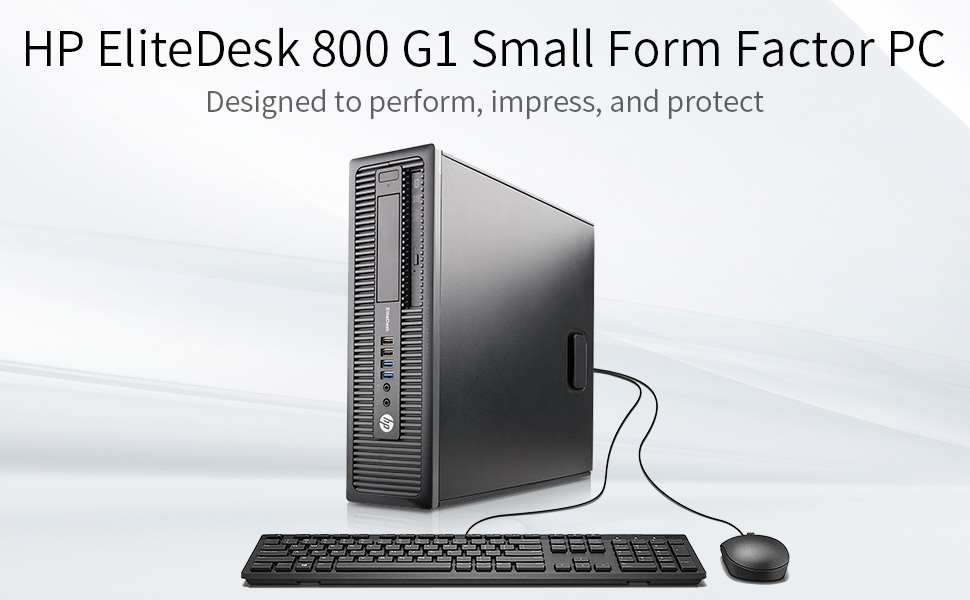
The HP EliteDesk 800 G1 SFF is a certified refurbished business desktop featuring an Intel Quad-Core i5-4590 processor up to 3.7GHz, 16GB DDR3 RAM, and a hybrid storage setup with a 256GB SSD for fast boot and a 1TB HDD for ample storage. It supports dual 4K displays, runs Windows 11 Pro, and comes with essential accessories and a 90-day warranty, making it a reliable, high-performance solution for professionals seeking premium performance at a smart price.


| ASIN | B07NL4CT8L |
| Additional Features | Optical Drive |
| Aspect Ratio | 16:9 |
| Best Sellers Rank | #606 in Amazon Renewed ( See Top 100 in Amazon Renewed ) #45 in Tower Computers #166 in Renewed Computers & Accessories |
| Brand | HP |
| Built-In Media | Keyboard, Mouse |
| CPU Model | Core i5 |
| CPU Model Number | i5-4590 |
| CPU Model Speed Maximum | 3.7 GHz |
| CPU Speed | 3.2 GHz |
| Cache Memory Installed Size | 16 GB |
| Cache Size | 16 GB |
| Color | Black |
| Compatible Devices | Keyboard, Mouse |
| Connectivity Technology | Bluetooth, LAN, USB, Wi-Fi |
| Cooling Method | Air |
| Customer Reviews | 4.1 out of 5 stars 2,981 Reviews |
| Display Resolution Maximum | 3840x2160 pixels |
| Display Type | LCD |
| EU Spare Part Availability Duration | 91 days |
| Global Trade Identification Number | 00760625132813 |
| Graphics Card Description | Integrated |
| Graphics Card Interface | Integrated |
| Graphics Coprocessor | Intel HD Graphics 4600 |
| Graphics Description | Integrated |
| Graphics Ram Type | DDR3 SDRAM |
| Hard Disk Description | 1TB HDD |
| Hard Disk Interface | Serial ATA |
| Hardware Interface | USB |
| Human-Interface Input | Keyboard, Mouse |
| Item Dimensions | 14.9 x 13.3 x 3.9 inches |
| Keyboard Description | USB Full Size Keyboard |
| Keyboard Layout | QWERTY |
| Manufacturer | HP |
| Memory Slots Available | 4 |
| Memory Speed | 3.7 GHz |
| Memory Storage Capacity | 256 GB |
| Model Name | EliteDesk |
| Model Number | HP 800 G1 |
| Model Year | 2021 |
| Native Resolution | 3840 x 2160 |
| Number of Component Outputs | 2 |
| Operating System | Windows 11 Pro |
| Optical Storage Device | DVD-ROM |
| Personal Computer Design Type | Computer Tower |
| Power Plug Type | Type B - 3 pin (North American & Japanese) |
| Processor Brand | Intel |
| Processor Count | 4 |
| Processor Series | Core i5 |
| Processor Socket | LGA 1150 |
| Processor Speed | 3.2 GHz |
| RAM Memory Installed | 16 GB |
| RAM Memory Technology | DDR3 |
| RAM Type | DDR3 SDRAM |
| Ram Memory Maximum Size | 32 GB |
| Resolution | 3840 x 2160 |
| Screen Size | 0.01 |
| Security Features | Standard security features |
| Speaker Type | External |
| Specific Uses For Product | Personal |
| Specification Met | True |
| Style Name | i5 |
| Total Expansion Slots Quantity | 4 |
| Total Number of HDMI Ports | 1 |
| Total Usb Ports | 10 |
| UPC | 760625132813 |
| Unit Count | 1 Count |
| Video Output | HDMI |
| Video Output Interface | HDMI |
| Video Processor | Intel |
| Warranty Description | 1 |
| Wireless Compability | 802.11n |
| Wireless Network Technology | Wi-Fi |
| Wireless Technology | Wi-Fi |
A**R
Perfectly functioning, well packed, super clean, very expandable, and completely reliable!
What I needed: I needed a computer for my electronics lab. It didn't need to be immensely powerful, but I wanted something that would be easy to expand as needed. This PC met my needs almost perfectly, and at a very economical price. I purchased this 6 months ago (almost to the day), so this is not an "out of the box" impression, but one based on months of experience. It has been powered on (or sleeping) continuously, so I can remote access it when needed. My uses are primarily centered around my lab work: Electronic Design, PCB Layout, and 3D Rendering of PCBs, along with Design of small enclosures and modest software development. I also have several PC connected pieces of bench equipment: Digital Scope, Power Supplies, Function Generator, and whatever thing I'm creating. Most of these connect via USB, and one via RS-232. This PC: You can see in the pictures that the front panel has 4 USB ports - 2 are SuperSpeed. These have already proven valuable for quick attachments. The rear panel is loaded up with 6 more USB ports (2 of which are SuperSpeed), and I've used most of them. If I had to, I could easily dig out an old PS2 Keyboard to free up another USB port - but with 4 empty ports on the front I'm ok for now. As noted above, I needed RS-232, and this PC had one - which is a bonus. Of course, I could have plugged in a USB to RS-232 adapter. Beneath the back-panel RS-232 port (the gray plug in the picture) is a VGA connector, which I don't expect to use. To the left of those are a couple of Display Ports - one connected to my big screen (3440 x 1440). The specs say that each can support a 4K monitor, but my bench doesn't have space (and the screen resolution works for my eyeballs and needs). The host processor in the unit I purchased is an i5-4590 quad core running at 3.3 GHz. The motherboard memory slots are full, loaded with 16 GB of RAM. The motherboard has 3 SATA ports, but they are fully occupied, connected to a 240 GB SSD hosting Win10 Pro, a 1GB spinning HDD, and a DVD drive. The graphics is served with an integrated Intel HD 4600. For further expansion, there are 4 PCIe slots: 2 x X1, 1 x X4 and 1 x X16. Other Discoveries: * The BIOS still had the name of the prior "owner" (a company), which is probably where many of these came from. It was simple to change, so now is hosts a name appropriate for my lab. * This PC is not for gaming, so I didn't rate that since I've never run a game on it. With my single high-resolution monitor connected, spinning a 3D model of a modestly complex circuit board is fast - it more than meets my needs. * And I had no need for Tech Support, so I didn't rate that either. My Expansion: * In the pictures you'll see one of the PCI slots is occupied - with the 4-channel SATA adapter that I added. The 3 on the motherboard were occupied but I needed one more for an external HD dock. * I expect to add a Webcam soon. * I also expect to add one more PCI card to it, to add USB-C connectors. My newest gear (Laptop, Phone, etc.) all have USB-C, so this will be necessary. My Summary: This was the right PC for my needs. It was also relatively inexpensive. It has been running close to non-stop since my unboxing. It "seems" quiet enough for most any location, but my lab isn't the best place to judge that. It didn't have support for every interface I needed but was more than expandable enough to add to it. I do wish the overall unit was a bit smaller (for my lab space), and in years prior I had a large tower PC, but tired of crawling under the desk to swap cables around.
J**H
Great computer! I give it 4 stars only because the HD was disappearing on every restart
I have to say that i actually love this little computer and its GREAT DEAL!!! so I purchased the (HP EliteDesk 800 G1 SFF High Performance Business Desktop Computer, Intel Quad Core i5-4590 upto 3.7GHz, 16GB RAM, 1TB HDD, 256GB SSD (boot), DVD, WiFi, Windows 10 Professional computer) shipped very fast [ 2-day shipping, ordered it sunday night and arrived Tue later morning] it was packaged wonderfully and booted up Fast about 15 sec , the set up process was very simple and easy. Once i got access to my desktop , I opened my *File explorer; to check everything was as advertised on amazon: the CD-ROM disk was actually DVDRW instead of just DVD drive , Very nice! it came with QQfamily mouse and Keyboard but i used my own. Next , i looked for the HDD and SSD and only found that it showed the 256 SSD and no trace of the 1TB HDD but i kind of had a heads up as the first review was written by someone who said they had issue locating their HDD in file explore and disk management but that they just opened it up and seen a wire loose and that fixed the issue. unfortunately that did not help me , I opened my tower up checked the connecting wires but it still wasn't seen in file explore :( so I went into disk management and there it was :) it was online it was partitioned but it was not assigned a letter , so i did what YT video said to do an assign it a letter and even formatted it and i thought i had figured it out , til i restarted my computer after a windows update and then tried to install a game and wanted to install it on the HD instead of the SSD where my OS was and i couldn't find it , so back to disk management i go, only to see that the letter i assigned the HD was no longer there SMH , so change drive and letter path 2 more times and to check if it held; i would restart but every time the same thing would happen.. so i just clicked on the HD - deleted the volume and went through the whole process with wizard thinking that would help. NOPE! So , i was frustrated at this point , so i went on YouTube and found a way to *Format a drive using Command prompt/diskpart and followed it step by step and it was so easy- the Video is by Chris Piedra* OMG! when i tell you it worked , i found it in file explore and when i finsihed i got the notification in my task bar asking what setting i wanted for that drive ( which i had not gotten once before) not only that but when i restarted my computer it was still there!!! so if you choose to buy this lovely computer and canโt find the HD or see the HD just format it using Command prompts and diskpart and i am no computer expert at all
A**.
Great Choice
Overall I'm very happy with this computer, though I would caution computer novices before considering this. The computer arrived on time and packed very well in a strong bubble wrap cocoon and overall was quite clean. Included in the Amazon box were two brand new-in-box Chinese items as described: keyboard and mouse. There was a power plug. There was also a USB wifi adapter plugged into one of the many USB ports in the back. One of the tabs covering unused card ports in the back was missing, indicating the prior owner had some sort of additional item removed before shipping to me. No problem. The front of the unit has two USB 3.0 ports and two prior generation ports. The rear also has two USB 3.0 ports and four more prior generation ports. There are two display ports in the rear, along with ethernet port, headphone/mic, and two of the older types: serial/vga? The front also has headhpone and mic jacks. There is no HDMI port. I hooked everything up: two monitors, keyboard, and mouse and fired it up. Windows 10 led me through their setup process including wifi networking. Nice. The machine immediately recognized (I think...) the two monitor setup; I didn't have to do anything (display port to HDMI). I've been using generally low-end laptops for years, so perhaps my expectations are low, but this machine is a significant improvement for me. I don't do much on my computers; I run Office, Quicken, Chrome and various google apps like google play music, stream movies, do some photo editing and that's about it. No gaming. This machine, with the solid state primary drive, boots up VERY fast. I've encountered no lag whatsoever with multiple programs running. My laptops on the other hand... I encountered no fatal problems with this unit, though as I began installing software, transferring files etc, I learned a few things that prompts my caution against computer novices: 1) The included Chinese mouse/keyboard should probably be tossed. My mouse was defective out of the box. Don't count on these in any way. 2) The included USB wifi adapter is S L O W and essentially garbage. Obtain a better one first or just use ethernet. 3) My CD/DVD drive was not plugged in; I had to open the box during my troubleshooting to fix. I had solutions for all of these items and figured them all out pretty quickly, so in the end I got a great machine at a great price and am very happy. For those that want a plug it in and turn it on product, refurb options like this are probably not for you. I'm not even close to a 'computer guy' though, and I figured everything out just fine. I knocked one star off due to the CD/DVD drive not being plugged in... the useless USB wifi adapter and mouse, in my opinion, aren't really an issue, but the CD/DVD drive should have been plugged in. Now, how long will this work flawlessly? To be determined!
E**E
Really Impressive Computer
I got this product for a friend whose old desktop died and she didn't have the money for a new one. She is non-technical, and uses it for basic web surfing, printing the occasional document, and storing pictures and videos from her phone. I needed to set it up for her and transport data over from old pc to the new one. This desktop is actually nicer than I was expecting. The specifications are really impressive, the amount of storage is excellent, and it was easy to set it up and get things going. As others have mentioned, you might want to use your old mouse and keyboard, or buy new ones, because the one included is not very high quality. Since that was disclosed in others comments, and we had her old ones, which still worked, this wasn't an issue. It is a small footprint PC, also, and can actually fit on top of a desk, making it much easier to work with the DVD player. I assume it can be used horizontal, or sitting up vertical, but it would be much less likely to fall over being situated horizontal, and it is fairly small, so that is what we did. The included DVD drive was the type that can operate sideways, because you have to click in the CD or DVD into a holder in the drive, so you can choose to sit the computer vertical like a small tower, which gives flexibility. There are plenty of USB ports, and the WI FI adapter was included, but it is a small little USB plug in, so don't lose it! The power supply cord was a bit short, but we used the longer one from her old PC. The short power cord was honestly the only thing about it that I didn't like. SPECCY gave some warnings on some Sector Reallocation issues on the extra 1 TB hard drive, but my friend probably will never use the second hard drive, so I am just keeping an eye on it. It works so far, and it may work forever. My friend has plenty of space for her pictures and occasional documents on the C: drive. So, this wasn't an issue, or worth returning the unit. Especially given the price paid for the unit. A power user might have issues with a questionable hard drive, though. Something to check if you buy one of these. Everything else seems great so far! I was actually kind of jealous, and for about a microsecond, thought about getting another one for me! This was a perfect solution for my friend. I am very happy with this purchase, so far! I hope it lasts a long time!
T**N
So far this computer is fantastic!
Updatehe 7/16/2026 I finally got around to trying this computer since I received it at the end of May I didn't have cables for it so it took me forever to have the ability to try it out I am very disappointed I would never let anybody by this computer if you are serious about using your computer for any kind of practical applications. I spent from 9:30 till 7:00 last night reading a thousand help screens doing all kinds of updates and tune-ups and working with BIOS and all kinds of stuff that never in my life did I ever imagined I would be learning to do on a computer so I feel like I could be a computer repair technician now but what I'm going to tell you is most important so listen wisely this particular You will not be able to upgrade to Windows 11 with this computer I was on Dell support's page I joined their community did all this funky stuff to be entitled and it's just the APM it's 1.2 and you have to have a two-point oh 8:00 p.m. and I can't upgrade it so you may be stuck with your previous generation computers that work This one is not sufficient it doesn't let my microphone turn up That's a problem and it is just super outdated to the point where you can't put new apps on it it is from 2019 which I was unaware of until I bought this piece of crap computer. Don't buy it please save youpr money! Get a microcomputer they are awesome and small and they are durable!
'**'
Love it!!!
Absolutely love this desktop good quality and condition I'm so used to windows 10 but the windows 11 is a nice change also not bad in price for a PC that has windows 11 beautiful graphics it runs smoothly so if questioning it's performance it's great
A**R
Faulty HDD, support was quick!... to replace it with another faulty hdd
When I first got this computer there were a few things I noticed. Firstly, the side panel was loose and there was no screw in the back to (rather uselessly) keep it in place. Okay, its refurbished. Slight problem. The other being the dented in heat sink for the CPU fan. Again, refurbished. The last post-opening issue is the PSU's cord is way to small but that's easily rectified. Of course, mine was a pro-desk instead of an elite-desk but considering I dont know the actual differences, I don't know how much a cheat that is. On to launching the pc, of which it started fast! And straight to the setup for Windows 10. It's nice and straightforward, with a digital key activation at the end. Keep in mind that you'll need an ethernet cable to have access to the internet until you can download the necessary Windows updates to use either the built in wifi or an adapter (I personally used the latter). Checking the pc components, everything is as promised. The cpu is indeed an i5- 4th generation, 16gb ram, 256 (a slight bit lower but that's expected) ssd, 1tb(again, a bit lower) hdd, and everything ran fine the first day. In terms of using graphics heavy programs, such as modeling programs or recent video games, this pc will definitely not be for you *unless* you spend an additional 300 or so dollars for a dedicated low profile gpu. It should excel at doing pretty much anything else, however. Enough of the good stuff, heres the bad. Yesterday, when I received the product, the computer ran as expected and was as quiet as a sleeping baby. However, when I started it today, a thumping noise could be heard from the case. After putting my ear to it and feeling where the thumping was coming from, it became increasingly clear that it was the hdd. It generates a loud thump whenever it writes or reads files. I've had a pc do this in the past right before the hdd failed and became a useless piece of metal so the one that I got is likely going to end up being the same way. In terms of support I've contacted skytech, USA llc, the company that appeared on the box and this store page as I purchased it. They've stated they dont even know what this computer is. I've contacted astsys, the company that has their support stickers on the computer. There hasn't been a peep yet, but I suspect they're closed at the moment so I'll wait until tomorrow to get a response. Lastly, Amazon tech support suggested a return and refund. I was hoping for a replaced hdd instead, but if astsys doesnt respond, I'll take their advice. I'll update this review once I take either option. TL;DR Great when it works, but remember that its refurbished and something might go wrong the very next day or 3 months out. Play smart and get the additional warranty and hope for the best if you're going to purchase this. EDIT 1: Maybe my edit will save this time. Anyway, Astsys answered back and offered a pre-paid replacement for the faulty HDD the very next day at 6:00 AM. They were quick and understood the situation immediately, answering every query I threw at them along the way. I'm hoping the new hard drive will work, but the support is definitely admirable! Because of this, I'll up my review score accordingly. EDIT 2: Got the new hdd. Right off the bat, I'm disappointed to see yet *another* Seagate Constellation. But I gave it a chance, slid it into the tray nice and easy, booted the computer and! *drumroll* it had the same thumping noise the old one had, only slightly quieter now. Is this a Seagate classic? It's still loud enough and constant enough to be greatly annoying. I'm going to contact support once again with images of the innards to see if they cant find anything wrong with the chassis. If they suggest another replacement hdd, I'm going to refuse and just buy some other one to throw in there instead. I'll be deducting the review score for now. I'm sure the Amazon review verification team love me by now with all the edits I'm throwing here.
T**K
Great computer at a bargain price, IF you know what you're doing
Something to understand before I dive into my review is: if you're thinking of buying a refurbished computer, and you have little to no experience with troubleshooting basic computer issues, then buying refurbished is not for you, and you should look elsewhere and buy brand new. But, if you can open up a computer case, and know the basics of its components, you'll be just fine. Now onto the computer. I received the desktop very quickly, in less than two business days, which I was very impressed by. It came in great shape, with little to no wear that could be detected on the outside case. Despite the differences in the stock image, the desktop is still a small form factor, but also comes with a CD drive. It also came with a cheap keyboard and mouse. Like many of the other reviews say, just throw these out, I promise you they're cheap and not worth it. The wifi adapter is also meh, but ultimately I bought another for $15 on amazon that works just fine. You really shouldn't expect free add-ons like that to perform well anyway, just spend the extra cash and buy those things new (they're not very expensive anyway). Now lets get into the nitty-gritty details. I purchased the quad core i5-4590 model with 16GB of RAM and dual 256GB SSD boot with additional 1TB drive and Windows 10 Pro. Everything came as advertised. However, when I first powered on, the additional 1TB drive wasn't showing up anywhere, not even in disk management. So I opened up the case and found that the cable was loose. Easy enough fix, and not impossible that it could've happened during shipping. But I also found that one of the bracket attachments for the SSD was completely detached and free-falling around the case (as shown in the last photo). Not sure if that was an error during refurbishment, but re-attaching was just as easy since I know my way around desktops fairly well. The computer also comes with no HDMI, only DisplayPorts and VGA. But a cheap DisplayPort to HDMI cable for my monitor fixes that problem as well. The computer also performs VERY well. For being only a 4th-gen Intel processor, the quad core i5 boosts great speeds (averaging around 3.5ghz and 25% utilization), and has handled everything I've thrown at it while also being very quiet. Whether it be streaming, bigger programs like photoshop and lightroom, DJ software, and even gaming, the processor keeps up just fine, and the 16GBs of RAM has been plenty to support it. I've played a few games on it (the master chief collection being one of them) and it usually does fairly well. I do plan on adding a GTX graphics card in the extra PCIe slot soon though to optimize performance. You shouldn't expect an integrated graphics card to hold up against brand new games, that much should be obvious. So if you are expecting that, be prepared to be somewhat disappointed. Overall the computer is sleek, shipped fast in great condition, and has performed up to my expectations. For $250, this desktop is a steal. Despite being a few years older and refurbished, it stands against all my tasks just fine. It came exactly as advertised, and most poor reviews I've seen come from people who aren't exactly sure what they're buying to begin with. If you're looking for a computer that has good power behind it and can handle some heavier tasks at a bargain price, this computer is for you. But if you don't know much about computers or you're not very sure what it is you need, look elsewhere.
M**L
no sirve
no pude regresarla por falta de tiempo y dinero el disco duro de 1 tb que traia hacia ruidos al siguiente dia que la prendi y ya no fuinciono y ya me corrompio 2 discos duros con archivos que le puse. simplemente no sirve para nadamas que ver videos en internet por que solo le sirve el disco duro en el que viene el sistema.
K**A
Multiples problemas
Es una computadora reconstruida, detalle no mencionado en la descripcion. No reconocia el monitor al conectarla, dice venir con un USB para Wifi el cual no estaba, en la pagina del producto dice garantia de un aรฑo, sin embargo, no dan poliza de garantia con el paquete. La pagina del producto dice que ante dificultades tecnicas contactes a HP, sin embargo como es reconstruido no hay forma que te la den. Ademas de que en el nombre del producto dice core i7 mientras que en la descripcion core i5 lo cual es confuso, pero no pude corroborar dado a que no funciono. Devolvi el equipo.
Trustpilot
1 day ago
3 weeks ago