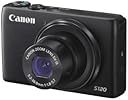
๐ท Elevate your everyday moments with pro-level clarity and instant sharing โ because your story deserves the spotlight.
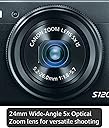
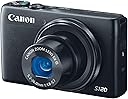
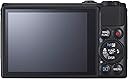
The Canon PowerShot S120 is a compact digital camera featuring a 12.1MP high-sensitivity CMOS sensor paired with the DIGIC 6 processor, enabling exceptional low-light photography and fast autofocus. It offers 5x optical zoom with a bright f/1.8 lens, 1080p/60fps Full HD video recording, and a sharp 3.0-inch capacitive touchscreen LCD. Built-in Wi-Fi allows seamless wireless sharing to smartphones and social platforms. Designed for professionals and enthusiasts seeking portability without sacrificing image quality or creative control.
| ASIN | B00EFILNV8 |
| Age Range Description | All Ages |
| Aperture modes | Av |
| Are Batteries Included | Yes |
| Aspect Ratio | 4:3 |
| Auto Focus Technology | Center, Continuous, Contrast Detection, Face Detection, Live View, Multi-area, Selective single-point, Single, Touch, Tracking |
| Autofocus | Yes |
| Autofocus Points | 9 |
| Best Sellers Rank | #169,375 in Electronics ( See Top 100 in Electronics ) #1,518 in Digital Point & Shoot Cameras |
| Bit Depth | 12 Bit |
| Brand | Canon |
| Built-In Media | CB-2LY Battery Charger for Canon NB-6L Lithium-Ion Battery, NB-6LH Lithium-Ion Battery Pack (3.7V, 1,060mAh), One Year Limited One Year Limited Warranty Card, PowerShot S120 Point-and-Shoot Camera, WS-DC11 Wrist Strap |
| Camera Flash | Built-In |
| Camera Lens | 120 Mm |
| Color | Black |
| Compatible Devices | Canon EF |
| Compatible Flash Memory Type | SDHC, SDXC |
| Compatible Mountings | Canon EF |
| Connectivity Technology | HDMI, USB |
| Continuous Shooting | 60 FPS |
| Crop Mode | 16:9 |
| Customer Reviews | 4.3 out of 5 stars 261 Reviews |
| Digital Scene Transition | zoom |
| Digital Zoom | 4.00 |
| Digital-Still | No |
| Display Fixture Type | Fixed |
| Display Maximum Resolution | 1024 x 768 pixels |
| Display Resolution Maximum | 922000 |
| Display Type | LCD |
| Dots Per Screen | 922000 |
| Effective Still Resolution | 12.1 |
| Expanded ISO Minimum | 80 |
| Exposure Control | Aperture priority AE, Automatic, Creative Filters, Custom, Manual, Movie, Program AE, Scene, Shutter priority AE |
| File Format | JPEG, RAW |
| Flash Memory Bus Interface Type | SD |
| Flash Memory Installed Size | 9.7 |
| Flash Memory Speed Class | 10 |
| Flash Memory Type | SD/SDHC/SDXC |
| Flash Memory UHS Speed Class | U1 |
| Flash Memory Video Speed Class | 10 |
| Flash Modes | Auto, On, Off, Slow Synch, Rear Curtain Synch |
| Flash Sync Speed | slower than 1/200 |
| Focal Length Description | 120 millimeters |
| Focus Features | AiAF TTL |
| Focus Mode | Manual Focus (MF) |
| Focus Type | Manual Focus |
| Form Factor | Compact |
| Generation | 1 |
| Global Trade Identification Number | 00138032289916 |
| HDMI Type | Type C Mini HDMI |
| Hardware Interface | USB |
| Has Color Screen | Yes |
| Image Capture Type | Stills |
| Image Stabilization | Optical |
| Image stabilization | Optical |
| Item Weight | 7.7 Ounces |
| JPEG Quality Level | Basic, Fine, Normal |
| Lens Construction | prime |
| Lens Correction Type | aspherical |
| Lens Type | Fixed-zoom |
| Manufacturer | Canon Cameras US |
| Manufacturer Part Number | 8407B001 |
| Maximum Aperture | 5.7 f |
| Maximum Focal Length | 120 Millimeters |
| Maximum Image Size | 4000 Pixels |
| Maximum Shutter Speed | Jan-00 Seconds |
| Metering Methods | Multi, Center-weighted, Spot |
| Minimum Focal Length | 24 Millimeters |
| Minimum Shutter Speed | 15 seconds Seconds |
| Model Name | Canon PowerShot S120 |
| Model Number | 8407B001 |
| Model Series | PowerShot S120 |
| Movie Mode | Yes |
| Night vision | No |
| Number of Diaphragm Blades | 7 |
| Optical Zoom | 5 x |
| Photo Sensor Resolution | 12.1 MP |
| Photo Sensor Size | 1/1.7-inch |
| Photo Sensor Technology | CMOS |
| Real Angle Of View | 75 Degrees |
| Remote Included | No |
| Screen Size | 3 Inches |
| Self Timer | 10 Seconds |
| Sensor Type | CMOS |
| Series Number | 120 |
| Shooting Modes | Underwater |
| Skill Level | Professional |
| Special Feature | Live View |
| Specific Uses For Product | Photography |
| Supported File Format | JPEG, RAW |
| Supported Image Format | JPEG, RAW |
| Total Still Resolution | 12.1 MP |
| Total USB 2.0 Ports | 1 |
| Total USB Ports | 1 |
| Total Video Out Ports | 1 |
| Touch Screen Type | Yes |
| UPC | 138032289916 013803228991 |
| Unit Count | 1.0 Count |
| Video Capture Format | MPEG-4, H.264 |
| Video Output | HDMI |
| Video Resolution | FHD 1080p |
| Viewfinder | Electronic |
| White Balance Settings | Auto, Custom |
| Wireless Technology | Yes |
| Write Speed | 12 fps |
| Zoom | Optical Zoom |
A**R
As good as you are going to get for this price point and form factor of camera
Key Point: A photo is made better more so by being a better photographer than getting a better camera. That being said, Iโve gotten some pictures I really like from this camera (I will upload some here eventually), but after using it for almost a couple months, I have come to notice some limitations that are typical of point and shoot cameras. Camera Design: I like that this remains a pocket camera. It fits in my pocket and doesnโt weigh it down too much (I think my keys actually weigh a bit more). There is no need for a case and the lens gets covered automatically when you power down the camera. I like the clicky control ring on the front (that can be customized with pretty much any functionality) and I tend to use it to step zoom to standard focal lengths like 35mm, 50mm, etc. This is really useful! I rarely use flash, so the manual pop up flash isnโt a big deal to me. The on off button works fine and I like that the camera really does turn on and off quick (much quicker than the RX100 III). I have a habit of turning off my camera when I walk around and not using it. This saves the battery and I was able to take 373 shots on a single charge. The zoom lever works fine, as does the shutter release. The control dial to select your mode functions fine. The buttons and dial on the back of the camera do their job, I have no issues. The touch screen is a nice to have feature. I use it most to select my focus point, and tend to stick to physical controls for everything else. Camera Usage: I do like that while this is a point and shoot camera it does have typical DSLR features like aperture and shutter priority mode, even though sometimes you have to dig into a menu to find them. I typically take RAW + JPG pictures in aperture priority mode and this works for most situations. I like going to f/1.8 to create a shallow depth of field. I have noticed though that the smallest aperture available is f/8, whereas f/22 is standard on most DSLR lenses. Depending on what you are doing this can be an issue, if either you have a wider depth of field or are trying for a longer exposure in bright light. I also have taken a few pictures with shutter priority mode, mainly for long exposures of water. This works and the built in neutral density filter is nice to reduce the incoming light, although the 2 stops it provides wonโt make much of a difference in bright light. The one other picture mode I have played with is HDR mode. As other reviewers have mentioned the โnaturalโ HDR merge mode does not work. You have to at least use โart standardโ I think itโs called to get a proper increase in dynamic range. This causes the camera to play with the colors, which you may or may not like. Also important to keep in mind is that this creates JPG only photos, no RAWs. If you want RAWs, you can however do +/-2 bracketing and then HDR merge them in post production software like Lightroom 6. I have also used the video mode, and am impressed by the small file size for the best quality video. The one drawback that I have noticed is that it really does sap battery life to take video, something other reviewers have mentioned. Image Quality: Overall, I have been quite satisfied with the image quality of this camera. The in camera processing that this camera does for JPGs is very nice and useable. From my own test shots, images up to ISO 3,200 are acceptable quality. When in focus, the images can be sharp. Furthermore, I recently downloaded Lightroom 6 (trial) and have been using it to process RAW images. With my limited ability I have been able to take some images that made great JPGs and turn them into phenomenal RAW images. I have also been able to make edits to RAWs to make the images acceptable that I would have otherwise discarded as JPGs out of the camera. Doing this really makes me feel good. Thatโs not to say RAW editing will make bad pictures good, but rather it gives you the leeway to tweak the image to your own personal preference (white balance, exposure, etc.) and really make it your own. I like doing this and will be doing more RAW images in the future I think. One thing to note is that I would avoid free RAW software as they typically donโt support point and shoot cameras for lens correction and your images will end up distorted. Sometimes they donโt even support the specific RAW format. I have tried a bunch like Raw Therapee and even Canonโs own Digital Photo Professional, but I have been far more satisfied with the Lightroom trial so far. Itโs a true case of you get what you pay for, and Lightroom is much more accessible price wise than it has been in the past ($10 / month subscription model available). Limitations: One major limitation of this camera (and all small sensor size cameras) is that you have very limited control to create shallow depth of field (that nice blurry background effect). This is because when comparing to the standard 35 MM sensor size cameras, small sensors cameras have much shorter real focal lengths (one of 3 factors in creating depth of field). You can do a web search to find details on this, but in short, you can typically only get a shallow depth of field with this camera if you are very close to the subject and are using a decently wide aperture, say f/4.0 and larger. Now I know this camera has a portrait mode to โsimulateโ a shallow depth of field, but for me it doesnโt substitute for the real thing. There are other drawbacks to a small sensor size, but depth of field is most noticeable to me. Another limitation that I have touched on briefly before is that access to some settings like metering mode, ISO, continuous shooting, etc. are tucked away in menus and it can make them difficult to change quickly based on shooting conditions. This is typical of many point and shoot cameras so I deal with it, but makes me want a DSLR. =D Conclusion: There are tradeoffs between a point and shoot and DSLR camera. Therefore I rate this camera 5/5 for what it is and how it does against its peers, rather than against a DSLR. However, as I am growing to like photography more and more I am starting to think I could appreciate a DSLR. The choice is yours!
R**N
Superb Pocket Camera
I am a longtime user of the PowerShot S100, but my wife decided to expropriate my S100, so here I am with the S120. I will begin with the end -- I believe that the S120 is possibly the very best choice for a true pocket camera. The first thing that the user will notice about the S120 is the fit and finish. This camera is built very nicely and with reasonable sturdiness. Ergonomically it is very good. Most users can be taking pictures within 60 seconds of taking the camera out of the box. Of course, studying the manual and the built-in menus reveals a host of sophisticated features beyond the taking of simple snapshots. One thing that Canon did with the S120 that is different than my old excellent S100 was to put a switch on the side of the camera to raise the flash. If this switch is disabled, the camera will not select flash no matter what. I actually preferred the S100 system where the user selected the flash setting in the menu and then the camera used the flash based upon that settings and the composition of the shot. I'll grant that the S120 system gives the user even more control, which I suppose was the idea. But it is one more setting to have to remember. The S120 seems to be a solid improvement over the S100 in most respects. The main thing that I like about both of these cameras, the S120 in particular, is that it pretty much lets you shoot the way that you want to. I mainly shoot in Program mode with this camera, but the camera also offers an AUTO mode, which sets absolutely everything, as well as a manual, aperture-priority, and speed priority setting. These options are quite impressive for a camera of this class, and yes I do sometimes use them, especially the speed-priority setting. The camera has various other special settings for various types of shooting and for shooting to achieve various effects. The lens on this camera is very good for a camera of this class. It is the equivalent of a 24-120mm lens on a 35mm camera. The lens is relatively fast, meaning that when shooting in non-zoom situations, i.e. portraits, the lens is an F/1.8 lens, which is able to shoot, for example, portrait type shots without flash under some lighting conditions. (Many lenses require flash for pretty much any indoor scenario in order to achieve a quality photograph.) Canon reports that this is an F/1.8-F/5.7 lens -- which means that as you zoom the lens it will require more light. Nonetheless, these are impressive specifications for a lens of this class. In practice I find that this camera takes very good pictures and it is ideal for vacations, industrial and business uses, and all situations where you do not want to have to carry a full Single Lens Reflex camera. This camera features a generous 3.0 inch capacitive touch LCD on the back, and this is the nerve center of the camera. You will use this LCD to compose shots, review the shots, and set most menu settings. Like all modern cameras, this camera is controlled by menus that you access via the LCD screen. Mostly the menus are intuitive and most users will quickly become familiar with them, especially users who have used other electronic cameras in the past. Years ago most cameras of this class had an optical focusing window, but no more. The user must compose shots using the rear LCD. This LCD is superior to many and as good as any LCDs on the market for this purpose, but I prefer an optical focusing window. Alas, pretty much all camera manufacturers have decided that composing via the LCD is the way to go. Mostly this works fine, and indoor this works superbly, but there are times out in bright sun venues when this becomes tricky. On minor nit -- As with the S100 and S110, Canon relentlessly refuses to put a protective lip or bezel around the edge of the LCD, so if you set the camera down on the LCD you stand a good chance of scratching it. This can be largely solved by buying one of the after-market screen protectors. One of the really nice advances on the S120 is that you can move the focusing square to anywhere in the composition shot simply by placing your finger on the capacitance LCD. In the field this makes for very fast composition, and I like this feature a lot. WI FI CONNECTION! The S120 connects easily to your iPhone by use of the Canon Window App, which is available in the App Store. It will also connect to your computer. SINCE THE CANON INSTRUCTIONS TO DO THIS FOR A WINDOWS COMPUTER ARE WRONG, HERE IS HOW TO DO IT. First follow the Canon directions to connect the S120 to your network. Then, for a Windows computer, follow the Canon directions and begin trying to connect to your computer. (Here is the step Canon omitted) THEN, go into Control Panel/Devices and Printers and select "Add a Device". Your Canon S-120 will show as a new device. As soon as you add it you will be able to see the folders on your S-120's SD card. I hope this helps someone; it took me a long time to figure this out. By the way, ensure that if you have two networks from your router, i.e. a 2.4Ghz and a 5.0 Ghz, your computer needs to be on the 2.4 Ghz network. Once you set your S-120 to be connected to your Windows computer as I just explained, it connects very very easily. Works like a dream. At the end of the day the purpose of this, or any, camera is to take great photographs. You can do that with the S120. It has a very good lens for this class of camera and it will produce excellent images under most conditions. No, this camera is not the best choice for shooting indoor sports, for example -- the combination of low light and high speed subjects really necessitates a full Single Lens Reflex camera with a high-dollar lens. Similarly, an SLR will do a better job on fast-moving wildlife. But for portraits, landscape shots, and many other shots that people typically take on vacations or with family and whatnot, this camera will deliver excellent images and is a great choice. RJB.
I**E
Great Camera, But...
This is an excellent camera! It takes great pictures and the settings are simple and easy to use. It takes fantastic low light photos, which was very important to me. Also very important to me are the small size, so it can fit easily in a pocket, and the very solid construction, since I am notoriously rough on cameras. So why not 5 stars? I decided on this camera, in part for its WiFi capabilities, and as it turns out, the WiFi functions are completely worthless. I'm reasonably tech savvy, and I have spent countless hours trying to make the WiFi function with my Android phone and my Windows desktop and laptop computers. Maybe it works, and I just can't figure it out, but nothing should be that difficult. Canon has made a very solid camera here, but they really dropped the ball with the WiFi functions.
D**O
Worth the Wait, a Truly Great Pocket Camera!
Ok, here's my take on the wonderful Canon S120. If that opening seems a bit balanced in favor of the S120, it is meant to be. This is the camera I have been waiting for. In fact, I pre-ordered my S120 on September 8th, thirty days before it was forecast to be available on Amazon. I got two notices before the order became final. I received a shipping notice and the camera subsequently arrived via Lasership in perfect order and one day earlier, October 7th, than estimated. Through tracking I found I might not be home when the camera arrived and called Lasership to ask the driver to leave it on my doorstep. Lasership contacted the driver directly at that minute and made it so, a great shipping company. Now for the S120, I am an amateur wanting RAW format and HD, high quality, video in a pocket camera with above average low light capabilities. I also wanted Wi-Fi. I had looked at the Sony DSC-RX100M II but was scared away by the very high price point. Just as I was about to settle for less, Canon announced the S120 which met all of my criteria and then some. I already have a Canon SD 500 and a SD 990, both top of the line pocket cameras but each lacking in HD video and RAW format capabilities. The Digic6 processor put it all over the top for the S120. My expectations have so far been met. For anyone wanting fantastic, very professional results, the S120's built-in special effects, modes and scenes will deliver surprisingly pleasing results with little effort. The High Dynamic Range setting almost eliminates any need for adjustment of brightness, contrast and saturation, effortlessly delivering print-ready photos right out of the camera. The front-located Control Ring around the lens can be set to control several different functions and is knurled, sized and located to make it very easy to control while shooting. I like to use it for step zooming. The videos and photos can now be set to the same, matching aspect ratio (16x9 or 4x3), making videos using photos and video clips very easy to assemble. Speaking of video clips, the very handy Hybrid Auto Mode simultaneously records both a still shot and a short 2 to 4 sec video clip for each shot taken. I am currently exploring this interesting feature which I believe will greatly enhance the videos I assemble. Some downsides I feel are worth mentioning. First there is the lack of a remote audio socket. The auto wind noise reduction feature of the built-in stereo microphone works only marginally well. Users of the S120 that want high quality sound to match the very high quality (HD and 60 fps) video may want to invest in a stand-alone recorder such as the Zoom HN4. I don't yet have one of these and am using the quality cassette recorder from my old stereo set for indoor sound recording. I got the Wi-Fi setup to work but still have plenty of questions on using the system. The Canon instruction booklet (comes with the camera) and Canon User Manual (available only as a *.pdf file) provide enough instruction to make the system work. However to ensure the system is working securely I feel one should be familiar with the meaning of the terms like SSID, WEP, WPA, MAC (Media Access Control, not the Apple Mac), IP, DHCP, etc. I have made the system transfer photos and videos to my PC but still harbor concerns about the possibilities for security leaks. Perhaps someone could address this specifically in another review. As for accessories, I recommend a remote power supply, ACK-DC40 or equivalent. It fits easily to replace the battery. In my opinion there is ample room for most tripod bases to hold the camera and connect the power supply. Others have said this is a problem, I think not. The distance from the mount screw center-line to the outside of the connector on the bottom of the camera is 1 1/2 inches, allowing a tripod base of at least 2 3/4 inches square to be used. I purchased a Sandisk Extreme 32 GB 80MB/s Class 10 UHS-1 memory card which, based on present experience, will be very adequate for any full day of shooting. I plan on getting two more equivalent cards but at 16 GB each. Extra batteries are a must. Based on the large number of positive reviews I bought a Wasabi charger and two spare NB-6LH batteries on Amazon. I will report if any problems in a followup. In any case, at minimum, I will carry one spare battery at all times. The OEM PSC-900 case is a perfect fit, looks great, and is handy to use. The case loops onto my belt and in locations where I worry about having someone rip off the S120 I first run the hand strap under my belt, the camera through the hand strap loop, then place the camera in the case. I can still fairly quickly pull the camera from the case and un-loop it to shoot. The little inconvenience is worth the extra security. There is little protection from rain or dust with this case and in wet or damp situations I place the camera and case in a zip lock bag and into my pocket. Bottom line, this is a great camera and worth the upgrade if you want a true pocket camera and plan to take many photos and videos. Pros and amateurs alike can produce very high quality photos and videos under low light conditions. I feel many pros will find this a better choice for freedom while traveling and still getting top quality results. The S120 compares favorably almost all along the line to the much lauded Sony DSC-RX100M II at 40% less cost. Bob
C**E
Fast, portable, and love the wifi feature!
I've had the Canon S90 for the last five years and it truly served me well. I was in the market for a new portable camera with RAW and after comparing the Sony RX100 to the Canon S120, I decided to go with the S120. I was hesitant to go with the S120 because it looked exactly like the S90 and I wanted something different but I've discovered that the S120 is a completely different beast! Here are the things that have made this upgrade a worthy investment: 1. High Resolution screen: The S120 has a 922,000 dot 3 inch LCD screen, almost double the S90's. Colors are richer and details are sharper! 2. Built-In Wifi: I like to share lots of photos and photo collages on facebook and instagram. The S120 allows me to import high-resolution photos into my iPhone with ease. My instagram uploads never looked better (no more grainy iPhone selfies)! I had to snoop around to figure things out as the instruction manual and online blogs offered nothing. If you want simple instructions, I've provided them below. 3. Faster overall usage: The shutter speed is fast and the camera's burst feature is awesome (9.4 fps). 4. HDR mode: The HDR mode is very useful for scenic, high contrast scenes when you want all the details and shadow areas to come forth! 5. Wide Angle: The focal length is 5.2โ26.0mm (or 35mm film equivalent: 24โ120mm). This is slightly wider than the S90 and the Sony RX100. It may not seem like much but it makes a big difference when shooting various scenes. 6. Versatile: I've clumsily dropped the camera twice already (once on asphalt and once in a restaurant) and despite some cosmetic scruffs, the camera works great. Downsides: The battery life on the S120 is definitely shorter than the S90. Be sure to buy a couple of generic batteries for the S90/S120 and carry them with you. How to Import Photos into Your Smartphone Do not use Canon ImageGateway, you will waste your time with a registration system that doesn't even work (as of April 2014). 1. To start importing photos into your smartphone, you've first got to set it up. Do this at home on your wireless network. Connect your smartphone to your wireless network. Connect your camera to your wireless network. Take a few photos, go into playback mode on your S120, press up on the spin dial, select "Add a Device," and then follow the prompts to add your smartphone onto your S120. 2. Go to the Apple AppStore and download an app called "Canon CW." 3. Once your smartphone is setup and recognized by your S120 camera, you have two options to import photos. The first option (at home on your wireless network): Go to playback mode on your S120, press up on the spin dial, select the smartphone icon, and the camera will begin searching for the smartphone on your wireless network. Turn your smartphone on (make sure it's connected to your wireless network) and open the "Canon CW" app (your camera will say "Start dedicated app on target device"). The app should recognize your camera and allow you to preview the photos. Select only the photos you want to import. If the app doesn't recognize the camera, try quitting the app and open it up again. The second option (on the road with no wireless network): Go to playback mode on your S120, press up on the spin dial, select the smartphone icon, and the camera will create a wireless access point. Turn your smartphone on, go to your network settings, and then select the access point that your camera has created. Then open up the "Canon CW" app and it's the same as above. I hope this helps someone. I spent hours before I figured this out on my own.
S**I
A decent buy
I have mixed feelings. I do photography for a living, bought this for the holidays since I have a hard time carrying my DSLR photo bag around in addition to my two children. I loved how many manual settings this had, and how small it was, but after a few weeks of using this I wasn't too happy with it: - the time that occurs between the moment you press the button and the moment the actual picture is takes is pretty long, you have to learn to adjust to it and even then, it's annoying. A simple iPhone will perform better from this point of view; - You can't freeze the AF point, an involuntary swipe on the screen (can happen) will just move your focus point around without you noticing it, which I found to be really annoying; - it's cool that you can change settings as if this was a reflex camera but obviously that really makes no difference, it obviously doesn't have the optics a reflex so simply put: the pictures that come out of this camera will never look as good as those you can take with a DLSR camera, you shouldn't really expect much similarity; - the paint on the outer body barely stays on. I used to just trow this in my purse and as a result, after only a couple of weeks, a ton of paint came of around the edges of the camera's body. Really Canon?! This said, it's not all bad: - I like that you can regulate the exposure, you can bracket and adjust precisely your white balance; - I like that you can shoot in raw; - and the actual quality of images isn't that bad after all, really, only you really need to find yourself in optimal light conditions or the quality will deteriorate quickly Overall, it's a decent buy. This is a great little camera that can make good quality images, has a good amount of features that will the more advanced photographer feel at home (because it's very frustrating being used to DSLR and then use a digital camera and not being able to make any setting), small, light and very easy to carry around (but do protect it), perfect for family pics on the go. If it were also waterproof it would be almost perfect :)
M**L
Almost perfect camera for a traveler
I bought this camera for a trip to Seoul, and wanted something more powerful than my cell phone camera or a normal point and shoot. This camera performed admirably for every scene I could throw at it, including low light shots. I am not a professional photographer or reviewer, so I will leave you to Google for good reviews, which there are a few. I will only comment from the point of view of a normal user. Image quality is, as stated above, excellent. I took some beautiful images with this, which my friends remarked were near professional quality. Build quality seems extremely good. Its a solid little camera with very little plastic used. Its just about the perfect weight, and the size is perfect. Small enough to comfortably fit in your pocket, without being too small to be comfortable in use. The LCD screen is beautiful. And if you need a better view, you can connect it to your tablet or smartphone via the WiFi connection, which worked very well. The Canon CW app for iOS 7 worked very well and never let me down. It even allows to attach location data from your smartphones GPS. The only drawbacks: NO PANORAMA MODE. Don't look for it. Its not there. Big shame, I could certainly have used it to great effect where I was. I had to fall back to my iPhone 5 for that function. Also the battery life is mediocre. Plan to get spare battery to keep around if you are gonna see heavy use. I nearly ran out of juice one day, and you can't charge it via USB while its in the camera, this would at least have let me juice it back up with my travel charger. I am keeping this a five star review because the pros outweigh the cons heavily, but this is more of a four-and-a-half star product.
T**R
Just Received S120,, Orange Focus Beam is Painful!
I just received the S120 which was a gift for my wife. I am still feeling my way around but there seems to be a lot of options on this camera however I hope to be able to do 99% of my shooting in AUTO mode. Primary use will be pictures of grandkid and general "quick shots". Recycle speed without a flash seems very fast and well as power "on" to first picture. Picture quality seems good and touch focus is nice. Biggest problem I am having is the very bright blinding orange "spotlight" that shines in a subjects face before the picture is taken. I assume this is the autofocus beam. My wife has complained that this beam is very painful and leaves a spot before her eyes. If there is not a way to disable this, it is a show stopper. I have explored the menu items and thought I had it off but it is still there. Update.. 2/13/2014 This camera will be going back. Went to record a video of the neighbor using his backhoe to clean my drive way and 10" into the video the battery indicator turned Red and about 30" in the camera shut off. Battery was at 75% when I started. This is a defect that Canon needs to fix. Tim
D**Y
Perfect travel video camera
Light weight but does a great job. Perfect for travelling when you are trying to be compact with luggage.
M**Z
Great camera for any situation....even underwater photography.
Prior to this camera, I was using a Canon S95. It's a great travelling camera. Takes superb photos, fits into your back pocket and has all the features that you need whether you take automatic photos or if you want more manual control. I also used the camera in an underwater housing for underwater photography. Unfortunately, my housing leaked (lesson learned - don't go with the Canon brand housing). I've had many very favourable comments on photos.
Trustpilot
3 weeks ago
1 month ago