


⚡ Label like a pro, speed like a boss!
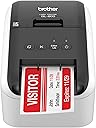
The Brother RQL-800 is a high-speed, professional-grade thermal label printer capable of producing up to 93 black or red labels per minute at 300 dpi. It supports Brother DK pre-sized and continuous-length labels with an auto-cutter for banners up to 3 feet. Ideal for office, shipping, and organizational needs, it also prints postage directly, making it a versatile and efficient tool for busy professionals.


| ASIN | B07MRGX4VL |
| Additional Printer Functions | Print Only |
| B&W Pages per Minute | 93 |
| Best Sellers Rank | #2,895 in Amazon Renewed ( See Top 100 in Amazon Renewed ) #47 in Desktop Label Printers #50 in Renewed Office Products |
| Brand | Brother |
| Built-In Media | Labels |
| Color | white |
| Color Depth | 1 bpp |
| Compatible Cartridge | [Brother thermal cartridges] |
| Compatible Devices | Laptops, PC |
| Connectivity Technology | USB |
| Control Method | Touch |
| Customer Reviews | 4.3 out of 5 stars 2,188 Reviews |
| Duplex | auto |
| Global Trade Identification Number | 00012502599333 |
| Hardware Interface | USB |
| Ink Color | Black, Red |
| Item Dimensions D x W x H | 8.4"D x 4.9"W x 5.6"H |
| Item Type Name | RQL800 |
| Item Weight | 2.4 pounds |
| Manufacturer | Brother International |
| Maximum Copies Per Run | 9999 |
| Maximum Copy Resolution Black and White | 300 dpi |
| Maximum Copy Resolution Color | 300 x 600 dpi |
| Maximum Copy Speed Black and White | 93 pages_per_minute |
| Maximum Media Size | 4 x 6 inch |
| Maximum Print Resolution Black and White | 300 dpi |
| Maximum Sheet Capacity | 100 |
| Maximum print Resolution Color | 300dpi |
| Model Name | Renewed Model: RQL800 |
| Model Number | RQL800 |
| Model Series | RQL |
| Number of Licenses | 1 |
| Other Special Features of the Product | Energy Star |
| Paper Size | 8.5 x 11 |
| Print media | Labels |
| Printer Connectivity Type | USB |
| Printer Output Type | Monochrome |
| Printer Type | Thermal |
| Printing Technology | Thermal |
| Resolution | 300 x 300 |
| Special Feature | Energy Star |
| Specific Uses For Product | Label printing, Package labeling, Envelope labeling, File folder labeling, Name badge printing, Postage printing, Home use, Office use, School use |
| Total Usb Ports | 1 |
| UPC | 012502599333 |
| Unit Count | 1 Count |
| Warranty Description | 2 year manufacturer |
| Warranty Type | limited warranty |
| Wattage | 204 watts |
D**O
Solid design. Excellent Quality.
Excellent printer. Use them in our store for inventory marking. Runs well with ACCESS database generating barcodes on various versions of Windows. We have 7 of these printing different size labels in various locations in the store. Only had problems with one over a 5 year period. Super easy to set up and maintain. Occasionally use the red-black printing for name tags - never had a problem with the color printing. All printing is dark and sharp.
A**Y
Good printer, but frustrating software issues
The printer itself is good—fast, reliable hardware, and the print quality is solid. Setup is straightforward, and the Plug & Label feature is a nice idea. However, the software is buggy and frustrating to use. Every time I try to print a label, I get an error saying “cannot print – Black/Red on white paper installed, change it to monochrome media.” Even when everything is set correctly. I contacted support, but they weren’t able to resolve the issue, which makes it even more disappointing. Overall, the hardware is great, but the software seriously holds it back.
G**.
Excellent Label Printer
Excellent label printer! I use it mainly for my business, to print UPC labels. The only fault I can find is with the P-Touch editor software. The software will not allow the printing of the entire label because of its margins settings, and it would be nice to be able to add additional barcode formats to the software, if that is an option I haven't learned how to do it yet. Both could be fixed with a software and firmware update. The ability to print labels in red is neat, and adds to the professional look of some labels, but I wouldn't call it a must-have feature. The ability to change label rolls and sizes quickly and easily is a great benefit.
T**H
Fast & Clear Printing – Perfect for Office Use
The Brother QL-800 is an excellent label printer with outstanding print quality. Text comes out sharp and professional, and the printing speed is impressively fast—perfect for handling large volumes of labels. Setup was easy, and it’s very user-friendly. I especially like the option to print in both black and red, which makes labels stand out more. Overall, this printer has greatly improved my workflow and is highly recommended for business or office use.
W**H
Trashing a new Brother QL-800 and and QL-81-OWC label printers-going back to Dymo
I bought two new Brother label printers – a QL‑810Wc and a QL‑800 – expecting an upgrade from my old Dymo. Instead, both have been extremely frustrating to use. The hardware might be fine, but the software is a problem. For weeks, I kept trying to work with these printers, assuming I’d eventually figure out the software. I’ve spent far too long wrestling with P‑touch Editor and the Brother drivers just to print a simple label. The software is confusing, inconsistent, and full of hidden or greyed‑out options. Orientation, label sizes, and text layout never behave in a straightforward way. What should be a simple 5‑minute setup turned into repeated trial‑and‑error sessions that went nowhere. Because I kept thinking I’d solve it, my Amazon return windows recently closed, but I am not wasting another minute on these products. I am literally trashing both units and all the labels I bought for them and going back to a Dymo labeler that just works. If you value your time and need a label printer that’s actually usable, I strongly recommend avoiding the Brother QL‑810Wc and QL‑800.
A**E
Excellent Label Printer Uses Quality Labels
The Brother QL-800 is versatile because of its software and diversity of labels available. I'm pleased with the quality of the labels, which have better longevity than the Dymo labels I'd previously used. My only disappointment after considerable use is the Brother QL-800 lacks an automated bar code addition for postal address labels, which my previous Dymo printer had.
M**S
Brother QL-800 — Great Printer, Software Could Be Better
The Brother QL-800 label printer has been working very well with our POS system, which actually recommends this brand and includes built-in label templates. Because of that integration, printing price tags and labels for the business is fast, consistent, and reliable. The printer hardware itself is excellent. It’s fast, prints clean labels, and has been dependable and compatible in daily use. Once set up through the POS, it does exactly what it’s supposed to do. My main issue was the Brother software when I initially tried using the printer directly with my computer. The software that needs to be downloaded is not very intuitive, and designing custom price tags or labels wasn’t as easy as it should be. The software could definitely benefit from updates and a more user-friendly interface. Another limitation is that I did not purchase the Wi-Fi version, so labels can only be printed when I’m physically at the business. That’s something buyers should consider if remote printing is important. Overall, this is a great label printer, especially when paired with a POS system. The hardware is solid, but the standalone software experience and lack of Wi-Fi (on this model) hold it back slightly.
L**E
Great Diversity Labeler
Wonderful product I enjoy it. I love the diversity of this product however, I think brother should work on maybe condensing and simplifying their instruction manual a little bit, especially for us older people.
A**O
Excelente y muy barato comparado a todos lados
Excelente producto, muy buen precio, al parecer por los datos del vendedor es directo de fábrica vienen los datos de la fábrica en EU, super rápido que me llegó, me ahorró mucho tiempo y dinero, me arriesgué a comprarle a alguien sin comentarios y la verdad me generó mucha confianza, casa cambio de ubicación me avisaba
J**B
Label -all- the things !! This printer is fantastic and ptouch sw. can import from Excel / Databases
Those who know me know how I love to label aaalllllllllll the things :) And this very high speed printer will make this even easier now! I was tired of printing misaligned address label sheets using my laser printer - sure they are cheap and use equipment that I've already got, but you know what? The alignment issues were driving me more than a little crazy. Since I keep track of a large number of items using an Excel spreadsheet, I was looking for a labeling solution which would allow me to print "one-off" labels (without having to manage a partially used label sheet) or entire batches of labels. Using the ptouch software, I am able to pull the exact data fields that I want from a spreadsheet and put them on my label where and how I want. Even more cool is the ability to concatenate a number of cells into a "super string" and then print that portion as a barcode (QR code for example). Awesome! If you are even remotely on the spectrum or are just very particular about how you organize things, you will no doubt fall in love with this printer as I have.
I**S
Fit for purpose
Works well
G**T
QL800
Der QL800 hat meinen alten QL500 nach etwa 4 Jahren abgelöst. Ich hatte auch schon vorher LabelPrinter von Zebra in Einsatz. Das Preis / Leistungsverhältnis ist hier aber Super und die Langlebigkeit des Vorgängermodels hat alle Erwartungen und Erfahrungen übertroffen. Bei dem QL800 erkennt man die Verbesserung des Gerätes selber direkt. Wobei die Druckgeschwindigkeit sich nur minimal verbessert hat, dafür aber ist aber das Handling und die Druckqualität merkbar gestiegen.
実**ん
思い切って買ってよかった
簡単に使えました。 宛名書きから開放されて楽になりました! 書き間違い・読み間違えが減るので、荷主(自分)だけでなく、配達の人や、送付先にもメリットが有ると思っています。 発送業務以外でも、分類ラベルなどにも使えるので、小規模な業務においては必需品レベルなんじゃないかと思います。 日本語フォントも自由に選択でき、商用フォントもキレイに印刷できます。 (よくあるゴシックだけでなく、ヒラギノ丸ゴや筑紫明朝Aなどを使えば宛名のニュアンスを差別化できるので、簡易的なブランディングにも役立ちます。) 想像よりもコンパクトで場所を取らず、しっかりしている印象なので、好きなところに適当に設置できてしまいます。 付属ケーブルが長いのもナイスです。 印刷スピードなどにも不満は感じません。
Trustpilot
1 month ago
5 days ago