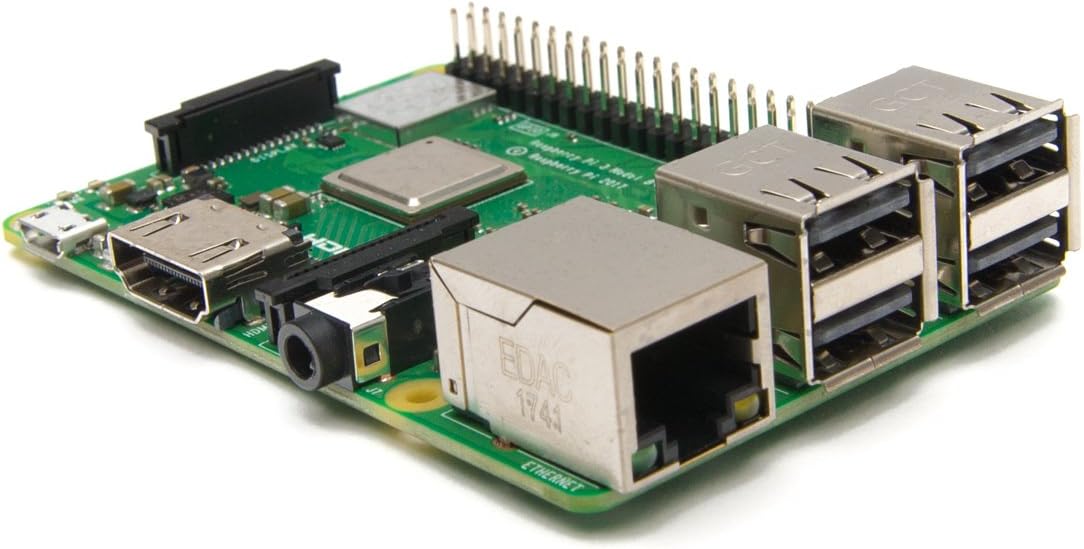
Raspberry Pi 3 Model B+ Board (3B+)
Product ID: 118752994
Details
- BrandPlusysee
- CPU Speed1.4 GHz
- Memory Storage Capacity1 GB
- Model Name3 Model B+
- Ram Memory Installed Size1 GB
⚡1.4GHz Quad-Core
📶Dual-Band WiFi
🔌4 USB Ports
Buy anything from 5,000+ international stores. One checkout price. No surprise fees. Join 2M+ shoppers on Desertcart.
Desertcart purchases this item on your behalf and handles shipping, customs, and support to South Korea.
🔧 Build, Create, Innovate!
The Raspberry Pi 3 Model B+ is a versatile single-board computer featuring a 1.4GHz quad-core processor, dual-band wireless connectivity, and multiple USB ports, making it ideal for a wide range of projects from home automation to media centers.
| ASIN | B07P4LSDYV |
| Best Sellers Rank | #319 in Single Board Computers (Computers & Accessories) |
| Brand | Plusysee |
| CPU Speed | 1.4 GHz |
| Compatible Devices | Personal Computer |
| Connectivity Technology | USB |
| Customer Reviews | 4.7 out of 5 stars 1,622 Reviews |
| Item Weight | 200 Grams |
| Manufacturer | Raspberry Pi |
| Memory Storage Capacity | 1 GB |
| Mfr Part Number | MS.04.0065 |
| Model Name | 3 Model B+ |
| Model Number | 8541589947 |
| Operating System | Linux |
| Processor Brand | Broadcom |
| Processor Count | 4 |
| Processor Speed | 1.4 GHz |
| RAM Memory Installed | 1 GB |
| RAM Memory Technology | LPDDR2 |
| Ram Memory Installed Size | 1 GB |
| Total Usb Ports | 4 |
| UPC | 603051855102 |
| Wireless Compability | Bluetooth |
J**M
No issues at all, a really great board !!
Works great !! Using it for HAMCLOCK. No issues at all, a really great board !!
A**A
Works great for LLE and some MLE
So this is an interesting ride. I bought this because I bought an NES classic and it was a fake and didn't work well. So I turned to this. Well it works great so far. I've used pinn to dual boot rasbian and retropie. Using chromium browser is faster than Firefox but really isn't powerful enough to do too much like a mini pc. I would assume you would need more like a pi 4. However for low level stuff in retropie it is great. I have tried too many high level stuff but did try SOTN PSX version. I was curious how this was since my laser died on my PS2. I only played through the Dracula fight at the beginning and I had no issues. So happy with it. I bought one of the geekpi nes cases and a nes controller to get the full NES experience. I haven't tried any OC yet but from reading it is pretty tapped out being stock. Now getting used to the quirks for retropie takes a little to get used too. I tried lakka but it didn't work to well. I'm familiar with linux so rasbian wasn't too hard to manage especially since it was the desktop mode. If you plan on dual booting though definitely use PINN.
I**T
Great toy at a great price.
I made a RetroPie. My adult daughter was so impressed she asked me to build her one. She and her hubby love it.
R**.
Plex Server Wonders... just don't transcode
I got this in an effort to create a Plex Server. There were a couple bumps, mainly with hard drive access to the Plex Server, which you'd need to sort out, but that isn't the Pi's issue, that is Linux. Running temperature isn't too high, as it is just streaming. Keep in mind, for a Plex Server, this can only send out the original stream. If your device can't handle the codec or compression and needs the Plex Server to transcode, it won't work, so make certain your device can handle the streams. Latest Rokus can do just fine with H.264, older ones, not so much. FYI, some blu-rays are VC-1, which Roku can't handle. I have only streamed up to 1080p, so I can't say how it'll handle 4K. It'd be best to keep it close to your router, if not hardwired into it. With it's small size, the cables for the Ethernet and USBs can get a bit tight. This is the best bargain for a streaming server you'll ever find. That comes with the non-transcoding asterisk, but as long as you have equipment / devices that can handle the original stream, it'll work brilliantly.
S**B
I love Pie, Raspberry Pie that is!
I use a bunch of these things. This one is no different than any of the other ones I've used. Like all Raspberry Pies I've used, right out of the box, plug in a uSD, a power cable and you are up and running. Unfortunately the price of the Raspberry Pie has gotten a bit out of hand. These used to be a lot less expensive then they are now, even though the hardware hasn't changed very much. All things considered, they are still a convenient way to build up a quick project. This particular one will be used for monitoring the AC power at my home. I want to prove to the utility company that their power isn't as reliable as they claim it to be! Be that said, a Raspberry Pie can be used for just about anything you can imagine. There are different versions offering a wide variety of speed, functions, memory and so on. A little research will yield exactly the Pie that will suit your needs. This wasn't the first I've purchased, nor will it be the last.
L**D
It's a Raspberry Pi
Overall I am pleased with it. I use it with one of my 3d printers to run Octoprint. I was a bit intimidated with it at first but the youtube videos helped get over that. Use the Raspbery Pi Installer to load the OS, very easy to do. I added the 10 in. Raspberry Pi touch screen. You will need to follow along with the youtube videos to load the Touch UI software. The one big thing I have a problem with is I consistantly get "Under voltage warnings" I have tried different power supplies and still get the warning. I did reload the OS and upon loading the Touch Screen I did not update the Pi. And after 10 prints with it the Under Power / Voltage warnings have stopped.
A**R
Versatile
Worked great as a general game system emulator
M**I
Perfect SBC
This is the 2nd Pi 3B+ I have running. You want to get a heat sync and fan on them if temperature stability mattered. One of the computers runs a ham radio interface Pi-Star and the most recent computer is a telnet BBS system. The 3B+ is getting to be a little older for the Raspberry Pi series with the 4 and 5's out but it has everything you need for a dedicated little machine and with Wifi and Blue tooth on board it's that much easier to work with.
L**V
Agil y confiable entrega a buen precio
Entrega agil y a buen precio, tecnicamente aun no la configuro para mis experimentos
J**.
Good price & performance. Tried a 3b, but decided on the 3b+ for better wifi speeds.
I'm happy with the performance. I borrowed my son's old Raspberry Pi 3b and its wifi was way too slow with it only supporting 2.4Ghz. The Pi 3b+ I bought is so much better with support of 5.8Ghz. Now, the video feed for my Octopi prints no longer lag, and uploads & downloads to/from my Raspberry run lickity split. I noticed that reviewer mentioned that their's was possibly conterfeit ... Mine is also stamped with 'made in China'; however, since they don't seem to be hiding the place of origin, I'm assuming that it's not counterfeit, but rather an outsourced manufacture. Also, here's what I found on Wikipedia .... "Most Pis are made in a Sony factory in Pencoed, Wales,[20] while others are made in China and Japan."
J**L
Work like it should.
Love this little computer. Work perfectly with retropie.
D**E
Update the system date - Works great
As a tip for other buyers you need to ensure you update the date once the OS is installed or you will have certificate issues. Use sudo apt-get install ntp I did have some keyboard symbol issues, no key for | - you can adjust your keyboard layout using sudo raspi-config - alternatively if your using a terminal environment SSH works best imo. This served my interests well. I'm running Raspberry Pi Lite OS with Pi-Hole on micro-usb power. Very happy with it; cheap and effective. Thank you,
D**D
Best value computer out there
There's a reason the Raspberry Pi boards are so popular. Good value and great quality.
Trustpilot
1 week ago
2 weeks ago