Buy anything from 5,000+ international stores. One checkout price. No surprise fees. Join 2M+ shoppers on Desertcart.
Desertcart purchases this item on your behalf and handles shipping, customs, and support to South Korea.
📡 One remote to rule them all — smart control, zero hassle!
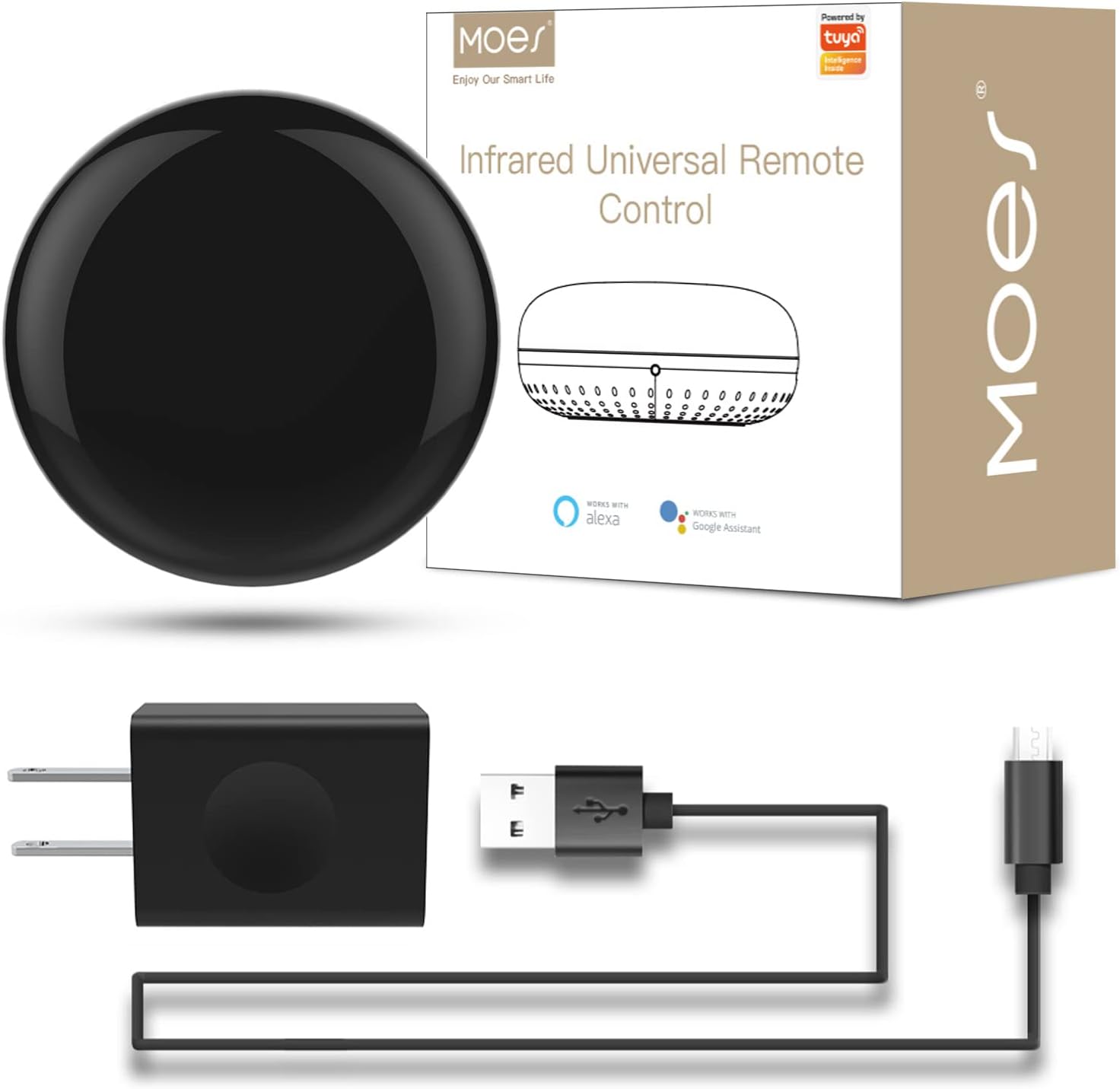
The MOES WiFi Smart IR Remote Controller is a universal infrared blaster that consolidates control of multiple IR devices like ACs, TVs, and DVD players into a single smart hub. Compatible with Alexa and Google Assistant, it enables voice commands and remote app control via 2.4GHz WiFi without needing a hub. Featuring DIY IR learning, it supports custom device programming, making it the ultimate smart home IR solution for professionals seeking streamlined, hands-free device management.


| ASIN | B07QH1X7PX |
| Additional Features | Universal |
| Battery Type | Lithium |
| Best Sellers Rank | #28,732 in Tools & Home Improvement ( See Top 100 in Tools & Home Improvement ) #34 in Home Automation Hubs & Controllers |
| Brand | MOES |
| Button Quantity | 12 |
| Color | IR+USB+Cable |
| Compatible Devices | Television |
| Connectivity Technology | Infrared |
| Controller Type | Amazon Alexa, Google Assistant |
| Customer Reviews | 4.3 4.3 out of 5 stars (1,165) |
| Item Weight | 3.52 ounces |
| Manufacturer | WENZHOU NOVA NEW ENERGY CO., LTD-Hangzhou Tuya Information Technology Co.,Ltd |
| Maximum Number of Supported Devices | 1 |
| Maximum Range | 15 Meters |
| Mfr Part Number | UFO-R1 |
| Model Name | WR-TY-THR-BK-MS |
| Model Number | UFO-R1 |
| Smart Home Compatibility | Smart Home Compatible |
| UPC | 703931915244 |
J**R
works good am happy
my remote for TV getting really old and not working good anymore. This actually works kind of good. Load up as an app on your tablet or phone. Then you have all the remote functions. I was able to put a widget on my tablet desktop and can click on buttons right from the home screen. Nice little device. I had to look up how to do the home screen shortcuts but it worked after i consulted google AI.
L**S
My Vizio TV can be controlled over WiFi with Vizio App, this device and it's app are faster
I bought this so that I can control everything in my entertainment center on my phone. The funny part is that I can launch the Smart Life App and control my Vizio TV over IR faster with this device than I can launching Vizio's SmartCast App and control the TV over WiFi. Here's an illustration of how good this device and app are: Vizio SmartCast TV using SmartCast App (after having set up the app, app not running): 1. Launch SmartCast App (wait a few seconds for the app to say: "Welcome to SmartCast, Tap Devices above to choose a TV, Sound Bar or other device to set up or control") 2. Do not follow the instructions displayed in the app, if you do you will never be able to control your TV as it won't let you set it up if it is already set up and it won't load the remote interface if you are on the set up screen, instead you just have to wait patiently without interacting with the app in any way. After what feels like a minute, the remote interface appears in the app with all but the power button grayed out/inoperable, it will never appear if you are out side your home LAN, native WiFi control does not work over the internet, only works within the same LAN that the TV is connected to. 3. After what feels like another minute, the buttons are no longer grayed out and I can finally tell my TV what I want it to do. (Rarely can you switch inputs or adjust volume in under a minute if you didn't already have the app up and running before you decided you wanted to control the TV) Vizio SmartCast TV using Smart Life App and this device (after configuring app, app not running): 1. Launch Smart Life (wait a second or two, often less than a second) 2. Click SmartCast (wait a second or two) 3. Click what ever button you want. (TV reacts to command in under a second), even works over internet, you can turn off TV when you aren't at home and the kids are watching TV instead of going to bed. (Worst case scenario 10 seconds elapse between deciding to control your TV and issuing the command)
Q**R
Old moe works pretty good
Old Moe what can I say about moe. This is a pretty good device there's probably better ones nowadays but this old boy has done a good job throughout the years always stays connected and makes it to where I never need to find a remote. It does not connect to blinds however.
X**R
Great to have!
I love this product! It has turned all my non smart IR devices into smart devices I am able to control from my phone anywhere such as a window ac unit, tower fan, sound bar and projector, and all my tvs(although they are smart tvs it was still nice to have this option because the app is easy to use and you can access your devices quickly, some quicker than the manufacturers app) the only downside is the device can only control items in the same room it wouldn’t be able to reach things in a room it isn’t in however for the price it’s a great and helpful device. I recommend!
P**.
Works great!!.....Need a 2.4GHZ network only.
I use this to control a video projector that is in my attic being used to display a Holiday Window and replaced an IR repeater that was not so reliable and had to physically turn it on/off (first world problem). The included remote schemes didn't include my projector, but the button learn feature worked for me after a few tries. The ability to include with Alexa is great. When purchasing it, I wasn't sure if it would work well with my projector since you have to press the power button twice in a row to get it to turn off. Luckily, the Scene feature of the Smart Life app allowed me to create a button press sequence with time delays between them. This allowed me to not only control the time it comes on/turns off but to press the power button twice to turn it off. Now my projector works in concert with the rest of my Christmas lights to all come on at sunset and off at the specified time. I can confirm what others had commented about needing to have a separate 2.4GHZ wifi network connection and not a combined 2.4GHZ/5GHZ (combined with the same SSID/Network name). I had an extra wifi router lying around and was able to complete the setup. You may be able to accomplish this by setting up a guest network that only utilizes the 2.4GHZ band if your router allows for that configuration (I did not test to see if that was possible on my existing router).
S**S
Not working with Alexa
Main reason for buying was to have a simple mechanism of controlling one device through Alexa. Setup was easy, despite lack of instructions, and this does work with my smartphone, albeit a rudimentary interface. However, I could not get Alexa to discover the device after multiple times trying, whether linking the Smart Life app or the Tuya app. It simply does not discover the device, which means I have no voice control. I wrote to customer service and explained my issue several times and they were frankly not helpful; they kept telling me to check all the things that I had been successful with and did not specifically address my issue. I bought this because the overall Amazon reviews were good. In hindsight I should have checked the reviews on the Smart Life app through Alexa, because there it seems many people are having the same trouble as me. So overall, for my purpose, this only gets 1 star; if I was not wanting Alexa integration, then would have been higher. It also bothers me that Amazon allows such the manufacturer to claim integration with an Amazon product when that is clearly highly variable, and certainly not consistent.
L**N
Easy to set up easy to hide
Great to control TVs, audio types of devices links well with Alexa to allow for SELF home automation.
F**S
Me sirvió para todos mis artículos de control
M**B
Dispositivo muy útil para controlar mis dispositivos inalámbricamente solo con mi voz con mi dispositivo Alexa fue muy rápido la configuración y funcionan al 100
A**R
Funciona totalmente con alexa, hace la vida más fácil. Ya tenemos 4 en nuestra casa, controlamos la televisión y los mini splits.
R**S
Fácil de configurar
C**A
El articulo se ve que era de uso, jamas se pudo conectar con Alexa o con el celular con Google assitem lo devolví porque nunca se pudo enlazar con ningún dispositivo.
Trustpilot
2 weeks ago
2 months ago