Buy anything from 5,000+ international stores. One checkout price. No surprise fees. Join 2M+ shoppers on Desertcart.
Desertcart purchases this item on your behalf and handles shipping, customs, and support to South Korea.
🚀 Elevate your meetings with pro-grade video and audio — because your team deserves the best seat in the room.
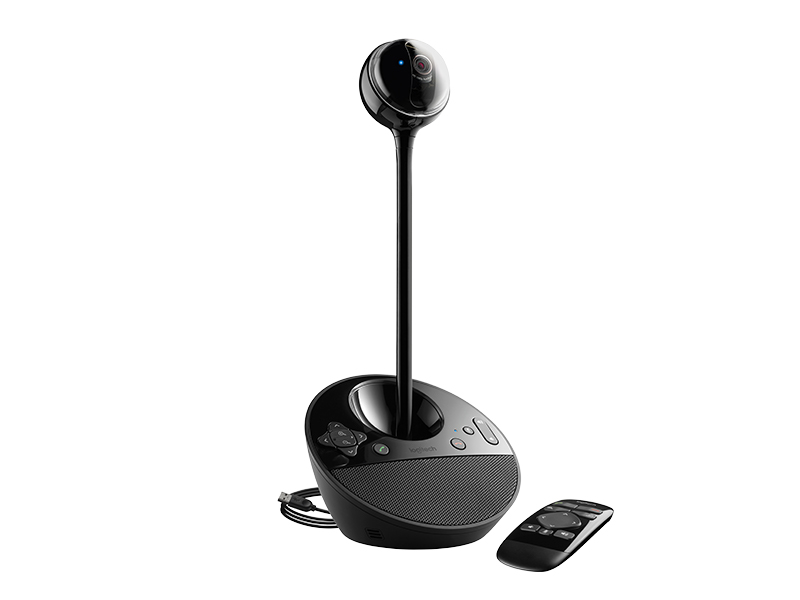
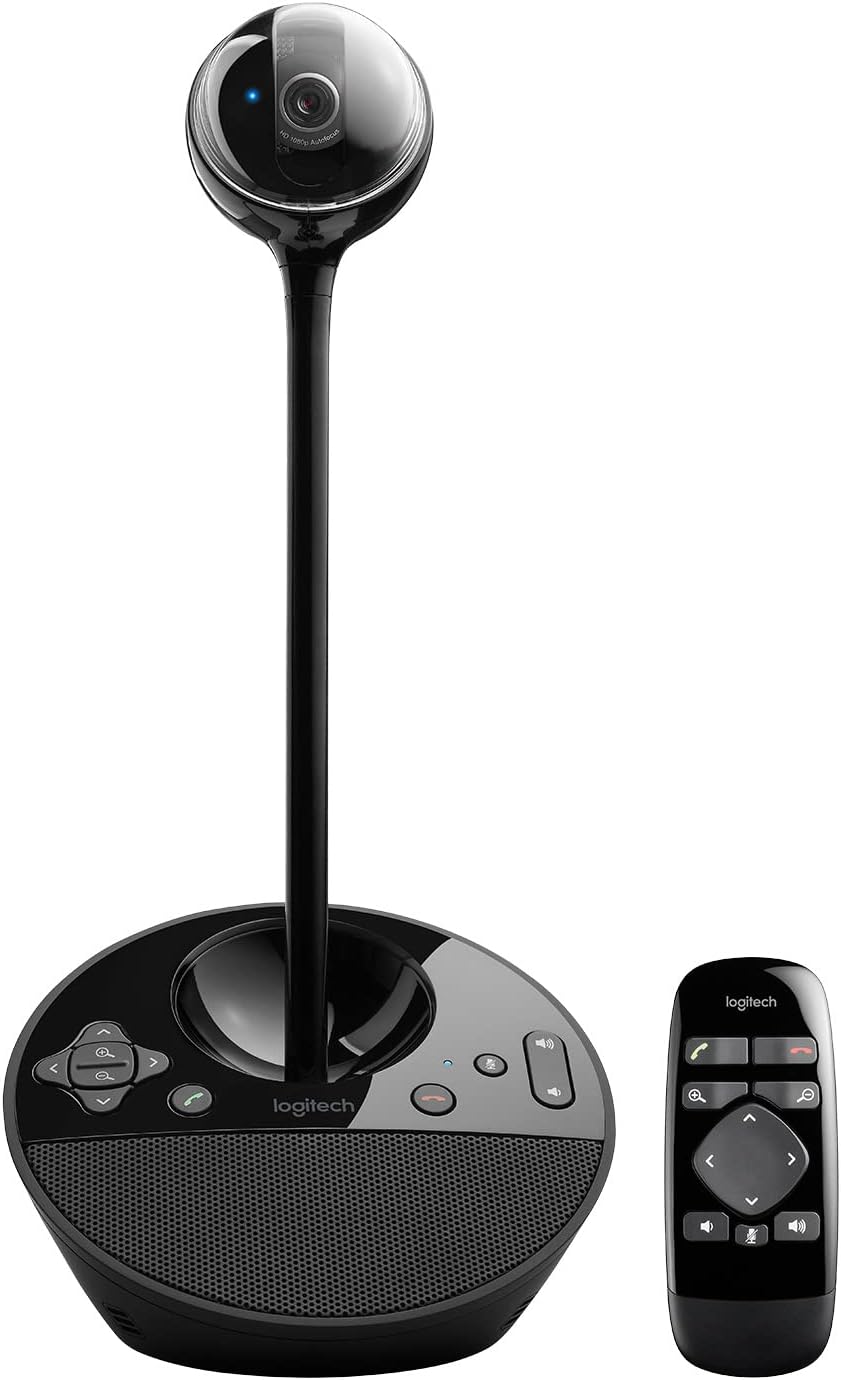
The Logitech BCC950 Desktop Conferencing Solution combines a Carl Zeiss 1080p HD webcam with a full duplex speakerphone and noise-cancelling microphone, delivering crystal-clear video and immersive audio for small group or individual conferencing. Featuring wireless remote PTZ control, plug-and-play USB connectivity, and broad compatibility with leading business communication platforms, it’s designed to enhance productivity and collaboration in any professional setting.


| ASIN | B0083I7Y8W |
| Are Batteries Included | No |
| Best Sellers Rank | #126 in Webcams |
| Brand | Logitech |
| Built-In Media | Conferencecam^Remote Control^Stem^User Documentation^A/C Adapter^USB Powe Cable |
| Camcorder Type | Video Camera |
| Color | BLACK |
| Compatible Devices | Laptop, Personal Computer |
| Connectivity Technology | USB |
| Customer Reviews | 4.3 out of 5 stars 1,440 Reviews |
| Digital Zoom | 4 x |
| Display Resolution Maximum | FHD |
| Effective Still Resolution | 3 MP |
| Effective Video Resolution | 30 MP |
| Exposure Control Type | Automatic |
| Features | Low Light |
| File Format | JPEG |
| Flash Memory Speed Class | C10 |
| Flash Memory Type | Micro SD |
| Flash Memory Video Speed Class | V90 |
| Focus Type | Auto Focus |
| Form Factor | freestanding |
| Global Trade Identification Number | 00097855088499 |
| Has Image Stabilization | No |
| Image Aspect Ratio | 16:9 |
| Image Capture Speed | 30 fps |
| Image stabilization | false |
| Item Dimensions D x W x H | 6.97"D x 6.81"W x 4.88"H |
| Item Weight | 2.3 Pounds |
| Lens Type | Zoom |
| Manufacturer | Logitech |
| Maximum Aperture | 2 f |
| Maximum Focal Length | 0.1 Meters |
| Minimum Focal Length | 0.1 |
| Model Name | bcc950 |
| Model Number | 960-000866 |
| Number of Batteries | 1 CR2 batteries required. |
| Number of Speakers | 1 |
| Operating System | Windows, macOS |
| Optical Zoom | 100 x |
| Photo Sensor Technology | CCD |
| Screen Size | 65 Inches |
| Sensor Type | CCD |
| Shooting Modes | Automatic, Easy |
| Style Name | Webcam |
| Supported Audio Format | MP3, AAC, Opus |
| Supported Image Format | JPEG |
| UPC | 097855088499 |
| Unit Count | 2.6 Pounds |
| Video Capture Format | AVI |
| Video Capture Resolution | 1080p , 720p |
| Video Resolution | 1080p, 720p |
| Warranty Description | 2 year limited warranty |
| Water Resistance Level | Not Water Resistant |
| White Balance Settings | Auto |
| Zoom | Digital |
R**R
Surely the best web cam for conferencing!
Been waiting for a webcam that is designed for small group as well as individual conferencing, and this is it! Has several key features that are absolutely unique at this price point, and the quality of hardware, audio and video is top notch. Key points: + Pans, Tilts and (digitally) Zooms for easy adjustment of image during conference. + PTZ function is via wireless remote, NOT software, which is a huge plus! Nobody wants to be fooling around with software for a camera while conferencing! The remote puts this function right where it belongs, in a purpose-built unit that is super simple and quick to use. + HD images are excellent, with great ability to adjust to ambient light automatically. + Audio sending and receiving quality are remarkable. Speakers are crystal clear on reception, and easily fill a large conference room without distortion. + Driver-free operation! Plug it in and go! + Compatibility with Microsoft Lync was excellent. Just had to choose the Logitech as my source camera. + Raising camera on stalk makes for more normal viewing angles for folks around a conference table. + Dual power options - USB or AC adapter + The digital zoom quality is pretty good, given that you're essentially cropping the image. Improvement areas/wish fors... * Charging port on camera should be standard USB mini or micro, NOT barrel type, so that other power sources could more easily be used to power the camera, e.g., an external battery or any of the millions of USB chargers folks have laying around. * Camera cannot be operated until connected to computer, even though the AC power is connected. Would be handy to be able to PTZ before connection to get ready for a conference or specific shot, say of a product. and in a moderately higher priced companion... * Optical zoom for full res image as one zooms in * Would love to see ports for add-on boundary mics for use on larger tables via standard 3.5mm audio in jacks * Would be useful to be able to daisy chain a couple of cameras set in different locations with different views, and have the camera hardware join the images into a collage, with the remote then able to switch from collage to single camera view and back again (again, keeping all the functionality in the hardware and remote, not the PC or custom software). Overall, the best webcam for conferencing I've ever found, worth every penny when it comes to on-line collaboration. Highly recommended for small group or high quality personal conferencing. ***********Update 2013-01-23 Plug and Play for Win and Mac laptops********** The Conference Cam continues to work extremely well. Can now confirm simple, plug and play operation on range of both Windows and Mac laptops. I just leave this sitting out in our team room, and folks have no trouble connecting and using it for group conferences. The remote is not only intuitive, but kinda fun to play with as well!
A**R
Great product!
This is the best dual purpose conferencing gadget we have found. Easy set up. Easy to use.
T**6
A solid performer even while being asked to work beyond it's design parameters.
This is being used to webcast community and club meetings from a large common room. It is really asking the camera/microphone to do more than it was designed to do but there are some workarounds to make this actually seem like a professional system. For those interested, here is what I did to make it suffice. First, if you are doing anything more than just peer to peer in a couple of small rooms, assign an operator to the system. They will be able to pan the camera appropriately, adjust volumes and sensitivities and, perhaps most importantly, "call on" people who raise their hand from remote locations via whatever conferencing software you are using. Our meetings use either a central microphone system or, if it's a smaller club meeting, a portable speaker system. The microphone on this is sensitive enough to pick up either system although the portable speaker system needs to be placed with 15-20 feet of the camera to get the best sound quality. The problem that we encountered was people wanting to speak remotely. The built in speakers are just not sufficient for a large room (nor were they ever intended to be) and even switching sound over to computer speakers (using the control panel function) isn't going to provide enough volume for a 2000 square foot open room. Fortunately, the unit has an audio out jack that is 3.5mm. We bought a 50' audio cable with the 3.5mm on one end and a standard 1/4" headphone jack on the other. That 1/4" jack plugs into our Anchor Audio portable speaker and so now the incoming sound is being piped through our portable system. You can only have one remote party speaking at a time (this is a GOOD thing!) and thus the need for an operator to call on people as they "raise their hands" to be heard. It took a couple of tries at webcasting some smaller meetings before we got all the settings correct for our environment but now we've had as many as fifty remote users viewing various neighborhood meetings and the feedback has been overwhelmingly positive. It's not ever going to mirror a professional $10K system like a Tanberg setup but for our needs, it works quite well. Why not five starts then? The video quality is not as good as expected and transitions aren't as smooth as they should be - we're running a consistent 25MPS wireless connection and so throughput isn't the issue. I wasn't expecting high-def but think the quality should be better. The ambient light sensor is about worthless - it doesn't read an average or even spot readings but seems to detect the brightest part of the picture and adjust everything based on that which darkens out the people almost completely. We've just learned to not have anyone sitting/standing directly in front of an unshaded window. The one thing that would really make this camera a five start device is to make the remote a radio signal instead of infrared. As it is, you have to be pretty much straight in front of the camera and within 10-15 feet for the remote to work. Because we use and operator, it's easier for them to sit right next to the camera with the controlling laptop but then it doesn't pick up the remote signal. With a RF remote, they could station themselves further away, completely out of the meeting and still control the camera. If you're trying to do remote conferencing on a budget, this appears, for the money, to be the best solution on the market. Our technology club did research several different cameras before settling on this one and it will serve its purpose for the next couple of years. By then, I suspect the professional type cameras that can follow the speaker and do a host of other things will have come down greatly in price and that's what this will eventually get replaced with.
E**S
A couple of notes.
This cam works great. I use it on a conference room for meeting of 4 to 10 people and it is a HUGE improvement over the integrated laptop cam/mic/speaker that we were using before. A couple of points to consider: This is not just a camera. It is a camera, microphone and speaker. As a matter of fact, the biggest improvement was with the microphone. No need to raise the voice for the other party to hear you, even when sitting across the room (about 12 feet away from the cam.) The camera was plug and play on Windows 7 with Skype. I got the video, mic, speakers, volume control, pan and tilt and the remote working immediately. However, the answer and hang call buttons didn't work out of the box. I haven't installed the included drivers or apps since I don't really need these functions and I prefer to keep my PC as clean as possible. The little bar that raises the camera is NOT telescopic. You either have the camera plugged directly to the base or you use the extending bar to raise it about 10 inches, but no middle point and the camera will not pop up when you power it up. This is not a problem at all but it is good to know. Look at the product pictures. The speaker is good for conferencing. It is better than my laptop speaker but not nearly as good a stand alone speaker set. I haven't tried it for anything other than voices. In conclusion, if you Skype with more than one person in the room then this camera will make your experience much better and significantly easier. Laptop cams and mics are meant for one person only, so if this is your primarily use then you are probably better off with your integrated cam.
C**E
Fantastic camera for the price
I have used this for a book club with on site and online members. What I was most surprised by was the audio quality. We have a group of five in the room and the camera easily fits us all in. We are well over nine feet from the camera and everyone can hear. Easy to set up with computer and tv or monitor.
M**N
Microphone stopped working in first month, but not fast enough to return it. DO NOT BUY
Absolute garbage. The microphone worked for two weeks, and the product was great, then the microphone stopped working. After spending hours with resets, settings and reboots, it came back. Now there's no mic again. I've wasted way too much time on this. Plug-and-play my ass. Same experience trying multiple Windows PCs to make sure it was the conference cam and not the computer settings.
T**T
Perfect for the home office.
I use this conference camera for video conferences several hours a day from my home office. It works great with Zoom conferencing, Google Hangouts, and Skype. It adapts to multiple lighting situations, and performs echo cancelation well. This stays on my desk adjacent to my monitor. The "stick" elevates the camera to almost eye level. The elevated camera position next to the monitor enables me to communicate with distant work partners eye to eye in video conferences. Poor camera positioning on cameras without the "stick" prevents eye to eye communications and can make video calls awkward. I love the camera's remote control, zoom, and the ability to rotate on the X and Y axes. It works great when moving between my desk and a whiteboard during video conference calls with my distant co-workers. The "stick" portion of the device is sufficient for holding and positioning the camera, but it can be a fragile. Reasonable caution must be taken when placing the camera in your room. It should be placed out of harm's way. A moderate bump will send the "stick" one direction and the camera ball rolling in another decapitating the head of the camera.
N**E
Above average in all categories at a great price point.
I have not seen a better option in this price range. The picture quality is great! Others have commented that the camera is prone to breaking based on people turning it manually rather than using the remote. The PTZ also has controls on the base, so it is a real problem, but you can try to correct for it by proper training up front. The audio is not the best speakerphone, but the mic works well and it is better than laptop speakers. We installed this in a conference room directly beneath the TV. It looks good, is not obtrusive and has a wide enough angle to catch a large conference table that seats 6 comfortably and as many as 8. I have no doubt that there are camera/speaker phones with better zoom and better audio quality. However for this package and the seem less user install via USB, I can’t find a better value.
W**L
Well packaged . though bulky at least it's all in one
Wanted a product which has cam and speaker at the same time. This serves my office needs as well as able to view a few people in teams/zoom. Clear visual and clear audio. Though bulky but bonus is that it's all in one. The rod that holds the cam is detachable not retractable. So the cam can be lowered by placing directly onto the speaker. overall good product and comes in a closed tight box, however once unpacked, can't really fit it back into the box.
A**N
Better than most professional grade setups
Even with the price tag I had my doubts about this camera, but I was actually completely blown away. The video is actually 1080p at 27-30 fps. None of the games or fakery that some cameras use. It was immediately usable on my mac without any additional drivers or bloat ware. The conference speaker itself is very good. The mic doesn't pick up what it shouldn't and does pick up what it should. The movement is responsive and the remote works really well. Easily better than most of the thousand plus dollar systems I've been forced to use over the years (though obviously lacking actual phone line support)
E**R
Se ve excelente y nos permite realizar una conferencia a 4 personas del equipo
La cámara funciona muy bien, además nos escuchan perfecto, tenemos una pequeña sala de juntas donde podemos tener la conferencia 4 personas sin problemas.
S**N
Only good thing is the webcam
The only good part about this is the webcam, the microphone is causing a huge echo for the other person and the speaker quality is not that great for a small meeting room
R**O
Exelente Produto!!!
Exelente com custo benificio muito bom!!!! Não fica devendo a nada a outros equipamentos bem mais caros!!!
Trustpilot
2 months ago
1 month ago