Desertcart purchases this item on your behalf and handles shipping, customs, and support to South Korea.
🎯 Master your multi-PC domain with precision and style!
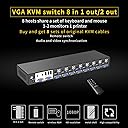
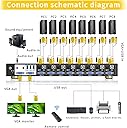
The eKL VGA KVM Switch 8 Port 2 Out is a professional-grade manual switcher designed for managing up to 8 computers via VGA and USB 2.0. It supports basic keyboard and mouse sharing, offers high-resolution output up to 1920x1440, and fits perfectly in rack-mounted environments. Ideal for data centers, control rooms, and trading floors, it ensures efficient device management with remote and button control options.


| ASIN | B07PQP4P2F |
| Actuator Type | Push Button |
| Best Sellers Rank | #556 in KVM Switches |
| Brand | eKL |
| Brand Name | eKL |
| Circuit Type | 1-way |
| Color | 8 Port VGA KVM Manual Switch |
| Compatible Devices | VGA devices, standard USB keyboards and mice, devices running Windows 9x, NT, 2000, XP, 7, Linux, Novell operating systems |
| Connectivity Protocol | Vga |
| Connector Type | Usb 2.0 |
| Contact Material | Copper |
| Contact Type | Normally Open |
| Control Method | Remote |
| Control Type | Manual and Remote |
| Controller Type | Button Press" or "Manual remote control |
| Current Rating | 1 A |
| Customer Reviews | 3.7 out of 5 stars 111 Reviews |
| International Protection Rating | IP54 |
| Manufacturer | xudongtai |
| Material Type | Kvm |
| Model | eKL-81UA |
| Mounting Type | Rack Mount |
| Number of Items | 1 |
| Number of Positions | 8 |
| Operating Voltage | 12 volts |
| Operation Mode | Manual |
| Part Number | eKL-81UA |
| Switch Type | Manual |
| Terminal | Button |
| Unit Count | 1 Count |
| Wattage | 12 watts |
D**N
Cheap but works great
At first I was convinced this was gonna be a low quality kvm switch.. so I plugged it all up, even used two hdmi to vga cords with matching usb cords, since my tower servers are hdmi/dp only. Get it all plugged in, and switch channels and everything works, I was even amazed it worked with my wireless keyboard/mouse combo, they work flawlessly, but I noticed in dmesg of Debian it does throw warnings but it still works and only throws warnings when you switch, claiming it can’t reclaim the usb. I have to say for 89 bucks it’s worth it.. I can’t speak for long term but right off I was impressed, very impressed..
C**T
Machines constantly lose keyboard and mouse connection at random.
I liked the simple design with standard USB and VGA connectors on the KVM eliminating stupid and unnecessary proprietary cables. It also has audio switching which is not common or necessary but appreciated. The price was low which indicated it was likely of very low quality but the port design was what I wanted so I decided to try it. It doesn't work properly at all. I have it hooked to a mix of Dell and Supermicro servers in a test rack. When switching between machines you are almost guaranteed to lose the mouse and/or keyboard after you switch. That or the mouse and keyboard just don't work at all. You then have to unplug the mouse and keyboard from the KVM or power cycle the KVM. Completely useless. The build quality is lacking as the cables feel flimsy, the connectors are loose, and it barely functions. Going to pack this up and return it.
A**R
happy with kvm switch
works good, only two small issues. 1. when a machine goes to sleep i lose connection. fix is to prevent pc's from going to sleep. 2. if i tried to remote into machine using remote desktop on another kvm port instead of letting me see both machines at same time.it does an automatic switch to the other kvm port instead.
S**S
Nice features
Use this to hook up 6 different Macs. The beeping when starting up is annoying but other beeping can be turned off. One quirk it seems is the switch needs to be on the channel of a computer before you start it up otherwise the usb doesn’t always work. If you remember to do that it works fine. The switched audio and remote control are nice features.
R**Y
Excellent KVM for the price
for a rackmounted configuration. seamlessly controls 8 machines. easy to set up. emits a series of audible tones when you switch it on. wish i could mute that. overall 5 star device
D**O
HELP??? Wireless not working??
So.. I purchased this device. Wireless USB mouse works..keyboard does not. I was upgrading from a 4 port so I know that all devices on my end worked previously. This did not come with any instructions/drivers etc. ..I wasn't too worried afterall its a switch..pretty straight forward. But now I'm not so sure. The packaging was ...horrible and the box half opened. Maybe it was damaged? I kinda need this working ASAP... so I will attempt to figure something out on my end..but really could use some help. I'm willing to overlook a LOT as long as the device works like advertised. I will upgrade my review once I can get this device working like its supposed to... provided that it does. EKL? any thoughts???
A**R
Using it to share more than just monitors
This was a breeze to install and use. I connected a wireless dongle to one of the USB ports and a hard drive to another. When I select then boot a computer, the computer selected can use not only the shared monitor, but also the same HD, mouse, and keyboard. Wow, does that eliminate clutter.
M**G
Grwat price bad product
I orderd this product and right out the box i had problems smh. When you put it on screen 7 it wont go to any other screen and it changes my resolution. I sent it back to get a replacement and this is having problems too. Great price bad product just spend a little more and get a good one.
Z**F
Good video, good cabling - issues with power management and USB disconnects
++ It comes with a full set of cables, which is great. It also has conventional video + USB connections (as opposed to some others that have a proprietary USB-over-VGA cable which are difficult to find, and expensive). All in all a great package of hardware for the price. + The IR remote control works well, and it's useful to have an extension IR reciever if the KVM is out of direct IR range. - The lights on the front are recessed and are only visible from straight on which makes a quick visible check of selected host difficult. --- However, I was noticing frequent, apparently random, device disconnects and reconnects across all host computers, which meant that the mouse would freeze momentarily - a serious hassle when trying to do something significant like scripting or programming. --- Turns out that if ANY of the hosts turns the screen off or goes into standby, this will cause a disconnect/reconnect of the USB connection to ALL of the other hosts. I had not realised this because the first thing I did was to turn off the selection beep. If you have the beep on, this process becomes very irritatingly obvious! -- The only way I have found to stop this happening is to set ALL host devices to never go into sleep/standby or turn the screen off. This means that all of the hosts have to be running all of the time. Fine for servers that need to be running 24/7, but not so great for situations where hosts do not need to be on full power all of the time. For me, this is not acceptable, and I am looking for an alternative device that does not do this.
D**D
I love this KVM, broken remote probably from shipping
Decent 8-port KVM switch. Comes with 8 pairs of VGA and USB cables, rackmountable ears, power supply, receiver for the remote, and a remote (more on the remote later). I’m very happy to have found this KVM switch because it was the cheapest 8-port rackmountable VGA and USB KVM switch that I could find on Amazon or eBay. The feet on this are made of plastic and are removable. The rackmount ears are very simple to install. The KVM itself isn’t very deep, so it’s very simple to install. All ports worked right out of the box, no software required. You can disable the audible beep by holding down the “1” button, and you can disable the auto-scan feature by holding the “8” button. I noticed there’s an audible whine when the device is powered off and connected to a host over VGA. Not sure why this is the case, but there are very few reasons to turn the device off anyway. Now the remote, the receiver is simple to plug in. However the remote I got in the box must have not been packaged very well and was eviscerated in shipping, so I cannot comment on how well the remote functions. This is a rather minor inconvenience because I was planning on using the physical buttons on the front of the KVM regardless. I had ordered multiple items from amazon alongside this item and they all came in the same box, however the amazon box was not filled with very much packing material. I believe that the remote control breaking was a shipping issue, out of the control of the seller. Like I said before, I’m not bothered by the broken remote, this is just my experience with the product. I’m very happy with this KVM regardless. My only wish is that maybe there could be a 16-port option, however I know that this request might not be as affordable as this 8-port device.
く**パ
ブザー音がうるさい
電源投入時やPC切り替え時にかなり大きなブザー音が鳴ります。 複数の人間がいる静かな環境で使うPC切り替え器としては失格です。 ブザーを止める方法がネットで調べても判らなかったので、 おそらく保証が効かなくなることを承知の上でケースを開けると、 アクティブ電子ブザーのTMB12A05が切り替え用のスイッチが 複数搭載された基板の裏についていました。これが鳴っていることが 明白だったので除去したら、静かに動くようになりました。 もちろん、機器の改造は自己責任でお願いします。 KVM切り替え器になんでブザー音が必要なのか私には理解できません。
T**O
Worked fine for 3 years
Worked fine for 3 years, now the USB doesn't work and I have to swap my USB cables manually between my servers.
M**D
Alot for the money, Let down by USB.
You get a lot for your money here. Equivelent units from others are twice the price. Poor USB support. Seems to be troublesome. You need to reboot the KVM or the connected PC to get it to work again. I have resulte din using a wireless keyboard and mouse that I hot swap betwen each computer now. Excellent quality kit however. Remote control is a noce touch.
Trustpilot
1 month ago
2 weeks ago