๐พ Power your productivity with Drobo 5C โ storage that works as hard as you do!
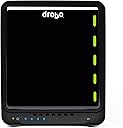
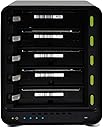
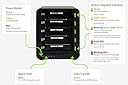
The Drobo 5C 10TB is a robust 5-bay direct attached storage array featuring Seagate HDDs and USB 3.0 Type-C connectivity. Designed for professionals, it supports up to 64TB volume size with advanced beyond RAID technology, battery-backed memory to protect data during power interruptions, and hot-swappable drives for seamless scalability. Its durable metal chassis and intuitive LED indicators make it an ideal, reliable storage solution for Mac and PC users seeking secure, expandable, and high-capacity data management.


| ASIN | B07TK87DN6 |
| Additional Features | Portable |
| Brand | Drobo |
| Compatible Devices | Desktop, Laptop |
| Connectivity Technology | SATA, USB |
| Customer Reviews | 3.7 out of 5 stars 207 Reviews |
| Digital Storage Capacity | 10000 GB |
| Form Factor | 3.5-inch |
| Global Trade Identification Number | 00816604021279 |
| Hard Disk Form Factor | 3.5 Inches |
| Hard Disk Interface | Raid |
| Hard-Drive Size | 10 TB |
| Hardware Connectivity | Solid State Drive |
| Hardware Platform | Mac, PC |
| Installation Type | Internal Hard Drive |
| Item Weight | 21.5 Pounds |
| Manufacturer | Drobo |
| Mfr Part Number | DDR4A21-10TB |
| Model Number | DDR4A21-10TB |
| Number of Items | 1 |
| Special Feature | Portable |
| UPC | 816604021279 |
| Warranty Description | 2yr RTF HW Warranty( No Advanced Replacement) and 90 Days of Business Hour Tech Support(drives are supported by original manufacturer) |
A**R
Worth it if you don't want to run apps on a NAS box but still want automated storage management.
This thing is amazing if you use it correctly. And half the price of the 5D3. Some tips: -DON'T USE SEAGATE DRIVES! I've only had luck with Western Digital drives in this thing. Seagate drives show as "failed," but test fine once you take them out of the Drobo. I'm not risking my data on the off chance the Drobo is actually correct. Luckily, since the Drobo handles redundancy automatically, I just swapped in a new WD drive and didn't lose a single byte. -Turn OFF "Disk Drive Spindown" under Drobo Settings in the Drobo Dashboard app. My Drobo constantly became unresponsive when I had this enabled--on both MacOS and Windows. Now that I've disabled it, I never even have to think about the Drobo. -If you fill this with cheap drives, it will be slow. Don't use cold storage drives if you want high-speed storage! I've got 2 WD Red 8TB drives and 3 WD 4TB (blue?) drives in mine, and the transfer speed is incredible (500 MB/s) until the blue's caches fill up, then it drops to ~100 MB/s. If you want lightning fast transfer speeds, use NAS drives! (When I had 4TB and 5TB Seagate cold storage drives in there my speeds maxed at ~150MB/s and dropped to ~40. Just swapping those two for the NAS drives made all the difference.) -If you get slow transfer speeds even though you have good drives in there, flip the USB-C cable. It's ridiculous, I know. USB-C is reversible, you say. It won't make a difference, you say! But it works. And Drobo's website will tell you the same. I use mine to host my movie and TV media collection, and it's fast enough to simultaneously handle play back of high-bitrate content and downloads that saturate my 150Mbps internet connection. If you're looking to use this as a drive to work from (editing video, etc.) you MAY be better off with the 5D3, especially if you plan to be working with 4K or higher footage. But for playback, the 5c is more than adequate.
G**N
Drobo 5C Customer Support is Seriously Lacking in Care and Concern
4/29/2020 - The Saga Continues On 3/30/20 I sent an email to Drobo regarding my malfunctioning unit since there had been no response to my message sent on their web site. I got an email the next day detailing what I needed to do to trouble shoot the unit. I promptly went through the steps suggested (I had already done most of them) and emailed them the results. On 4/8/20 I got an email that said my trouble shooting results indicated they would need to replace my Drobo. On 4/10/20 they acknowledged receiving the tracking number for the Drobo I sent to them for a replacement. On 4/18/20 I received an email from them saying the case was "closed" but that it could be reopened within 14 days. I incorrectly assumed that this meant my replacement Drobo was on its way. On 4/23/20 having not received any tracking information or other indication the Drobo was on its way, I contacted them again. On 4/29/20 they sent me an email saying the unit I sent them was on the bench getting checked out. On 5/6/20 my repaired Drobo was delivered by Fedex. I like the Drobo when it works but product support is PATHETIC. I doubt I'll ever buy another one but rather rely on other means to back up my important data. --------------------------------------------------------------------- This is an update of my previous review and is being made on 4/6/20. I purchased this unit in 2018 and in April 2020 and within the 2 year warranty period it stopped working. I contacted the makers of the unit last week and got an email the next day detailing what I needed to do to troubleshoot it. I had already done most of the suggested things but I did them all over with the addition of the additional few things they suggested. I've now sent them two emails detailing the results of my troubleshooting and have received no response. My previous review from shortly after I bought the unit is below. --------------------------------------------------------------------- My old Drobo which saved my information during two incidents where my iMac malfunctioned quit working. It had functioned great for quite a few years (I definitely got my money's worth out of it) so I decided to get another one to replace it. My new Drobo 5C is finally working as it should but the process was tedious. There is no phone number for technical support and, of course, no useful printed manual with the device. Technical support is via email at their convenience and my experience was that the person didn't really understand what the issue was though I explained it as well as I could. It is finally working due in large part to the great amount of time spent by me fiddling with it. I wouldn't say don't get one but if you're not at least a little familiar with troubleshooting computers, good luck if it doesn't work right.
R**L
If Apple Made a RAID Device...
The unboxing and ease of use remind me of Apple products. The ability to dim the outer LEDs on a customizable ten-point scale is a nice touch. I've also been very impressed with the speed. My observed speeds are as below, using a Drobo 5C connected directly to a retina iMac (which supports USB 3), loaded with four 3 TB Western Digital Red and one 1.5 TB Western Digital Green drives: Backing up a FireWire 400 drive to Drobo 5C: ~20-30 MB/s Backing up a USB 2.0 drive to Drobo 5C:~30-40 MB/s (this one was interesting, as FireWire has usually had better speeds in general for me) Backing up a USB 3.0 drive to Drobo 5C: ~80-90 MB/s Transferring directly between Drobo 5C and iMac: 90-170 MB/s, with speeds mostly sustaining in the 130-150 range (I hope that those speeds help set people's expectations as to what speeds might be like when backing up from other hard drives) I bought the Drobo intending for it to be more of a storage and retrieval archive, rather than a drive used for actively processing data. Just to experiment, I put my Aperture photo library on the Drobo and it was very fast - a bit faster than when I've used it on an external USB 3 drive, and worlds faster than when I had my library on a FireWire 400 drive. I am now rethinking my intended usage, and may process media files directly off of it. I have yet to experience a drive failure, so I can't vouch for the ease of that process, but I have confidence that the process will be pretty painless. Setup and usage has been largely flawless so far; the experience makes me want to get a Drobo 5N for the family to use...
N**A
Great for Apple Time Machine
I have two of these especially dedicated to Time Machine on the Mac, as I have about 12 TB of data that needs continuous backup. I have two for redundancy and use exclusively WD Red drives in it. Before this I was using a synology NAS, which is a great product, but I have found that TM simply does not play well with NAS storage and I had a major corruption every few weeks. Simply a horrible experience. Once I went to a DAS system for this, all the headaches disappeared, and the price for the Drobo is reasonable (although the Red drives are expensive). These units have performed flawlessly. The only complaints are: โขThe supposedly easy setup method failed. It simply didn't work and setting it up was a big time-consuming headache. I don't remember the procedure I had to do, but I do remember it was a pain and took a while. โขThe USB is on a the slow side, even when attached to a USB 3 card. But for Time Machine this isn't such a big deal. โขWhile the Drobo offers expandable volumes without reformatting, the specialized compatible Time Machine partitions are *not* resizable. So eventually when I run out of space on one, I am going to have to add bigger drives, then erase and reformat the Drobo and copy the contents of the other Drobo to it, leaving me somewhat vulnerable for a few days. โขI run Disk Warrior on the volume once or twice a month, and it always finds corruption, so I think regular disk utility maintenance is absolutely essential. And this takes up to a few hours a pop, so that's a minor hassle. But you can't just leave these things running and expect not to run into problems. On a Mac, running Disk Warrior once or twice a month is mandatory. Corruptions can also happen if there's a sudden power loss. These drives like to go through a proper shutdown procedure to keep the data safe, so it's wise to put them on a UPS, which is an additional expense.
V**S
A fantastic RAID device. Just be sure you buy the right drives!
This is by far the best unit Drobo has created for the home/small business market. One thing to be careful of, especially if you're going to load it up with high capacity drives (8TB, 10TB, 12TB or more)... be sure you buy drives that are intended for such heavy-duty use. If you're having any kind of problem with your Drobo, you should check the level of drive you've installed. These drives take the high-end drives. As an example, for the five 10TB drives I installed, they were $320 apiece. If you put the cheap drive in there, they'll fail much faster as they're not intended for high-demand use that you'll get with a RAID implementation like this. I use mine as direct attached storage and not only is the transfer rate really fast, the unit runs flawlessly. I run a small business and this is one of several Drobos throughout the office. This one serves as our TimeMachine backup unit, so it runs 24/7 and has never given us even the slightest hiccup, even with a single 36TB volume.
S**B
Migrated from Gen 2 to Drobo 5C - great product again
I purchased my first Drobo Gen 2 4-bay device in 2010 to backup and store photos and files. The Drobo 12v power supply just died after leaving the device on almost 24/7 for 8+ years. I contacted customer support and received a response within 24 hours. I need to upgrade to a new Drobo. Purchased a new power supply from a different vendor to update my firmware and dashboard before the migration as recommended by Drobo customer support. Migration was simple, and everything is back working again. Love this product. Looking forward to many more years of support. Highly recommended.
M**L
So much frustration, spent an extra $300 in unnecessary costs setting up
This should have a higher star rating. However it's rocky start prevents that. The performance was horrible, and it kept disconnecting 2 to 3 times a day from my 3 year old MacBook Pro. I read about the supplied cable, and making sure it is plugged in correctly (one side is usb 2, flip it over and it's usb3). I verified it was recognized as usb3 but still it was still very slow, about 1gb per 2-3 hours slow. It took 20 days to copy 8tb to it, including the time lost with the 2 to 3 disconnects per day. Customer service was so bad it was like they were trying to make the issue worse, and trying to make me more upset. It's ridiculous how bad customer service was. I contacted Drobo customer service, saying my 5C is slow even though it is recognized as usb3, and I uncluded a screenshot showing the system information window that verified it is recognized as usb 3. Customers service replies, "please make sure it's plugged in as a usb3 device". Horrible, considering I said it's usb3 AND included a screen shot!!! Then they took about 2 days to reply after that. I got so frustrated with the Drobo and their amazingly poor customer service that once I completed copying my 8tb to the Drobo, I walked away and didn't look at it for 2 days. Turns out, the Drobo needed to be left alone in order to do system maintenance. Now it's working great, speeds are about 150mb and it hasn't disconnected since. I really wish Drobo would have warned about the system maintenance it needs, and the time it takes to run. Drobo, have a status bar in your software that indicates system maintenance is happening, or at least mention it in the instructions. It would have saved 20 days of frustration. Oh, also, my Drobo said one of my hard drives failed and needed to be replaced, so I bought another $300 hard drive. However the "bad" drive still works when plugged in individually after I reformatted it. So now I spent $300 on an unnecessary extra hard drive, spent 20 days of frustration trying to copy my files to it, and their customer service seemingly goes out of their way to frustrate me.
A**T
Beware if migrating from older Drobo - Zero Tech Support
I'm not one to leave bad reviews usually, but I think people purchasing this product should know there's zero tech support. I'm only giving this 3 stars because once I was able to get it working it works great. However, the process to get there took many frustrating months. I was migrating from my old 4 bay Drobo because I needed more space, so naturally I figured I'd upgrade to the 5 bay. I followed all the steps on the Drobo website to migrate and the Drobo appeared to be up and running just fine in the Drobo dashboard. However, anytime I'd try to put any files on it would upload the files very very slow (we're talking 27 minutes to upload 6 GBs) and to make matters worse, the Drobo would ALWAYS eject halfway through the upload making the upload incomplete. I would then get me an error claiming the file didn't have permissions to be read or written, but I checked the permissions on every file I tried to upload and all of them were set correctly. This was obviously very frustrating because every time the Drobo ejected I worried about corrupting the data already on the drives, so I contacted customer support. Boy was that a waste of time! I have never in my life experienced such horrible customer service. Despite a phone number being listed on their site, every time I tried to call it it gave me the disconnected signal. So I then filed a support ticket with their website and proceeded to email back and forth with the most unhelpful support employees. First they claimed it was a Mac problem and sent me a support article that wasn't even from the Drobo website! I tried this fix anyway and of course that didn't fix my problem. They kept dodging my question every time I asked if I could talk to someone on the phone, as they clearly didn't seem to understand the problem. They would tell me to buy new expensive products to solve my problem, like Diskwarrior. They would promise to escalate my ticket to advance support, telling me to wait to hear from them, and then I never would and they would close my support ticket! They did this several times, closing my ticket and forcing me to reopen it, which was not very straightforward to do on their website. I even returned the Drobo for a replacement, thinking maybe it was just the unit, but experienced the same problem again. After months of this back and forth I decided to take matters into my own hands and purchased two new external hard drives to back up all of my files that were on the Drobo. Luckily, I was able to copy things off just fine but just not able to add any files to the unit. After doing this, I completely wiped the Drobo restoring it to factory settings and erasing all data. I then formatted the Drobo and drives and now the Drobo works perfectly! I can only assume that whatever formatting the drives were in from the 4 Bay Drobo just didn't jive well with the new 5 Bay Drobo, so if you're migrating I recommend backing everything up first and just wiping and formatting before using. Why this wasn't one of the many many things tech support suggested to me I don't know! Long story short, if you've already got a Drobo you're stuck with Drobo because their software is proprietary and your drives won't work on any other raid backup system, unless you want to buy more hard drives, move all your data there, and start all over. But if you are just looking at purchasing a Drobo for the first time, I wouldn't recommend it. I'd suggest going with Synology instead and save yourself the headache of bad tech support in the future.
J**N
Reliable
Reliable storage that you just set up and forget.
M**C
Best price and awesome product!
Paring this drive with 5 x Seagate Iron Wolf Drives has been the best decision for my commercial Photography backup solution. I have looked at many setups and found this to not only be a very great price but also since using it, a very simple, secure and a solid archive solution. I have it set to two drive redundancy which lowers the amount of useable space however adds an extra layer of protection to my onsite storage in conjunction with my offsite and cloud backups. I found this drive to be great for the purpose of simply backing up and storing my files without fuss, I do not work of this drive so the speed is never an issue. I found the app & time machine volume features very intuitive and effective to use. I highly recommend this product! For my uses I didn't see the need to run the Drobo 5D3 or opt for a NAS solution, it saved both money which I put into higher capacity drives - if your simply just wanting to store files, have the option to upgrade size easily and know the health status of your backup then this is for you. One tip: If using the newer version of the MacBook Pro with USB C, I highly recommend ordering a USB C male to male cable rated for high-speed transfers as you will get the most out of this unit in terms of the speed it's capable of. Definitely recommend!
A**O
Me encanta la gran capacidad y seguridad que ofrece
Me encanta mi nuevo Drobo, excelente para las fotos y videos que necesitaba almacenar ya que constantemente los fosfatos externos me fallan.
C**N
Simple. Safe. Easy to upgrade. The perfect storage solution.
This company and the Drobo series NAD/DAS are amazing. Had a Gen2 for 8 years and it started to have issues... upgraded and within 2 minutes I was back up and running. All family photos, songs, and movies safe as can be. The hot swap drives are incredible. Never misses a beat. A huge upgrade over standard RAID protocols.
J**A
Una porqueria...
No lo he podido usar... me reporta problemas con los discos....
Trustpilot
1 week ago
1 month ago